
Lifeline IPX7 Smart Watch User Manual
Content
Lifeline IPX7 Smart Watch: Full Product Manual and Buyer Guide
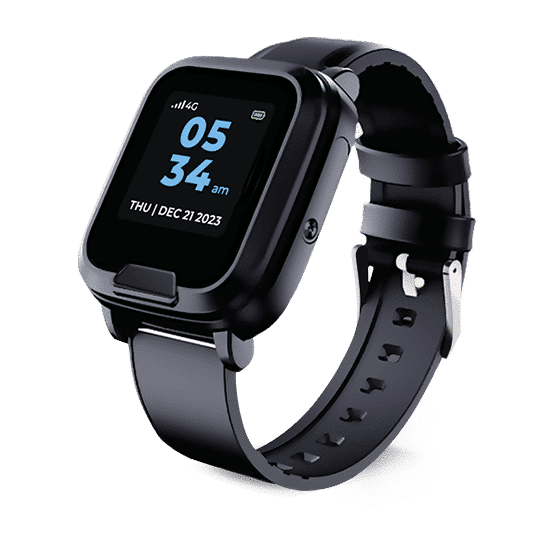
The Lifeline IPX7 Smart Watch is a discreet medical alert smartwatch designed to support older adults, active users, and caregivers who want dependable emergency protection in a wearable format. It combines a help button, GPS-enabled safety features, heart rate and step tracking, and cellular connectivity in a single device that looks and feels like a standard smartwatch. For users who want safety without wearing a bulky pendant, the Lifeline IPX7 Smart Watch offers a practical balance of convenience, mobility, and peace of mind.
One of its strongest benefits is all-day wearability. The watch is lightweight, rechargeable, and water-resistant, making it suitable for showers, light rain, and everyday routines. It is also built for users who need quick access to assistance, whether at home or while traveling. Common use cases include fall-related emergencies, wellness tracking, caregiver monitoring, and support for people living independently. The device is especially appealing to seniors who want a less visible alternative to traditional medical alert systems.
Estimated pricing generally falls in the mid-range for medical alert smartwatches, with monthly service plans often starting around the mid-$30 range and optional add-ons such as fall detection increasing the total cost. A one-time equipment fee may also apply. Availability is typically through Lifeline’s official sales channels and authorized product pages, with phone ordering and online purchase support commonly offered. The Lifeline IPX7 Smart Watch is best suited for users who value safety, cellular coverage, and smartwatch-style design in one easy-to-use device.
Specifications for the Lifeline IPX7 Smart Watch
- Water resistance: IPX7-rated protection for everyday exposure to water
- Dimensions: 46.9 mm x 41.7 mm x 15.4 mm
- Weight: 38 g, making it comfortable for extended wear
- Battery: Rechargeable 3.8V, 600mAh battery
- Charging: 5V/DC 1.0A charging input with cradle-style charging
- Connectivity: Cellular-based safety system with GPS support
- Core functions: Emergency help button, step tracking, heart rate monitoring, and caregiver alerts
- Display: Touchscreen smartwatch interface for easier navigation
- Service features: 24/7 emergency monitoring and optional fall detection
- Use profile: Designed for active seniors, independent adults, and caregivers
Compared with traditional pendant-style medical alert devices, the Lifeline IPX7 Smart Watch offers a more modern, wearable design and additional wellness tracking. Compared with basic fitness watches, it includes emergency response services, which makes it far more suitable for safety-focused users.
Troubleshooting the Lifeline IPX7 Smart Watch
If the watch does not charge, first confirm that the charging cradle is seated correctly and the power source is active. Clean the charging contacts and try a different outlet if needed. If the screen remains blank, allow the battery to charge for at least 20 to 30 minutes before testing again.
If GPS location is inaccurate or delayed, move to an open outdoor area and wait for a stronger satellite lock. Poor indoor reception, heavy cloud cover, or cellular congestion can affect performance. If the emergency call does not connect, check that the device is activated, the plan is current, and cellular coverage is available in your area.
Common error codes may appear as low-battery, connection, or communication alerts. A low-battery warning usually means the watch needs charging immediately. A connection alert may indicate that the cellular network is unavailable or the device needs to be restarted. Preventive care includes regular charging, monthly functionality checks, and keeping the watch dry after prolonged water exposure. Warranty coverage and support options are generally available through Lifeline customer service. For help, contact the main support line at 855-681-5351 during published business hours or use the official customer service channels listed by Lifeline.
Pros and Cons of the Lifeline IPX7 Smart Watch
Pros
- Discreet smartwatch design that looks less medical than a pendant alarm
- IPX7 water resistance supports everyday wear and shower use
- Includes emergency help access, GPS support, and cellular connectivity
- Heart rate and step tracking add basic wellness monitoring
- Lightweight construction makes it comfortable for all-day use
- Good value for users who want safety plus smartwatch convenience
Cons
- Requires an ongoing monthly service plan, which raises long-term cost
- Fall detection may cost extra depending on the plan
- Battery life is useful but not as long as some non-connected fitness watches
- Dependence on cellular coverage can limit performance in weak-signal areas
- More expensive than basic waterproof smartwatches without medical monitoring
For value for money, the Lifeline IPX7 Smart Watch is strongest when safety is the top priority. Compared with cheaper alternatives, it offers professional monitoring and emergency response. Compared with premium fitness smartwatches, it is less focused on advanced workout metrics but far better suited for emergency protection.
Customer Reviews of the Lifeline IPX7 Smart Watch
Customer feedback is generally positive, with many users praising the discreet design, easy emergency access, and reassurance it provides to families. Typical ratings cluster around 4 out of 5 stars, especially among seniors who want a watch that blends safety and everyday style.
Common praises include simple setup, comfortable fit, and useful heart rate and step tracking. Frequent complaints mention subscription pricing, occasional connectivity issues in weak coverage areas, and the desire for longer battery life. One frequent comment from users is that it feels more modern than a pendant-style alarm while still being easy to wear daily. Another recurring note is that the watch is best for users who value safety monitoring more than advanced smartwatch features.
For buyers comparing medical alert smartwatches, this model is a solid choice if professional monitoring, GPS support, and water resistance matter most. It is especially recommended for older adults living independently and caregivers looking for a reliable emergency wearable.
Faqs
How do I set up the lifeline IPX7 Smart Watch for the first time?
Why is my lifeline IPX7 Smart Watch not connecting to my phone?
What does IPX7 mean on the lifeline IPX7 Smart Watch, and can I wear it while washing hands?
How do I fix inaccurate step count or heart rate readings on the lifeline IPX7 Smart Watch?
Which phones are compatible with the lifeline IPX7 Smart Watch?
How do I improve battery life on the lifeline IPX7 Smart Watch?
What should I do if the lifeline IPX7 Smart Watch screen is unresponsive or frozen?
How should I clean and maintain the lifeline IPX7 Smart Watch for long-term use?
Leave a Comment