
Nextbase NB7-CAR Portable DVD player User Manual
Content
Nextbase NB7-CAR Portable DVD Player: Complete Product Manual
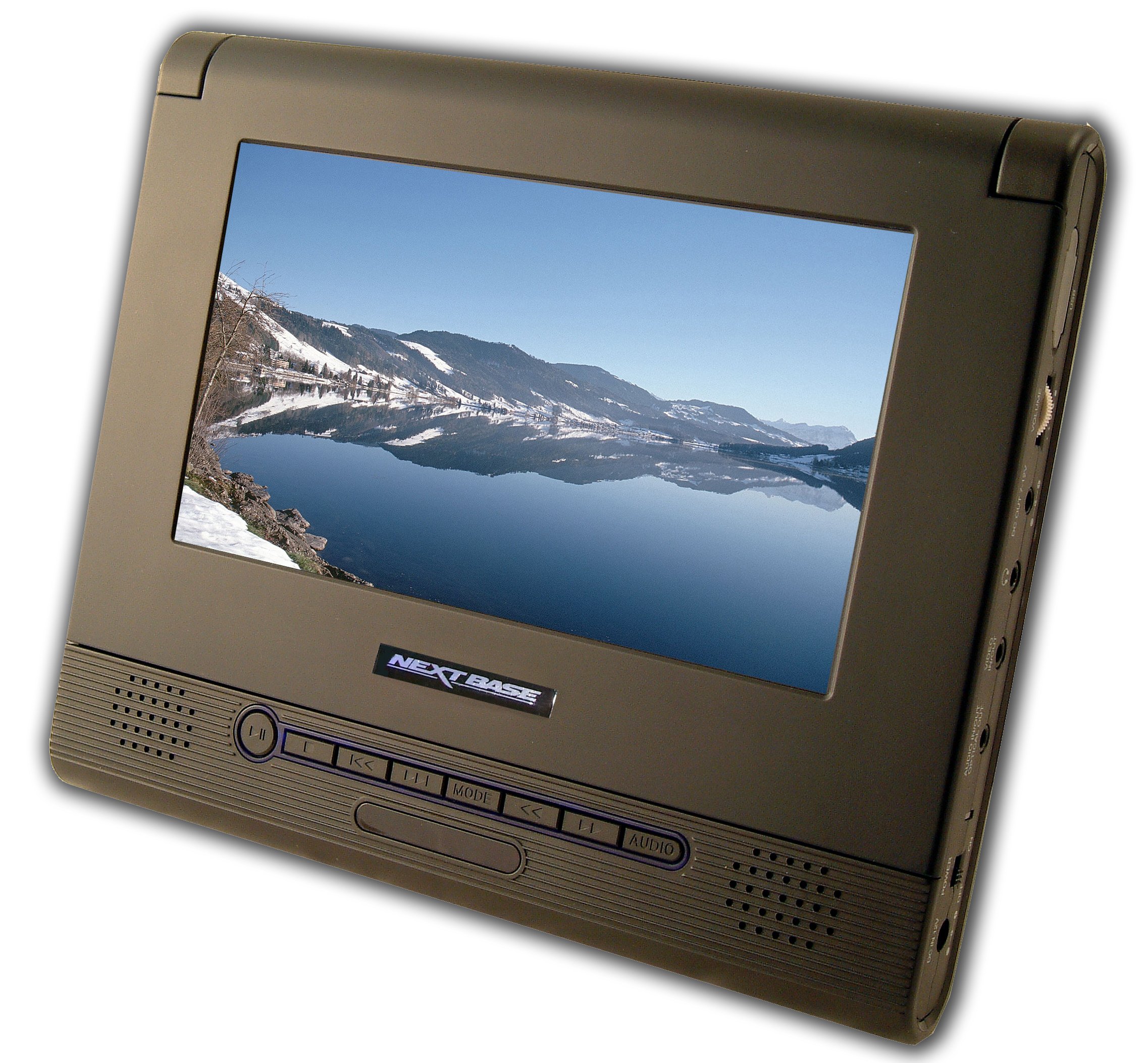
The Nextbase NB7-CAR Portable DVD player is a compact in-car entertainment system designed to keep passengers engaged on road trips, daily commutes, and family travel. Built around a 7-inch display and portable DVD playback, it offers a straightforward way to watch movies, view photos, and listen to music without depending on streaming or mobile data. This makes it especially useful for families with children, long-distance travelers, and anyone looking for a reliable offline media player for the car.
One of the main advantages of the Nextbase NB7-CAR Portable DVD player is its ease of installation and car-focused design. It is typically powered through a 12V DC vehicle outlet and is intended for in-car use, with mounting options that help position the screen for rear-seat viewing. The unit supports common disc and media formats, includes anti-skip playback for smoother motion on bumpy roads, and usually comes with remote control convenience. For users who want a simple rear-seat entertainment solution, the NB7-CAR remains practical, affordable, and easy to operate.
The estimated price range for the Nextbase NB7-CAR Portable DVD player is usually budget-friendly, often found in the lower mid-range market depending on condition, seller, and included accessories. Availability is best through online marketplaces, second-hand listings, and occasional reseller stock, since this model is an older portable DVD player and may not be widely sold as a current retail item. For buyers comparing portable media players, the NB7-CAR is best suited to those who value disc playback, portability, and dependable car use over modern streaming features.
Specifications for Nextbase NB7-CAR Portable DVD Player
- Display size: 7-inch screen for rear-seat entertainment.
- Resolution: 480 x 234 RGB, suitable for standard portable DVD playback.
- Power input: 12V DC vehicle power, not intended for 24V systems.
- Audio: Built-in stereo speakers plus headphone support for private viewing.
- Media support: DVD, CD, MP3, JPEG, CD-R/RW, DVD-R/RW, and similar common disc formats.
- Playback stability: Anti-skip technology helps reduce interruptions on rough roads.
- Controls: Remote control support for easier passenger operation.
- Connectivity: AV input/output for external media sharing and playback expansion.
- Use case: Designed primarily as a portable in-car DVD player rather than a streaming tablet.
- Comparison: Compared with newer portable screens, the Nextbase NB7-CAR Portable DVD player offers simpler operation and disc-based reliability, while modern alternatives may provide larger displays, USB-heavy media support, and digital streaming compatibility.
In practical use, the NB7-CAR is a lightweight entertainment solution focused on travel convenience. Its 7-inch panel is smaller than many modern portable monitors, but that also makes it easier to mount and power in a car.
Troubleshooting the Nextbase NB7-CAR Portable DVD Player
If the player does not power on, check that the vehicle outlet is active and that the unit is connected to a 12V DC source. This model is not designed for 24V power systems, so using the wrong supply can prevent operation or damage the unit. If the screen turns on but no disc plays, confirm that the disc is clean, inserted correctly, and compatible with the player’s supported formats. Scratched or poorly recorded discs can cause skipping or loading errors.
If playback freezes during driving, the anti-skip function may be overwhelmed by severe vibration; secure the player properly and avoid loose mounting. If headphones produce no sound, verify volume settings, battery charge in wireless headphones if used, and correct AV/audio connections. Common errors are often linked to power instability, disc compatibility, or incorrect cabling rather than a major fault.
Preventive measures include keeping the lens and discs clean, storing the unit away from heat, and using only the supplied car adapter. Warranty coverage depends on the seller and package condition, especially for older units, so check purchase details carefully. For support, contact the retailer, the original seller, or the manufacturer’s customer service channel listed with the product packaging or manual. If the player is second-hand, confirm whether any remaining warranty or return policy is included before purchase.
Pros and Cons of the Nextbase NB7-CAR Portable DVD Player
Pros
- Simple, travel-friendly design that works well for rear-seat entertainment.
- 7-inch screen is compact enough for easy car mounting and comfortable viewing.
- Disc playback is reliable in areas with poor mobile signal or no Wi-Fi.
- Anti-skip protection improves movie watching on rough roads.
- Useful for families who still own DVDs, music CDs, or photo discs.
- Generally strong value for money on the second-hand market.
Cons
- Smaller screen and lower resolution than newer portable entertainment devices.
- Lacks modern streaming, app, and smart connectivity features.
- Best suited to older disc libraries rather than digital-first users.
- Availability may be limited because it is an older model.
- Some buyers may prefer larger dual-screen alternatives for shared viewing.
Overall, the Nextbase NB7-CAR Portable DVD player offers good value if the goal is dependable in-car disc playback at a reasonable cost. Compared with tablet-based entertainment or newer portable media players, it is less versatile but often more straightforward and easier for children to use.
Customer Reviews of the Nextbase NB7-CAR Portable DVD Player
Typical customer feedback for the Nextbase NB7-CAR Portable DVD player trends around 4 out of 5 stars, with users praising its portability, easy setup, and reliable movie playback during travel. Many parents like that it keeps children occupied on long journeys without needing mobile data or constant supervision.
Common praise includes the anti-skip feature, the included remote, and the convenience of disc-based entertainment. Typical complaints mention the smaller display, the limited resolution by modern standards, and the age of the model, which can affect availability and accessory replacement.
Example testimonials often sound like this: “Perfect for road trips and simple enough for kids to use.” Another frequent comment is: “Great value if you still use DVDs, but not for streaming fans.” For buyers seeking a basic rear-seat DVD player, the Nextbase NB7-CAR Portable DVD player is a sensible choice, especially when purchased in good condition with all accessories included.
Faqs
How do I set up the nextbase NB7-CAR Portable DVD player for the first time in my vehicle?
Why is my nextbase NB7-CAR Portable DVD player not turning on, and how do I fix it?
How do I connect the nextbase NB7-CAR Portable DVD player to headphones or external speakers?
What disc formats does the nextbase NB7-CAR Portable DVD player typically support?
How can I improve picture quality on the nextbase NB7-CAR Portable DVD player during daytime use?
What should I do if the nextbase NB7-CAR Portable DVD player keeps skipping or freezing on discs?
Can the nextbase NB7-CAR Portable DVD player be used safely with kids during long car trips?
How should I clean and maintain the nextbase NB7-CAR Portable DVD player to extend its life?
Tags
Leave a Comment