
Skydrop 8-Zone Smart Sprinkler Controller User Manual
Content
Skydrop 8-Zone Smart Sprinkler Controller Review and User Manual
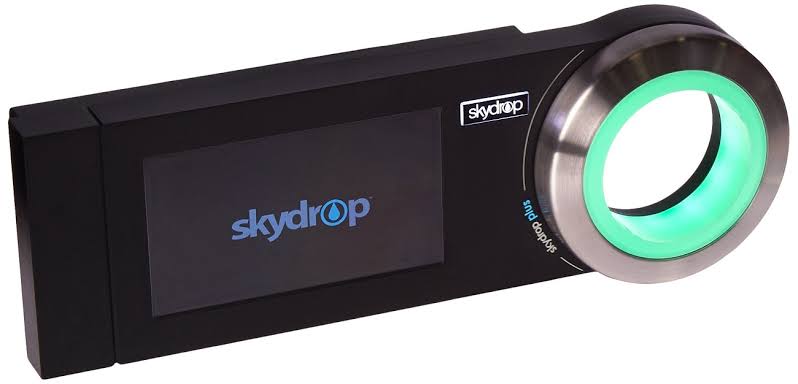
The Skydrop 8-Zone Smart Sprinkler Controller is a Wi-Fi-enabled irrigation controller designed to automate residential lawn and garden watering with weather-aware scheduling and app-based control. Built for homeowners who want to reduce water waste without sacrificing lawn health, it supports up to eight watering zones and is especially useful for medium-sized yards, mixed plant beds, and properties with varied sun exposure or soil conditions. The controller combines on-device manual control with mobile app management, making it a practical choice for users who want both convenience and precision.
One of its biggest strengths is smart watering adjustment. Instead of relying on a fixed timer alone, the system can account for local weather conditions and adjust irrigation schedules accordingly. This helps prevent overwatering during rain or cooler periods and can improve water efficiency over time. The unit also appeals to users who prefer connected home devices, since it supports smartphone-based control and is designed for easy integration into a modern smart home routine.
In terms of availability, the Skydrop 8-Zone Smart Sprinkler Controller is typically found through major online retailers and marketplace sellers, often as new old stock or refurbished inventory. Estimated pricing varies widely based on condition and seller, but a realistic range is about $80 to $300, with used units sometimes appearing lower and installed pricing much higher. For shoppers comparing smart irrigation controllers, the Skydrop 8-Zone Smart Sprinkler Controller remains attractive for its weather intelligence, zone capacity, and straightforward smart watering features.
Specifications for the Skydrop 8-Zone Smart Sprinkler Controller
- Zone capacity: 8 watering zones standard, with expansion options available for larger systems.
- Connectivity: Wi-Fi enabled for remote control and scheduling through a companion app.
- Mobile support: Compatible with iOS and Android devices.
- Dimensions: Approximately 3.1 to 3.4 inches high, 9.7 inches wide, and about 1.9 inches deep.
- Display: Integrated LCD screen for local status viewing and manual operation.
- Controls: On-device dial and interface for quick adjustments without using the app.
- Installation style: Indoor-style wall-mounted controller, with some setups supported by weatherproof housing.
- Smart features: Weather-aware watering, scheduling automation, and water-use optimization.
- Compatibility: Designed for standard residential sprinkler wiring and common irrigation configurations.
- Typical comparison: More affordable than premium controllers from Rachio in some listings, but less common than newer mainstream smart irrigation systems.
Compared with similar smart sprinkler controllers, the Skydrop model offers a strong balance of core smart features and manual usability. It is less expansive than some newer systems with broader ecosystem support, but it remains competitive for users who want an 8-zone smart irrigation controller without excessive complexity.
Troubleshooting the Skydrop 8-Zone Smart Sprinkler Controller
If the controller does not connect to Wi-Fi, verify that your router is broadcasting on a supported home network band and that the password was entered correctly. Reboot both the router and controller, then reattempt pairing from the app. If one or more zones fail to activate, check the wiring terminals, inspect valve connections, and confirm that the zone is correctly assigned in the schedule.
Common issue signs include a blank display, delayed watering, or zones running at the wrong time. A blank display usually indicates a power interruption, so confirm the transformer connection and outlet supply. Delayed watering may be caused by weather-based skip settings or a paused schedule. If the controller reports a communication or sync problem, sign out of the app, update the phone software, and reconnect the controller.
Preventive maintenance matters: keep wiring dry, avoid pulling on zone cables, and clean dust from the unit periodically. For warranty or support help, contact the seller or original manufacturer support channel if available, especially for refurbished or legacy inventory. If you need direct product assistance, start with the retailer’s order support, then request controller documentation, replacement parts, or setup guidance through their customer service team.
Pros and Cons of the Skydrop 8-Zone Smart Sprinkler Controller
Pros
- Smart weather-based watering helps reduce unnecessary irrigation and can lower water usage.
- Eight-zone support fits many average residential lawns and gardens.
- App control adds convenience for travel, schedule changes, and seasonal adjustments.
- Manual on-device controls make it useful even when you do not want to open the app.
- Good value for buyers who find it at a reasonable sale price compared with newer premium alternatives.
Cons
- Availability can be inconsistent because it is often sold through secondary channels.
- Some buyers may prefer newer controllers with broader smart home ecosystems.
- Legacy product status may mean fewer official accessories and less current documentation.
- Installation and configuration can be confusing for first-time sprinkler controller users.
- Price varies significantly, so value depends heavily on condition and seller support.
For homeowners comparing smart irrigation controllers, the Skydrop 8-Zone Smart Sprinkler Controller offers strong utility, but it is most compelling when purchased at a competitive price. Buyers seeking the newest app experience or the widest compatibility may want to compare it with newer systems before making a final decision.
Customer Reviews of the Skydrop 8-Zone Smart Sprinkler Controller
Customer feedback is generally positive when users want easy smart watering and dependable zone control. Many owners rate it around 4 out of 5 stars for its convenience, weather-based scheduling, and ability to simplify lawn care. A common praise is that it helps users “set it and forget it” while still keeping the lawn healthy.
Typical complaints focus on setup difficulty, app reliability on older devices, and the challenge of finding current official support. One user-style comment often reflected in reviews is: “Great once installed, but the initial wiring took longer than expected.” Another common sentiment is: “The weather-based scheduling saved water and reduced overwatering.”
Purchase it if you want a practical eight-zone smart sprinkler controller and do not mind buying through marketplace sellers. Avoid it if you need guaranteed long-term product support, modern ecosystem integration, or a brand-new retail supply chain. Frequently mentioned issues include documentation gaps and inconsistent stock, but the core watering performance still receives solid praise.
Faqs
How do I set up the skydrop 8-Zone Smart Sprinkler Controller for the first time?
Why is my skydrop 8-Zone Smart Sprinkler Controller not connecting to Wi-Fi?
Can the skydrop 8-Zone Smart Sprinkler Controller work with my existing sprinkler system?
How do I adjust watering schedules on the skydrop 8-Zone Smart Sprinkler Controller for better lawn performance?
What should I do if one zone on the skydrop 8-Zone Smart Sprinkler Controller is not turning on?
Does the skydrop 8-Zone Smart Sprinkler Controller support weather-based watering and rain delays?
How do I troubleshoot skipped watering cycles on the skydrop 8-Zone Smart Sprinkler Controller?
What maintenance does the skydrop 8-Zone Smart Sprinkler Controller need to stay reliable?
Tags
Leave a Comment