
Setup & Pairing: 1more Aero Wireless Earbuds ES903 User Manual
Content
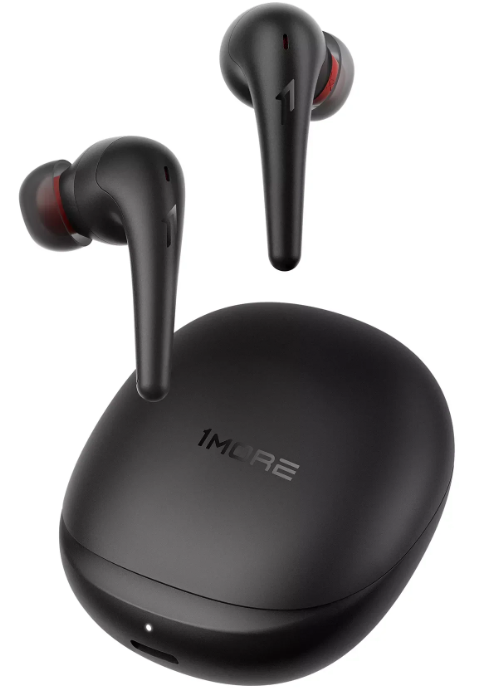
1more Aero Wireless Earbuds ES903
Introduction
The 1more Aero Wireless Earbuds ES903 are premium true wireless earbuds designed to deliver an immersive audio experience with advanced active noise cancellation (ANC) and spatial audio technology. Equipped with a 10mm dynamic driver featuring a diamond-like-carbon (DLC) diaphragm, these earbuds produce rich bass, clear mids, and scintillating highs, ideal for audiophiles and casual listeners alike. Their standout feature is head-tracked spatial audio, which dynamically adjusts the soundstage as you move your head, enhancing realism for music, gaming, and virtual reality applications.
Targeted at users who demand high-quality sound, effective noise isolation, and versatile connectivity, the 1more Aero ES903 is perfect for daily commuting, office use, workouts, and multimedia consumption. The earbuds support Bluetooth 5.2 for stable pairing and feature a lightweight design with IPX5 water resistance, making them suitable for active lifestyles.
Additional benefits include customizable sound profiles through the 1MORE app, four levels of ANC,, including a strong mode, smart loudness technology that adjusts frequency response based on volume, and wireless Qi charging for convenient power top-ups. Battery life offers up to 7 hours per charge with ANC off and 5 hours with ANC on, extended to 28 and 20 hours, respectively, using the charging case. The earbuds retail in the mid-price range, approximately $120-$150, and are widely available through major online retailers and electronics stores.
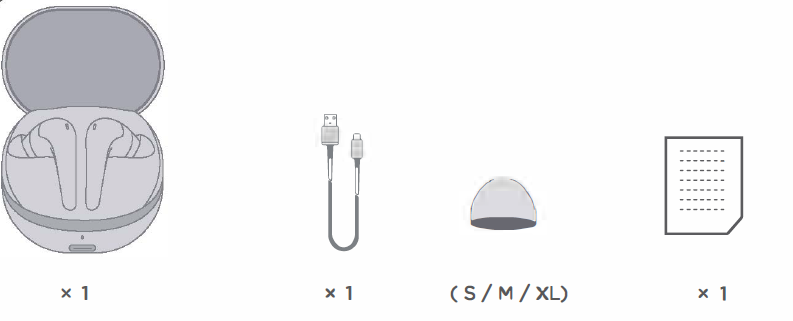
In Box
Specifications
- Name: Wireless Earphones
- Earbuds Fully Charged: 7 hours
- Model: ES903
- Case and Earbuds Fully Charged: 28 hours
- Single Earbud Weight: 4.9 g
- Playtime: (ANC On)
- Case Weight: 45.2 g
- Earbuds Fully Charged: 5 hours
- Gross Weight: 55.1 g
- Case and Earbuds Fully Charged: 20 hours
- Earbuds Size: 39.42 X 20.33 X 24.36 mm
- Speaker Impedance: 32 fl
- Case Size: 61.99 X 56.40 X 25.5 mm
- Bluetooth Range: 10 m
- Single Earbud Battery Capacity: 40 mAh
- Bluetooth Version: Bluetooth 5.2
- Case Battery Capacity: 450 mAh
- Bluetooth Protocol: HFP / A2DP / AVRCP
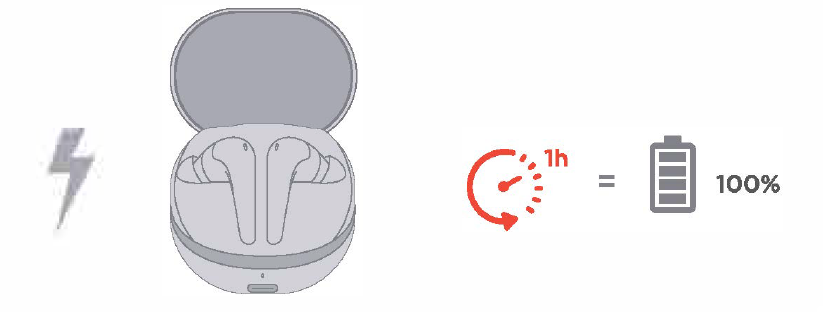
- Earbuds Charging Time: 1 hour Input: s V=: 0.7 A
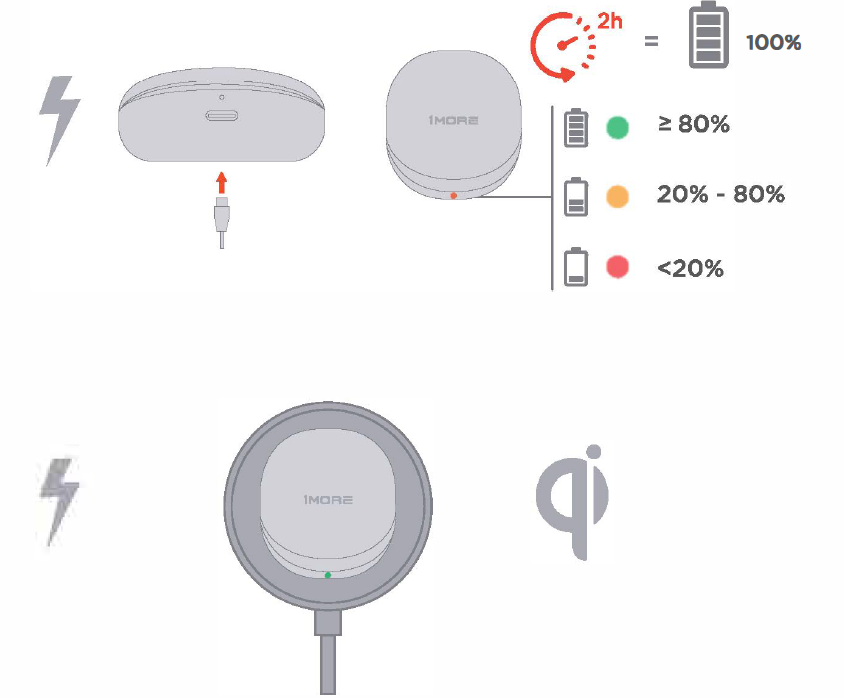
- Case Charging Time: 2 hours
- Working Temperature: O t .. 45 t
- Playtime: (ANC Off)
- Frequency Range: 2.400 GHz - 2.4835 GHz
- IC 24662-ES903L FCC ID: 2ASDIE5903L HVIN: ES903L
- IC 24662-ES903R FCC ID: 2ASDIES903R HVIN: ES903R
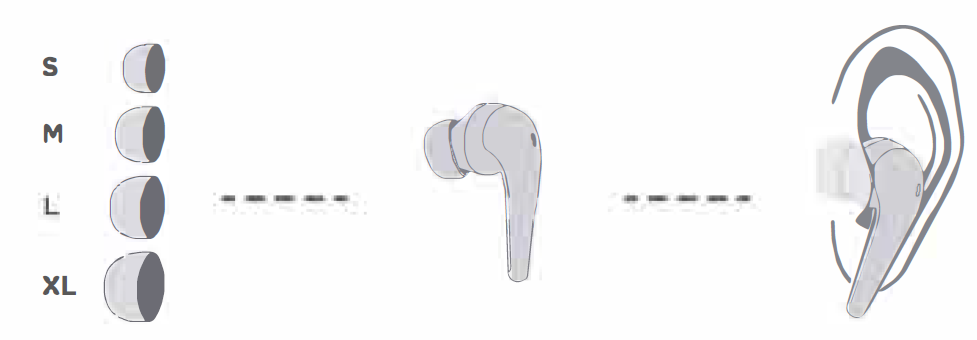
Size
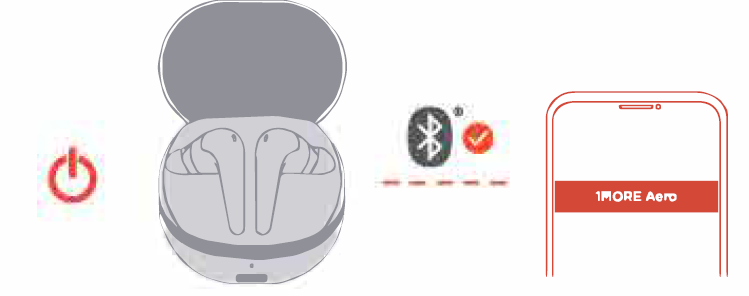
Bluetooth
Charging
Button
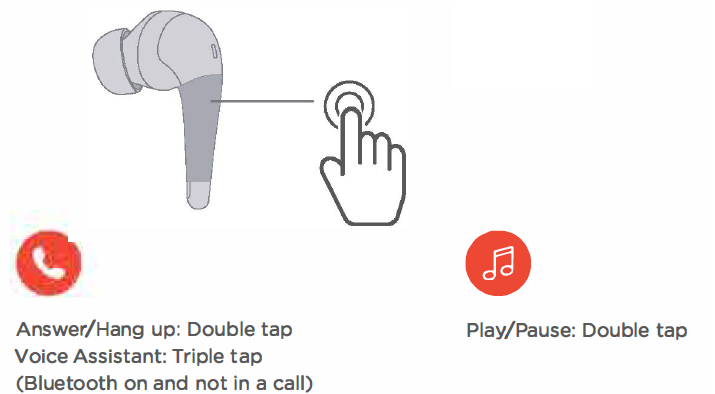
- The above functions are available for either earbud in individual or stereo mode. Custom setup is available on the APP.
- To decline a call, control the music playback,, or volume adjustment, please operate it on the app or the connected device.
The above functions may vary with different devices.
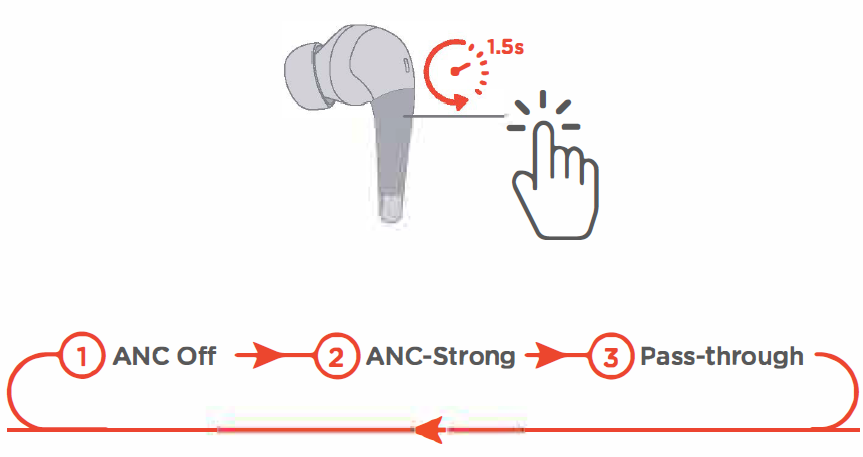
- The default setting of the headphones is "ANC Off". Long-press the touch control area of the earbuds to switch between "ANC-Off", "ANC-Strong", and "Pass-through".
- "ANC-Mild", "WNR (Wind Noise Resistance), "ANC-Adaptive" options are available via IMORE MUSIC APP.
- Once the listening mode has been set up in the APP, they will be memorized by the headphones,s allowing you to switch modes based on your settings.
Safety Information
- Never disassemble the headphones. There are no user-serviceable parts inside.
- Do not expose the headphones to temperatures below 32 "F (0 °C) or temperatures above 113°F (45 °C).
- Do not use headphones in a thunderstorm .storm. This could prevent the headphones from working properly, and also increase your chance of being electrically shocked.
- Do not use oil or any volatile liquid to clean this product.
- Do not listen to high volumes for extended periods.
- Do not use headphones in traffic. Do not use the headphones at any time it would be dangerous to be unaware of the noises around you.
- Adult supervision is required for children aged 6 and under.
- If you don't feel comfortable after wearing the headphones. Please refer to an audiologist for advice on whether in-ear headphones are suitable for you.
Real-time Spatial Audio
With in-built head-tracking technology, the Real-time Spatial Audio function creates a new level of immersed listening. It is compatible with different OS and devices without limitation of audio formats.
Available via APP.
Extra Functions
- If only one earbud can be connected to the device. Please put the two earbuds back into the case and triple-tap the pairing button, then click "1MOAE Aem11 in the device pairing list to connect to your device.
- Clear The Pairing Records: Put both Left and Right earbuds into the case, press and hold the pairing button for 8 ,ec:onds, the pairing records will be cleared.
- OTA Firmware Update: It can be synchronously upgraded via the MORE MUSIC APP while the Left and Right earbuds are connected to each other with at least 50% battery.
Functions of the I MORE MUSIC APP may vary with different devices or operating systems. For more information:, please contact. Customer service
Troubleshooting Guide for 1more Aero Wireless Earbuds ES903
Common issues with the 1more Aero Wireless Earbuds ES903 include connectivity drops, ANC malfunctions, and charging problems. If earbuds fail to pair, ensure Bluetooth 5.2 is enabled on your device and try resetting the earbuds by placing them back in the case and holding the touch controls for 10 seconds. For issues with noise cancellation, verify the ANC mode is activated via the earbuds or 1MORE app, and update firmware if available.
Error codes are generally communicated through LED indicators: a red light signals low battery and requires immediate charging, while flashing white may indicate pairing mode. If earbuds do not charge, clean the charging contacts on both the earbuds and the case, and check the USB-C cable or wireless charger for faults.
To prevent issues, keep earbuds and the charging case clean and dry, avoid extreme temperatures (outside 0℃–45℃), and regularly update the 1MORE app and firmware. The earbuds come with a standard 12-month warranty covering manufacturing defects. For additional support, users can contact 1MORE customer service via their official website or authorized retailer support channels.
1MORE (1) Year Limited Warranty
MORE warrants to the original retail purchaser' that this product is to be free from defective materials and workmanship for a period of one year from the date of purchase if it is properly used and maintained. If this product proves defective in either material or workmanship, 1MORE, at its option. Will (a) repair the. Product with new or refurbished parts. or (b) replace the product with an equivalent new or refurbished product, E!t no Charge for parts or labor_ If the product model is no longer available and cannot be repaired effectively or replaced with an identical model, MORE at its sole option may replace the unit with a current model of equal or greater value. In some cases, modification to the mounting surface may be required where a new model is substituted. MORE assumes no responsibility or liability for such modification. TO OBTAIN A REPAIR OR REPLACEMENT UNDER THE TERMS OF THIS WARRANTY. PLEASE RETURN TO THE ORIGINAL DEALER FIRST A, ND THE ORIGINAL DEALER SHALL REPAIR THE PRODUCT WITH NEW OR REFURBISHED PARTS OR REPLACE THE PRODUCT WITH AN EQUIVALENT NEW OR REFURBISHED PRODUCT.
You will be required to submit a proof of purchase details. Including, but not limited to, o a receipt or sales invoice
Return shipping for exchanges/rep!!lifs is the sole responsibility of the Original fet: ail purchaser.
Limitations:
- This limited warranty does not cover the failure of the product resulting from improper installation, misuse, abuse, or accident. ne9lect, mishandling, or wear from ordinary use or environmental deterioration.
- This limited war,f!nty does not cover cosmetic damage, including paint damage, or c: consequential damage to other components or premises which may resu It for <1ny reason from the failure of the product.
- This limited warranty ·1s null and void for products not used in accordance with IMORE's instructions.
- This limited Warranty is null and void for products: with altered or missing serial numbers and for products not purchased from an AUTHORIZED dealer.
- This limited warranty terminates if you sell or otherwise transfer this product to another party.
Pros & Cons of 1more Aero Wireless Earbuds ES903
Advantages
- Advanced ANC: Effective noise cancellation with four adjustable levels to suit different environments.
- Spatial Audio with Head Tracking: A Unique feature for enhanced immersion in music and VR content.
- Customizable Sound Profiles: 12 preset EQs and a 10-band customizable equalizer via the 1MORE app.
- Long Battery Life: Up to 28 hours total playback with case, supporting fast charge and wireless Qi charging.
- Lightweight and Comfortable: Each earbud weighs only 4.9g with IPX5 water resistance for active use.
Disadvantages
- Spatial Audio Utility: Some users find head-tracked spatial audio less effective for casual music listening.
- ANC Limitations: While strong ANC reduces most ambient noise, very high-frequency sounds like alarms remain faintly audible.
- App Dependency: Many advanced features require the 1MORE app, which may not be intuitive for all users.
- Price Point: Slightly higher than basic wireless earbuds, though justified by features and sound quality.
Compared to alternatives like Sony WF-1000XM4 or Bose QuietComfort Earbuds, the 1more Aero offers competitive ANC and unique spatial audio at a more affordable price, delivering excellent value for money.
Customer Reviews & Feedback on 1more Aero Wireless Earbuds ES903
Users generally praise the 1more Aero Wireless Earbuds ES903 for their clear, balanced sound and effective noise cancellation. Many reviews highlight the spatial audio feature as innovative, especially for VR and gaming enthusiasts, while the smart loudness adjustment is appreciated for maintaining audio quality at various listening volumes. The earbuds' comfort and long battery life receive frequent positive mentions.
Common complaints include occasional Bluetooth connectivity drops and a learning curve with the 1MORE app for customizing settings. Some users find the ANC insufficient against very loud or high-pitched noises but adequate for everyday environments. Overall, the earbuds hold an average star rating of 4 to 4.5 out of 5, with recommendations for those seeking a feature-rich, mid-range wireless earbud option.
Many reviewers recommend purchasing the 1more Aero ES903 for its blend of sound quality, ANC performance, and spatial audio capabilities, noting it as a worthwhile upgrade from basic true wireless models.
Faqs
How do I set up 1more Aero Wireless Earbuds ES903 for the first time?
What should I do if 1more Aero Wireless Earbuds ES903 is not connecting to my device?
Can I use 1more Aero Wireless Earbuds ES903 with multiple devices simultaneously?
How do I maintain and clean 1more Aero Wireless Earbuds ES903?
What are the key features that make 1more Aero Wireless Earbuds ES903 different?
How long does the battery of 1more Aero Wireless Earbuds ES903 last?
Can I use 1more Aero Wireless Earbuds ES903 with Spatial Audio on any device?
What should I do if 1more Aero Wireless Earbuds ES903 are not producing sound or have poor sound quality?
More 1more manuals
Leave a Comment