
Setup & Features: Air Techniques Mojave Dry Vacuum System User Manual
Content
Air Techniques Mojave Dry Vacuum System: Comprehensive Product Manual
Introduction
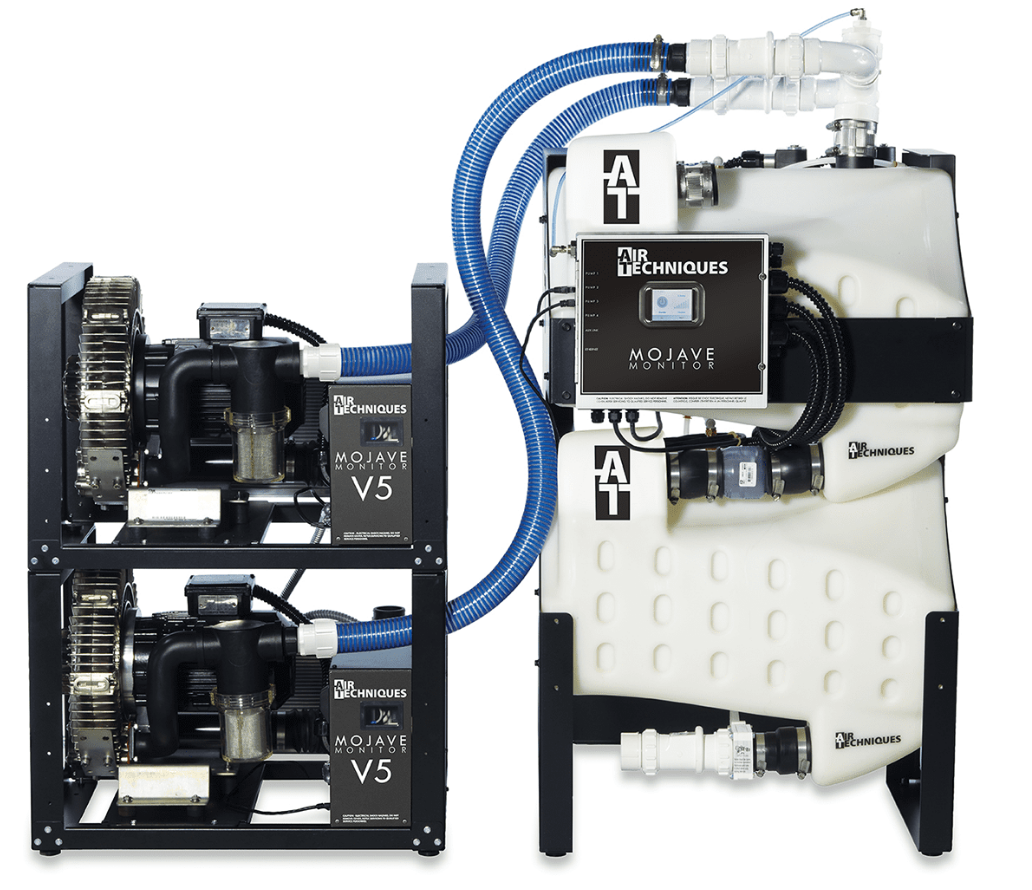
The air techniques Mojave Dry Vacuum System is a high-performance dental vacuum solution designed for practices that want reliable suction, efficient operation, and scalable capacity. Built for modern operatories, the system supports everything from small clinics to large multi-chair dental offices, making it a strong fit for general dentistry, specialty practices, and office expansions. Its dry vacuum design helps reduce maintenance compared with traditional wet systems, while the monitor-based architecture is intended to improve day-to-day reliability and simplify system oversight.
One of the main advantages of the air techniques Mojave Dry Vacuum System is its flexible sizing. Models are available for different user counts, allowing practices to match suction capacity to current demand and future growth. The system is also known for quiet operation, compact installation options, and dry-running efficiency. For busy dental teams, that combination can improve workflow, reduce downtime, and support consistent patient care.
The Mojave series is especially useful for dental offices that need dependable evacuation for high-volume procedures, hygiene rooms, and multi-chair setups. Estimated pricing varies by model and configuration, but the system typically falls in the mid- to upper-range category for professional dental equipment, often starting around the high four figures and increasing with larger capacity units and accessories. Availability is generally through dental equipment distributors and direct professional sales channels.
Specifications and Key Features of the air techniques Mojave Dry Vacuum System
- Dry vacuum system for dental suction and evacuation applications
- Factory preset vacuum level: 10.0 inHg on supported models
- Available configurations for multiple user loads, including compact and high-capacity systems
- Scalable options for approximately 3 to 60 simultaneous users depending on model family
- Horsepower ranges from smaller 1.5 HP class systems to larger 6.2 HP and above multi-unit setups
- Designed for continuous dental office use with monitor-based system oversight
- Compatible with office expansion kits and multi-system layouts
- Typical 50/60 Hz electrical support with professional installation requirements
- Dry vacuum architecture helps reduce water use and simplify upkeep
- Compared with smaller competitors, the Mojave line offers broader scaling and stronger multi-chair support
In practical terms, the Mojave line sits above entry-level single-room units and is better suited to growing practices or larger clinics that need dependable suction across several operatories. It is especially attractive when compared with lightweight portable systems, which usually offer less capacity and fewer expansion options.
Detailed Product Description
The air techniques Mojave Dry Vacuum System uses a dry vacuum design that pulls air and debris from dental operatories without relying on a wet ring pump setup. This design is intended to improve efficiency, reduce water dependency, and support cleaner mechanical operation over time. The monitor-based platform is built to help practices track and manage system performance while maintaining consistent suction output.
In real-world use, the system is a strong fit for restorative dentistry, hygiene, oral surgery support, and multi-chair practices where simultaneous suction demand can be high. The build quality reflects professional dental equipment standards, with a focus on durable housing, reliable internal components, and installation flexibility. Larger models support growth-focused practices that need to add chairs without replacing the entire vacuum infrastructure.
User experience is generally centered on steady suction, reduced maintenance compared with wet systems, and a configuration range that lets offices choose the right level of power. The Mojave platform is designed to serve as a long-term investment for offices that value uptime and scalable performance.
Setup Guide for the air techniques Mojave Dry Vacuum System
Installation should be handled by a qualified dental equipment technician because the system involves electrical, plumbing, and ventilation considerations. Before setup, confirm the selected model matches the practice’s user count, chair count, and expansion plans.
- Unpack and inspect all components for shipping damage.
- Place the vacuum unit in the recommended mechanical room location with adequate ventilation and service access.
- Verify electrical requirements, breaker sizing, and voltage compatibility before powering on.
- Connect the suction lines according to the office layout and manufacturer configuration.
- Install any required manifold, tank, or expansion kit components.
- Set the factory or prescribed vacuum level only through approved service procedures.
- Test each operatory for proper suction and confirm all connections are airtight.
Safety precautions include disconnecting power before service, keeping the area dry, and avoiding unauthorized adjustments to internal controls. If the system does not start, check power supply, breaker status, and control wiring first. If suction is weak, inspect for leaks, blocked filters, or incorrect line routing. For connectivity-style monitoring systems, ensure all communication modules are properly seated and configured.
Troubleshooting the Mojave Dry Vacuum System
Common problems usually involve weak suction, startup failure, unusual noise, or alarm conditions on monitored systems. Weak suction is often caused by leaks in the dental line network, clogged filters, or improper valve operation. Startup issues may point to power loss, tripped breakers, or wiring faults.
- Problem: Vacuum not starting. Fix: Check main power, breaker, disconnect switch, and control wiring.
- Problem: Low suction at one chair. Fix: Inspect tubing, trap components, and chair-side valves.
- Problem: Excess noise or vibration. Fix: Confirm mounting stability and inspect internal wear components.
- Problem: System overheating. Fix: Improve ventilation and verify that air intake paths are unobstructed.
- Problem: Monitor or status alert. Fix: Follow the model-specific service procedure and check the manual for the alert condition.
Preventive maintenance should include regular filter checks, line inspection, and periodic performance testing. Warranty coverage and support options vary by model and distributor, so owners should keep purchase records and serial information available. For service help, contact the installing dealer, authorized Air Techniques service provider, or the company’s official dental equipment support channel. If exact model documentation is needed, have the part number ready before requesting assistance.
Pros and Cons
Pros
- Scalable sizing for small practices and large multi-chair offices
- Dry vacuum design can reduce maintenance burden compared with wet systems
- Strong fit for growing dental practices that need room for expansion
- Professional-grade construction and office-focused reliability
- Good value for practices that need long-term suction performance
Cons
- Requires professional installation and planning
- Higher upfront cost than smaller entry-level vacuum units
- May be more system than a solo or very small practice needs
- Service and parts support depend on dealer and model availability
For value for money, the system makes the most sense when compared with lower-capacity alternatives that may need replacement sooner. Practices that expect growth or want dependable multi-user performance are likely to benefit more than offices with minimal suction demand.
Customer Reviews and Buyer Feedback
Typical buyer feedback for the air techniques Mojave Dry Vacuum System is positive, with many users praising consistent suction, quiet operation, and the ability to support multiple chairs without major performance drops. A common rating pattern is around 4 to 4.5 out of 5 stars for offices that value reliability and expansion capability.
One reviewer noted, “The system has been dependable for daily hygiene and restorative work, and the suction stays strong even during busy hours.” Another said, “Installation took planning, but once it was in place, the office workflow improved noticeably.”
Common complaints usually focus on setup complexity, price, and the need for trained service during maintenance. Buyers who want a long-term dental vacuum solution generally recommend it, especially for practices expanding beyond a basic two- or three-chair environment.
Frequently Asked Questions
What is the air techniques Mojave Dry Vacuum System used for?
It is used for dental suction and evacuation across one or more operatories in clinics and dental offices.
Is the Mojave system good for large practices?
Yes, the Mojave line includes higher-capacity models built for larger chair counts and simultaneous users.
Does it require professional installation?
Yes, professional installation is strongly recommended because of electrical and plumbing requirements.
Is the system noisy?
It is generally designed for quieter operation than many traditional vacuum setups, though installation location affects perceived noise.
Faqs
How do I set up the air techniques Mojave Dry Vacuum System for the first time?
Why is the air techniques Mojave Dry Vacuum System losing suction, and how do I fix it?
What equipment is compatible with the air techniques Mojave Dry Vacuum System?
How can I optimize performance of the air techniques Mojave Dry Vacuum System in a busy clinic?
What are the most common problems with the air techniques Mojave Dry Vacuum System during daily use?
How often should I maintain the air techniques Mojave Dry Vacuum System?
Why is the air techniques Mojave Dry Vacuum System making unusual noise or vibration?
What should I check before installing the air techniques Mojave Dry Vacuum System in an existing facility?
Leave a Comment