
Alarm.com ADC-VDB750 Wi-Fi Doorbell Camera User Manual
Content
Alarm.com ADC-VDB750 Wi-Fi Doorbell Camera: Complete Product Manual and Review
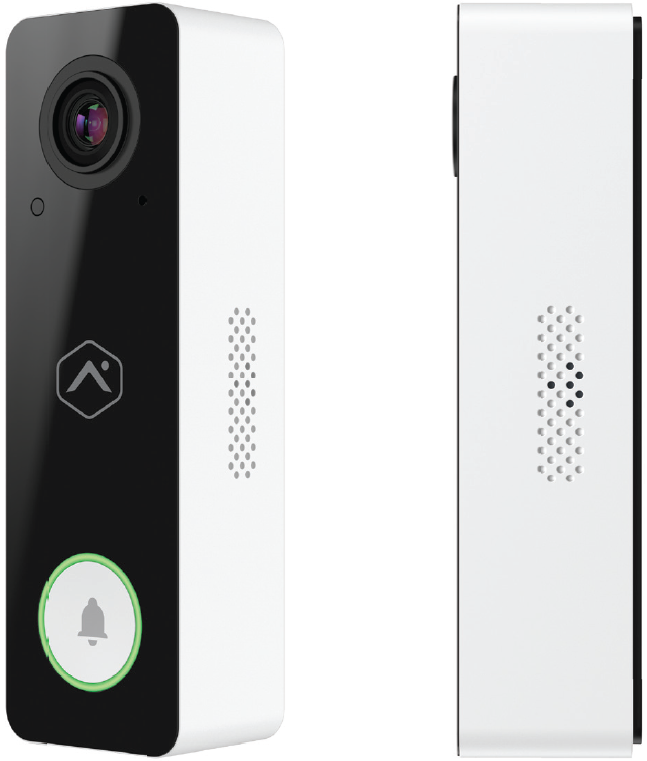
The Alarm.com ADC-VDB750 Wi-Fi Doorbell Camera is a wired smart video doorbell built for homeowners and small businesses that want dependable front-door monitoring, crisp two-way communication, and seamless integration with the Alarm.com security platform. It stands out for its 1440 x 1440 high-definition video, expansive 165° horizontal and 145° vertical field of view, dual-band Wi-Fi support, and advanced video analytics designed to detect people more intelligently than basic motion alerts. For users who want a professional-grade doorbell camera that works well in both residential and monitored security setups, the ADC-VDB750 is a strong option.
This model is especially useful for package delivery monitoring, visitor identification, porch security, and remote answering through the app. It supports full-duplex two-way audio, infrared night vision up to 15 feet, HDR imaging, and weather-resistant construction with IP65 protection. In real-world use, those features help reduce glare, improve low-light visibility, and deliver clearer communication at the door. The camera is typically available through security dealers and online retailers, with an estimated price range of about $198 to $300 depending on seller, bundle, and market conditions. That makes it a mid-range choice compared with many consumer smart doorbells, but it offers stronger security-system integration than many standalone alternatives.
For buyers comparing wired video doorbells, the alarm.com ADC-VDB750 Wi-Fi Doorbell Camera is best suited to users who already use Alarm.com or want a professionally installed, security-focused device. It may be less ideal for shoppers seeking a battery-powered doorbell or broad DIY smart-home flexibility, but it delivers solid value for monitored security environments and reliable everyday entryway surveillance.
Alarm.com ADC-VDB750 Wi-Fi Doorbell Camera Specifications and Key Features
- Video resolution: 1440 x 1440 HD image quality for a square-format live view.
- Image sensor: 1/2.4-inch, 2.36 MP sensor with HDR support.
- Field of view: 165° horizontal and 145° vertical for broad porch coverage.
- Night vision: Infrared vision up to 15 feet with 0 lux low-light sensitivity.
- Audio: Full-duplex two-way audio for natural conversations at the door.
- Wireless: 802.11 b/g/n/ac Wi-Fi on 2.4 GHz and 5 GHz bands.
- Power: 16–24 VAC, 10–40 VA recommended, or 15–24 VDC depending on installation.
- Weather rating: IP65 for outdoor use in exposed entryway conditions.
- Operating temperature: -58°F to 122°F (-50°C to 50°C).
- Video compression: H.264.
- Analytics: Advanced video analytics with people detection.
- Dimensions: Approximately 1.5 x 4.81 x 1.18 inches with back plate assembled.
Compared with many standard smart doorbells, the alarm.com ADC-VDB750 Wi-Fi Doorbell Camera emphasizes security-platform integration, analytics, and wide-angle coverage rather than consumer-first extras. It is stronger than basic Wi-Fi doorbells that only send generic motion alerts, but it is less flexible than some battery-powered competitors for renters or DIY installations. Its high resolution and dual-band Wi-Fi support make it a solid fit for homes with strong network coverage and professional alarm monitoring.
Troubleshooting the ADC-VDB750 Video Doorbell Camera
If the doorbell does not power on, first verify transformer output and wiring compatibility. A common issue is insufficient power from an older chime transformer, so confirm that the system provides the required voltage and VA rating. If the device will not join Wi-Fi, move the router closer during setup, try the 2.4 GHz band, or complete enrollment through WPS or AP mode. If video quality appears blurry or washed out, clean the lens, reduce direct glare from sunlight, and check HDR and image settings in the app.
For pairing or enrollment failures, restart the device and confirm that the installer is using the correct setup method. If the LED blinks unexpectedly after reset, perform a factory reset by holding the doorbell button for about 45 to 50 seconds until the LED indicates reset mode. Common issues with mechanical or digital chimes usually point to wiring or power module configuration rather than camera failure. Digital chimes may require a compatible power module for proper operation.
There are no widely published public error codes for this model, so most fixes rely on LED behavior, app status, and power checks. To prevent recurring problems, keep firmware updated, ensure stable Wi-Fi coverage, and verify that the transformer meets the recommended specifications. For warranty service and technical support, contact the installing dealer or Alarm.com partner support channel. If you purchased through a distributor, keep your invoice, device serial number, and MAC address ready for faster assistance.
Pros and Cons of the Alarm.com ADC-VDB750 Wi-Fi Doorbell Camera
Pros
- Wide 165° x 145° viewing angle captures visitors, packages, and porch activity clearly.
- Sharp 1440 x 1440 video with HDR improves detail in mixed lighting.
- Dual-band Wi-Fi adds installation flexibility in homes with crowded networks.
- Advanced people detection reduces unnecessary alerts compared with basic motion detection.
- Full-duplex two-way audio makes conversations sound more natural.
- IP65 weather resistance and extreme temperature tolerance support outdoor reliability.
Cons
- Wired power requirement limits use in homes without compatible doorbell wiring.
- Best experience depends on the Alarm.com ecosystem, which may not suit all users.
- No onboard recording means it relies on the connected service plan and platform features.
- Not ideal for renters or users wanting a battery-powered DIY installation.
- Price can be higher than entry-level smart doorbells with simpler features.
Overall value is strong for monitored security users and homeowners who want a professionally supported smart doorbell. Compared with consumer-focused alternatives, the ADC-VDB750 offers better alarm-platform integration and analytics, but less standalone convenience.
Customer Reviews and User Feedback on the alarm.com ADC-VDB750 Wi-Fi Doorbell Camera
Customer feedback is generally positive, with many users praising the sharp video, wide field of view, and dependable app-based access. Typical ratings cluster around 4 out of 5 stars for users who already have an Alarm.com system and want a doorbell camera that feels integrated and reliable. One common compliment is that the image remains useful at dusk and at night, especially when compared with older 1080p doorbells.
Frequent complaints focus on installation complexity, the need for compatible wiring, and the fact that the best features are tied to the Alarm.com service environment. Some buyers also mention that the price feels high compared with mainstream consumer brands. A representative user-style takeaway is: “Great picture quality and excellent porch coverage, but it works best when you already use Alarm.com.” Another common view is: “Very dependable once installed, but not the simplest plug-and-play option.”
For shoppers deciding whether to buy the alarm.com ADC-VDB750 Wi-Fi Doorbell Camera, it is a good recommendation for monitored homes, security-conscious families, and users who want professional-grade doorbell coverage. It is less compelling for budget-focused buyers who want a battery model or a fully standalone smart doorbell.
Faqs
How do I set up the alarm.com ADC-VDB750 Wi-Fi Doorbell Camera for the first time?
Why is my alarm.com ADC-VDB750 Wi-Fi Doorbell Camera not connecting to Wi-Fi?
What features does the alarm.com ADC-VDB750 Wi-Fi Doorbell Camera offer for home security?
Is the alarm.com ADC-VDB750 Wi-Fi Doorbell Camera compatible with my existing doorbell wiring and chime?
How can I improve video quality and motion detection on the alarm.com ADC-VDB750 Wi-Fi Doorbell Camera?
What should I do if the alarm.com ADC-VDB750 Wi-Fi Doorbell Camera has delayed notifications?
How do I troubleshoot no video or a blank screen on the alarm.com ADC-VDB750 Wi-Fi Doorbell Camera?
How should I clean and maintain the alarm.com ADC-VDB750 Wi-Fi Doorbell Camera for long-term reliability?
Tags
Leave a Comment