
Setup: Amzhero IDW19 Fitness Smartwatch User Manual
Content
amzhero IDW19 Fitness Smartwatch
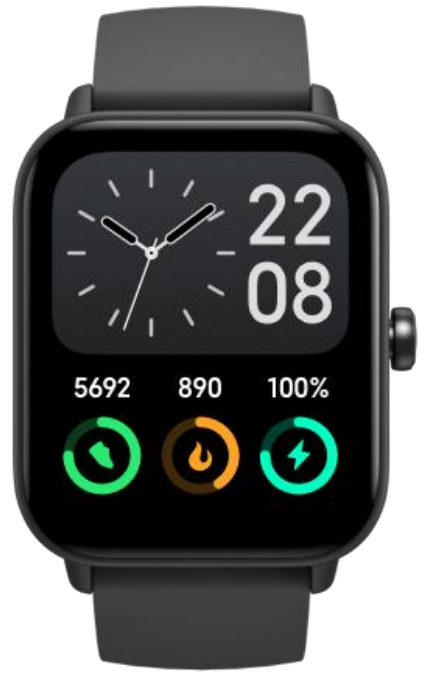
Introduction
The **amzhero IDW19 Fitness Smartwatch** is designed for fitness enthusiasts and everyday users alike, offering a comprehensive suite of features to track health and fitness goals. This smartwatch is packed with advanced health monitoring capabilities, including heart rate tracking, step counting, and sleep monitoring. It also supports notification alerts from your smartphone, ensuring you stay connected on the go. With its sleek design and affordable price range, typically between $50 and $80, the amzhero IDW19 is an excellent choice for those seeking a reliable fitness companion without breaking the bank. It is widely available on leading e-commerce platforms.
Whether you're a seasoned athlete or just starting your fitness journey, the amzhero IDW19 provides valuable insights into your daily activities and health metrics. Its user-friendly interface makes it accessible to users of all skill levels, from beginners to advanced users.
Getting started
What’s in the box
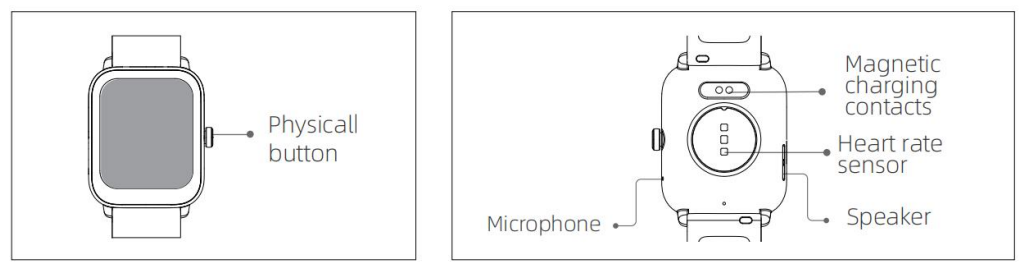
- Screen display area
- Function button
- Pressure relief hole
- Heart rate sensor
- Microphone
- Speaker
- Front side
- Back side
Set up with your phone
- Open the package and check its contents
- Delivery content:
- IDW19 smart watch (with built-in lithium battery);
- user manual;
- charging cable;
- martwatch band
- warranty card
- Charge the watch to activate and turn it on before first use. To charge, simply connect the magnetic charging cable to the charging contacts located on the back of the watch.
- Please scan the QR code on the user manual to install the “VeryFit” app, or download it the from the App Store or Google Play.
- Open the VeryFit app, allow the request to enable the Bluetooth function of your phone to connect the watch.
- Please do not pair directly via Bluetooth. The pairing operation should be done in the APP page.
- Select "IDW19" on the VeryFit app--> Click “Confirm Bind Device”.
- After binding, fill in your age/weight/height correctly.
- Then a progress bar will appear at the top of the VeryFit app--> It will take 1-2 mins to sync the date/time and your info.
- The pairing will be done once it reaches 100%.
- Log in to the app and set your personal information, as well as your step and weight goals.
Note:
- Please make sure "location" or "GPS" is turned on.
- If disconnection occurs, you just need to swipe down the homepage of the VeryFit app to reconnect.
- If you can't sync, please contact us by sending your Amazon order number, phone model,, and system version. We'll check if it is compatible.
- VeryFit app is compatible with most iOS 7.0 & Android 4.4 above smartphones. Not suitable for PC or tablet.
Basic Operations
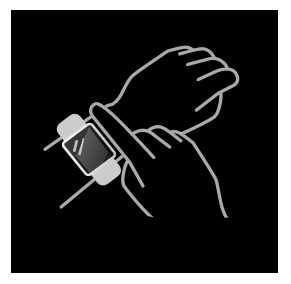
Wear your smart watch
- Wear the watch correctly: ensure that your watch is at least one finger above your wrist bone and that the sensor on the back touches your skin.
- Screen operation: IDW19 has a full touch screen, which supports operations including short tap, swipe left/right,t and swipe up/down.
- Button operation: IDW19 has a physical button, which supports “short press” and “long press” operations. Short press: to return to the home page/pause exercise. Long press: for 2 seconds to turn on the watch when it is off; to turn on Alexa when the watch is on.
Specifications of the Amzhero IDW19 Fitness Smartwatch
Here are the key specifications and features of the Amzhero IDW19:
- Display: High-resolution touchscreen display for easy navigation
- Health Monitoring: Continuous heart rate tracking, blood oxygen level monitoring, and sleep analysis
- Connectivity: Bluetooth 5.0 support for seamless connectivity with smartphones
- Compatibility: Compatible with both Android and iOS devices
- Battery Life: Up to 7 days on a single charge, depending on usage
- Water Resistance: IP68 rating for protection against water and dust
- Additional Features: GPS tracking, music control, and customizable watch faces
Compared to similar smartwatches, the amzhero IDW19 offers a great balance of features and affordability, making it a competitive choice in the fitness smartwatch market.
Troubleshooting Common Issues with the amzhero IDW19
Like any electronic device, the Amzhero IDW19 may encounter some common issues. Here are some troubleshooting tips:
- Smartwatch won’t Turn On: Ensure the smartwatch is properly charged. If it still doesn’t turn on, perform a soft reset by holding the power button for 10-20 seconds.
- Connectivity Problems: Restart both the smartwatch and your smartphone. Ensure Bluetooth is enabled and devices are within range.
- App Not Recognizing Smartwatch: Update the app and ensure your smartphone’s operating system is up-to-date.
For more complex issues, contact our customer support team or visit our website for detailed troubleshooting guides. We offer a one-year warranty and dedicated customer service to ensure your satisfaction with the product.
Pros & Cons of the amzhero IDW19 Fitness Smartwatch
Pros
- Affordable Price: Offers great value for money compared to more expensive smartwatches on the market.
- Advanced Health Features: Comprehensive health monitoring capabilities, including heart rate and sleep tracking.
- Long Battery Life: Lasts up to 7 days on a single charge, reducing the need for frequent recharging.
Cons
- Limited App Support: Some users may find the app selection limited compared to other smartwatches.
- Slightly Delayed Response: Some users report a slight delay in screen response, particularly with rapid app switching.
Customer Reviews and Feedback
Customers have praised the amzhero IDW19 for its durability and ease of use. Many appreciate its affordability and comprehensive health tracking features. However, some users note that the app ecosystem could be more robust. Overall, the Amzhero IDW19 averages a 4-star rating on most review platforms.
If you're looking for a reliable fitness companion without breaking the bank, the amzhero IDW19 is a solid choice. While it may not offer all the bells and whistles of more expensive models, it provides excellent value for its price.
Faqs
How do I set up the amzhero IDW19 Fitness Smartwatch for the first time?
What can I do if the heart rate monitor on my amzhero IDW19 Fitness Smartwatch is not working correctly?
Can the amzhero IDW19 Fitness Smartwatch track my blood oxygen levels and how accurate is it?
Is the amzhero IDW19 Fitness Smartwatch compatible with all smartphones and tablets?
How can I optimize battery life on my amzhero IDW19 Fitness Smartwatch?
What should I do if my amzhero IDW19 Fitness Smartwatch is not syncing data with the VeryFit app?
How do I use the breath training feature on the amzhero IDW19 Fitness Smartwatch?
How do I care for and maintain the amzhero IDW19 Fitness Smartwatch to ensure longevity?
Tags
Leave a Comment