
Operations: Anceltech Diagnostic Tools BM500 User Manual
Content
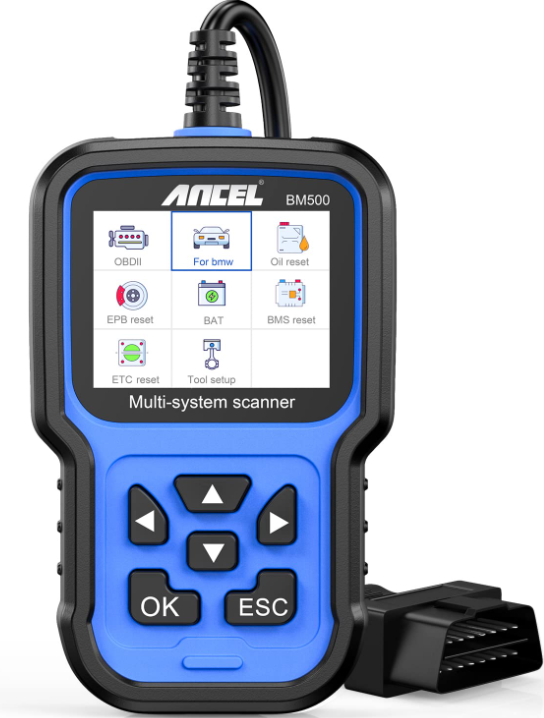
Anceletch Diagnostic Tools BM500
Introduction
The Anceletch Diagnostic Tools BM500 is a comprehensive and advanced automotive diagnostic scanner designed to cater to the needs of both professional mechanics and DIY enthusiasts. This tool is equipped with a wide range of features that enable users to diagnose and troubleshoot various issues in vehicles efficiently. The BM500 supports multiple vehicle protocols, including OBD-II, CAN, and others, making it compatible with a broad spectrum of vehicles from different manufacturers.
The estimated price of the Anceletch Diagnostic Tools BM500 is around $200-$300, making it a cost-effective solution for those seeking advanced diagnostic capabilities without the hefty price tag of more specialized tools. The product was launched in late 2022 and has since gained popularity among automotive professionals and hobbyists alike.
The primary purpose of the BM500 is to provide detailed diagnostic information, perform various tests, and reset certain systems within the vehicle. It is particularly useful for diagnosing engine issues, transmission problems, and other system malfunctions. With its user-friendly interface and robust set of features, the BM500 is an essential tool for anyone involved in vehicle maintenance and repair.
Specifications
- 2.4" 240x320 pixels LCD screen ..
- Operating Voltage: 8V-18V.
- Operating Temperature: 0°C-60°C(32-140° F).
- Storage Temperature: -20°C-70°C(4-158° F).
SAFETY PRECAUTIONS
- To prevent personal injury or damage to vehicles and/or the scan tool, read this instruction manual first and observe the following safety precautions at a minimum whenever working on a vehicle:
- Always perform automotive testing in a safe environment.
- Do not attempt to operate or observe the tool while driving a vehicle. Operating or observing the tool will cause driver distraction and could cause a fatal accident.
- Wear safety eye protection that meets ANSI standards.
- Operate the vehicle in a well-ventilated work area: Exhaust gases are Poisonous.
- Put the transmission in PARK (for automatic transmission) or NEUTRAL (for manual transmission) and make sure the parking brake is engaged.
- Keep the scan tool dry, clean, and free from oil/water or grease. Use a mild detergent on a clean cloth to clean the outside of the scan tool, when necessary.
ABOUT BM500
Coverage
- BM500 supports for BMW, Mini,, and Rolls-Royce brand cars. It works on all the systems such as engine, transmission, ABS, and airbag, etc.
- Supports OBDII/EOBD Modes of operation.
Appearance and buttons description
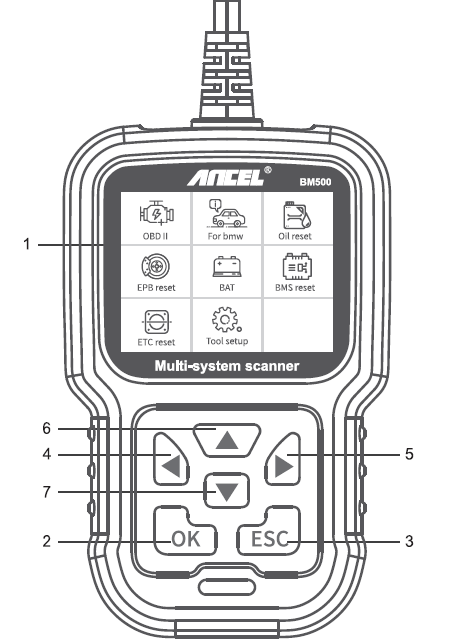
- LCD SCREEN - Indicates test results. Backlit, 320 x 240 pixels display
- [OK] BUTTON - Confirms a selection (or action) from a menu.
- [ESC] BUTTON - Cancels a selection (or action) from a menu or returns to the menu.
- [LEFT] SCROLL BUTTON - In the menu mode,, through the menu and sub menu, move to the left. When rolling in a data interface, use the left button to move to the last screen.
- [RIGHT] SCROLL BUTTON - In the menu mode, through the menu and sub menu items, move to the right. When rolling in the data interface, use the right button to move to the next screen.
- [UP] SCROLL BUTTON - In the menu mode t, through the menu and sub menu item m, moving up. When retrieving data for more than a screen by moving up the screen to the previous screen for more data.
- [DOWN] SCROLL BUTTON - In the menu mode,, through the menu and sub menu items moves down. When retrieving data on more than one screen, move down the screen to the next screen for more data.
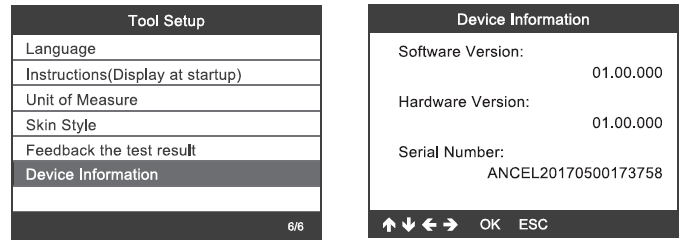
Device Information
Choose Device Information, and it displays as follows:
Update
- Download the updated software.
Connect the device to the computer through the USB cable.
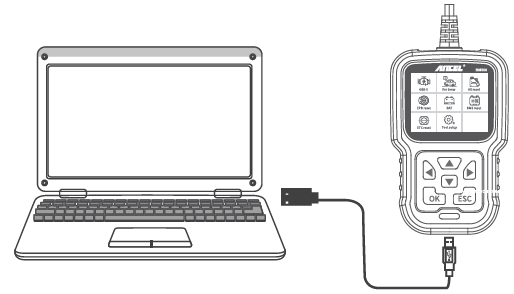
- The updated software is only supported by win?/8/10.
Click "install driver.bat" in the driver files to install the driver, if the computer system is Windows 7
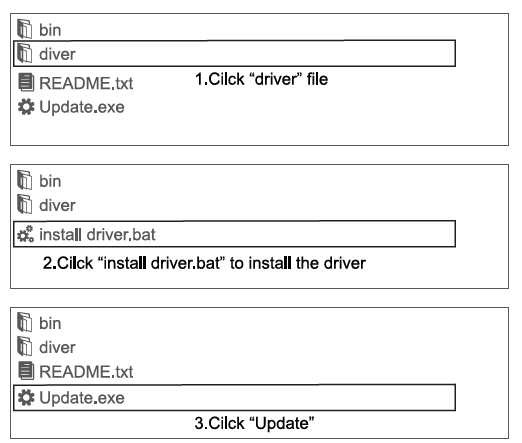
Windows 8/10 can run updated software directly.
Warranty
- This warranty is limited to the person who purchases ANCEL products.
- ANCEL product is warranted against defects in materials and workmanship for one year (12 months) from the date of delivery to the user.
Troubleshooting
Common problems with the Anceletch Diagnostic Tools BM500 include connectivity issues and incorrect vehicle selection. To resolve connectivity issues, ensure that the OBD-II cable is securely connected to both the vehicle and the device. If the issue persists, try restarting both the vehicle and the diagnostic tool.
If you encounter errors related to vehicle selection, double-check that you have selected the correct make and model of your vehicle. Refer to the user manual or contact customer support if you are unsure about the correct settings.
Important instructions and warnings include ensuring that the device is not exposed to extreme temperatures or physical damage. Always follow proper safety protocols when working with electrical systems in vehicles.
Pros & Cons
Pros:
- Advanced diagnostic capabilities at an affordable price
- Wide compatibility with various vehicle makes and models
- User-friendly interface and intuitive menu system
- Real-time data streaming for detailed vehicle performance monitoring
- Durable design with a rechargeable battery
Cons:
- Some users may find the menu system complex for initial setup
- Limited support for certain advanced functions in some vehicle models
- No built-in Wi-Fi connectivity for online updates (requires manual updates)
Customer Reviews
Customers have generally praised the Anceletch Diagnostic Tools BM500 for its robust features and ease of use. Many have found it to be a valuable addition to their toolkit, especially given its affordability compared to other advanced diagnostic scanners on the market.
Common complaints include some users experiencing difficulty with the initial setup process and occasional connectivity issues. However, these are generally resolved through troubleshooting or contacting customer support.
Faqs
What is the primary purpose of the Anceletch Diagnostic Tools BM500?
How do I connect the BM500 to my vehicle?
Is the Anceletch Diagnostic Tools BM500 compatible with all vehicles?
How do I update the software on my BM500?
What kind of battery does the BM500 use?
Can I use the BM500 to reset certain systems in my vehicle?
Is customer support available for the BM500?
How long does it take to charge the BM500?
Can I use the BM500 on multiple vehicles?
Does the BM500 support multiple languages?
Leave a Comment