
Setup: Ancwear ANC-S7 Max Smart Watch User Manual
Content
Ancwear ANC-S7 Max Smart Watch
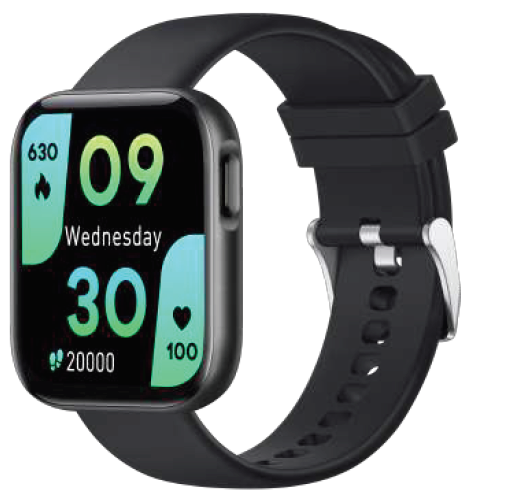
The ancwear ANC-S7 Max Smart Watch is a versatile wearable designed to enhance your fitness, health monitoring, and daily connectivity with style and ease. Featuring a vibrant 1.96-inch IPS touchscreen with a resolution of 240x285 pixels, this smartwatch offers a broad and clear visual interface perfect for both active users and tech enthusiasts. Its zinc alloy frame paired with a comfortable, replaceable silicone strap ensures durability without compromising comfort, making it ideal for workouts, outdoor activities, and everyday use.
Key benefits include comprehensive health tracking with heart rate, blood pressure, and sleep monitoring, plus women’s health features. The watch supports over 120 sports modes, empowering users to track exercise time, distance, and calories burned accurately. Enhanced connectivity comes via Bluetooth 5.0, allowing hands-free calling, voice assistant activation, music control, and smart notifications right from your wrist. With an IP67 waterproof rating, the ANC-S7 Max withstands rain and sweat, though it is not intended for deep-water activities.
This smartwatch targets fitness enthusiasts, busy professionals, and anyone looking to streamline health and communication in a stylish gadget. It is compatible with both Android and iOS devices. The price range typically falls between $24.99 to $39.99, offering an affordable option for a feature-rich smartwatch available through online retailers and select marketplaces.
Product parameters
- Device Name: ANC-S7 Max
- Bluetooth Version: Bluetooth 5.0; 10 m / 33 ft
- Screen Type: 1.96" IPS
- Waterproof Level: IP67
- Battery Capacity: 300 mAh
- Charging Time: 2 hours
- Working Time: 10 days
- Weight: 53 g / 1.9 oz
- Bandwidth: 22 mm
Product overview
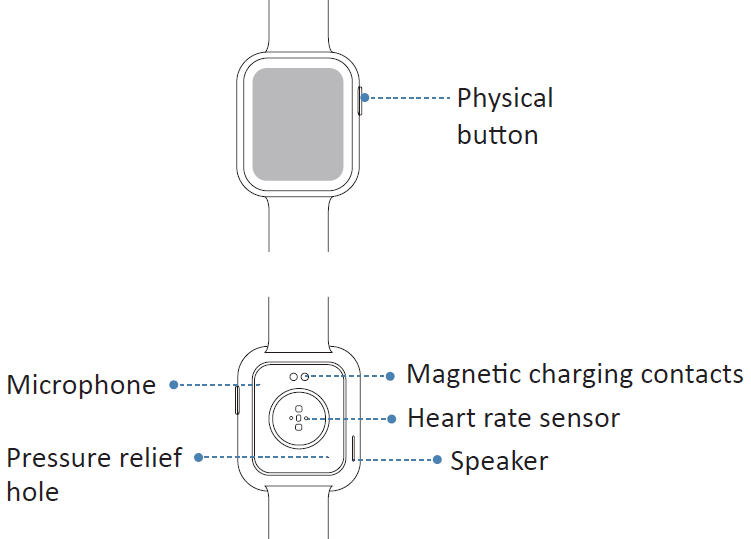
Set Up Your Watch
Charge your watch
NOTE: Please fully charge your watch before initial use.
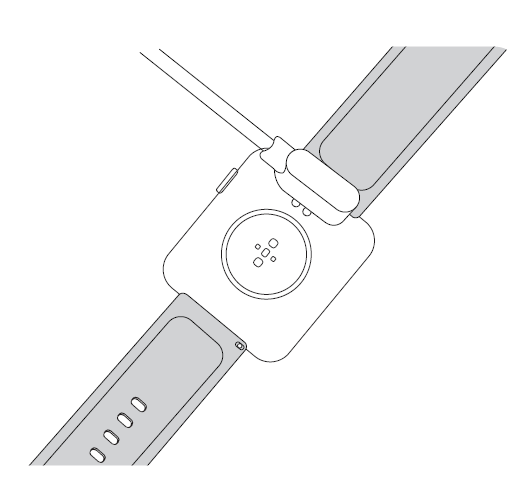
- Plug the USB charging cable into the USB port of your computer or a UL-certified USB wall charger.
- Hold the magnetic end of the charging cable to close to the port on the back of the watch until it adheres.
Attach
- To attach a wristband, slide the pin (the side opposite the quick-release lever) into the notch on the watch.
- While pressing the quick-release lever inward, slide the other end of the wristband into place.
- When both ends of the pin are inserted, release the quick-release lever.
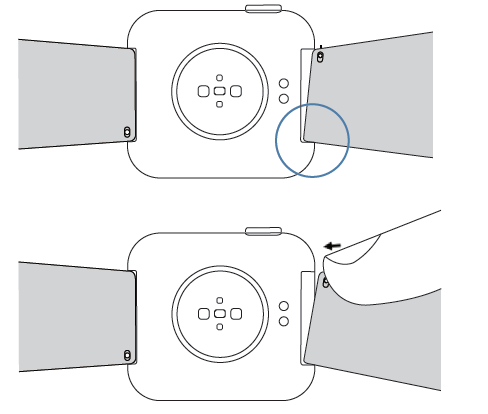
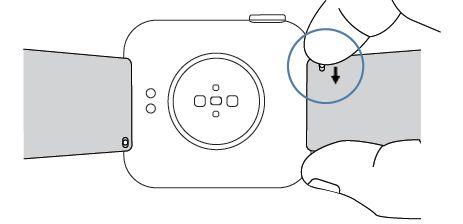
Remove
- Turn over the watch and find the quick-release lever.
- While pressing the quick-release lever inward, gently pull the wristband away from the watch to remove it.
Turning on
Press and hold the button until you feel the watch vibrate, and then release it. The brand logo-ANCwear appears on the screen to indicate successful turning on.
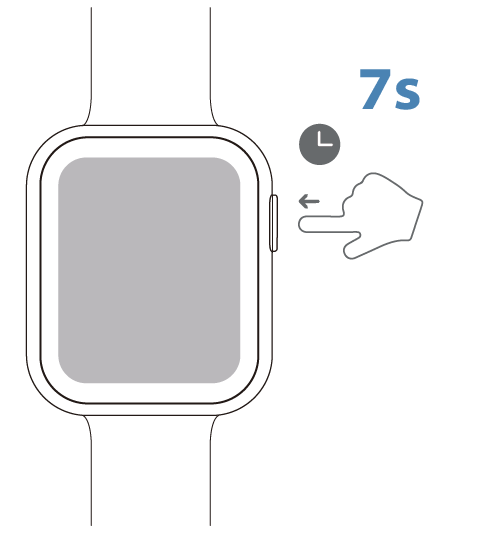
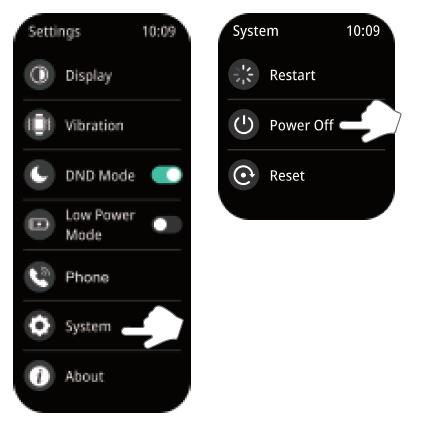
Turning off
You can long-press the button to select shutdown or go to Settings ---> System ---> Shutdown
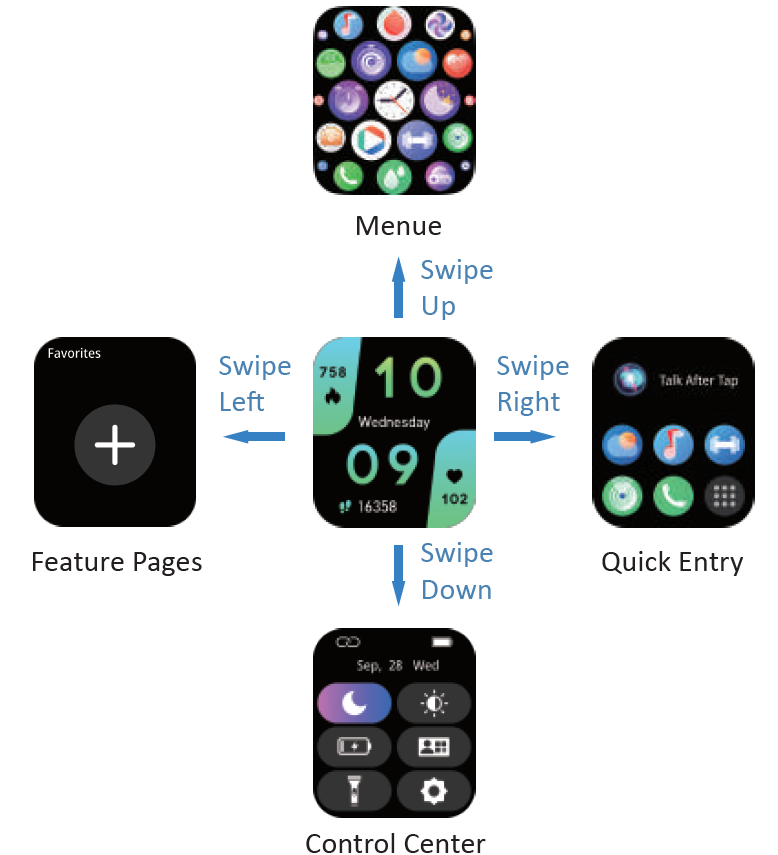
Watch interfaces
- Swipe down to enter Control Center.
- Swipe up to see the Message.
- Swipe right to wake up the voice assistant and enter the function menu.
- Swipe left to the feature pages, including activity, sleep, heart rate, BP, SpO2, weather, etc.
- Long-press the home page to change the watch face.
Icons introduction
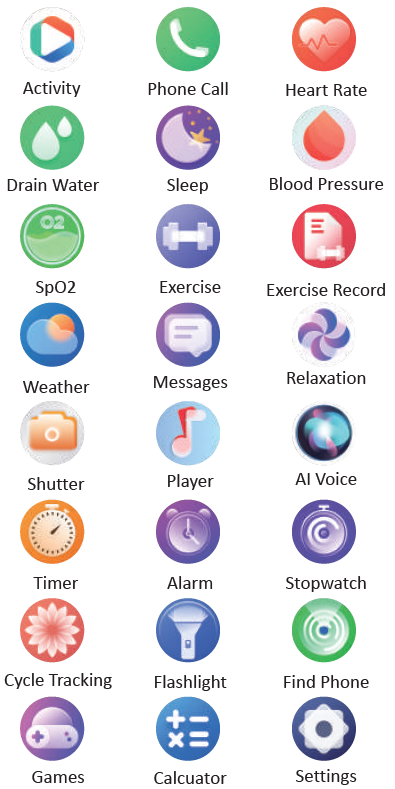
Important instructions
Please read the safety guidelines on the following pages to ensure proper use and care.
- Do NOT expose your device to liquid, moisture, humidity, or rain while charging. Do not charge your device when it is wet, as this may result in electrical shock and injury.
- Do NOT expose your watch to extremely high or low temperatures.
- Do NOT use your device in a sauna or steam room.
Battery warnings
A lithium-ion battery is used in this device. When using this smart watch, please observe the following guidelines for using batteries.
- Do NOT disassemble, modify, puncture, or damage the device or batteries.
- Do NOT remove or attempt to remove the non-user-replaceable battery.
- Do NOT expose the device or batteries to fire, explosion, or other hazards.
Main Features
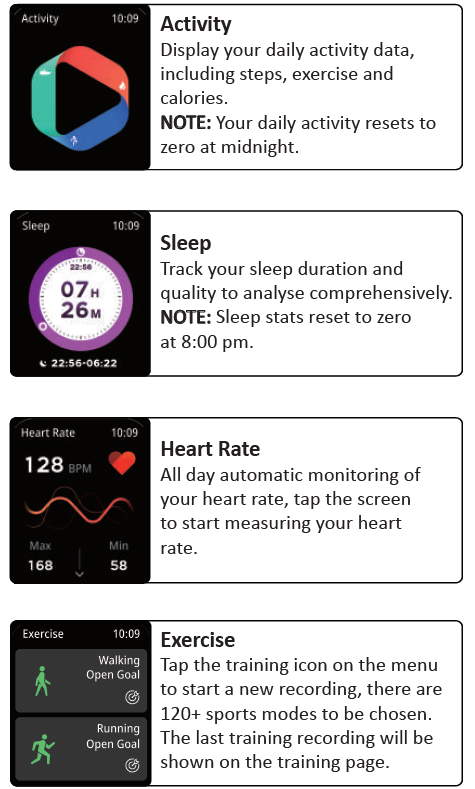
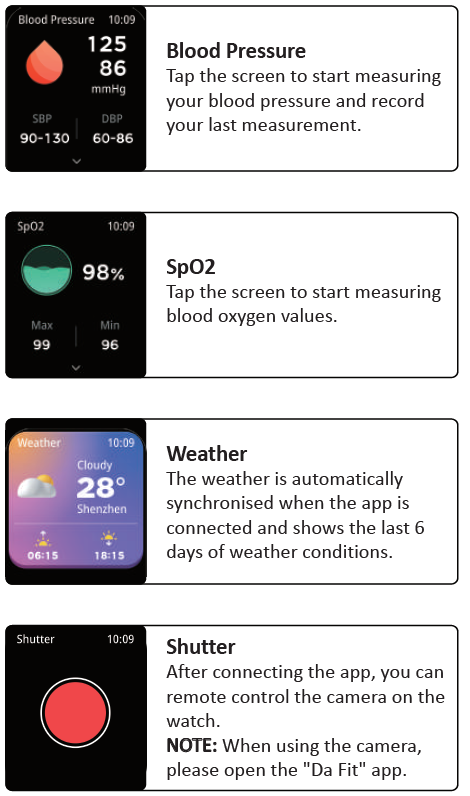
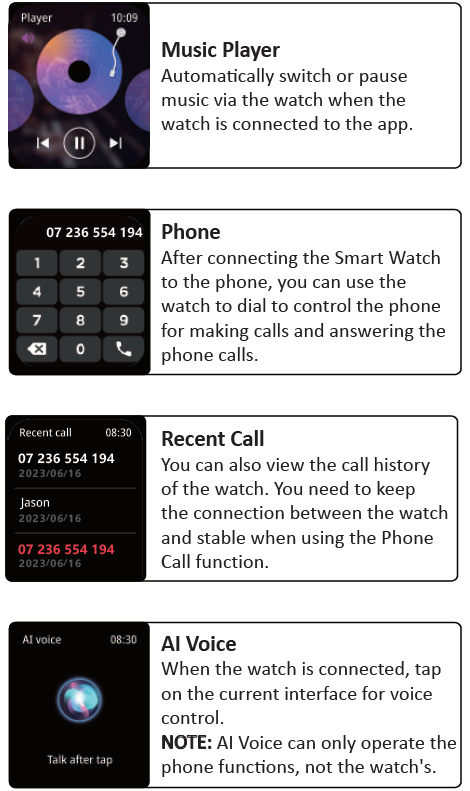
Settings
Display
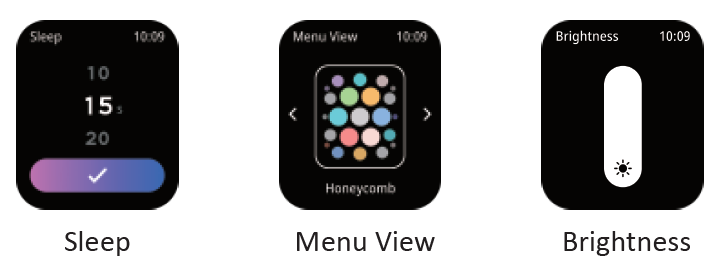
- Sleep
Tap the "Sleep" button to set the watch's screen-on time. - Menu View
There are 8 menu types to meet your personal preferences. - Wrist Raise
Click the slider to turn on the Wrist Raise function. In the "Display", you could also use the "Brightness" and "Watch Face" functions.
- Vibrate & Ring
You could set the vibration mode, including "Vibrate", "Vibrate & Ring",, and "Mute", and so the intensity of the vibration. - Phone
You can set whether or not to answer calls via the watch. - Low Power Mode
Enable this mode, and it will turn off vibration / quick view, and turn down the brightness. - More Setting
In "System", you could restart, power off,, and reset your watch.
- Vibrate & Ring
Maintenance
- Regularly clean your wrist and the smart watch, especially after sweating during exercise or being exposed to substances such as soap or detergent, which may adhere to the internal side of the watch.
- Though the watch is waterproof, wearing a wet band is not good for your skin.
- Do not contact your device with any sharp objects, as this could cause scratches and other damage.
Troubleshooting the ancwear ANC-S7 Max Smart Watch: Common Issues and Solutions
Users of the ancwear ANC-S7 Max Smart Watch may encounter occasional issues such as connectivity drops, inaccurate sensor readings, or app synchronization problems. Here are common problems and fixes:
- Bluetooth connectivity issues: Ensure Bluetooth 5.0 is enabled on your phone, and restart both devices. Remove previous pairings and re-pair through the RD-Fit app for stability.
- Heart rate or blood pressure sensor errors: Wear the watch snugly on your wrist, clean the sensor area regularly, and avoid bright direct light interference during measurements.
- App synchronization delays: Check for updates to the RD-Fit app, ensure your phone’s OS is supported, and allow necessary permissions for notifications and data access.
- Watch not charging: Use the included magnetic charger, clean the charging pins, and verify power source functionality. Charging typically takes 2 hours for up to 10 days of usage.
Preventive measures include keeping the device dry despite its IP67 rating, avoiding extreme temperatures, and regular software updates. The ANC-S7 Max usually comes with a 12-month warranty covering manufacturing defects. For additional support, contact customer service via the official ancwear website or the retailer’s helpdesk.
Warranty
- One-year warranty for manufacturing defects.
- Any quality defects, contact us, and you will get A Full Refund or A Free Replacement!
Customer Reviews of the ancwear ANC-S7 Max Smart Watch
Users commonly praise the ancwear ANC-S7 Max Smart Watch for its large, clear display and extensive fitness tracking options, particularly the variety of over 120 sports modes. Many appreciate the long battery life—up to 10 days on a single charge—and the convenience of hands-free calling and voice assistant features. The affordability and stylish design also received positive remarks.
However, some customers note issues with the band’s comfort and durability, describing it as less soft than expected. A few reviews mention inaccuracies in GPS-related tracking, clarifying that the watch does not have built-in GPS but relies on connected phone GPS through the app. Occasional syncing hiccups with the RD-Fit app are also reported, but often resolved by updates.
Overall, the smartwatch frequently receives a star rating of around 4 out of 5, with users recommending it for budget-conscious buyers seeking a multifunctional health and fitness wearable. Prospective buyers are advised to manage expectations regarding advanced GPS features and band material quality.
Faqs
How do I set up the ancwear ANC-S7 Max Smart Watch for first-time use?
What should I do if my ancwear ANC-S7 Max Smart Watch is not connecting to my smartphone?
What are the main fitness tracking features of the ancwear ANC-S7 Max Smart Watch?
Is the ancwear ANC-S7 Max Smart Watch waterproof and suitable for outdoor activities?
How can I optimize the battery life of my ancwear ANC-S7 Max Smart Watch?
Can I customize watch faces on the ancwear ANC-S7 Max Smart Watch?
How do I maintain and clean my ancwear ANC-S7 Max Smart Watch properly?
Does the ancwear ANC-S7 Max Smart Watch support hands-free calling and voice assistant features?
More ancwear manuals
Leave a Comment