
Setup: Anyloop Smart Watch User Manual
Content
anyloop Smart Watch
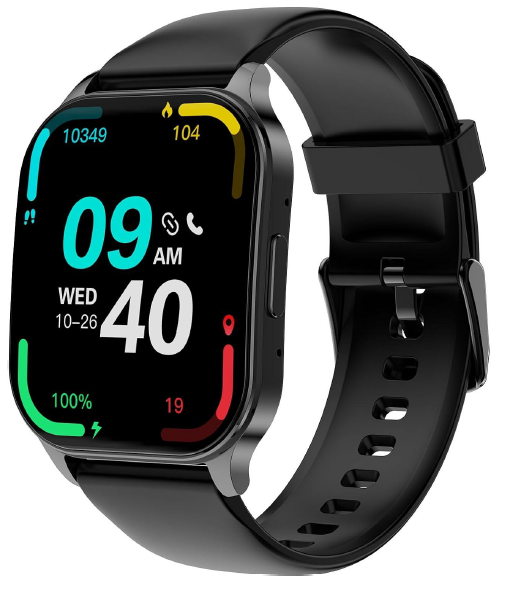
Introduction to anyloop Smart Watch
The anyloop Smart Watch is a versatile, feature-packed wearable designed to help you track your health, stay connected, and boost your fitness routine—all from your wrist. This smartwatch blends sleek design with advanced technology, offering a large, vibrant touchscreen display and an impressive array of health and activity tracking features that cater to both casual users and fitness enthusiasts. With over 100 sports modes, 24/7 heart rate and blood oxygen monitoring, sleep tracking, and smart notifications, the anyloop Smart Watch stands out as a reliable companion for everyday wellness and active lifestyles..
Key benefits include accurate fitness tracking, long battery life, and compatibility with both iOS and Android devices. The device is also water-resistant (IP67/IP68), making it suitable for swimming and workouts, while built-in GPS and Alexa voice assistant support on select models provide added convenience for outdoor activities and hands-free control
Target users include health-conscious individuals, busy professionals, athletes, and anyone seeking a budget-friendly yet powerful smartwatch. Anyloopop Smart Watch is ideal for tracking daily activity, monitoring vital signs, staying on top of notifications, and even making or receiving calls directly from your wrist on certain models
The estimated price ranges from $49.99 to $79.99,, depending on the model and features, making it an affordable choice in the smartwatch market[6][7][8]. The anyloop Smart Watch is available for purchase online through the official anyloop store and select e-commerce platforms, ensuring easy accessibility for global customers
App download login
- The download method of the app "Onwear Pro"An :
- Apple phone can be downloaded from the App Store.
- Android phones can be downloaded from the the Google Play Store.
- Or scan the QR code in the watch (compatible: iOS 11.0 or more /Android 6.0 or more).
- Install the app, please register and log in according to the interface prompt. You need to open the Bluetooth.
- In the device interface, select the Bluetooth name LA32 for binding, which can be used normally.
Method of operation
- In the dial interface, draw from top to bottom, and enter the shortcut interface..
- In the dial interface, draw from bottom to top, and enter the information list interface..
- In the dial interface, draw from left to right, and enter the menu list
- In the dial interface, draw from right to left, enter the interface of steps, heart rate, sleep,, and other interfaces
Settings and Use
How do I download the App?
- Android users can download and install the App by searching in the Google Play Store.
- iOS users can download and install the App by searching in the App Store.
- Scan the QR code on the watch to download.
- Scan the QR code in the user guide to download.
How do I get connected to my phone and bind my watch?
- Enable Bluetooth on your phone.
- Go to the "Device" page of the App, select the device to be connected, and enable the location permission for the App when the permission window pops up.
- Tap "Search Device" to select the device to be connected and tap the device name to connect. You can check the watch name and Mac information in "Settings" > "About".
- Connect by scanning the QR code through "Scan and Add" on the watch. The App will send a connection request when you connect. You can complete the connection by confirming the request on your watch.
How do I charge the watch?
- Connect the magnetic charging port to the charging contact of the watch <both the port and the contact have an anode and a cathode. The port and the contact will be repulsive when the anodes and cathodes are connected incorrectly, and attractive when connected correctly>. If connected correctly, the watch will vibrate and show a charging icon.
- Normally, the watch can be fully charged in 2-2.5 hours. Unplug the magnetic charging cable when the battery is full.
How do I use the camera feature?
- Ensure that the watch is within effective range of the phone for Bluetooth connection.
- Ensure that the permissions related to the camera have been allowed to the App.
- When you enter the watch camera in the App and shake the watch or tap the camera button on the watch, a 3-second timer will start, and the shooting will be completed after the timer.
Note: The camera can only be controlled by the watch on the App page. The camera cannot be controlled by the watch beyond the App page.
Hardware
Why does the watch not turn on while charging?
- Charge the watch to activate it before using it for the first time. When the watch is turned off, it needs to be charged before it can be turned on again.
- The rated voltage for watch charging is 4.8-5.2 V. Generally, the best charging power supply voltage that the customer needs is 5 V. Fast charging at 9 V will cause the capacitor breakdown, as well as a short circuit or breakage of the PCBA board.
- Battery over-discharging for a long period (e.g.,, the product cannot be turned on if its battery is out of power and the user does not charge it for a long period).
- The product is not waterproof, and it cannot be turned on due to a short circuit;
- False soldering of the battery line. In the process of use, the anode and cathode lines at both ends of the battery are broken. With no output from the battery, the watch cannot be turned on.
- If the screen of the watch does not respond when charging, confirm whether the watch can vibrate and whether the heart rate indicator on the backside of the watch is flashing. If the above responses exist, there is a screen failure with the watch that requires the factory maintenance. If none of the above responses exist, there is a hardware failure with the watch , which requires the factory maintenance.
- If you confirm that there is no problem with the charging cable, yet the watch still cannot be charged, there is a hardware failure with the watch that requires the factory maintenance.
Bluetooth Connection
The App could not find my device?
- Check if the device is turned on by pressing and holding the side button until it turns on.
- Hold the device close to the phone. The closer,, the easier for the App to find the device.
- Check whether the device is connected to other phones. If it is connected to other Android phones, unpair the phone and try again. If it is connected to another iPhone, unpair the phone and go to Settings > the Bluetooth list to find My Device, tap the small icon at the end of the Bluetooth name to ignore the device, and try again.
- Ensure that the permissions of the App location are allowed.
- Try to disable the phone's Bluetooth and enable it again before searching.
- Try to restart the App before searching.
- Try to turn on the device again before searching.
- Try to restart the phone and open the App before searching.
The device cannot connect to the App?
- Try to disable the phone's Bluetooth and enable it again before connecting.
- Try to turn on the device again before connecting.
- Try to restart the App before connecting.
- Try to restart the phone and open the App before connecting.
Unstable device connection?
- Ensure that the App has obtained the permission to run in the background. Please go to Profile > Background Operation Permission Settings for details.
- Ensure that the distance between the watch and the phone is not too far, as the distance will affect the Bluetooth connection.
- Check whether too many Bluetooth devices have been bound to the phone. If so, ignore some devices in the Bluetooth settings. For Android phones, unpair the devices in the Bluetooth settings. For iPhone, ignore the devices in the Bluetooth list.
- Try to reconnect after unbinding.
- Try to restart the Bluetooth or phone before connecting.
- Obstructions between the device and the phone, such as human bodies or metal jewelry, will interfere with the stability of the Bluetooth connection.
- If the problem remains unresolved after the above operations, please go to the App > Profile > Feedback and Suggestions to fill in the relevant options accurately and submit the problem to us. We will provide the corresponding operations suggestions according to your description.
How to unbind the device?
- Open the App, tap the device icon on the device page to enter the page for unbinding devices, and tap Unbind.
- For iPhone, after unbinding, you still need to go to Settings > the Bluetooth list to find My Device and tap the small icon behind the Bluetooth name to ignore the device.
- If the device is still in the Bluetooth list after being ignored, disable the Bluetooth and enable it again.
Do I need to keep my phone's Bluetooth enabled all the time when wearing my watch?
- There is no need to keep the phone connected all the time for workout features such as step counting, sleep, and heart rate. If you only need to wear the watch during a workout, you can connect the watch to the phone after the workout to
synchronize and view the data. - Reminder for alarm, sedentary, and water drinking will be written into the watch once successfully set, and does not require maintaining a Bluetooth connection.
- When using the notification features for incoming calls, finding the watch, and social media, you need to keep the App connection between the phone and the watch.
Technical Specifications and Key Features
- Display: 1.83"–1.96" HD touchscreen with up to 80% screen-to-body ratio for vibrant visuals and easy navigation
- Health Monitoring: 24/7 heart rate, blood oxygen (SpO2), sleep tracking (deep, light, awake), stress monitoring, and menstrual cycle reminders
- Fitness Tracking: Over 100 sports modes, step counting, calorie and distance tracking, built-in GPS (select models), and a super swimming algorithm for aquatic workouts
- Connectivity: Bluetooth 5.0/5.2 for seamless pairing with smartphones, call and message notifications (SMS, email, social apps), and music control..
- Water Resistance: IP67/IP68 rating for dust and water resistance—suitable for swimming and daily use
- Battery Life: Up to 21 days on standby, with magnetic charging for convenience
- Additional Features: Alexa built-in (select models), weather updates, DIY watch faces, find my phone, sedentary and hydration reminders..
- Build: Lightweight (approx. 55g), 20mm removable/replaceable rubber strap, available in multiple colors.
Compared to other budget smartwatches, the anyloop Smart Watch offers a larger display, more sports modes, and advanced health tracking at a competitive price point, making it a strong value-for-money option..
Troubleshooting Common Issues
Problem: The Watch is not pairing with smartphone
Solution: Ensure Bluetooth is enabled on both devices, restart both devices, and reinstall the Anyloop app if necessary.
Problem: Inaccurate heart rate or SpO2 readings
Solution: Wear the watch snugly on your wrist, ensure the sensor is clean, and avoid movement during measurement.
Problem: Battery drains quickly
Solution: Reduce screen brightness, disable unnecessary notifications, and update to the latest firmware.
Problem: Touchscreen unresponsive
Solution: Restart the watch, ensure the screen is clean and dry, and avoid using it with wet hands.
Preventive Measures: Regularly update the device firmware, avoid exposing the watch to extreme temperatures, and charge using the provided magnetic cable
Warranty & Support: Check the included warranty card for coverage details. For further assistance, contact anyloop customer support via their official website. Keep your purchase receipt for warranty claims.
Pros & Cons
Pros
- Comprehensive Health Tracking: Accurate 24/7 heart rate, SpO2, sleep, and stress monitoring
- Extensive Sports Modes: Over 100 activities tracked, including swimming with a dedicated algorithm
- Smart Notifications: Receive calls, messages, and app alerts directly on your wrist
- Long Battery Life: Up to 21 days of standby reduces frequent charging
- Affordable Price: Competitively priced compared to similar feature-rich smartwatches
- Water Resistance: IP67/IP68 rating for worry-free use during workouts and swimming
Cons
- Limited Third-Party App Support: Fewer apps compared to premium brands.
- Basic Design: Aesthetic may feel less premium than high-end competitors.
- Occasional Syncing Issues: Some users report intermittent connectivity with smartphones.
- No Cellular Connectivity: Requires a paired smartphone for calls and notifications.
Anyloopop Smart Watch delivers excellent value for budget-conscious buyers seeking robust health and fitness tracking without the premium price tag.
Customer Reviews and Testimonials
Users consistently praise the anyloop Smart Watch for its accurate fitness tracking, long battery life, and easy setup. Many highlight the large, clear display and the convenience of receiving notifications directly on the watch. The waterproof design and variety of sports modes are frequently mentioned as standout features, especially for swimmers and outdoor enthusiasts.s
Common complaints include occasional syncing issues with smartphones and a desire for more third-party app integrations. Some users note that the device’s design, while functional, lacks the premium feel of more expensive brands. Star ratings generally range from 4 to 4.5 out of 5, with most customers recommending the anyloop Smart Watch for its affordability and reliable performance.
If you’re seeking a budget-friendly, feature-rich smartwatch for health and fitness tracking, the anyloop Smart Watch is a solid choice—especially for those prioritizing essential smart features over luxury aesthetics.
SEO and Keyword Optimization
This Anyloop Smart Watch manual is optimized for search engines with natural placement of primary keywords like “anyloop Smart Watch,” “fitness tracker,” “health monitoring smartwatch,” and “budget smartwatch.” Related keywords such as “24/7 heart rate monitor,” “IP68 waterproof,” “sports modes,” and “long battery life” are integrated throughout for better visibility. Long-tail keywords in headings (e.g., “anyloop Smart Watch troubleshooting,” “anyloop Smart Watch customer reviews”) help target specific user queries and improve chances for featured snippets and voice search results.
Faqs
How do I set up my anyloop Smart Watch for the first time?
What should I do if my anyloop Smart Watch is not syncing with my phone?
Which health monitoring features are available on the anyloop Smart Watch?
Can I use the anyloop Smart Watch with both Android and iOS devices?
How do I optimize battery life on my anyloop Smart Watch?
What troubleshooting steps can I take if the anyloop Smart Watch display is unresponsive?
Is the anyloop Smart Watch water-resistant or waterproof for daily use?
How should I properly clean and maintain my anyloop Smart Watch to ensure longevity?
Leave a Comment