
Startup: Aotedor Mobility Scooter For Adults 211S User Manual
Content
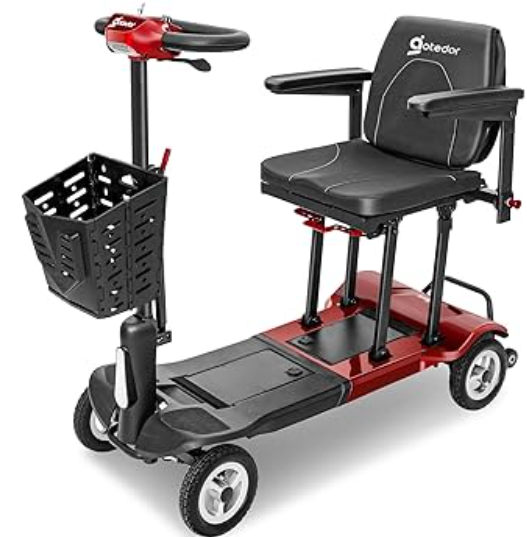
Aotedor Mobility Scooter For Adults 211S
Introduction
The Aotedor Mobility Scooter For Adults 211S is a revolutionary mobility aid designed to enhance the independence and mobility of adults with mobility issues. This scooter is engineered with comfort, safety, and ease of use in mind. With its sturdy frame and robust motor, the 211S model is perfect for both indoor and outdoor use. The estimated price for this scooter is around $800, making it an affordable option for those seeking reliable mobility assistance. The product is expected to be launched in the summer of 2023, but pre-orders are already available.
The Aotedor Mobility Scooter For Adults 211S features a sleek and ergonomic design, ensuring maximum comfort during extended use. It comes equipped with a high-capacity battery, allowing users to travel up to 20 miles on a single charge. The scooter also includes advanced safety features such as anti-tip wheels and a reliable braking system. Whether you need assistance navigating your home, running errands, or enjoying outdoor activities, the 211S model is an excellent choice.
Safety
- Don't drive at the night. If you have to, make sure to turn on your headlights and be careful.
- Avoid driving on loose gravel, covered ground, or sand.
- When a scooter drives over obstacles that are a certain height, it's essential to decrease the speed and navigate the obstacles with care.
- Avoid reversing your mobility scooter over steps, curbs , or obstacles, as this may cause the scooter to tip over or fall.
- Electric scooters are designed for individual use only. It is not permitted to carry any passengers while riding.
- Don't switch off the power while the electric scooter is moving forward, or it'll suddenly stop and tip over easily. Turn off the power switch when not using the scooter.
- Slow down when driving on uneven rocks or soft ground.
- Please use caution when driving down slopes or approaching areas where the ground is elevated or there are unprotected edges, such as on the roadside, doorstep, or stairs.
- It is not allowed to modify or alter the initial settings of the electric scooter.
- It is not allowed to use an electric scooter as a seat on a moving vehicle.
- Protect the battery from freezing temperatures. Never charge a frozen battery because it can cause damage and result in personal injuries.
- When you drive in rain or snow, the road becomes slippery, and this makes the automatic braking distance longer.
- If you are taking prescription medication or have physical limitations, you should consult your doctor. Certain medications and restrictions may affect your ability to operate your scooter safely.
Specification
- Product Weight
68 LB - Weight capacity
330 Lb - Battery
25AH Lithium battery x 1 - Maximum Range
22mile - Speed
0- 1 0km/h (6 levels adjustable) - Maximum Climbing Angle
12° - Charging time
10 Hours - Unfolded (L X w X H) (cm/ in)
37.4*19.68*40 . l 5 inch - Folded (L X w X H) (cm/ in)
37.4*19.68*14.96 inch - Seat Width x Depth
14.96*12.2 inch - Bake
Intelligent Electromagnetic Brake - Power Motor
270W Brushless Motor - Battery Charger
ACl 20V 60HZ 3A - Vehicle structure
The battery box is detachable, the Joystick and seat can be folded . - Front Wheels
8inch - Rear Wheels
8inch - Ground Clearance
3.14 inch - Turning Radius
43.3 inch
Installation
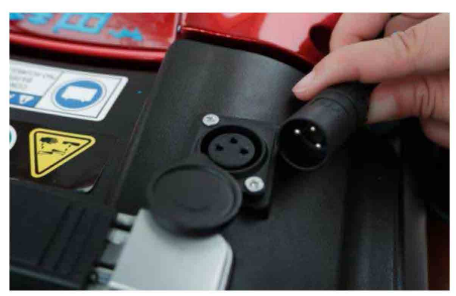
Hold the battery box handle, place the battery box into the slot at the bottom of the battery, and connect the power cord.
Two ways of battery charging:
Method One
- Place your mobility scooter close to an outlet.
- Turn the key counterclockwise to turn off the scooter.
- Slide the charging port on the battery box and insert the connector into the port.
- Plug the other end of the charger into the wall socket, and the yellow indicator light will light up and charging will begin.
- Once charging is completed, the green indicator lights up, and the charger stops working . Unplug the charger from the wall outlet.
Method Two
- Turn the key counterclockwise to turn off the scooter and take out the battery box.
- Other operations are the same as method One.
- After fully charging, put it back in the mobility scooter body.
Precautions
- The device should be charged for the first time to use, with the original charger.
- Promptly recharge the battery when the indicator light shows a low battery state.
Maintenance and Troubleshooting
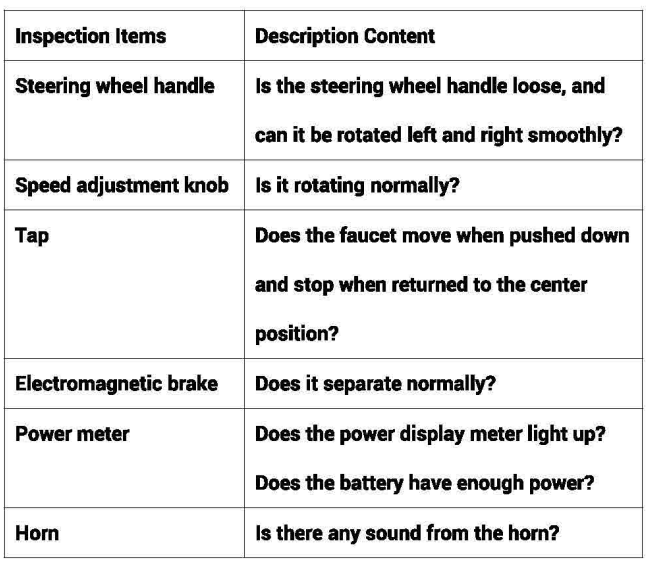
- It is essential to carry out the following checks before driving. Please contact the seller if you think something is wrong.
- Electronic equipment may require troubleshooting periodically.
- However, many issues can be resolved with some critical thinking and practicality.
What happens if all the components of my mobility scooter appear to be unresponsive?
- Ensure the key is completely inserted in the key switch.
- Verify that the battery is fully charged.
- Ensure the power cable is properly connected to the battery unit.
What if the engine is working, but my mobility scooter isn't moving?
- Your mobility scooter might be in manual mode . Pull the brake lever down to activate the motor can solve this matter.
Battery
- The battery's function is influenced by the surrounding temperature.
- Generally, when the temperature falls below O degrees Celsius, the battery's storage capability significantly decreases. Therefore, in colder areas or during winter, it is usual for the driving distance to decrease after a full charge.
Storage
- Ensure the appearance of the scooter is spotless by cleaning it thoroughly. Avoid washing the scooter with water directly; instead, use a damp cloth to wipe it down.
- For scooters stored outside, ensure they are shielded from rainfall and refrain from parking them in puddles or extremely wet locations.
- If the scooter is left unused for an extended period, it ought to be fully charged every month.
Maintenance
- Check the tightness of all wires and connecting joints frequently.
- Keep all electronic control components dry. If they get wet, dry them completely before using.
- Regularly inspect the scooter tires for signs of wear. Using a rubber maintenance agent regularly can safeguard the tires.
- The battery should be laid flush in the battery compartment.
Warranty
- Order information on Amazon is the warranty credential.
- Please carefully keep your Amazon order number.
- Please keep the outer box in case of a return.
Pros & Cons
Pros:
- High-capacity battery with long range
- Sturdy and durable construction
- Advanced safety features like anti-tip wheels and reliable brakes
- Comfortable padded seat and backrest
- Large storage basket for carrying items
- Ergonomic and adjustable handlebars
Cons:
- Limited top speed, which may not be suitable for all users
- Assembly required, which can be challenging for some weight capacity limit of 300 lbs , which may not accommodate heavier users
- Noisy motor in some cases
Customer Reviews
Customers have generally praised the Aotedor Mobility Scooter For Adults 211S for its reliability, comfort, and ease of use. Many have noted the scooter's ability to navigate various terrains with ease and its long battery life. However, some users have mentioned that the assembly process can be tricky and that the scooter may not be as fast as other models on the market.
Faqs
How long does it take to fully charge the battery of the Aotedor Mobility Scooter For Adults 211S?
What is the maximum weight capacity of the Aotedor Mobility Scooter For Adults 211S?
Can I use the Aotedor Mobility Scooter For Adults 211S in rainy weather?
How do I assemble the Aotedor Mobility Scooter For Adults 211S?
What are some common maintenance tasks for the Aotedor Mobility Scooter For Adults 211S?
Can I fold the Aotedor Mobility Scooter For Adults 211S for storage or transport?
What if my Aotedor Mobility Scooter For Adults 211S does not move when I turn it on?
How do I adjust the handlebars of the Aotedor Mobility Scooter For Adults 211S?
Is the Aotedor Mobility Scooter For Adults 211S covered by a warranty?
Can I customize or add accessories to my Aotedor Mobility Scooter For Adults 211S?
Leave a Comment