
How to Use: Aperia Technology Halo Inflator 2nd Generation User Manual
Content
Aperia Technology Halo Inflator 2nd Generation: Complete Product Manual and Buyer Guide
Introduction
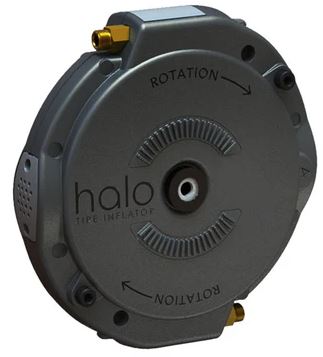
The Aperia Technology Halo Inflator 2nd Generation is a mechanical automatic tire inflation system designed for medium- and heavy-duty trucks and trailers. Built to maintain proper tire pressure while the vehicle is in motion, it helps reduce tire wear, improve fuel efficiency, and minimize downtime caused by underinflation. Unlike systems that depend on an onboard air compressor, the Halo uses a standalone rotational pump design, making it a practical retrofit solution for fleets that want reliable tire pressure management without adding complex pneumatic plumbing.
This second-generation Halo platform is especially useful for fleet operators, owner-operators, maintenance teams, and commercial vehicle managers who need a durable, low-maintenance tire inflation solution. It is compatible with dual and wide-base tire configurations and is commonly installed on tractors and trailers. The product is designed for quick bolt-on installation, with installation guides available for trucks, trailers, and FlowBelow-compatible setups.
Typical pricing for the Halo Inflator system starts in the mid-hundreds and can rise based on axle configuration, bracket kits, and hose kits. As a general estimate, individual Halo units may be found around the $385 range, while complete systems often start around $770 and increase with accessories. Availability is strongest through Aperia’s direct store and authorized commercial vehicle channels.
Specifications for Aperia Technology Halo Inflator 2nd Generation
- Product type: Mechanical automatic tire inflation system for trucks and trailers
- Operating method: Rotational pump driven by wheel movement
- Compatibility: Dual tires, wide-base tires, tractors, trailers, and select FlowBelow configurations
- Installation time: Typically 5 to 10 minutes per wheel-end under proper conditions
- Air source: No onboard air compressor connection required
- Target pressure options: Common configurations include 80, 85, 90, 95, 100, 105, 110, 115, and 120 PSI
- System components: Halo inflator unit, outer dual hose, inner dual hose, bracket kit, and fasteners
- Mounting style: Bolt-on retrofit design
- Maintenance profile: Low-maintenance, mechanically driven, and serviceable with replacement hoses and bracket kits
- Performance benefits: Helps maintain tire pressure, supports fuel savings, and extends casing life
- Comparison: More self-contained than TPMS-only systems and simpler than compressor-dependent automatic inflation setups
Compared with similar tire management products, the Halo focuses on active inflation rather than only pressure monitoring. That makes it a stronger option for fleets looking for continuous pressure correction on the road.
Setup Guide: How to Install and Configure the Halo Inflator
Before installation, confirm the axle type, tire configuration, and target pressure. Select the correct bracket kit and hose length for the wheel-end setup. The second-generation Halo uses application-specific parts, so checking compatibility first prevents installation issues.
- Park the vehicle on level ground, secure it, and relieve pressure only if required by the installation procedure.
- Identify the correct wheel-end configuration: single, inner dual, outer dual, or wide-base.
- Install the bracket kit according to the axle and mounting style.
- Mount the Halo inflator and route the hose to the proper valve stem connection.
- Tighten fasteners to manufacturer-recommended torque values and verify that parts are seated correctly.
- Check for clearance issues and make sure hoses do not contact rotating or heat-producing components.
- Test the system during vehicle movement and confirm that inflation begins as expected.
Safety warning: always verify wheel-end stability before working around the tire assembly. Keep hands clear of moving parts, and never route hoses near sharp edges or hot surfaces. If the system is used on a FlowBelow-equipped vehicle, use the proper adapter kit to ensure correct fitment.
Troubleshooting the Halo Inflator 2nd Generation
If the tire is not maintaining pressure, first inspect the hose for cracks, bends, or loose fittings. A disconnected or damaged hose is the most common cause of poor inflation performance. If the wheel-end is making unusual noise, check that the bracket is aligned correctly and that no part is contacting the tire or hub.
- Problem: No inflation activity — Solution: Verify hose routing, valve connection, and correct target-pressure configuration.
- Problem: Air leak at connection — Solution: Inspect seals, tighten fittings, and replace worn hose sections.
- Problem: Excess vibration or noise — Solution: Recheck bracket torque and confirm proper clearance.
- Problem: Inconsistent tire pressure — Solution: Inspect for hose damage or blocked airflow.
- Problem: Incorrect part fitment — Solution: Confirm the unit is matched to the correct generation and axle kit.
The Halo product literature does not emphasize user-facing error codes, so most issues are resolved through physical inspection and component replacement. Preventive maintenance should include periodic hose checks, fastener verification, and wheel-end clearance inspection. For warranty or support assistance, Aperia promotes direct commercial support through its customer service channel and published phone support line.
Pros and Cons of the Aperia Technology Halo Inflator 2nd Generation
Pros
- Mechanical design reduces dependence on onboard air systems
- Works well for fleet retrofits and mixed trailer/tractor operations
- Helps improve fuel economy by reducing underinflation
- Can support longer tire life and fewer pressure-related service events
- Quick installation makes it practical for maintenance teams
- Good value for fleets that want active inflation instead of monitoring only
Cons
- Higher upfront cost than basic tire pressure monitoring systems
- Requires correct hose and bracket selection for each wheel-end
- Not a universal one-part solution for every axle configuration
- Mechanical parts still require inspection over time
For fleets comparing the Halo to TPMS-only products, the biggest advantage is automatic inflation rather than passive alerts. For buyers prioritizing low operating cost and measurable tire savings, the value for money is strong, especially at scale.
Customer Reviews of Aperia Technology Halo Inflator 2nd Generation
Customer feedback on the Halo system is generally positive, with many commercial users praising the ease of installation and the peace of mind that comes from automatic inflation. Typical ratings trend around 4 out of 5 stars for performance-focused fleet applications, especially where uptime matters more than lowest initial cost.
- “Great fit for our trailers. Once installed, the system just works.”
- “We saw fewer pressure-related tire issues after adding Halo units.”
- “Installation was straightforward, but you need the right kit for the axle.”
Common complaints usually involve price, part compatibility, or confusion over hose selection. Buyers who need a durable automatic tire inflation system and are comfortable matching components correctly are the best candidates for this product.
Final Verdict
The Aperia Technology Halo Inflator 2nd Generation is a smart choice for commercial fleets that want a mechanical, retrofittable, and low-maintenance automatic tire inflation solution. It offers strong practical benefits for fuel savings, tire longevity, and uptime, making it one of the most useful options in the automatic tire inflation category.
Faqs
How do I set up aperia technology Halo Inflator 2nd Generation for the first time?
Why is my aperia technology Halo Inflator 2nd Generation not reaching the target pressure?
Which devices and accessories are compatible with aperia technology Halo Inflator 2nd Generation?
What features make aperia technology Halo Inflator 2nd Generation easier to use than older inflators?
How can I optimize inflation speed on aperia technology Halo Inflator 2nd Generation?
What should I do if aperia technology Halo Inflator 2nd Generation overheats during use?
How do I maintain and clean aperia technology Halo Inflator 2nd Generation properly?
Why does my aperia technology Halo Inflator 2nd Generation keep shutting off early?
Tags
Leave a Comment