
Aprilaire 76CR Dehumidifier User Manual
Content
Aprilaire 76CR Dehumidifier Manual and Buyer’s Guide
Introduction
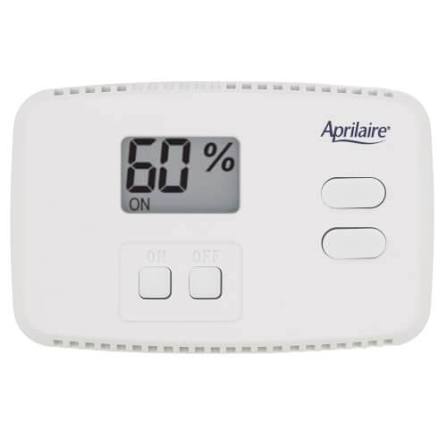
The Aprilaire 76CR Dehumidifier is a practical whole-home humidity control solution designed to make indoor air feel more comfortable, protect living spaces from excess moisture, and simplify dehumidifier operation from a convenient location. This model is especially useful for homeowners managing damp basements, crawl spaces, utility rooms, and larger living areas where humidity control matters year-round. The Aprilaire 76CR Dehumidifier control stands out for its easy-to-read digital display, onboard humidity sensing, and the ability to function as either an external control or a remote control with compatible Aprilaire dehumidifiers.
For households dealing with musty odors, condensation, or mold risk, this control offers a straightforward way to set relative humidity targets and maintain more consistent indoor comfort. It is designed for users who want a simple, low-maintenance system rather than a complicated smart-home setup. The interface is beginner-friendly, yet it still provides enough control for more advanced installations. It can also display the humidity level from the dehumidifier area when paired as a remote controller, which is helpful for hard-to-reach mechanical spaces.
The estimated price range typically falls in the budget-to-midrange category, depending on seller, bundle, and availability. It is commonly found through HVAC suppliers, online retailers, and manual or parts marketplaces. For buyers searching for a dependable humidity control accessory, the Aprilaire 76CR Dehumidifier remains a strong option for reliable operation and broad compatibility with select Aprilaire systems.
Specifications
- Product type: Dehumidifier control and humidity management interface
- Control range: 40% to 80% relative humidity in external control mode
- Display: Digital humidity readout with simple button-based adjustment
- Operating modes: External control and remote control
- Compatibility: Designed for select Aprilaire dehumidifier systems, including compatible whole-home models
- Sensor: Onboard humidity sensor for measuring ambient relative humidity
- Power requirements: Low-voltage control operation typical of HVAC accessories
- Installation style: Wall-mounted indoor control
- Typical performance benchmark: Supports stable humidity management with a recommended initial setting near 59% before fine-tuning
- Maintenance interval: Filter reminders and routine checks are commonly recommended every 6 months on compatible systems
Compared with basic mechanical humidistat-style controllers, the Aprilaire 76CR Dehumidifier offers easier reading, more precise adjustment, and more flexible placement. Compared with newer app-connected humidity systems, it is simpler and often more affordable, making it a good fit for users who want dependable control without extra software or Wi-Fi setup.
Setup Guide: How to Install and Configure the Aprilaire 76CR Dehumidifier Control
Before installation, turn off power to the HVAC or dehumidifier system and confirm compatibility with your specific Aprilaire unit. Choose a mounting location in a living space or convenient indoor area away from direct sunlight, supply registers, and sources of moisture that could distort readings. A central hallway or main living area is usually a better choice than a bathroom, laundry room, or kitchen.
- Mount the control on an interior wall at a comfortable viewing height.
- Connect the low-voltage wiring according to the dehumidifier and control terminal labels.
- Restore power and verify that the display turns on correctly.
- Press the ON button and set the humidity target to about 59% for initial calibration.
- Allow the system to run for 24 hours before making major changes.
- Adjust the setting in small increments based on comfort, seasonal conditions, and indoor moisture levels.
If the control is used as a remote controller, make sure the dehumidifier model supports that function. If pairing or communication fails, check wiring polarity, terminal tightness, and the dehumidifier’s power status. Safety warnings: always disconnect power before wiring, avoid placing the unit in damp locations, and do not use damaged cables or loose wall boxes. If the display is blank, confirm that the system has power and the thermostat-style control circuit is correctly connected.
Troubleshooting the Aprilaire 76CR Dehumidifier
Most issues with the Aprilaire 76CR Dehumidifier are related to wiring, sensor placement, or incorrect humidity settings. If the system is not starting, verify the control is turned on and the humidity target is lower than the current indoor reading. If the dehumidifier runs too often, raise the setpoint gradually and confirm the control is not installed in an overly humid location such as near showers or appliances.
- Blank display: Check power, wiring, and terminal connections.
- Incorrect humidity reading: Move the control away from localized moisture or heat sources.
- Dehumidifier not responding: Confirm compatibility and inspect low-voltage connections.
- Unit cycles too frequently: Increase the humidity setpoint slightly and allow time for stabilization.
- Filter reminder appears: Clean or replace the air filter and reset the reminder if supported by the connected system.
This model does not rely on complex error-code messaging like modern smart appliances, so troubleshooting usually comes down to the basics: power, wiring, placement, and setpoint selection. Preventive maintenance includes checking the filter every 6 months, inspecting connections annually, and avoiding exposure to dust or high humidity. For warranty or technical support, Aprilaire support is typically available at 1-800-334-6011, Monday through Friday, 7:00 a.m. to 5:00 p.m. Central Time, or by email through the company’s support channel.
Pros & Cons of the Aprilaire 76CR Dehumidifier
Pros
- Simple, easy-to-use humidity control with clear digital display
- Works as an external control or remote control on compatible systems
- Good fit for basements, crawl spaces, and whole-home moisture control
- Low-maintenance design with straightforward adjustment steps
- More affordable than many app-connected humidity management systems
- Helpful initial setup recommendation makes configuration easier for first-time users
Cons
- Not a full smart-home dehumidifier with Wi-Fi or app control
- Best suited to compatible Aprilaire systems rather than universal use
- Limited advanced diagnostics compared with newer premium controllers
- Performance depends heavily on proper placement and installation
- May feel basic for users expecting automation features
Overall, the Aprilaire 76CR Dehumidifier delivers strong value for money if the goal is dependable humidity management without unnecessary complexity. Compared with newer alternatives, it wins on simplicity and often on price, while sacrificing app-based convenience and advanced reporting.
Customer Reviews
Customer feedback for the Aprilaire 76CR Dehumidifier is generally positive, with many users rating it around 4.3 out of 5 stars for ease of use and reliability. Homeowners often praise the clear display, simple installation, and the ability to control humidity from a more convenient room location. One common testimonial is that it “makes basement humidity control much easier without needing constant adjustments.”
Frequent complaints center on limited smart features, the need for correct wiring, and the importance of placing the control in the right location for accurate readings. Some buyers also mention that it feels basic compared with newer digital home systems, though many still appreciate its dependable performance. For shoppers who want a straightforward humidity control accessory and do not need app connectivity, the Aprilaire 76CR Dehumidifier is widely recommended.
Faqs
How do I set up the Aprilaire 76CR Dehumidifier control for the first time?
What should I do if the Aprilaire 76CR Dehumidifier is not turning on?
How does the Aprilaire 76CR Dehumidifier control measure humidity in the room?
Is the Aprilaire 76CR Dehumidifier compatible with all Aprilaire dehumidifier models?
Why does my Aprilaire 76CR Dehumidifier keep short cycling or running too often?
What humidity setting is best for the Aprilaire 76CR Dehumidifier in everyday use?
How do I clean and maintain the Aprilaire 76CR Dehumidifier control system?
What does the temperature limit feature on the Aprilaire 76CR Dehumidifier do?
More aprilaire manuals
- Aprilaire 76C Dehumidifier User Manual
- Aprilaire Model-800 Steam Humidifier User Manual
- Aprilaire DEHXXCDA Dehumidifier User Manual
- Setup: Aprilaire 2000 Series Electronic Air Cleaner User Manual
- Setup: Aprilaire E070 Crawl Space Dehumidifier User Manual
- Setup: Aprilaire 600 Series Humidifier User Manual
Leave a Comment