
Arcam Radia Series Integrated Amplifier A15 User Manual
Content
Arcam Radia Series Integrated Amplifier A15 Product Manual and Review
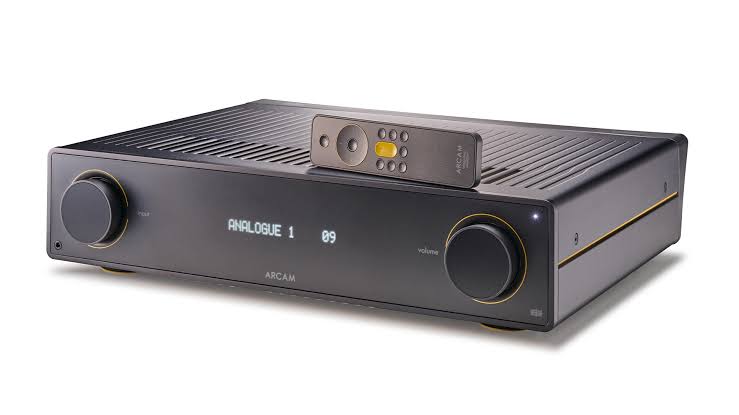
Introduction to the Arcam Radia Series Integrated Amplifier A15
The Arcam Radia Series Integrated Amplifier A15 is a compact yet powerful stereo amplifier designed for listeners who want refined sound quality, modern connectivity, and a simple all-in-one setup. Built as a Class AB integrated amplifier, it delivers 80 watts per channel into 8 ohms and 120 watts per channel into 4 ohms, making it a strong match for bookshelf speakers and many floorstanding models in small to medium-sized rooms. Its onboard DAC, Bluetooth 5.2 with aptX Adaptive, MM phono input, and multiple digital and analog inputs make it a practical hub for vinyl, streaming, TV audio, and traditional hi-fi sources.
This amplifier is aimed at music lovers, vinyl enthusiasts, and home audio users who want premium sound without the complexity of separates. The Arcam Radia Series Integrated Amplifier A15 is especially appealing to buyers who value clean design, smooth control, and balanced performance across different genres. It is also a smart choice for users upgrading from an entry-level receiver or older integrated amp and looking for better clarity, dynamics, and source flexibility.
In terms of pricing, the Arcam Radia Series Integrated Amplifier A15 typically sits in the mid-premium range, with street prices often around $999 to $1,200 depending on region and retailer. Availability is generally good through authorized hi-fi dealers and online audio stores, though stock can vary by market. For buyers comparing the A15 against models from Cambridge Audio, NAD, and Rega, the Arcam stands out for its musical presentation, versatile connectivity, and strong value for a well-equipped integrated amplifier.
Key Features and Technical Highlights of the Arcam Radia A15
- Class AB amplification for smooth, natural stereo playback
- 80W per channel into 8 ohms and 120W per channel into 4 ohms
- ESS Sabre DAC for high-resolution digital audio
- Bluetooth 5.2 with aptX Adaptive for convenient wireless streaming
- MM phono stage for turntable connection
- Three line-level analog inputs, two coaxial inputs, and one optical input
- Pre-out connection for adding a power amp or subwoofer integration in some setups
- Headphone output for private listening
Pros and Cons of the Arcam Radia Series Integrated Amplifier A15
The Arcam Radia Series Integrated Amplifier A15 offers a strong mix of sound quality, functionality, and build refinement, but it is not the perfect choice for every listener. Its biggest strength is the way it combines warm, controlled amplification with modern digital convenience. Compared with similarly priced integrated amplifiers from Cambridge Audio or NAD, the A15 often feels more relaxed and refined, especially with vocal, acoustic, and long-form listening. It also adds useful features like Bluetooth aptX Adaptive and a built-in phono stage, which improves value for money for users who do not want to buy extra boxes.
- Pros: Clean, musical sound with good detail and control
- Pros: Solid power output for most bookshelf and efficient floorstanding speakers
- Pros: Built-in DAC and Bluetooth reduce the need for external accessories
- Pros: MM phono input makes it attractive for vinyl setups
- Pros: Excellent value for buyers wanting a premium integrated amplifier with broad connectivity
- Cons: No network streaming or Wi-Fi built in, unlike some all-in-one rivals
- Cons: Power delivery is good, but not the best choice for very demanding, low-efficiency speakers
- Cons: Buyers who want extensive app control may prefer alternatives from NAD or Bluesound
- Cons: The feature set is practical rather than luxurious, so it may feel modest for the price to some users
For most buyers, the A15 represents excellent value for money if the goal is high-quality stereo listening rather than a feature-heavy network hub.
Customer Reviews and Real-World Feedback on the Arcam Radia Series Integrated Amplifier A15
User feedback on the Arcam Radia Series Integrated Amplifier A15 is generally positive, with many owners praising its smooth tonal balance, clean bass, and easy listening character. A common user sentiment is that it sounds more sophisticated than many midrange stereo amps, especially when paired with revealing speakers and a good source. Typical praise includes comments such as: “The soundstage is open and natural,” and “It drives my bookshelf speakers with ease while keeping vocals silky and controlled.”
Average user ratings commonly fall around 4.5 out of 5 stars, with strong marks for sound quality, build, and phono performance. Frequent complaints focus on the lack of streaming features, limited onboard smart functionality, and the desire for more output headroom with difficult speakers. Some buyers also note that the setup is straightforward, but the unit is best appreciated by users who already have a streamer or separate music source.
Recommendation: If you want a well-rounded integrated amplifier for vinyl, TV, and digital music playback, the Arcam Radia Series Integrated Amplifier A15 is an easy recommendation. If you need built-in streaming, room correction, or app-based ecosystem control, a rival all-in-one amplifier may be a better fit.
Who Should Buy the Arcam Radia Series Integrated Amplifier A15?
- Buyers upgrading from an entry-level stereo amplifier
- Vinyl listeners who want a built-in moving magnet phono stage
- Music lovers seeking a compact integrated amplifier with premium sound
- Users who already own a streamer and want a high-quality amplifier foundation
- Anyone comparing the Arcam A15 against Cambridge Audio, NAD, or Rega integrated amplifiers
Frequently Asked Questions About the Arcam A15 Integrated Amplifier
Is the Arcam A15 powerful enough for floorstanding speakers? It is suitable for many floorstanding speakers, especially efficient models, but very demanding speakers may benefit from a more powerful amplifier.
Does the Arcam A15 have a built-in DAC? Yes, it includes a high-quality DAC for digital sources through optical and coaxial inputs.
Can the Arcam A15 be used with a turntable? Yes, it includes an MM phono input for direct turntable connection.
Is the Arcam Radia Series Integrated Amplifier A15 good value? Yes, it offers strong value for listeners who want excellent sound, solid connectivity, and a refined analog character without paying for unnecessary extras.
Faqs
How do I set up the arcam Radia Series Integrated Amplifier A15 for the first time?
What should I do if the arcam Radia Series Integrated Amplifier A15 has no sound?
Which speakers work best with the arcam Radia Series Integrated Amplifier A15?
How can I connect a turntable to the arcam Radia Series Integrated Amplifier A15?
What are the key features of the arcam Radia Series Integrated Amplifier A15 that affect everyday use?
Why does the arcam Radia Series Integrated Amplifier A15 get warm during use?
How do I get the best sound quality from the arcam Radia Series Integrated Amplifier A15?
How should I clean and maintain the arcam Radia Series Integrated Amplifier A15?
Tags
Leave a Comment