
Setup & Features: Ato Air Quality Monitor User Manual
Content
ATO Air Quality Monitor: Complete Product Manual and Buyer Guide
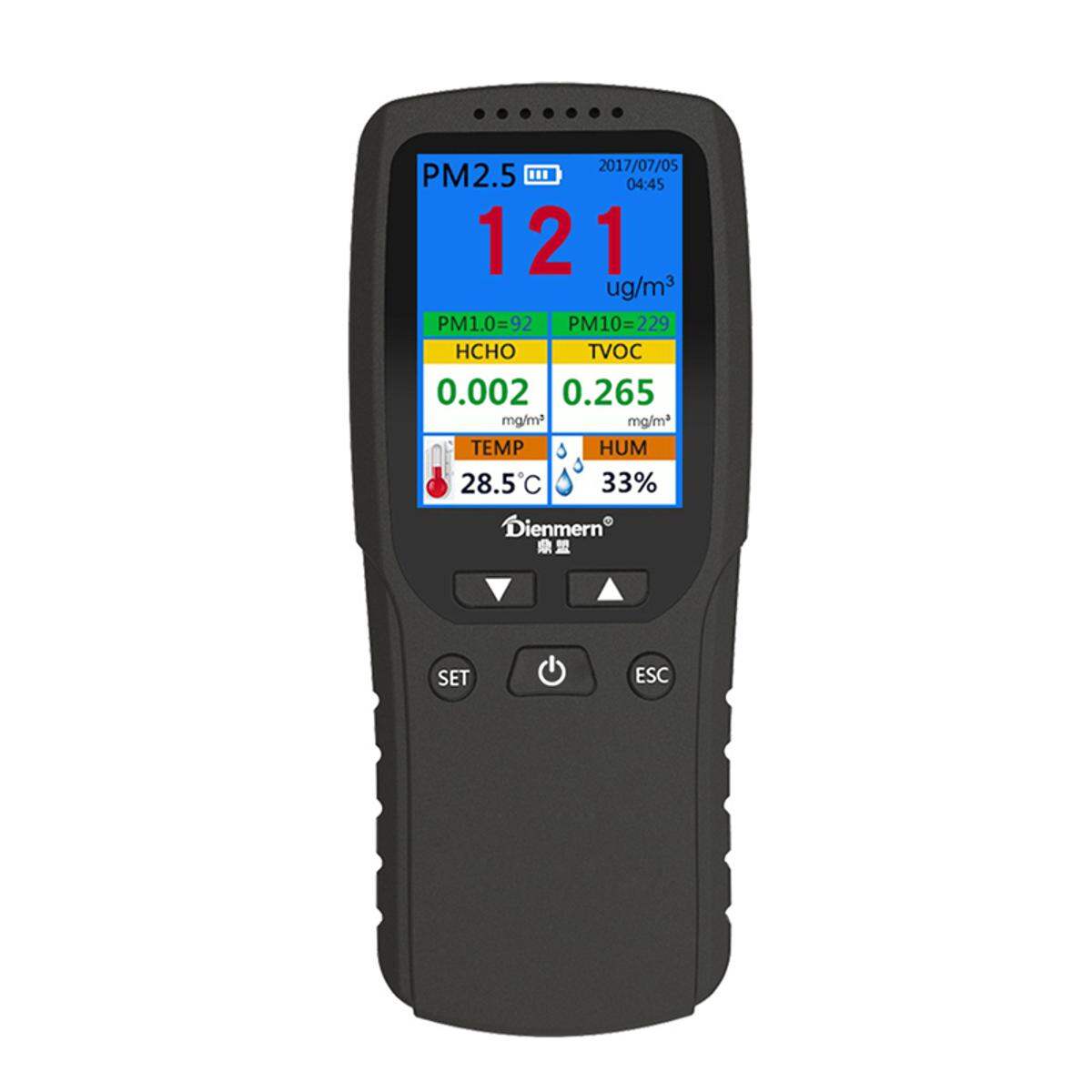
The ato Air Quality Monitor is a practical indoor air monitoring device designed to help households, offices, schools, and small commercial spaces track the quality of the air they breathe. Built for real-time monitoring, this air quality meter typically measures key pollutants such as PM2.5, PM1.0, PM10, formaldehyde (HCHO), TVOC, AQI, temperature, and humidity, giving users a clearer view of indoor environmental conditions. For buyers who want a straightforward way to check pollution levels, ventilation effectiveness, or potential air quality issues, the ato Air Quality Monitor offers an accessible all-in-one solution.
One of its biggest advantages is the combination of compact design, fast sampling, and easy-to-read LCD output. Depending on the model, the monitor may include a 2.8-inch or 4.3-inch display, rechargeable battery power, and laser-scattering particle detection for more responsive readings. This makes it useful for parents monitoring nursery air, allergy sufferers watching dust levels, office managers improving HVAC performance, and homeowners checking for smoke, cooking fumes, or chemical buildup. The device is also well suited for smart buying decisions, such as comparing the effects of air purifiers, open windows, and filtration upgrades.
In terms of price, the ato Air Quality Monitor usually sits in the mid-range category, with estimated pricing often falling around $70 to $200 depending on the model, display size, and supported pollutants. Availability is generally good through online retail channels and industrial equipment suppliers, with multiple home and portable versions offered for different use cases. For users seeking a dependable indoor air quality monitor with strong feature coverage, the ato Air Quality Monitor is a solid value-oriented option.
Specifications for ato Air Quality Monitor
- Measured parameters: PM2.5, PM1.0, PM10, HCHO, TVOC, AQI, temperature, humidity; select models also include CO2 or CO.
- PM detection method: Laser scattering for particle monitoring.
- HCHO/TVOC sensing: Semiconductor-based sensing on many models; some versions use electrochemical detection for formaldehyde.
- Display: 2.8-inch LCD or 4.3-inch TFT/LCD display with 320 × 240 pixel resolution on several models.
- Sampling speed: Fast response, commonly around 1.5 to 3 seconds for particle readings.
- Measurement ranges: PM2.5 up to 999 μg/m³; HCHO up to 1.999 mg/m³; TVOC up to 9.999 mg/m³; AQI up to 500.
- Power: Rechargeable lithium battery with micro USB charging; some units support 5V DC input.
- Operating conditions: Typical operating range around -10°C to 50°C or broader depending on model.
- Build and portability: ABS body, handheld or desktop-friendly design, with weights and sizes varying by model.
- Comparison: Compared with basic PM-only monitors, the ato Air Quality Monitor provides broader indoor air data; compared with premium smart monitors, it is more affordable but may offer fewer app-based features.
For users who want a portable air quality monitor with multi-pollutant visibility, this device delivers stronger value than entry-level particle counters while remaining simpler than advanced IoT air quality systems.
Setup Guide: How to Use the ato Air Quality Monitor
Start by fully charging the monitor with the included USB cable before first use. Once powered on, place the device in an open indoor area away from direct vents, windows, steam, or cooking smoke so the readings can stabilize. Let the unit run for several minutes to establish a baseline. If your model includes settings for date, time, alarm thresholds, or display options, use the on-device buttons to configure them before regular use.
For best results, keep the monitor at breathing height and avoid placing it against walls or on soft surfaces that can block airflow. If the device supports pairing or connectivity in your specific version, follow the user manual prompts for wireless setup; however, many ato units are standalone and do not require app pairing. Always verify that the sensor inlet remains unobstructed.
Troubleshooting during setup usually comes down to power or placement. If the screen does not light up, recharge for at least 30 minutes and confirm the cable is seated properly. If readings seem unstable, move the monitor away from fans, humidifiers, or direct sunlight. Safety precautions include keeping the unit dry, avoiding high-heat environments, and not exposing the sensor to corrosive chemicals or water spray.
Troubleshooting the ato Air Quality Monitor
If the monitor shows inconsistent or drifting readings, first allow it to warm up and stabilize in clean indoor air. Sudden spikes are often caused by nearby aerosols, cooking, incense, or opening a window. Place the unit in a more neutral location and compare the results over 10 to 15 minutes. If the display appears dim or frozen, restart the device and recharge the battery fully.
- Problem: No power or blank screen.
- Solution: Charge the battery, test another USB cable, and confirm the power source provides 5V output.
- Problem: Unstable PM readings.
- Solution: Clean the intake area, move away from drafts, and let the device settle.
- Problem: HCHO or TVOC appears unusually high.
- Solution: Check for cleaning products, paints, furniture off-gassing, or poor ventilation.
- Problem: Error indicators or abnormal display behavior.
- Solution: Power-cycle the unit and consult the printed manual for model-specific alerts.
Preventive care matters: keep the sensor openings clean, charge the battery regularly, and store the monitor in a dry place when not in use. Warranty coverage and support may vary by seller and model, so confirm terms at purchase. For help, contact the retailer, ATO customer support, or the supplier listed on your order confirmation using the support email or phone number shown on the product packaging or official listing.
Pros and Cons of the ato Air Quality Monitor
Pros
- Multi-parameter monitoring: Measures several key indoor pollutants, making it more useful than a simple PM2.5 meter.
- Fast response: Quick sampling helps users see changes after cooking, cleaning, or opening windows.
- Readable display: The LCD/TFT screen makes air quality easy to check at a glance.
- Good value for money: Offers broad functionality at a lower cost than many premium smart monitors.
- Portable design: Suitable for home, office, classroom, and travel use.
Cons
- Limited smart features: Some models lack Wi-Fi, Bluetooth, or app integration.
- Model variation: Specifications differ significantly across versions, so buyers must check carefully.
- Not a lab instrument: Good for practical monitoring, but not intended for professional calibration work.
- Battery-dependent use: Extended monitoring may require frequent charging on compact models.
Compared with alternatives like basic particle counters, this monitor offers better all-around indoor air insight. Compared with premium connected monitors, it is less feature-rich but often easier to justify for budget-conscious buyers.
Customer Reviews: What Users Say About the ato Air Quality Monitor
Average customer sentiment is generally positive, with many users rating the product around 4 out of 5 stars for practicality and ease of use. Buyers commonly praise the clear screen, fast updates, and usefulness for checking PM2.5 during cooking or wildfire smoke events. One typical review says, “It helped me see exactly when the air purifier made a difference in my living room.”
Common complaints focus on variation between models, limited app connectivity, and the need to interpret readings carefully because indoor conditions change quickly. Another frequent comment is, “Great for daily checks, but I wish it had smarter alerts.” Purchase recommendations are strongest for homeowners, apartment dwellers, parents, and small office users who want a straightforward air quality detector rather than a full smart-home platform. Frequent issues mentioned by buyers include battery life on smaller units and the learning curve for understanding VOC and formaldehyde readings.
Frequently Asked Questions About the ato Air Quality Monitor
What does the ato Air Quality Monitor measure?
Most versions measure PM2.5, PM1.0, PM10, HCHO, TVOC, AQI, temperature, and humidity. Some models also include CO2 or CO monitoring.
Is the ato Air Quality Monitor good for home use?
Yes. It is well suited for bedrooms, living rooms, nurseries, kitchens, and home offices where indoor air quality changes throughout the day.
How often should readings be checked?
For everyday use, check readings during cooking, cleaning, ventilation changes, and after running an air purifier or HVAC system.
Faqs
How do I set up ato Air Quality Monitor for the first time?
Why is my ato Air Quality Monitor showing unstable or changing readings after setup?
How accurate is ato Air Quality Monitor, and what affects its performance?
Can I use ato Air Quality Monitor with a smartphone app or smart home system?
What should I do if ato Air Quality Monitor is not connecting to Wi-Fi or pairing properly?
Where should I place ato Air Quality Monitor for the most reliable indoor air readings?
How do I clean and maintain ato Air Quality Monitor safely?
What does it mean when ato Air Quality Monitor detects poor air quality and how should I respond?
Leave a Comment