
Auro 3d Home Theater User Manual
Content
auro 3d Home Theater: Complete Product Manual and Buyer Guide
Introduction: What Is auro 3d Home Theater and Who Is It For?
auro 3d Home Theater is an immersive audio solution designed to bring three-dimensional sound into a living room or dedicated cinema space. Instead of relying only on conventional surround channels, it adds height information above the listener, creating a more realistic sense of space, depth, and movement. This makes movie soundtracks, concert recordings, and gaming effects feel larger, clearer, and more lifelike.
The system is especially appealing to home cinema enthusiasts who want a premium alternative to standard 5.1 or 7.1 setups. It is also a strong choice for users who value musical accuracy, natural vocal placement, and a more enveloping soundstage. Common use cases include movie night, high-resolution music playback, upmixing stereo content, and immersive playback of native Auro-3D mixes on compatible discs or streamed content.
Key selling points include flexible speaker layouts, strong backwards compatibility with standard surround systems, and advanced processing features such as upmixing and virtual speaker rendering. For buyers comparing immersive audio formats, auro 3d Home Theater stands out for its layered sound approach and its ability to work well in both small and large rooms.
Estimated pricing varies widely depending on whether you are buying an Auro-capable AV receiver, a processor, or a full speaker package. Entry-level compatible setups often start around the mid-hundreds for software-enabled AVR upgrades, while full premium systems can range from roughly $1,500 to $6,000 or more. Availability is strongest through specialty audio retailers and select home theater brands.
Specifications: Auro-3D Home Theater Features, Speaker Layouts, and Performance
- Immersive audio format with layered height reproduction for three-dimensional sound.
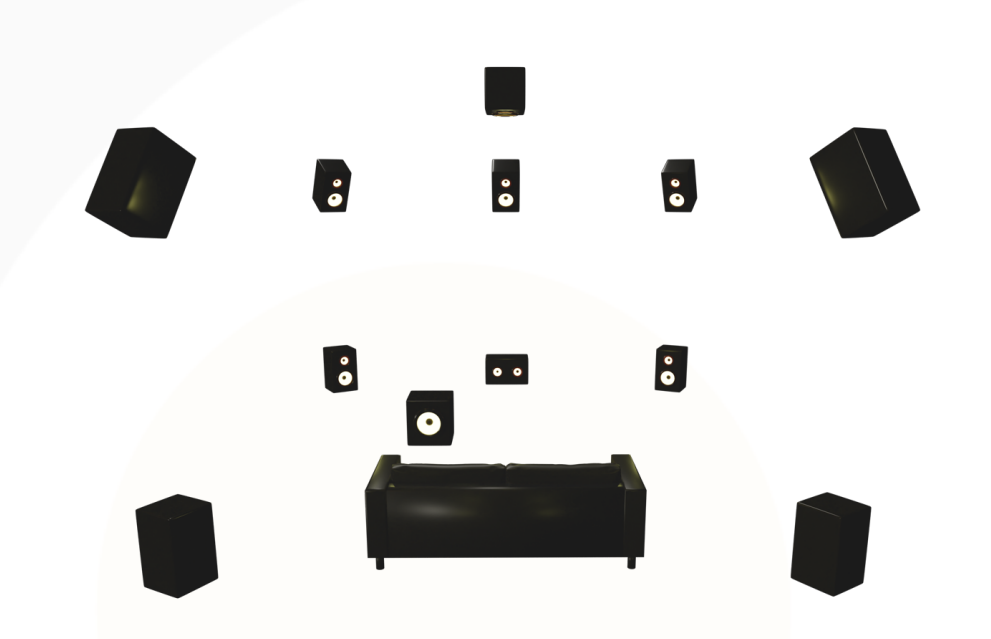
- Supported home theater layouts include Auro 9.1, 10.1, 11.1, and 13.1, depending on room size and hardware capability.
- Auro 9.1 is often recommended for smaller or medium rooms, while Auro 10.1 to 13.1 suits larger dedicated cinema spaces.
- Uses a three-layer concept: base layer, height layer, and optional top layer for expanded vertical imaging.
- Compatible with native Auro-3D content, stereo upmixing, and surround upmixing for legacy media.
- Auro-Matic processing helps convert standard content into a more spacious and immersive presentation.
- Auro-Scene virtual speaker technology can simulate speaker positions when full physical installation is not practical.
- Best performance is achieved with correctly angled height speakers placed above the front and surround plane.
- Typical benchmark advantage over basic surround systems: better vertical localization, improved front-to-back layering, and a more cohesive sound bubble.
- Compared with Atmos and DTS:X, Auro-3D is often favored for natural music playback and upmixing consistency, while Atmos may offer broader native content support.
Pros and Cons of auro 3d Home Theater
Pros
- Excellent vertical sound placement for movies, live concerts, and ambient effects.
- Strong upmixing performance that can make older stereo or 5.1 content sound more expansive.
- Flexible layouts help users adapt the system to different room sizes and budgets.
- Works well for both film enthusiasts and music listeners who want a more natural surround field.
- Good value when paired with an Auro-capable receiver already included in a home theater build.
Cons
- Native content library is smaller than some competing immersive audio formats.
- Installation requires careful speaker placement, which may be challenging in compact rooms.
- Full benefit often depends on an upgraded AV receiver or processor, increasing overall system cost.
- Some users may prefer the wider ecosystem support found in more mainstream alternatives.
- Best results usually need calibration and accurate speaker angling, not just plug-and-play setup.
Overall, auro 3d Home Theater offers strong value for listeners who prioritize realism, music performance, and a layered soundstage. Compared with alternatives, it is often the more refined choice for room-filling immersion, though not always the most widely supported format.
Customer Reviews: What Users Say About auro 3d Home Theater
Average user sentiment is generally positive, with many owners describing the experience as spacious, detailed, and surprisingly natural. A common praise is the way dialogue stays anchored while effects float smoothly through the room. Many reviewers give the experience a 4.5 out of 5 for movie immersion and music playback.
Typical testimonial: “The height layer made my 7.1 setup feel like a full cinema upgrade without sounding artificial.” Another frequent comment is that Auro-Matic upmixing makes older Blu-rays and streaming content feel more engaging.
Common complaints focus on setup complexity, the need for precise speaker placement, and limited native content compared with other immersive formats. Some users also note that the system delivers its best results only when paired with the right receiver and properly calibrated speakers.
Purchase recommendation: choose auro 3d Home Theater if you want premium immersive audio, value musicality, and already have room for height speakers. Buyers seeking the broadest content compatibility should compare it with other 3D audio systems before deciding.
Frequently Asked Questions About auro 3d Home Theater
What makes auro 3d Home Theater different? It adds a layered height structure that creates a more natural sense of depth and overhead sound than standard surround audio.
Is it good for small rooms? Yes, compact layouts such as Auro 9.1 can work well in smaller living rooms when speakers are positioned correctly.
Is it worth buying? It is worth buying for users who want immersive sound, strong upmixing, and a high-end home cinema experience.
Faqs
How do I set up auro 3d Home Theater correctly for the best surround sound experience?
Why is my auro 3d Home Theater not producing height effects or immersive 3D audio?
What devices and connections are compatible with auro 3d Home Theater systems?
How can I optimize auro 3d Home Theater settings for a small room?
What should I do if dialogue is unclear in auro 3d Home Theater playback?
Can I use auro 3d Home Theater with streaming apps and TV apps?
How do I fix buzzing, crackling, or audio dropouts in auro 3d Home Theater?
How often should I maintain auro 3d Home Theater speakers and equipment?
Leave a Comment