
How to Use: Aurora Link Carplay Ai Box Mini TV Box User Manual
Content
Aurora Link Carplay Ai Box Mini TV Box
Introduction
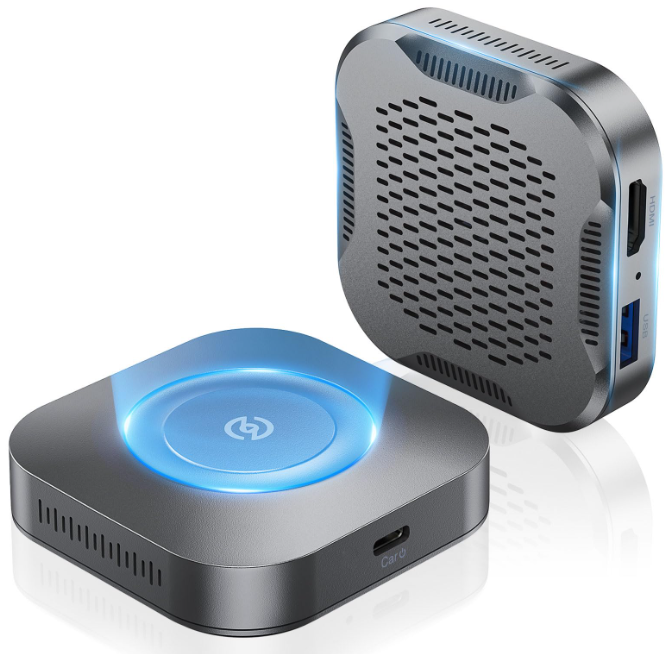
The Aurora Link CarPlay Ai Box Mini TV Box is a compact, versatile multimedia adapter designed to enhance your in-car entertainment and connectivity experience. Combining wireless Apple CarPlay, Android Auto compatibility, and an Android 11 operating system, this AI-powered mini box transforms your vehicle's infotainment system into a smart, multimedia hub. It offers seamless access to popular streaming apps like YouTube, Netflix, Disney+ Plus, and free live TV channels, enabling drivers and passengers to enjoy a wide range of content safely and conveniently.
Its unique selling points include wireless connectivity, video casting from mobile devices, an HDMI output for external displays, and a dedicated TV theatre mode that extends its uses beyond the car, making it suitable for home or office setups. The device is particularly suited for tech-savvy drivers, ride-share professionals, or anyone looking to upgrade their car entertainment system without replacing the head unit. Priced approximately around $80, it offers excellent value for money compared to bulkier or more expensive AI boxes.
Available through the AuroraLink online store and platforms like AliExpress, the AuroraLink CarPlay Ai Box Mini TV Box combines affordability, compact design, and rich functionality, making it an appealing choice for those wanting to add smart features to their vehicle in a hassle-free way.
Specifications and Features of aurora link Carplay Ai Box Mini TV Box
- Operating System: Android 11 closed system optimized for car use
- Processor: Qualcomm Snapdragon 665 chipset for smooth multitasking and media playback
- Memory: 8GB RAM and 128GB internal storage for apps and media
- Connectivity: Wireless Apple CarPlay and Android Auto support
- Video Streaming: Pre-installed YouTube, Netflix, Disney Plus, YouTube Music, plus a free live TV streaming app
- Ports: USB-C input for power, USB-A port for media playback and firmware updates, HDMI output for external displays
- Additional Features: Video casting from mobile devices, TV theatre mode for home/office use, Bluetooth remote compatibility
- Cooling: Passive ventilation with multiple air holes for chipset cooling
- Dimensions: Compact square form factor, designed for easy car installation
- Performance: Supports 800x480 resolution at 30fps,, suitable for in-car and external displays
Compared to similar AI boxes, Aurora Linknk CarPlay Ai Box Mini TV Box stands out for its lightweight design, extensive app support, and affordable price point, making it a competitive choice in the wireless CarPlay/Android Auto adapter market.
INITIAL CONNECTION
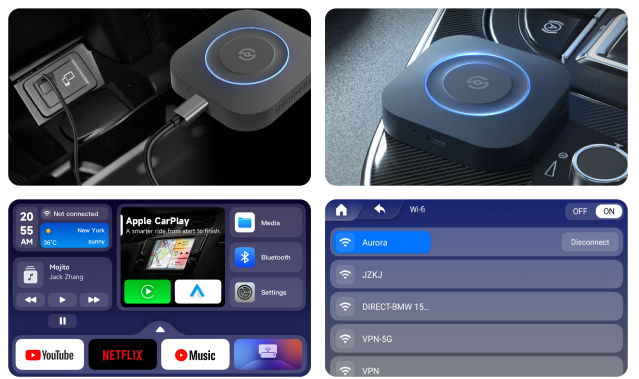
- Plug and play, use a Type-C cable to connect the CarPlay AI Box
- Observe the indicator light. If the red light turns blue and flashes, it is a normal connection
- Wait for the boot animation to finish playing and enter the CarPlay AI box system
- Enter settings, select "WIFI", then connect to WiFi
FUNCTION INSTRUCTIONS
Third-party applications
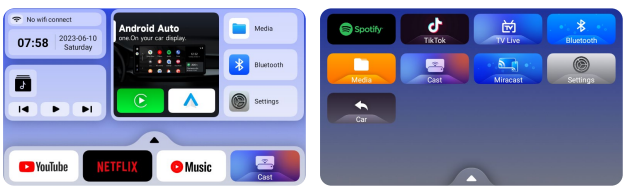
This product has built-in applications of YouTube, Netflix, YouTube Music, Spotify, TikTok, and TV Live.
Wireless CarPlay connection
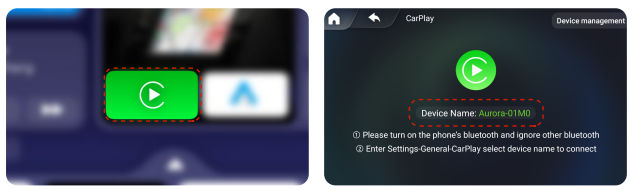
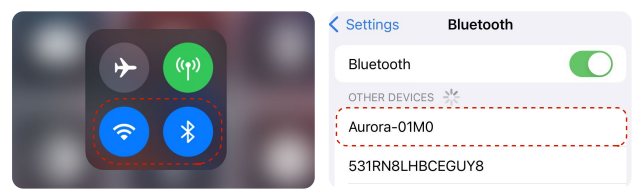
- Enter the "CarPlay" application
- Turn on the iPhone's Wifi and Bluetooth
- Pair the device, and then enter the wireless CarPlay interface.
Wireless Android Auto connection
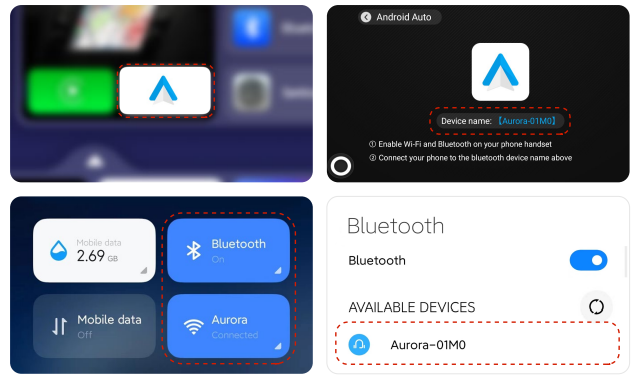
- Enter the "Android Auto" application
- Turn on the Android phone's Wifi and Bluetooth
- Pair the device, and then enter the wireless Android Auto interface.
MEDIA
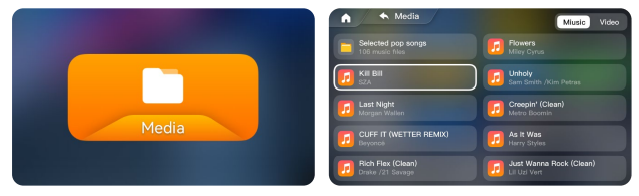
- Insert the U disk into the interface, and enter the "MEDIA" application
- Select "UDISK", and choose to play music or video
HOW TO REPORT A PROBLEM TO CUSTOMER SERVICE
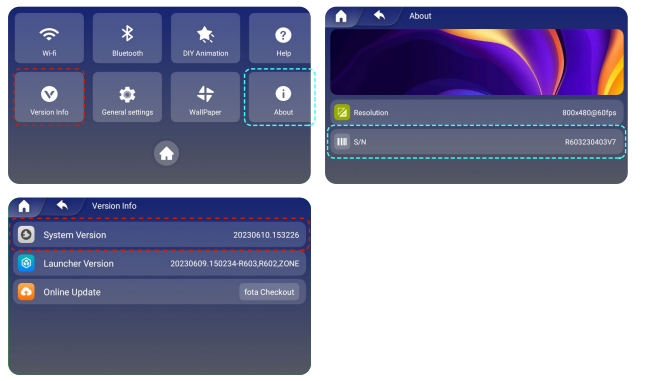
- Provide SN code information. Enter settings, select "About"
- Provide the version number.r Enter Settings, select “Version Info”
- After the box is connected to the network, upload the Log.
Troubleshooting Common Issues with aurora link Carplay Ai Box Mini TV Box
- Connection drops or lag: Ensure a stable Wi-Fi or Bluetooth connection; restart the box and device; update firmware via USB port
- Apps not loading or crashing: Clear cache in settings or perform a device restart; verify app updates within the Android subsystem.
- No audio or video output: Check HDMI cable connections; confirm the external display is set to the correct input source; test with alternative HDMI cables
- Device overheating: Ensure proper ventilation around the device; avoid covering air holes; use in environments within recommended temperature ranges
- Error codes: Refer to the included paper manual for specific error codes; generally, firmware reload or factory reset can resolve persistent errors
Preventive measures include keeping firmware updated, avoiding exposure to extreme temperatures, and using high-quality cables. The product typically comes with a standard warranty through the AuroraLink store, and customer support can be reached via their official website or AliExpress contact channels for assistance.
Pros & Cons of aurora link Carplay Ai Box Mini TV Box
- Pros:
- Compact and lightweight design fits easily in any vehicle
- Supports wireless Apple CarPlay and Android Auto, enhancing convenience
- Preloaded popular streaming apps and free live TV for diverse entertainment
- HDMI output and TV theatre mode expand usability to home or office settings
- Affordable price compared to competitors offering similar features
- Cons:
- Resolution capped at 800x480, which may not satisfy users seeking HD output
- USB-A port does not support passthrough wired CarPlay or Android Auto charging
- Performance limitations with video casting speed and minor UI lag were reported.
- Some users may find the closed Android system restrictive for installing additional apps.
Overall, the aurora link Carplay Ai Box Mini TV Box offers strong value for money, especially for users prioritizing compactness and multimedia versatility over top-tier resolution or open Android environments.
Customer Reviews and Feedback on aurora link Carplay Ai Box Mini TV Box
Users generally praise the Aurora Link CarPlay Ai Box Mini TV Box for its ease of installation, smooth wireless CarPlay connectivity, and the convenience of pre-installed streaming apps. Many highlight the excellent value at around $80, especially when compared to pricier AI boxes on the market. The TV theatre mode and HDMI output receive positive remarks for their versatility.
Common complaints include occasional lag during video casting, the device's limited screen resolution, and the lack of passthrough charging via the USB port. Some users note that the closed Android system restricts additional app installations, which may limit customization.
Star ratings average around 4 out of 5, with recommendations primarily for users seeking an affordable, compact upgrade to their car’s infotainment system without requiring advanced customization. Frequent tips include ensuring firmware updates and proper cable use to optimize performance.
Tags
Leave a Comment