
Autel Robotics EVO Lite Series Drone User Manual
Content
Autel Robotics EVO Lite Series Drone
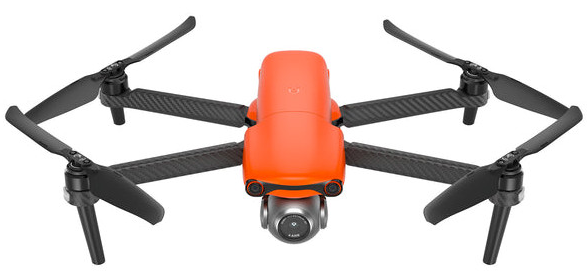
Introduction
The Autel Robotics EVO Lite Series Drone is a cutting-edge, compact aerial solution designed for both professionals and enthusiasts. This drone is renowned for its exceptional flight performance, robust features, and high-quality imaging capabilities. With a 40-minute flight time and a maximum distance of up to 24 kilometers, it offers superior endurance compared to similar models in its class. The EVO Lite Series is ideal for various applications, including aerial photography, surveillance, and search and rescue operations, catering to a wide range of users from hobbyists to professionals in law enforcement and emergency services.
The estimated price range for the EVO Lite Series is between $1,000 and $1,500, depending on the specific model and accessories. It is available for purchase from the official Autel Robotics website and authorized retailers worldwide.
Specifications of the Autel Robotics EVO Lite Series Drone
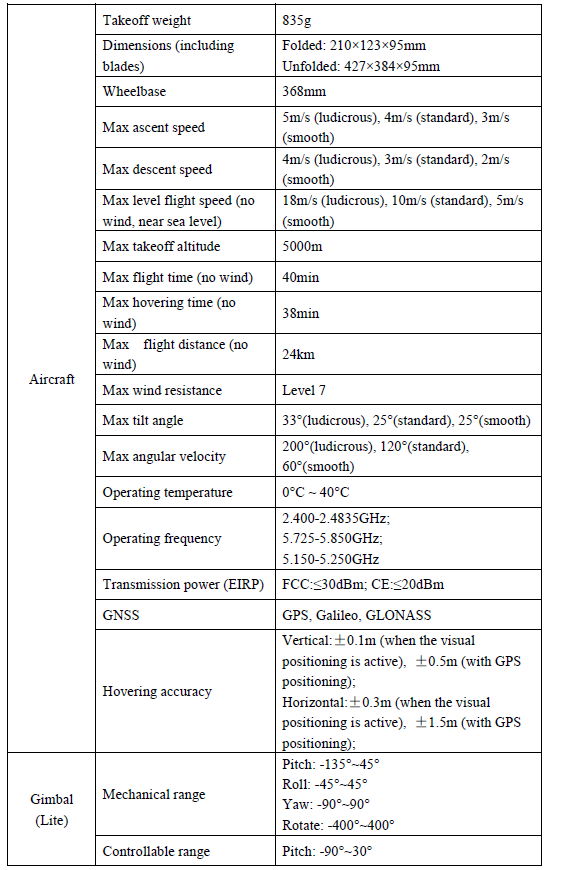
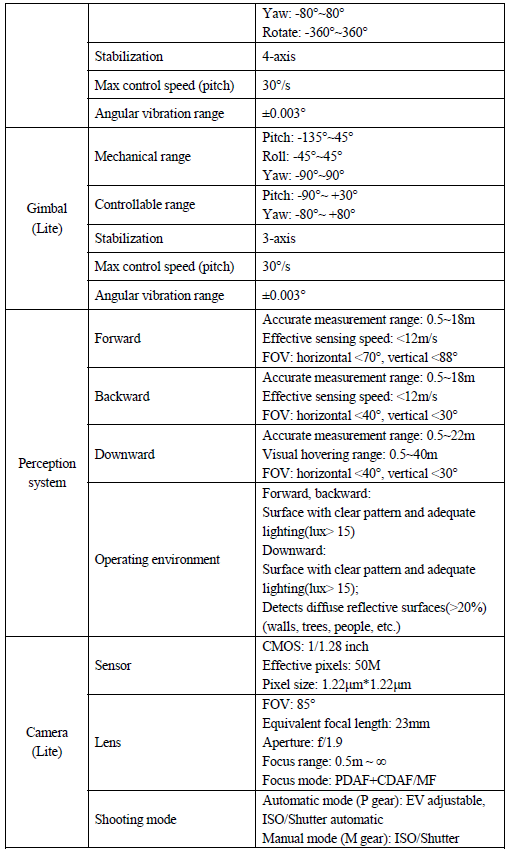
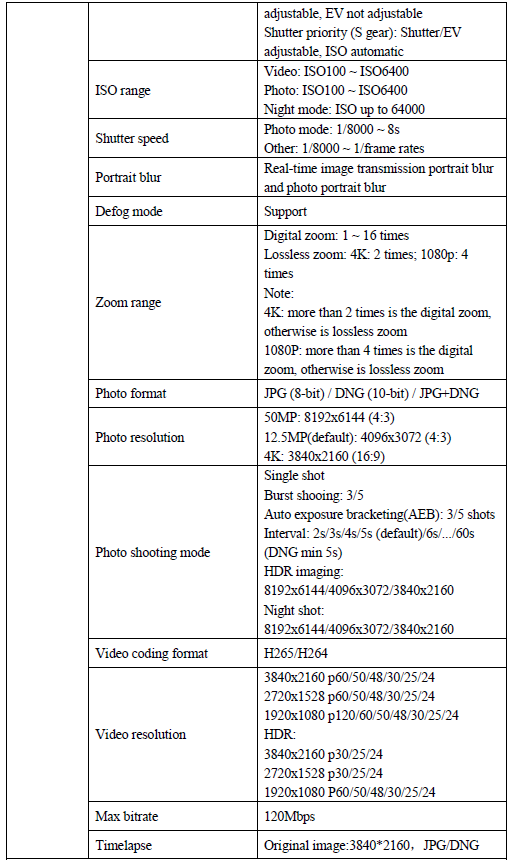
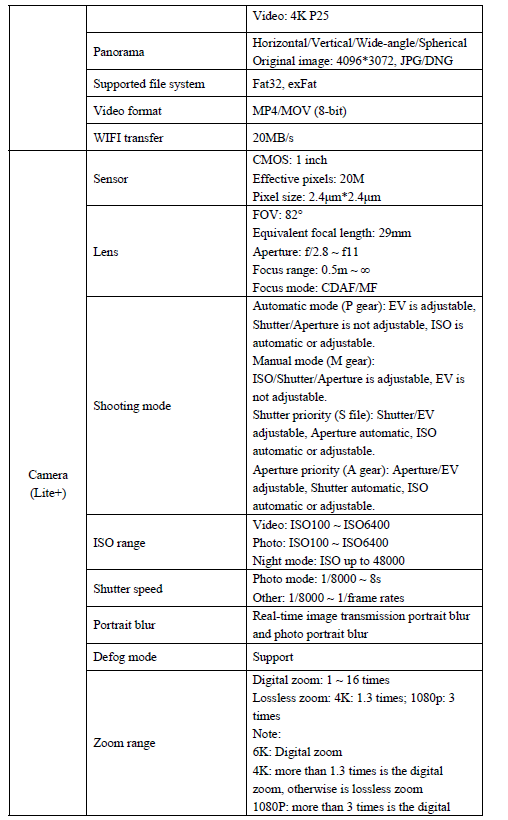
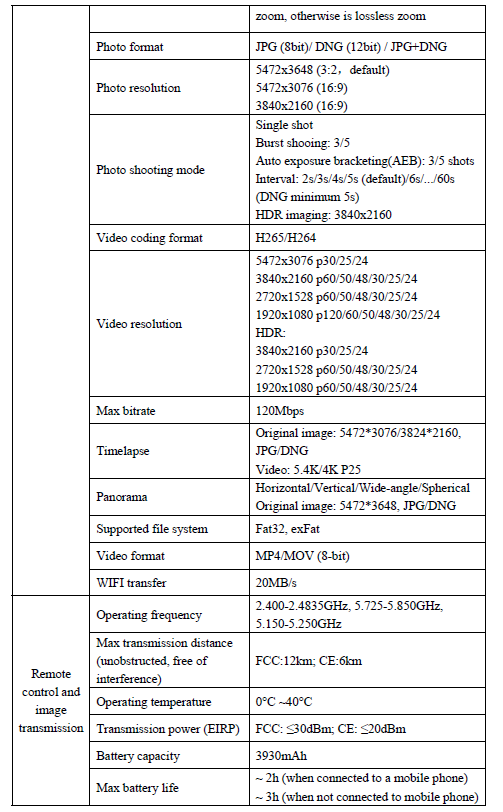
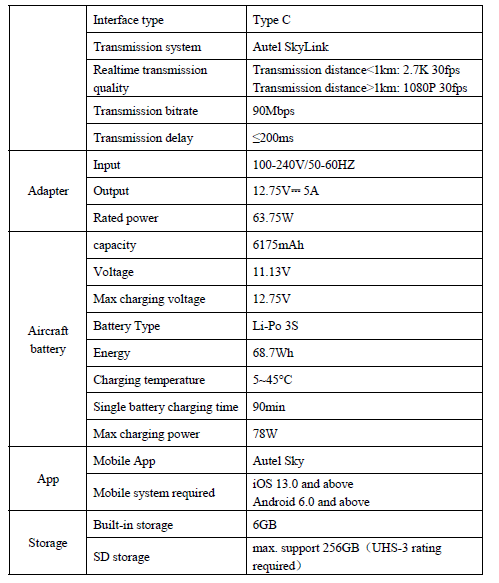
Aircraft
EVO Lite series is a four-rotor UAV with a folding body. EVO Lite series UAVs cannot only have indoor and outdoor steady hovering, intelligent flight, and other advanced functions, but also have powerful flight performance with the maximum flight speed up to 68km/h and the longest flight time up to about 40 minutes.
EVO Lite series UAVs include EVO Lite and EVO Lite+, the camera of which adopts 1/1.28 inch and 1-inch CMOS image sensors, respectively. EVO Lite is provided with a 4-axis gimbal that can steadily shoot 4K high-definition videos and pictures at 50 megapixels. EVO Lite+ is provided with a 3-axis gimbal that can shoot 6K videos and pictures at 2 MPm pixels. With the new Autel Sky App, they can realize a variety of intelligent shooting modes such as one-click short film, panorama, and time-lapse. With the rich built-in templates in the APP, you can use the templates in your film after selecting materials, and then use the mobile phone quick transfer or one-click share functions to quickly download and share your works.
EVO Lite series adopts the new generation of Autel Skylink image transmission technology of Autel Robotics, and supports the double-emission and double-receiving of 2.4GHz, 5.8GHz, and 5.2GHz. Without interference and blockage, it can realize 12km image transmission with the image resolution up to 2.7K; the remote controller is equipped with a support for the mobile device that can display the high-definition picture in a real-time manner using by Autel Sky App.
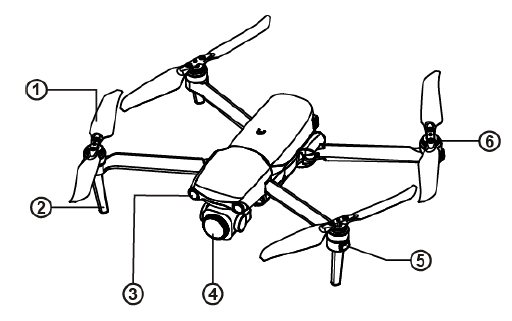
Components description
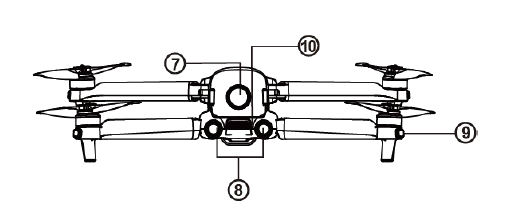
- Propeller
- Undercarriage
- Forward visual system
- Gimbal camera
- Front LED indicator
Motor
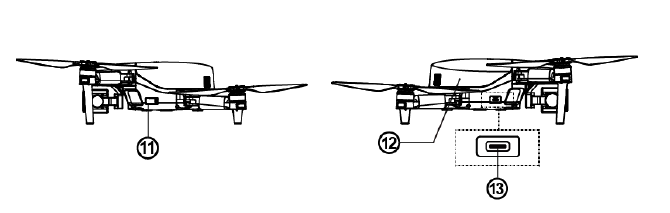
- Power button
- Rear vision system
- Rear LED indicator
Air outlet
- SD card slot
- Aircraft battery
USB-C port
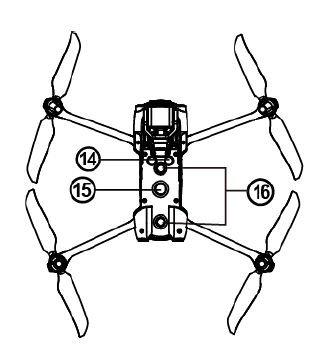
- Ultrasonic sensor
- Downward LED
Downward vision system
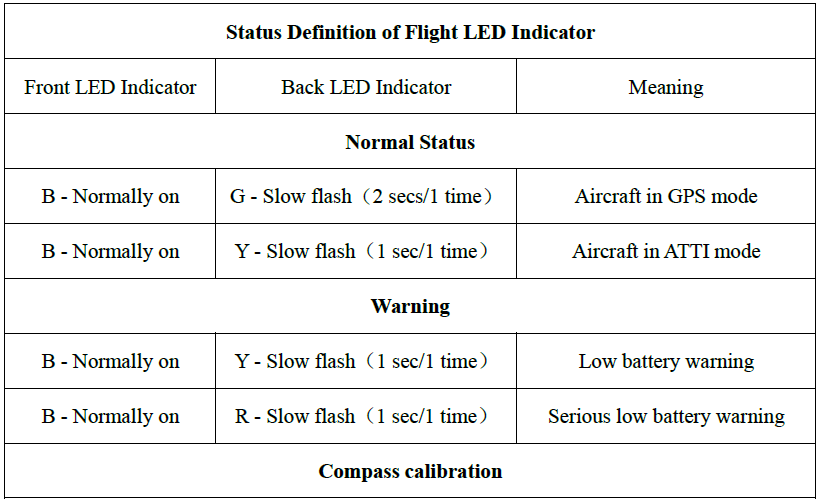
Flight indicator
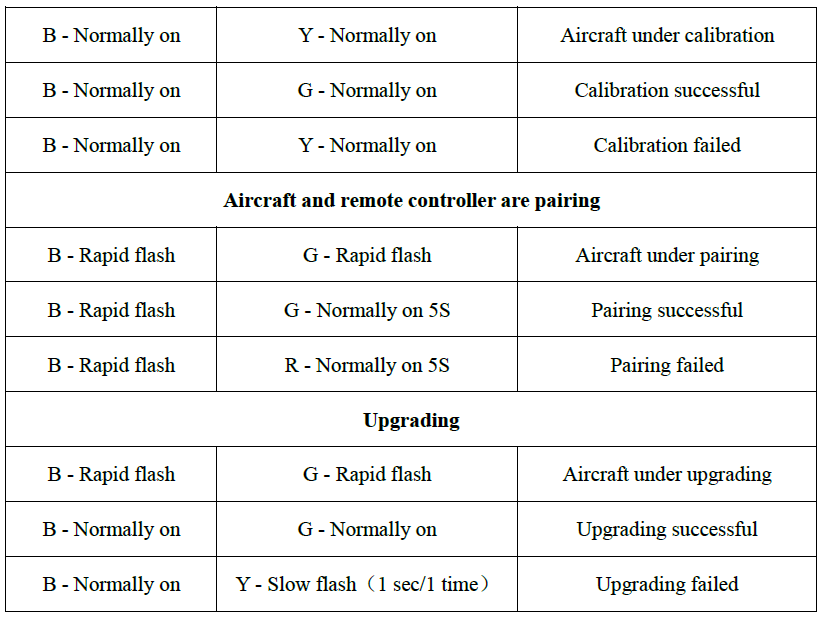
The aircraft has one LED indicator at the end of each arm. The front LED shows a steady red to help you to find the head direction. The rear LED shows the current flight status of the aircraft.
Designated symbol of color:
- R - Red
- G - Green
- Y - Yellow
- B - Blue
Aircraft battery
The battery for EVO Lite is 6175mAh and has a rated voltage of 11.13V and charging and discharging management functions. The battery needs to use the officially provided dedicated adapter and cable for charging.
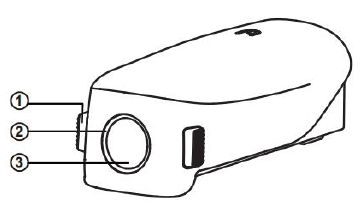
- Disconnect button
- Battery level indicator
- Power button
Maintenance and service
Firmware update
In order to optimize the system performance of the EVO Lite series aircraft, Autel Robotics will update relevant firmware when necessary.
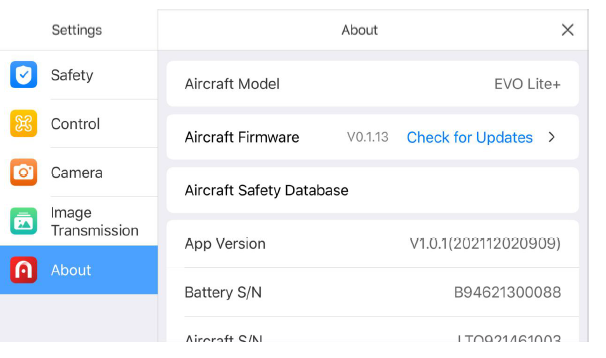
Download and update firmware.
- Turn on your remote controller and aircraft, connect your mobile phone to the remote controller, and operate the Autel Sky app.
- When the system detects a new firmware version, the Autel Sky app will open a prompt box after it is connected with the aircraft to remind you to download and install the new version.
- Please follow the prompt on the Autel Sky app to update the firmware. The user can view the upgrade process on the App interface.
- Please restart the aircraft and the remote controller after the update.
Important
Before the firmware update, please ensure that:
- Update the firmware step by step; otherwise, the update may fail. The aircraft will shut down automatically after the update.
- If the device is closed during the update, the update may fail.
- In the case of a network outage during the update, the update may fail.
- The whole update process will take more than ten minutes. The following situations may occur in the aircraft during update: it is normal that the gimbal is weak, the status indicator flashes abnormally, or the aircraft restarts. Please wait patiently for completing firmware update to complete.
- Ensure that the aircraft and remote controller have a battery level of more than 30%.
- After the firmware update, the flight control parameters, such as return height and distance limit of the aircraft, will be reset. Please reset them after the update.
Storage and maintenance
To ensure the optimal performance of EVO Lite, please read and abide by the maintenance instructions in this section carefully.
- Store the aircraft, battery,y, and remote controller in a clean, dry, cool, and well-ventilated place.
- Protect the aircraft from direct sunlight when it is not in use
- Please wipe dry your two hands dry before operating the aircraft.
- Clean the camera lens with a soft cloth with alcohol or a gentle window cleaner. Do not use any strong cleaners, detergents, or chemicals.
- Keep the battery charger clear of other conducting materials.
- Avoid the aircraft and its accessories falling, especially falling on a hard surface. Carefully check all components after each collision or impact. Please contact the customer support of Autel Robotics for any damage.
- Only use the accessories authorized by Autel Robotics, such as the charger. We will provide no warranty for any accident due to the use of unapproved accessories.
Maintenance service
If you want to send in your equipment for repair, please mail it to support@autelrobotics.com or call Autel Robotics’ customer support: (844) 692-8835.
You should be prepared with the following information:
- Name
- Mailing address
- Phone number
- Product name
- Complete problem description and photo
- For warranty: provide the proof of purchase
- For non-warranty: provide the preferred payment mode
Troubleshooting the Autel Robotics EVO Lite Series Drone
Common issues and solutions for the EVO Lite Series:
- Drone Not Turning On: Check battery level and ensure proper charging. If the issue persists, contact support for assistance.
- Connection Issues: Restart the drone and remote controller. Ensure firmware is up-to-date and antennas are properly aligned.
- Preventive Measures: Regularly clean and inspect the drone, ensure firmware updates are applied, and avoid overcharging batteries.
- Warranty and Support: Autel Robotics offers a comprehensive warranty and dedicated customer support. For more information, visit their official website or contact their support team directly.
Warranty
Autel Robotics Co., Ltd (hereinafter referred to as “the Company”) promises to the original retail buyer of the product that: under the normal use condition, if the product or its any part is certified to have defect in material or technology, causing equipment fault, then you can, within the warranty period (calculated from the date of delivery), carry your proof of purchase for free repair or replacement service by the Company.
Scope of service:
- Within the warranty period, the product has a non-human performance fault during normal use;
- The product is not disassembled without approval, or modified or added as instructed by the non-official manual, or has other non-human faults;
- The equipment serial number, factory label, and other marks are not torn away or altered;
- The effective proof of purchase, document, and document number are provided.
- The implementation of the specific rules of this service is subject to the local policies, laws, and regulations of different countries and regions.
This warranty clause will not be applied:
- When the product is out of the warranty period;
- When the battery has been charged for more than 200 times;
- When the product doesn't use the official latest firmware;
- When the fault occurs when the product is used for unlawful activities.
- When the product flight log has been changed or deleted without approval;
- When the serial number label and waterproof mark of the product are damaged or altered;
- When the product has appearance, decorative, or structural (such as frame and non-operating component) defects;
- When the damage is caused because it is not installed, used,d and operated as instructed by the manual;
- When the product damage is caused because of the use of the self-programming or non-official software;
- When the damage is caused by the reliability and compatibility problems when the product is used with a component of a third party other than Autel Robotics.;
- When the product suffers from abnormal use or environment, accident or improper handling, unauthorized change, abuse, or improper installation, maintenance, or storage;
- When the product is damaged due to external factors, including but not limited to, natural disaster, fire, water, dirt, dust, battery leakage, fuse burn-out, thef,t or any improper use of power supply;
- Whether the user fails to send the product within 7 natural days after contacting Autel Robotic
Pros and Cons of the Autel Robotics EVO Lite Series Drone
Pros
- Long Flight Time: Offers 40 minutes of flight time, ideal for extended missions.
- Advanced Camera: High-quality imaging with features like HDR and adjustable aperture.
- Robust Obstacle Avoidance: Three-way system ensures safe navigation.
- Value for Money: Competitive pricing with superior features.
Cons
- Weight and Portability: Though compact, the drone is slightly heavier than some competitors.
- Transmission Distance: While the transmission distance is impressive, it may vary based on environmental conditions.
Overall, the EVO Lite Series offers excellent value for its price, making it a strong contender in the drone market.
Customer Reviews of the Autel Robotics EVO Lite Series Drone
Users of the EVO Lite Series have praised its exceptional image quality, robust build, and ease of use. Some users have noted that the drone can be slightly heavier than expected, which may affect portability. However, the overall feedback is positive, with many users recommending it for its balance of features and price.
Common praises include the drone's ability to handle strong winds and its reliable obstacle avoidance system. Some users have noted minor issues with connectivity, but these are generally resolved through firmware updates and proper setup.
With a rating of 4.5 out of 5 stars, the EVO Lite Series is highly recommended for those seeking a reliable and feature-rich drone for both professional and recreational use.
Faqs
How do I set up my autel robotics EVO Lite Series Drone for the first flight?
What are common troubleshooting steps if my autel robotics EVO Lite Series Drone won’t connect to the remote controller?
How can I optimize the flight performance of the autel robotics EVO Lite Series Drone in different weather conditions?
What features of the autel robotics EVO Lite Series Drone enhance its camera and video capabilities?
Is the autel robotics EVO Lite Series Drone compatible with both iOS and Android devices?
How should I maintain the battery of my autel robotics EVO Lite Series Drone for longevity and safety?
What should I do if the autel robotics EVO Lite Series Drone’s gimbal is not stabilizing properly?
How can I use the 'Find My Drone' feature on the autel robotics EVO Lite Series Drone if I lose sight of it?
Tags
Leave a Comment