
Setup: Awei T69 True Wireless Earbuds User Manual
Content
Awei T69 True Wireless Earbuds
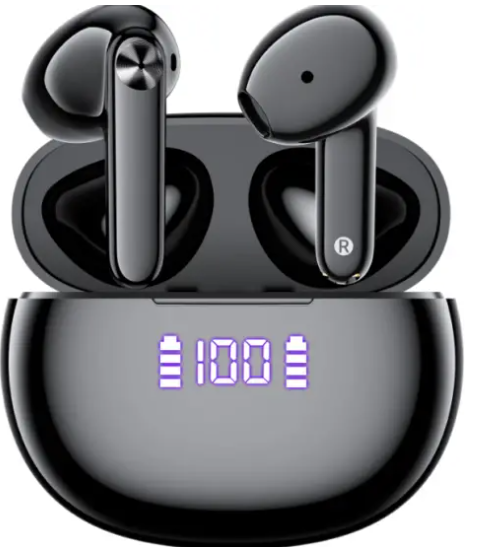
Introduction
The Awei T69 True Wireless Earbuds are a cutting-edge audio solution designed for music lovers, fitness enthusiasts, and professionals on the go. Featuring advanced Bluetooth 5.2/5.3 technology, these earbuds deliver fast, stable connections and crystal-clear sound quality, making them ideal for workouts, commutes, and daily use. With a unique open-ear or air conduction design, the Awei T69 ensures comfort and safety, allowing users to stay aware of their surroundings while enjoying immersive audio.
Key benefits include a long-lasting battery life, ergonomic earhook fit, and support for multiple Bluetooth protocols for seamless device compatibility. Whether you're jogging, working, or relaxing, these earbuds offer reliable performance and a secure fit. The Awei T69 True Wireless Earbuds are available in major online stores across Asia and select global markets, with prices typically ranging from $15 to $25 USD, making them an affordable choice for budget-conscious buyers seeking premium features.
Specifications of Awei T69 True Wireless Earbuds
- Bluetooth Version: 5.2/5.3 (Jerry AC6973D4 chip)
- Transmission Distance: Up to 10–15 meters (33–50 feet) without obstacles
- Battery Capacity: 110mAh per earbud, 300mAh charging case
- Music Playback Time: Up to 16 hours (with case)
- Talk Time: Up to 17 hours
- Charging Time: Approximately 1.5 hours
- Supported Protocols: HSP, HFP, A2DP, AVRCP
- Driver Size: 13mm dynamic drivers
- Design: Open-ear, air conduction, earhook style
- Weight: Lightweight, ergonomic build for all-day comfort
Earbud(Each)
- Model Name: T69
- Transmission Distance: 10m/33ft (without obstacles)
- Supports: HSP/HFP/AVRCP/A2DP
- Battery Capacity: 40 mAh
- Charging Time: 1.1H
- Standby Time: 300H
- Weight: approx 4g
- Size: 35.25 18.40*10.43 mm
Charging Case
- Battery Capacity: 400 mAh
- Charging Time: 2H
- Charging Port: Type-C
- Weight: approx 38g
- Size: 63.89 28.8152.45 mm
Compared to similar models, the Awei T69 stands out with its extended battery life, stable Bluetooth connection, and comfortable fit, making it a top choice among true wireless earbuds in its price range.
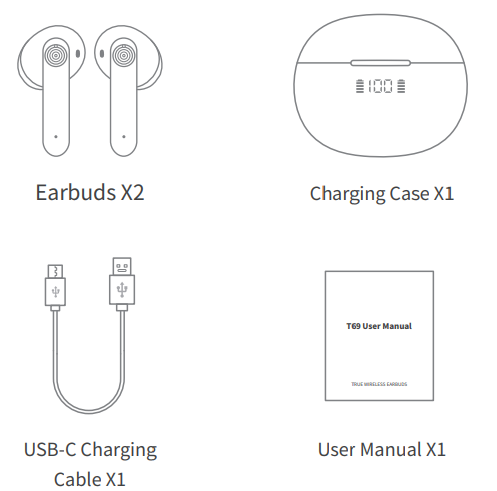
PACKING LIST
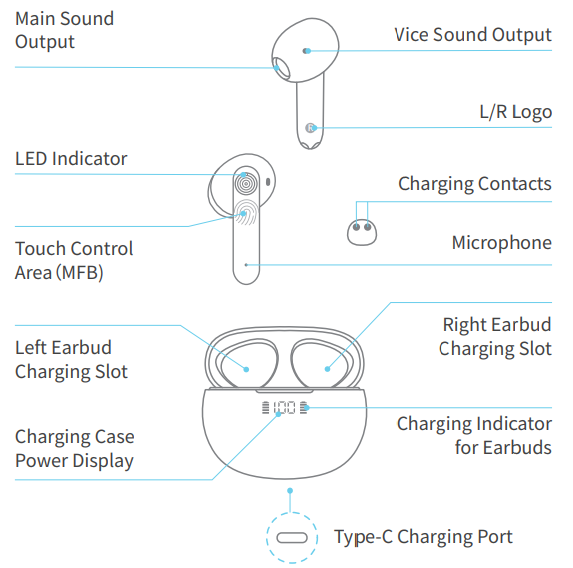
OVERVIEW
RESET
When should I reset the earbuds?
- When only one side of the earbuds plays music.
- When you can't make the two earbuds work together.
- When both of the earbuds fail to pair with each other or experience other connection issues, etc.
How to reset?
- Delete "T69" from the Bluetooth list on your phone and turn the Bluetooth off.
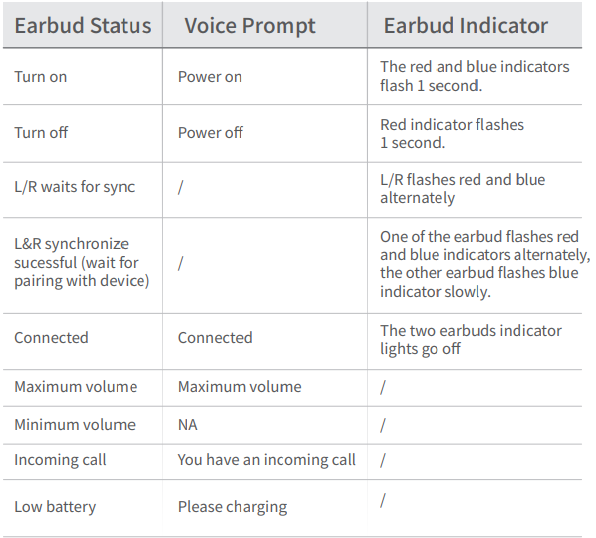
- Take out the two earbuds from the charging case, wait until one of the earbuds flashes red and blue alternately,, and another flashes blue slowly.
- Tap the control area(FBM)of either earbud 6 times quickly, and the earbuds will turn off with the voice prompt" power off". Reset done.
- Put the earbuds back into the charging case, wait several seconds, and take them out again. Then turn on the Bluetooth on your phone and find the "T69" to connect.
Note: Resetting the earbuds will clear the earbuds' pairing history on your device, so please reconnect your device with the earbuds after each reset.
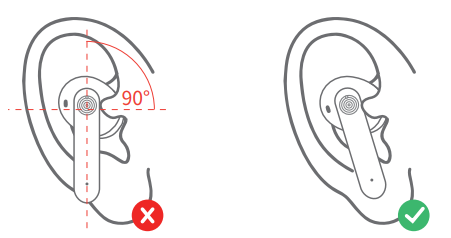
HOW TO WEAR?
For earbuds to effectively transmit sound, they need to be lodged in your ear. Please place the earbuds snugly into your ear correctly in a comfortable way.
CHARGING
Charging the Earbuds
Put the earbuds into the charging case and close the case. Thearbuds' charging indicator for the L/R sides will flash from the 1st grid to the 4th grid to show the charging status of the earbuds.
In order to save power consumption, the charging indicator for the earbuds will turn off in 10 seconds after the charging case is closed until the case is opened again.
A single full charge for the earbuds takes around 1.1 hours.
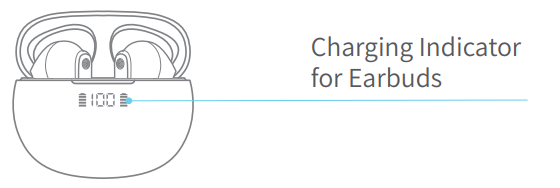
Note: The charging indicator for the earbuds is just to show the earbuds' charging status, not for indicating the real-time power level.
The LED digital display shows the real-time power of the charging case.
Charging the Charging Case
Method 1 : Wired Charging
Please use a 5V/1A adapter with the charging cable to charge the case. You can also charge it with a computer USB or other devices' USB interface. Note: The charging case comes with a USB-C charging cable in the package.
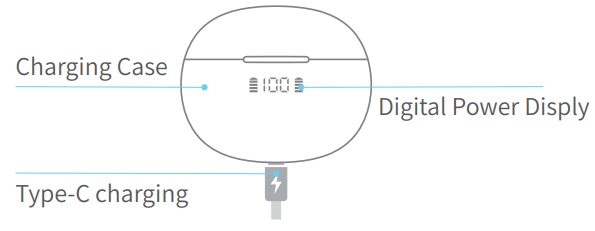
When the case is charging, the digital display will flash until 100.
Method 2 : Wireless Charging
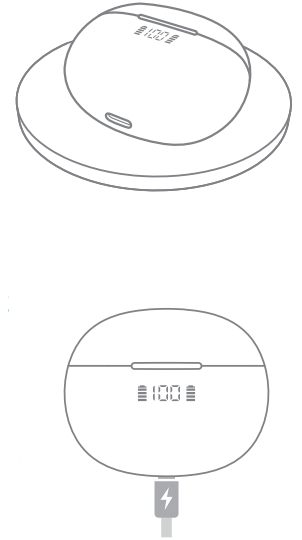
Put the charging case correctly on the wireless charging pad to charge. (The Wireless Charging Pad is Not Included)
Please try to reposition he charging case if it is charged.
Note: The wireless charging pad can only charge the charging case when the power level is greater than 1%.
If the charging case shows 0, the wireless charging pad will not be able to charge the charging case properly.
PRODUCT MAINTENANCE
- Never dismantle or refit the product to avoid malfunction or fire hazards.
- Keep away from corrosive liquids to avoid damage to the product.
- Keep away from extreme ambient temperatures below-10~C or above 60~C.
- Keep away from children and pets.
- Never touch the earphones with sharp objects, as otherwise can easily cause scratches.
- Don't use the product in thunderstorm weather to avoid malfunction or electric shock.
- If it has not been used for more than 1 week, please charge and maintain it in time to ensure that it is safe.
- If the charging case is excessively discharged, the LED display won't show immediately during charging. Please keep waiting for 15 minutes, the LED display will show later.
- After using them for a period of time, the earbuds charge or even can't even turn on. You can handle this problem by using an alcohol rag to clean the charging contacts and charging pins.
- If there is no sound from one earbud, you need to check if the phone & earbud volume are too low. If the phone & earbuds volume is normal, you need to reset the earbuds.
- Please use the original charging cable provided by the earphone manufacturer for charging ,, choose a Type-C cable.
Troubleshooting Common Issues
- Earbuds won’t pair: Reset by deleting "T69" from the Bluetooth list, turning Bluetooth off, removing the earbuds, and tapping the control area 6 times quickly.
- Only one earbud works: Reset both earbuds and ensure both are charged.
- No sound during calls/music: Check device volume, Bluetooth connection, and earbud battery.
- Earbuds disconnect frequently: Move closer to the device and avoid obstacles.
- Charging issues: Use a compatible USB charger and ensure charging contacts are clean.
Preventive measures include regular cleaning, avoiding extreme temperatures, and storing in the charging case when not in use. The Awei T69 comes with a standard 1-year warranty. For support, contact the retailer or manufacturer via their official website or customer service email.
Pros and Cons of Awei T69 True Wireless Earbuds
Pros
- Excellent sound quality with 13mm drivers
- Long battery life for extended use
- Comfortable, secure earhook design
- Fast, stable Bluetooth 5.2/5.3 connection
- Affordable price point
Cons
- Open-ear design may not suit users seeking noise isolation
- The charging case is slightly bulky
- Limited color options
The Awei T69 True Wireless Earbuds offer great value for money, especially for those prioritizing comfort, battery life, and reliable connectivity over premium noise cancellation.
Customer Reviews of Awei T69 True Wireless Earbuds
Users consistently praise the Awei T69 for its clear audio, comfortable fit, and long battery life. Many highlight the earbuds’ stability during workouts and daily commutes. Common complaints include occasional Bluetooth pairing issues and the lack of noise isolation due to the open-ear design. The average star rating is 4.3 out of 5, with most reviewers recommending these earbuds for casual listeners and fitness enthusiasts. Frequent mentions include the ease of use, quick charging, and value for money, making the Awei T69 True Wireless Earbuds a popular choice in the budget wireless earbud market.
Faqs
How do I set up the awei T69 True Wireless Earbuds for the first time?
What should I do if my awei T69 True Wireless Earbuds are not pairing with my phone?
How can I adjust the volume and control playback on the awei T69 True Wireless Earbuds?
Are awei T69 True Wireless Earbuds compatible with all Bluetooth devices?
What is the battery life of the awei T69 True Wireless Earbuds, and how long does charging take?
How do I clean and maintain my awei T69 True Wireless Earbuds for best performance?
Why does one earbud of my awei T69 True Wireless Earbuds flash red and blue during calls?
How can I optimize the sound quality and fit of the awei T69 True Wireless Earbuds?
Leave a Comment