
Installation: Banner VE-Series Smart Camera User Manual
Content
banner VE-Series Smart Camera: Complete Product Manual and Buying Guide
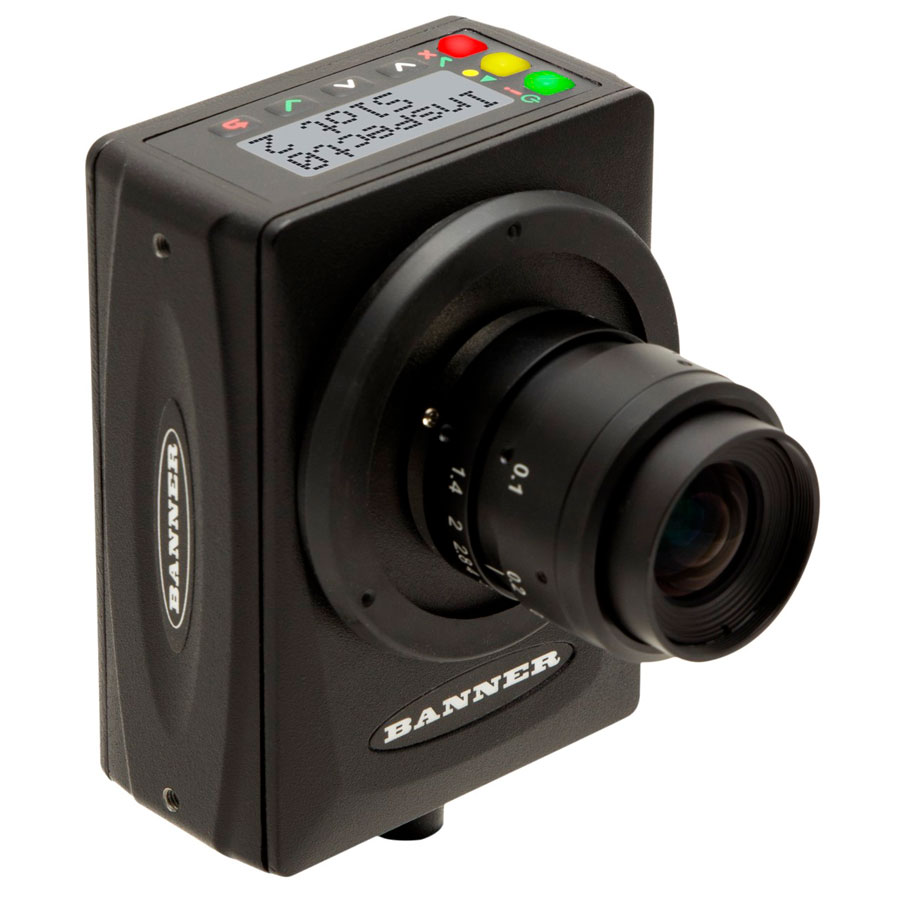
The banner VE-Series Smart Camera is an industrial vision sensor designed for inspection, identification, and automated quality control tasks in demanding production environments. It combines compact hardware, grayscale imaging options, and built-in vision processing so manufacturers can handle tasks like part presence checks, label verification, alignment, and code reading without needing a full external machine-vision PC. Available in multiple resolutions, including WVGA, 1.3 MP, 2 MP, and 5 MP models, the VE-Series gives integrators flexibility to match image detail to the application.
One of the biggest advantages of the banner VE-Series Smart Camera is its all-in-one design. The camera housing is rugged, IP67-rated, and built for industrial use, which makes it suitable for packaging lines, automotive subassemblies, material handling systems, and general factory automation. It supports C-mount lenses and offers multiple I/O and communication options, making integration easier for machine builders and controls engineers. Typical applications include defect detection, vision-guided positioning, and barcode or data verification. The camera’s grayscale imaging and high frame-rate options help it perform consistently in fast-moving production environments.
In terms of availability, the VE-Series is widely distributed through industrial automation suppliers and direct channel partners. Pricing varies significantly by model and configuration, but typical market pricing ranges from roughly $3,500 to $6,500+ depending on resolution, feature set, and seller. That places it in the mid-to-premium industrial smart camera category, where it competes with other smart vision sensors and compact machine-vision systems. For teams that need reliable inspection performance without the complexity of a full vision PC setup, the banner VE-Series Smart Camera is a practical and proven choice.
Pros & Cons of the banner VE-Series Smart Camera
Pros
- Multiple resolution options: With WVGA, 1.3 MP, 2 MP, and 5 MP models, the series can be matched to both simple presence detection and more detailed inspection tasks.
- Industrial-grade construction: The IP67 housing and compact aluminum design make it suitable for harsh factory conditions, washdown areas, and tight mounting spaces.
- All-in-one smart vision platform: Built-in inspection and identification functions reduce the need for external PCs, saving cabinet space and simplifying deployment.
- Flexible integration: C-mount lens support, multiple I/O options, and industrial networking compatibility make it easier to connect with existing automation systems.
- Strong value for targeted use cases: For plants that need dependable inspection performance without overpaying for a full vision workstation, the camera offers solid return on investment.
Cons
- Premium price point: Compared with basic vision sensors, the VE-Series can be expensive, especially at higher resolutions.
- Grayscale focus: The series is optimized around grayscale imaging, which may limit applications that require full-color analysis.
- Integration can require accessories: Depending on the model and setup, users may need compatible cables and a separate C-mount lens, increasing total system cost.
- Best suited for industrial users: It is not a casual plug-and-play camera; configuration is more appropriate for automation professionals and system integrators.
Compared with lower-cost smart sensors, the banner VE-Series Smart Camera offers better imaging flexibility and more robust industrial features. Compared with a full PC-based machine-vision system, it is simpler to deploy and maintain, though less customizable for advanced analytics.
Customer Reviews and User Feedback on the banner VE-Series Smart Camera
Typical user feedback for the banner VE-Series Smart Camera trends positive, with many industrial buyers giving it around 4.3 out of 5 stars for reliability, image quality, and ease of integration. Users often praise the compact build, strong inspection consistency, and the way it reduces machine-vision complexity on the line. One common comment is that the camera is especially effective for repetitive inspection jobs where stability matters more than advanced software features.
Frequent complaints focus on price, accessory requirements, and setup time. Some buyers note that the system can become costly once lenses, cables, and mounting hardware are added. Others mention that initial configuration takes time, especially for teams new to industrial vision systems. A typical testimonial might read: “Excellent for production inspection once configured, but expect a learning curve and a higher upfront cost.” Another common sentiment is: “Very reliable in tough factory conditions, and worth it for critical quality-control stations.”
For purchase decisions, the camera is best recommended for manufacturers, integrators, and OEMs who need a durable smart vision camera for inspection, identification, or barcode verification. Buyers seeking the cheapest option should compare it against entry-level smart sensors, while those needing more advanced customization may want a PC-based vision solution.
Key Specifications of the banner VE-Series Smart Camera
- Available resolutions: WVGA 752 × 480, 1.3 MP 1280 × 1024, 2 MP 1600 × 1200, and 5 MP 2592 × 2048
- Housing: Aluminum industrial enclosure
- Protection rating: IP67
- Lens mount: C-mount
- Use case: Inspection, identification, and industrial automation
- Installation style: Compact smart camera for factory environments
Who Should Buy the banner VE-Series Smart Camera?
The banner VE-Series Smart Camera is a strong fit for quality engineers, OEM machine builders, system integrators, and manufacturing teams that need dependable vision inspection with minimal hardware overhead. It is especially useful in packaging, assembly verification, sorting, and code-reading workflows. If your project demands rugged construction, flexible resolution options, and straightforward integration into an industrial control system, this smart camera is a practical choice.
If you need a compact industrial vision camera with proven inspection performance, the banner VE-Series Smart Camera remains a strong option in the smart camera market. It balances reliability, flexibility, and industrial durability better than many entry-level alternatives, while still being easier to deploy than a full PC-based machine-vision stack.
Faqs
How do I set up the banner VE-Series Smart Camera for the first time?
Why is my banner VE-Series Smart Camera not connecting to Wi‑Fi?
What should I do if the banner VE-Series Smart Camera keeps buffering or freezing in live view?
How do motion detection settings work on the banner VE-Series Smart Camera?
Is the banner VE-Series Smart Camera compatible with smart home assistants and mobile devices?
How can I improve night vision quality on the banner VE-Series Smart Camera?
What are the best maintenance steps for the banner VE-Series Smart Camera?
How do I fix poor video quality on the banner VE-Series Smart Camera?
Tags
Leave a Comment