
How to Use: Bay Alarm Medical SOS Smartwatch User Manual
Content
Bay Alarm Medical SOS Smartwatch: Complete Product Manual and Buyer Guide
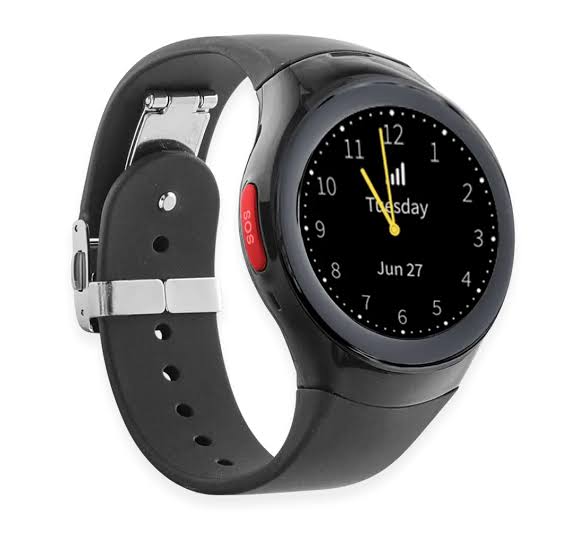
The Bay Alarm Medical SOS Smartwatch is a cellular medical alert watch designed for seniors and active adults who want emergency help on their wrist without carrying a separate pendant or relying on a smartphone. It combines one-touch SOS calling, GPS location sharing, two-way voice communication, and optional automatic fall detection in a compact smartwatch form factor. With its built-in speaker and microphone, the watch is made for clear communication with monitoring agents during urgent situations, whether at home, while walking, or during everyday errands.
This smartwatch is especially useful for users who value independence but still want fast access to professional emergency monitoring. It is a strong fit for older adults who live alone, people with mobility concerns, and families looking for peace of mind. The device also includes lifestyle features such as step tracking and weather information, making it more versatile than a basic medical alert pendant. The water-resistant design adds everyday practicality, while the included charging cradle simplifies daily use.
Pricing for the Bay Alarm Medical SOS Smartwatch typically starts around a $199 equipment fee, with monitoring plans around $39.95 per month and optional fall detection for an additional monthly charge. It is sold directly through Bay Alarm Medical and is generally positioned as a premium wearable medical alert system for users who want smartwatch convenience with professional emergency support.
Specifications for Bay Alarm Medical SOS Smartwatch
- Device type: Cellular medical alert smartwatch with professional monitoring
- Screen size: 1.25 inches
- Weight: About 2 oz
- Water resistance: IP67, suitable for everyday exposure and shower use
- Battery life: Up to 18 to 24 hours depending on usage
- Connectivity: 4G LTE cellular connection with GPS tracking
- Communication: Two-way voice calling with emergency monitoring center
- Emergency controls: Dedicated SOS button for help requests
- Optional feature: Automatic fall detection add-on
- Charging: Docking cradle with overnight charging support
- Wrist fit: Adjustable band sizes for most wrists
Compared with traditional medical alert pendants, the Bay Alarm Medical SOS Smartwatch offers more everyday functionality and a more discreet design. Compared with consumer smartwatches, it focuses less on apps and more on emergency response, which makes it more practical for safety-first users. Compared with similar medical alert watches, it stands out for its combination of GPS, cellular monitoring, and optional fall detection in a single wearable.
Setup Guide: How to Set Up the Bay Alarm Medical SOS Smartwatch
Start by fully charging the watch in the included docking cradle. Place the watch on the charger with the SOS button facing upward and confirm the charging indicator changes from red to green when the battery is full. This first charge may take several hours, so plan the setup before using the device for the first time.
Next, power on the watch by holding the power button until it vibrates or lights up. Follow the activation instructions provided by Bay Alarm Medical to connect the watch to your monitoring plan. Once activated, test the SOS button by pressing and holding it for several seconds so the device can place a call to the monitoring center.
Review configuration options such as volume, wrist fit, and any fall detection settings included in your plan. Make sure the watch is worn snugly but comfortably for better motion sensing and GPS performance. If the device does not turn on, ensure the battery is charged above the minimum level and that the cradle is properly connected to power.
Safety warning: Do not rely on the watch as your only emergency plan. Keep a phone nearby when possible, and test the device regularly to make sure it remains connected and ready for use.
Troubleshooting Bay Alarm Medical SOS Smartwatch Problems
- Watch will not power on: Place it on the charger for at least 30 minutes. The device may not turn on until the battery reaches a minimum charge level.
- Charging light stays red: Reseat the watch on the docking cradle and confirm the charger is plugged into a working outlet.
- SOS call does not connect: Check for cellular signal, confirm the plan is active, and test in an open area with better coverage.
- Low battery issues: Charge the watch daily, especially if GPS and cellular use are frequent.
- Fall detection not triggering: Ensure the feature is enabled on the account and that the watch is worn properly.
If you experience repeated connection problems, restart the device and test again after charging. Preventive care includes daily charging, regular device checks, and keeping the band clean and dry. While no universal error codes are commonly published for this model, recurring power or connection failures should be treated as support issues rather than isolated glitches.
Bay Alarm Medical support is available through customer service at 1-877-522-9633. Warranty terms and replacement options may vary by plan and purchase date, so users should confirm coverage directly with support if the device needs repair or replacement.
Pros and Cons of the Bay Alarm Medical SOS Smartwatch
Pros
- Emergency help is always on the wrist, making it easy to use in urgent moments
- Built-in GPS helps responders locate the wearer faster
- Two-way communication supports clear conversation with the monitoring center
- Optional fall detection adds extra protection for seniors at risk of falls
- Water-resistant design improves everyday practicality
- Includes useful extras like step tracking and weather info
Cons
- Requires a monthly monitoring fee, which raises long-term cost
- Battery life is shorter than many fitness-focused smartwatches
- Some users may prefer a simpler medical alert pendant
- Fall detection may cost extra depending on the plan
- Not as app-rich or feature-heavy as mainstream smartwatches
For value for money, the Bay Alarm Medical SOS Smartwatch makes the most sense for users who want safety and convenience in one device. Compared with cheaper medical alert pendants, it offers more mobility and style. Compared with premium smartwatches, it delivers better emergency-focused functionality for the price.
Customer Reviews of the Bay Alarm Medical SOS Smartwatch
Customer feedback is generally positive, with many users praising the watch’s ease of use, discreet design, and reliable access to live help. A common rating pattern is around 4 out of 5 stars, with users highlighting the convenience of having emergency support on the wrist.
Common praise includes the GPS tracking, clear voice connection, and the confidence the watch gives both users and family members. Frequent complaints focus on battery life, the cost of monthly monitoring, and the added charge for fall detection. Some reviewers also note that the device is best suited for safety rather than advanced smartwatch features.
Typical testimonial-style feedback: “Simple to wear and reassuring for my parents.” “The SOS button is easy to use, but I have to charge it every day.” For most buyers, it is a strong purchase if emergency readiness matters more than entertainment or app variety.
Frequently Asked Questions About the Bay Alarm Medical SOS Smartwatch
- Does the watch work without a phone? Yes, it uses cellular connectivity and does not require pairing with a smartphone for emergency use.
- Is fall detection included? It is typically available as an optional add-on.
- How long does the battery last? Battery life is generally up to 18 to 24 hours depending on use.
- Is the watch waterproof? It is IP67 water-resistant, which supports everyday exposure and shower use.
- Who should buy it? It is ideal for seniors, solo adults, and families seeking a medical alert smartwatch with GPS and monitoring.
Faqs
How do I set up the bay alarm medical SOS Smartwatch for the first time?
Why is my bay alarm medical SOS Smartwatch not pairing with my phone?
How does the SOS emergency button work on the bay alarm medical SOS Smartwatch?
What should I do if the bay alarm medical SOS Smartwatch battery drains too quickly?
Is the bay alarm medical SOS Smartwatch compatible with Android and iPhone?
How accurate are the health and activity features on the bay alarm medical SOS Smartwatch?
What are the most useful settings to optimize the bay alarm medical SOS Smartwatch for daily use?
How should I clean and maintain my bay alarm medical SOS Smartwatch?
Leave a Comment