
Setup: Beurer Blood Glucose Monitor GL 48 User Manual
Content
Beurer Blood Glucose Monitor GL 48: Comprehensive Product Manual & Guide
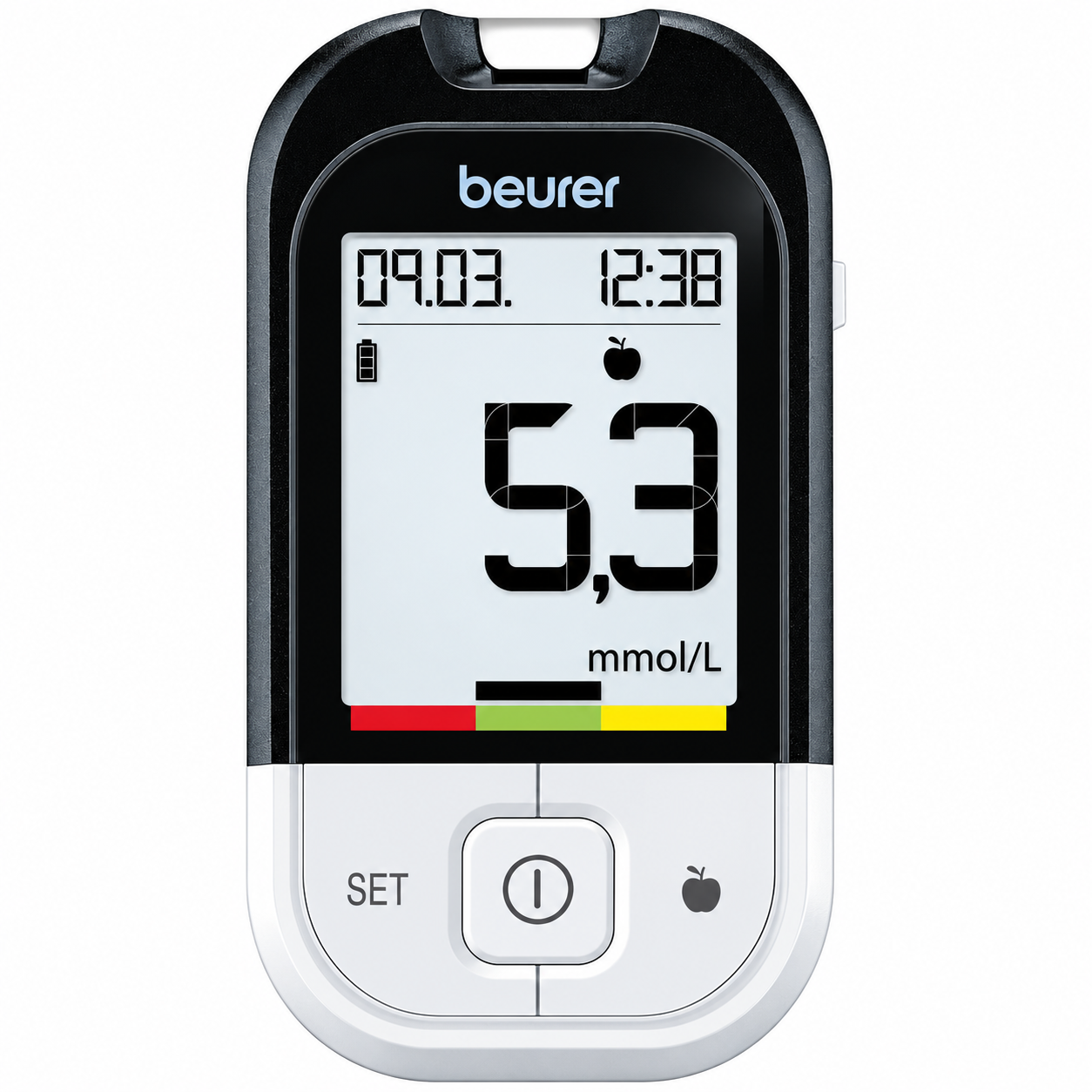
Introduction to the Beurer GL 48 Blood Glucose Monitor
The Beurer Blood Glucose Monitor GL 48 is a clinically tested, user-friendly blood glucose meter designed for individuals managing diabetes and those requiring regular blood sugar monitoring. This portable glucose monitor combines precision, ease of use, and comprehensive data tracking to support effective diabetes management at home.
The GL 48 delivers accurate blood glucose measurements in approximately 5 seconds, making it ideal for busy individuals who need quick, reliable results. Available in both mg/dL and mmol/L measurement units, this blood glucose monitor accommodates different regional preferences and medical requirements. The device features a large, illuminated LCD with easy-to-read digits, ensuring visibility even in low-light conditions.
Key benefits of the Beurer GL 48 include its code-free technology, plasma-calibrated measurement system, and comprehensive memory capacity of 900 measurements with date and time stamps. The device includes a colored target scale display that helps users interpret their blood glucose values at a glance, providing immediate feedback on whether measurements fall within the recommended range. Users can mark measurements as "before eating," "after eating," or general readings for optimized diabetes management.
The Beurer Blood Glucose Monitor GL 48 comes as a comprehensive starter set including the measuring device, LD 04 lancing device, 10 lancet needles, 10 test strips, USB cable, protective case, and detailed instructions. The device is suitable for self-testing at home and is backed by a 5-year warranty. With USB connectivity and compatibility with beurer HealthManager Pro app and GlucoMemory software, users can transfer and analyze their data on a PC for comprehensive trend monitoring.
Technical Specifications & Features
Core Measurement Capabilities:
- Measurement range: 20-630 mg/dL (1.1-35.0 mmol/L).
- Required blood volume: Only 0.5 microliters.
- Measurement time: Approximately 5 seconds.
- Memory capacity: 900 measurements with date, time, and marking.
- Plasma-calibrated for accuracy.
- Code-free operation.
Display & User Interface:
- Large, easy-to-read LCD with illuminated test strip insertion slot.
- Colored target scale for visual interpretation of results.
- Self-explanatory user menu.
- Available in mg/dL or mmol/L units.
Physical Specifications:
- Dimensions: 95 x 53 x 15 mm (approximately 94 x 52 x 14 mm).
- Weight: 50-52 grams.
- Power source: Battery-operated with CR2032 button cell batteries.
- Automatic shut-off function.
Data Management Features:
- Average value calculation for 7, 14, 30, or 90-day periods.
- USB connectivity for PC data transfer.
- Compatible with beurer HealthManager Pro, GlucoMemory, DiaBass, and SiDiary software.
- Web-based electronic diary access.
- Ketone warning indicator in display.
Blood glucose monitor
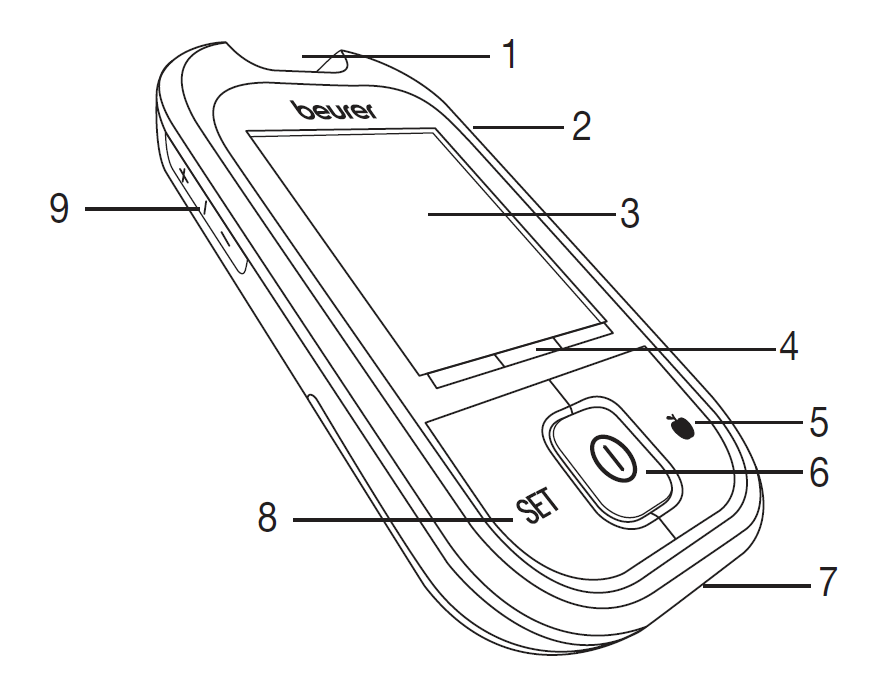
Front
- Receptacle for test strips, illuminated
- Test strip ejection slider
- Display
- Target scale
- Highlighting button
- ON/OFF button
- PC connection
- SET button
- +/- button
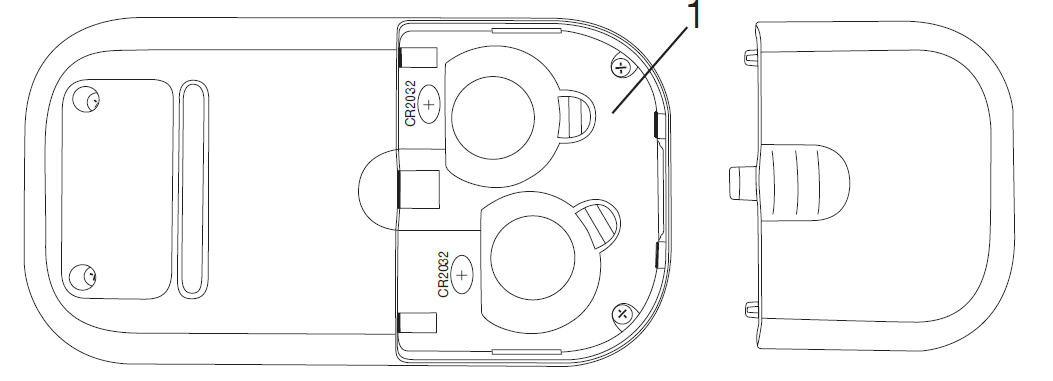
Rear
Battery compartment (bottom side)
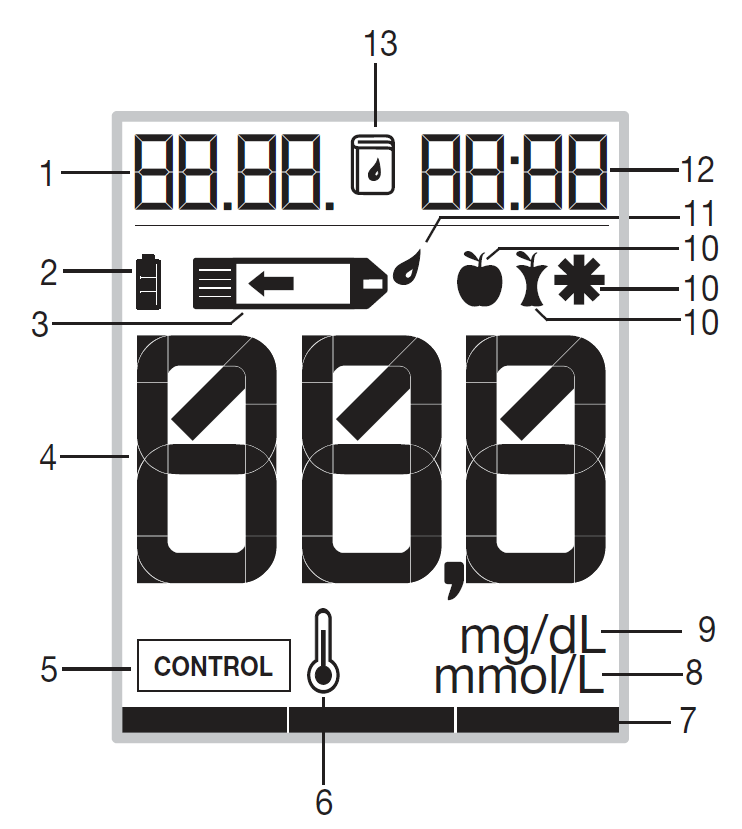
Display symbols
- Date, Err
- Battery status
- Test strip symbol
- Measured value display, HI, LO display, average blood glucose value
- Control solution measurement
- Temperature symbol
- Target scale
- Blood glucose unit mmol/L
- Blood glucose unit mg/dL
- Symbols for labelling measurements
- Drop symbol
- Time
- Memory symbol
Test strips
Front
- Gap for blood input
- Grip area
- Contacts
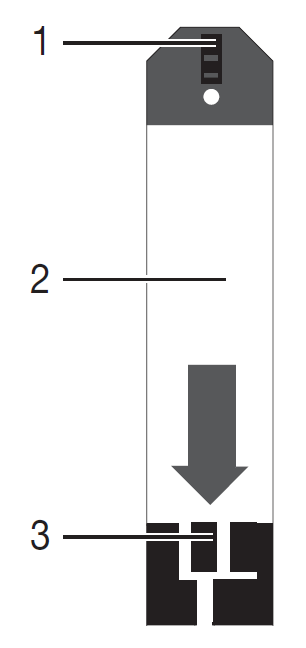
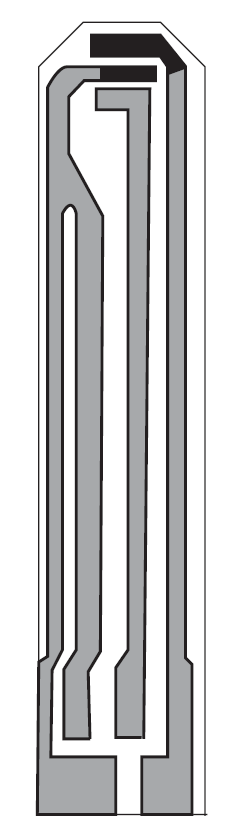
Rear
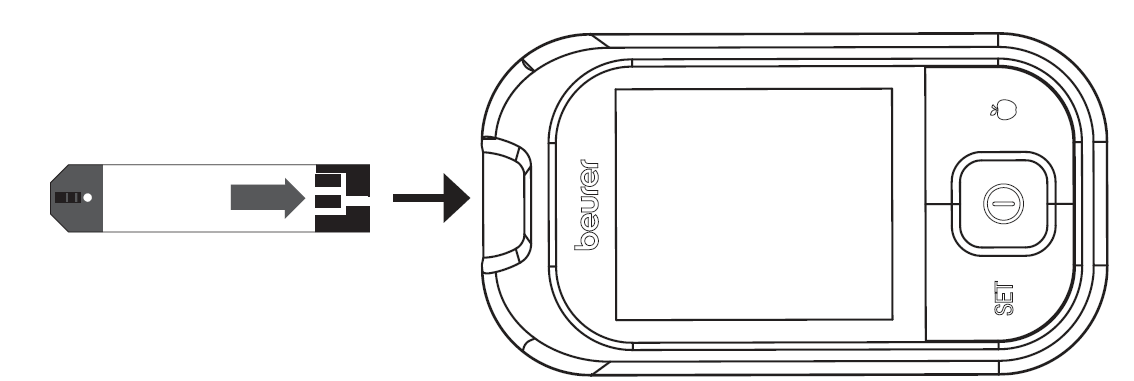
Insert the test strip into the device so that the contacts are pointing inside the slot. Make sure that the front of the test strip is facing you.
How to Use the Beurer GL 48
Preparation: Wash your hands thoroughly with soap and warm water. Dry completely before testing. Insert a CR2032 battery if this is your first use.
Basic Testing Steps:
- Insert a test strip into the illuminated insertion slot until you hear a click.
- Use the included LD 04 lancing device to obtain a small blood sample from your fingertip.
- Apply the blood drop to the test strip's designated area.
- The device will count down for approximately 5 seconds.
- Your blood glucose measurement will display on the screen.
- Mark your measurement (before eating, after eating, or general) using the device buttons.
- The device will automatically eject the used test strip for hygienic disposal.
Interpreting Your Results: The colored target scale beneath the display shows whether your reading falls within the normal range. The device also provides a ketone warning indicator if needed.
Data Management: Connect your device to a computer using the included USB cable to transfer measurements to beurer HealthManager Pro or compatible software for detailed analysis.
Initial use
Removing the battery insulation strips, replacing the batteries
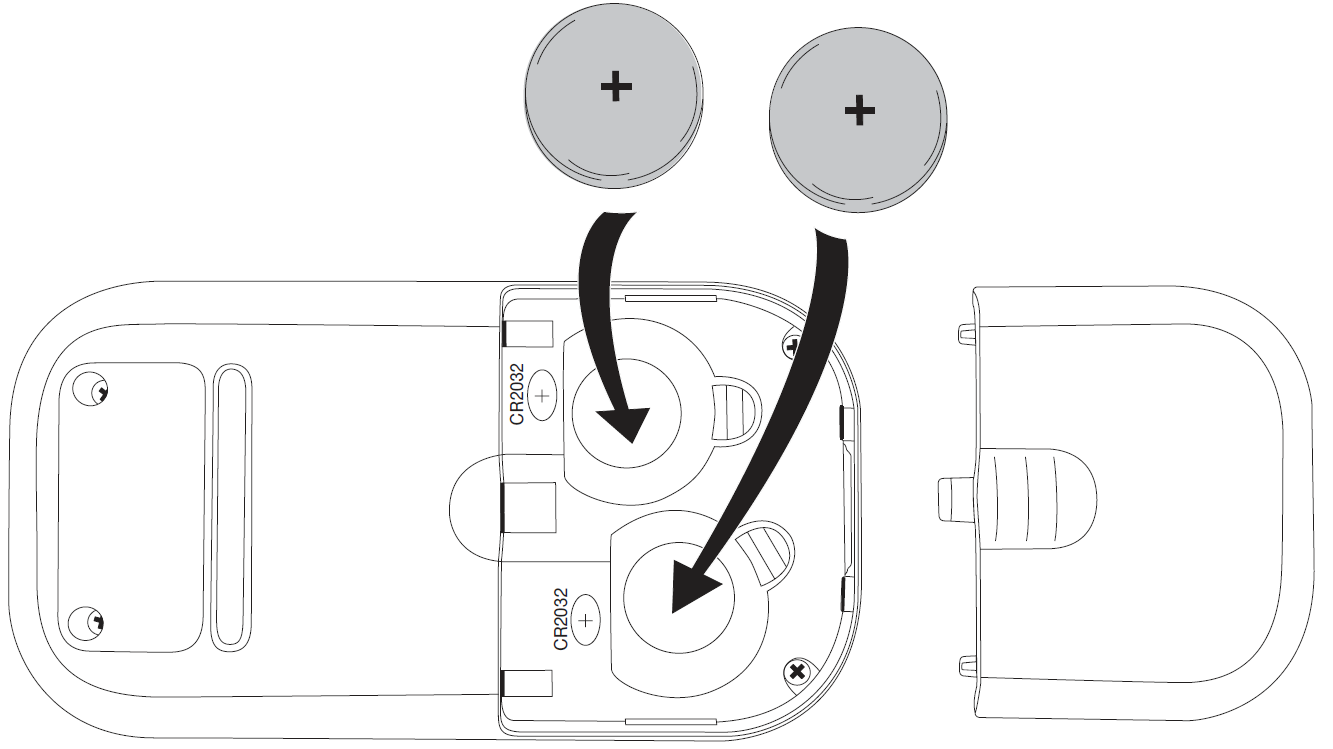
- Two batteries are included in delivery of the blood glucose monitor. These have already been inserted into the battery compartment.
- Remove the insulation strip before initial use.
- Remove the battery compartment lid on the underside of the device.
- When replacing the batteries, remove all batteries. If necessary, reset the date and time.
- Insert two new CR2032 3 V batteries. Make sure that the batteries are inserted the correct way round in accordance with the markings. See the graphic in the battery compartment.
- Close the battery compartment lid again carefully.
Making and changing basic settings
Remove the batteries and reinsert them. Alternatively, press the SET button. The year display flashes.
Setting the date and time
- You must set the date and time. Otherwise, you will not be able to save your measured values correctly with a date and time and access them again later.
- The time is displayed in the 24-hour format.
- Set the year (calendar to 2099) by pressing the “+” or “–” button. Confirm using the SET button.
- The day display flashes.
- Proceed as described above for the month, day, hour, and minute.
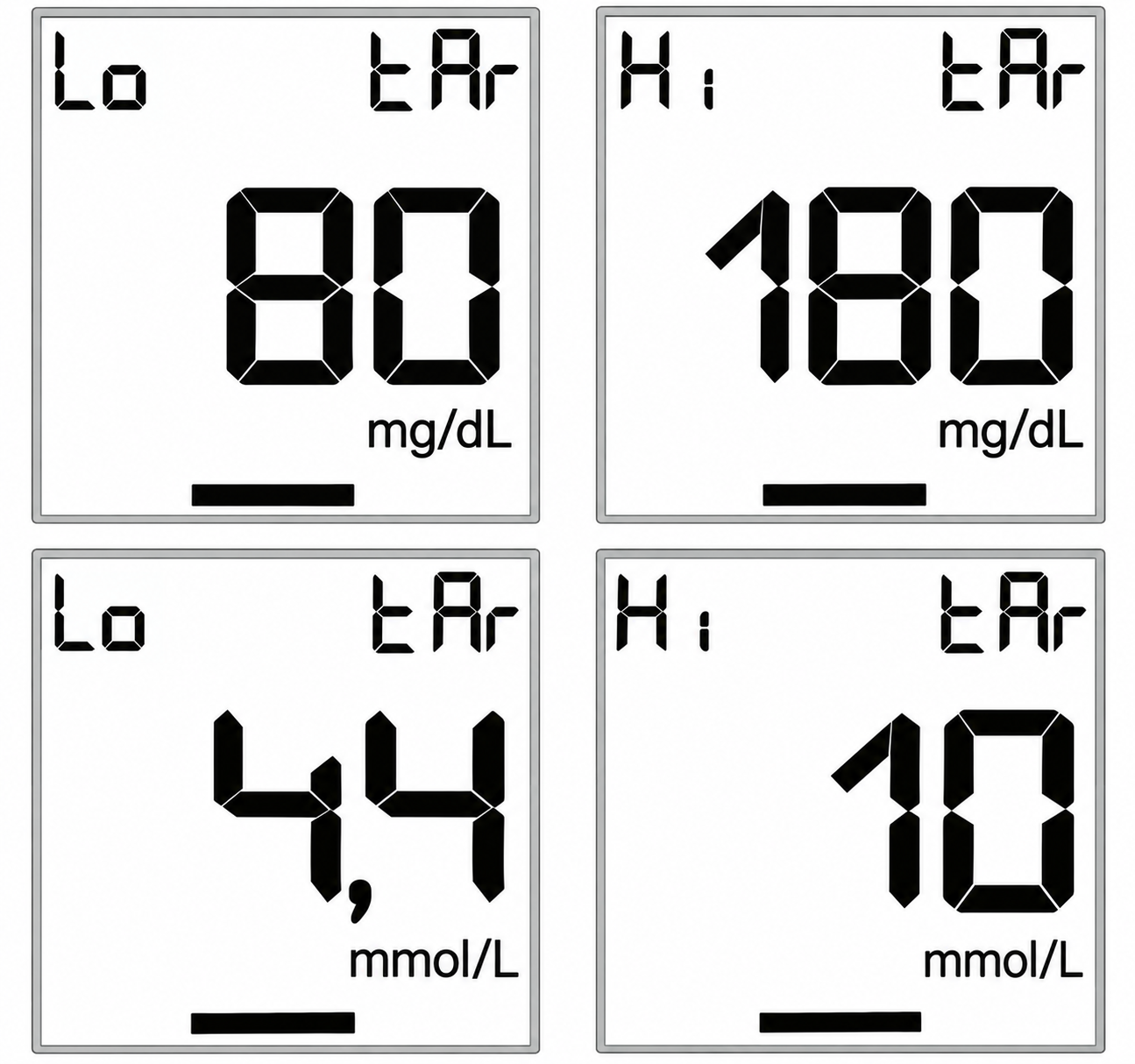
Setting the target scale
You can set a normal range for your blood glucose measuring results with the target scale. After a measurement, a bar in the display will point at the colour-coded target scale beneath the display.
- The bar is in the red area = the measurement value is below the set target range.
- The bar is in the green area = measurement value is within the set target range.
- The bar is in the yellow area = measurement value is above the set target range.
- Set the lower limit of your target range (Lo tAr) by pressing the +/– button. Confirm using the SET button.
- Set the upper limit of your target range (Hi tAr) by pressing the +/– button. Confirm using the SET button.
- The corresponding symbols are displayed.
Switching the acoustic signal on/off
- To switch the acoustic signal on/off, press the “+” or “–” button. The corresponding symbols indicate whether the acoustic signal is switched on or off.
- Confirm using the SET button.
- The measuring device is now ready for use.
Evaluating measured blood glucose values
Your blood glucose monitor can process measured values between 20 and 630 mg/dL (1.1 and 35.0 mmol/L). The “LO” warning is displayed for measured values below 20 mg/dL (1.1 mmol/L). For measured values above 250 mg/dL (13.9 mmol/L), a ketone warning is also displayed. The “HI” warning is displayed for measured values above 630 mg/dL (35.0 mmol/L).
Functional check using control solution
The control solution is used to test the entire blood glucose measuring system. This helps to determine whether the measuring device and the test strips are working optimally together and whether the test is being performed correctly.Perform the control solution test if you suspect that the measuring device and/or the test strips could be faulty or if you have repeatedly measured unusual blood glucose values. Also test the measuring device if it has been dropped or is damaged. The control solution is available separately. For the control solution test, please observe the additional notes in the instructions for use for the control solution.
Cleaning
- Only clean the device when it is switched off.
- Clean the surface of the device using a soft, slightly damp cloth (water or a mild cleaning solution).
- Dry the device using a lint-free cloth.
- Make sure that moisture does not enter the test strip insertion slot. Do not spray cleaning agent directly on the device. Do not submerge the device in water or any other fluids and make sure that no fluids can get into the device.
Disinfection
Please comply with the generally applicable guidelines on disinfection when using the device on different persons. Do not submerge the device in disinfection solutions or any other fluids and make sure that no fluids can enter the device.
Maintenance & Storage
Keep the Beurer Blood Glucose Monitor GL 48 in its supplied protective case when not in use. Store the device at room temperature away from direct sunlight, extreme heat, or excessive moisture. Check the battery indicator regularly and replace CR2032 batteries when the low battery warning appears. Clean the device gently with a soft, dry cloth; avoid harsh chemicals or water immersion.
Advantages of the Beurer GL 48
- Ease of Use: The Beurer Blood Glucose Monitor GL 48 features handy, wide test strips that are easy to handle, making testing less intimidating for users of all ages. The illuminated test strip insertion slot guides proper placement, while the strip ejection function provides hygienic disposal. The device requires minimal blood volume (0.5 microliters), reducing pain and making testing more comfortable.
- Accurate & Reliable Results: This glucose monitor is clinically tested and fully complies with EN ISO 15197:2015 standards, ensuring measurement accuracy. The plasma-calibrated technology delivers dependable results within the 20-630 mg/dL range. The blood volume check feature ensures measurements are only taken when sufficient blood is provided, preventing invalid results.
- Comprehensive Data Tracking: With 900 measurement memory spaces, users can track their blood glucose trends over extended periods. The ability to mark measurements (before eating, after eating, or general) enables detailed diabetes management analysis. The device calculates averages over 7, 14, 30, or 90-day periods, helping users and healthcare providers identify patterns.
- Smart Technology Integration: USB connectivity allows seamless data transfer to computers for detailed analysis using compatible software. The beurer HealthManager Pro app provides mobile access to glucose data and trends, supporting modern diabetes management approaches.
- Value for Money: The comprehensive starter set includes everything needed to begin testing immediately, eliminating additional purchase requirements. The 5-year warranty provides long-term peace of mind, and the device's durable design ensures reliable performance over years of daily use.
Limitations to Consider
- No Integrated Lancing Device: The Beurer GL 48 does not include an integrated lancing device in the meter itself; however, the included LD 04 lancing device provides a convenient solution.
- Manual Data Entry Requirements: While the device stores measurements, users must manually mark readings as "before eating" or "after eating" for optimized management.
- Temperature Sensitivity: The device requires proper storage in the supplied case and should not be exposed to direct sunlight or unsuitable temperatures.
- Not for Diagnosis: The device is intended for regular monitoring only and should not be used to diagnose diabetes; consultation with a healthcare provider is necessary for insulin dose adjustments.
Customer Experience & Reviews
Users consistently praise the Beurer Blood Glucose Monitor GL 48 for its reliability and ease of use. The large, illuminated display receives particular appreciation from users with vision difficulties, making readings immediately clear without squinting[3]. Customers frequently mention the device's quick 5-second measurement time, which fits conveniently into daily routines.
The minimal blood sample requirement (0.5 microliters) is highlighted as a significant advantage, as it reduces testing discomfort compared to older glucose monitors. Users value the colored target scale feature, which provides instant visual feedback without requiring complex interpretation.
Common praise includes the comprehensive starter set, which eliminates the need for immediate additional purchases, and the USB data transfer capability that enables detailed trend analysis with compatible software. The device's accuracy has been verified through clinical testing, giving users confidence in their results.
Regarding areas for improvement, some users mention that the device requires manual marking of measurement types, which can become tedious with frequent testing. The lack of integrated lancing means carrying a separate lancing device, though the included LD 04 addresses this concern.
Recommended For: The Beurer GL 48 is ideal for individuals newly diagnosed with diabetes, those seeking a reliable home monitoring solution, users who prefer detailed data tracking, and anyone requiring both mg/dL and mmol/L measurement options.
Warranty & Support
The Beurer GL 48 includes a 5-year warranty covering manufacturing defects. Free blood glucose diary software is available for download at www.beurer.com. For technical support or questions about insulin dosing, consult your healthcare provider or the Beurer customer service team.
```
Faqs
How do I set up the beurer Blood Glucose Monitor GL 48 for the first time?
What should I do if the beurer Blood Glucose Monitor GL 48 shows an error for insufficient blood?
How do I mark measurements on the beurer Blood Glucose Monitor GL 48 as before or after meals?
Is the beurer Blood Glucose Monitor GL 48 compatible with PC software and which ones?
How accurate is the beurer Blood Glucose Monitor GL 48 for blood glucose readings?
How do I replace batteries in the beurer Blood Glucose Monitor GL 48 and maintain it?
What does the target scale mean on the beurer Blood Glucose Monitor GL 48?
Why won't my beurer Blood Glucose Monitor GL 48 turn on or take readings?
More beurer manuals
- Setup: Beurer Sea Air Simulator MK 500 User Manual
- Setup: Beurer Heated Underblanket TS 23 User Manual
- Setup: Beurer BM-26 Blood pressure monitor User Manual
- Setup: Beurer Pulsoximeter PO 45 User Manual
- Setup: Beurer Non-contact Thermometer FT 85 User Manual
- Setup: Beurer Heated Underblanket UB 30 - UB 33 User Manual
Leave a Comment