
Setup: Beurer Non-contact Thermometer FT 90 Owner Manual
Content
Beurer Non-contact Thermometer FT 90: Comprehensive Product Manual
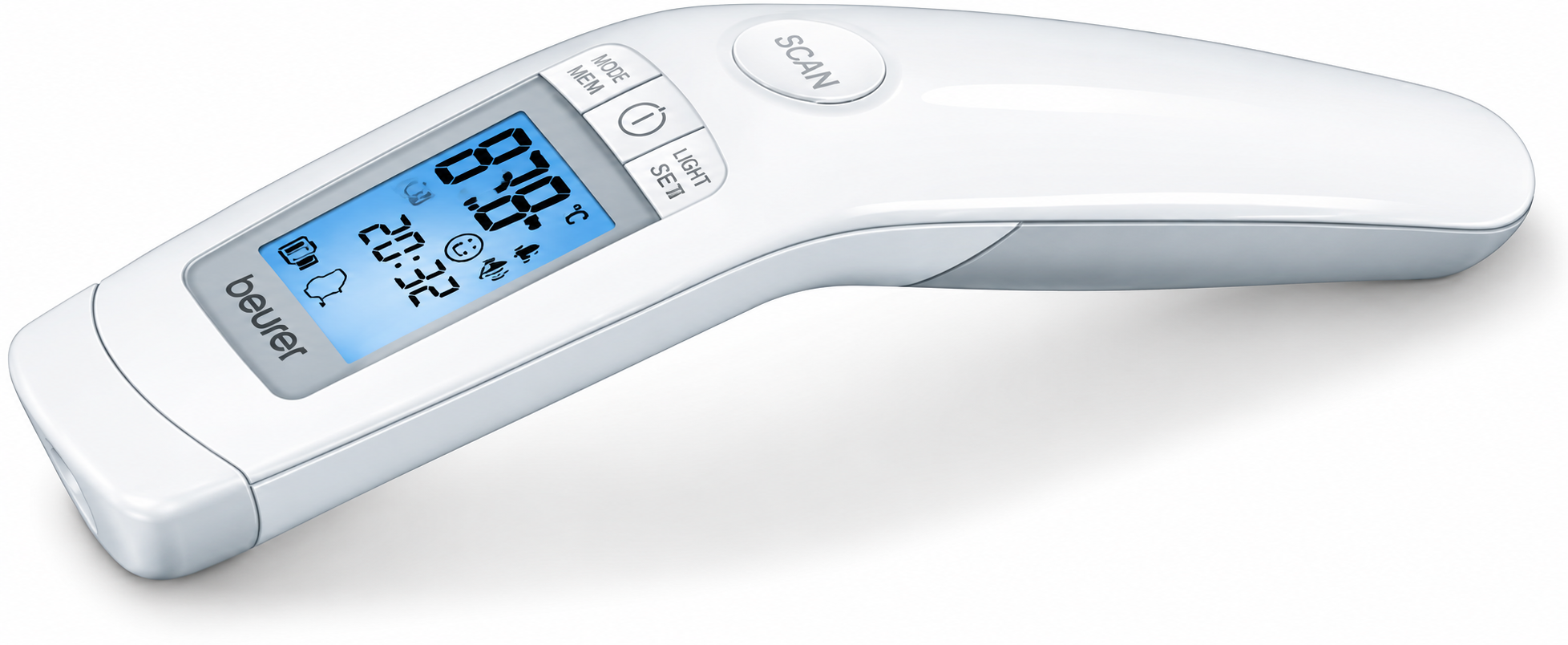
Introduction to the Beurer Non-contact Thermometer FT 90
The Beurer Non-contact Thermometer FT 90 is a versatile 3-in-1 infrared device designed for hygienic, accurate temperature measurements without skin contact. Ideal for families, parents of babies, and caregivers, this clinically tested thermometer measures forehead body temperature, object surface temperature, and room ambient temperature from a distance of 2-3 cm. Its non-contact infrared technology ensures safe, quick readings in seconds, making it perfect for restless children or during flu seasons.
Key benefits include a large backlit LCD for easy reading in low light, a fever alarm with color-coded indicators (green for normal, orange for elevated, red for fever above 38°C/100.4°F) and smiley/frown icons, and storage for up to 60 body temperature readings to track trends. Switch between °C and °F units effortlessly, with acoustic signals for activation, measurement, and completion (toggleable). Powered by 2x AAA batteries (included), it offers about 3000 measurements and auto-shuts off after 1 minute for energy efficiency.
Target users include parents monitoring infants, healthcare professionals, and anyone needing reliable non-contact forehead thermometer results. Use cases range from daily health checks to verifying baby bottle or room temperatures. Priced typically between $40-$60, it's widely available at medical supply stores, online retailers like Best Buy, and Beurer's official shop. German-engineered for precision (body accuracy ±0.2°C in the 36- 39 °C range), the Beurer FT 90 combines convenience, hygiene, and reliability in a compact 188 x 47.6 x 29 mm, 82g design with a storage case.
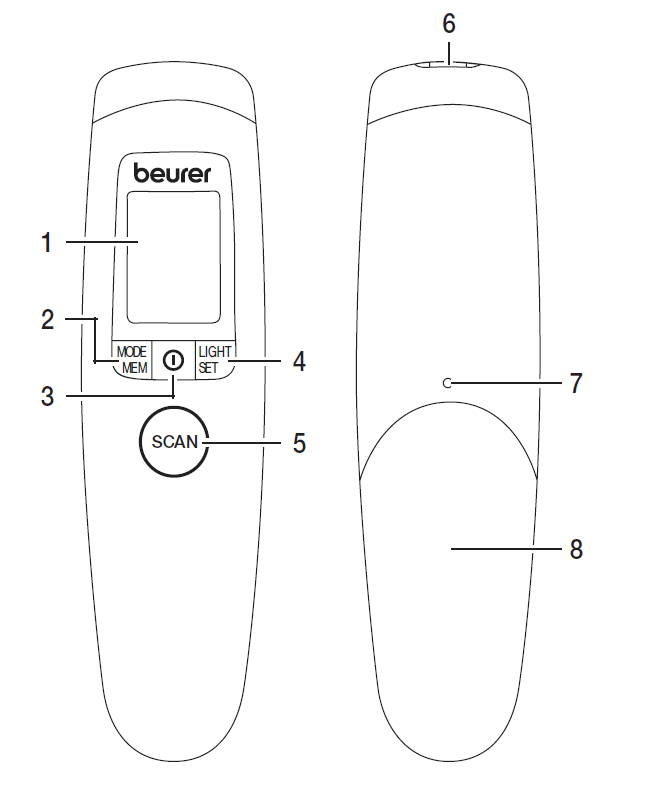
Unit description
- Display
- Mode/mem button
- On/off button
- Light/set button
- Scan button
- Measuring sensor
- Battery compartment lock
- Battery compartment lid
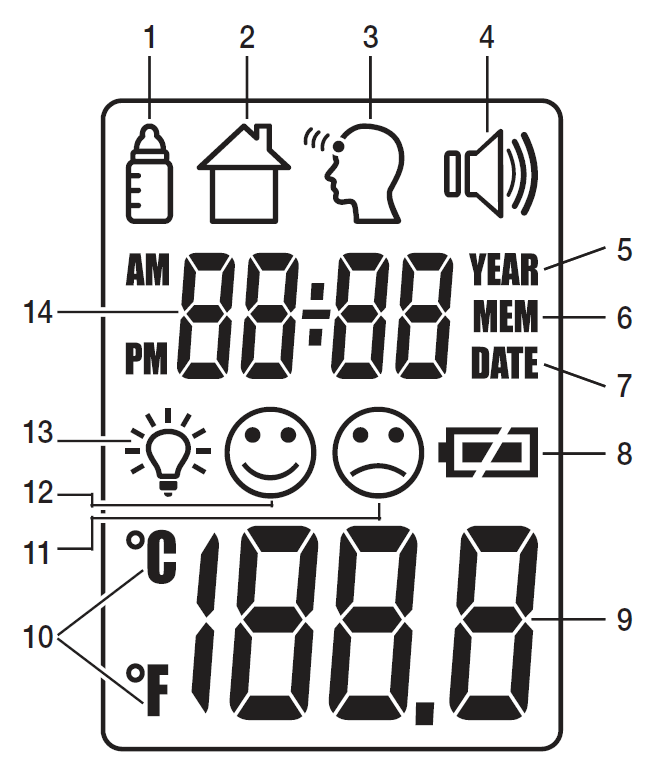
Display description
- Object temperature mode
- Room temperature mode
- Forehead temperature mode
- Acoustic signal symbol
- Year
- Memory function
- Date
- Battery level
- Temperature/memory space number display
- Celsius/fahrenheit measurement unit
- Measurement ≥ 38.0°c (≥ 100.4°f) “fever”
- Measurement < 38.0°c (< 100.4°f) “no fever”
- Illuminated display symbol
- Year/date/time display
Initial use
If provided, pull out the battery insulating strip at the battery compartment or remove the protective film from the battery and insert the battery with the correct polarity. After a brief self-test and two short beeps, the thermometer is ready for forehead measurements.
Switching on and setting the thermometer
Briefly press the on/off button.
After a brief self-test and two short beeps, the thermometer is ready for forehead measurement. The device always starts up in forehead temperature mode.
Setting the basic functions
This menu allows you to set the basic functions individually, one after another.

Displaying saved measurements
The device only stores measurements in forehead temperature mode. The device automatically stores the values from the last 60 measurements. When 60 storage places are exceeded, the oldest value is deleted.
The memory can be called up as follows:
- With the thermometer switched on, press and hold the mode/mem button for 5 seconds. The most recent measurement is displayed.
- With each subsequent press of the mode/mem button, the storage space number is displayed first, followed by the measurement upon release.
- In the upper line, the time and date are displayed alternately.
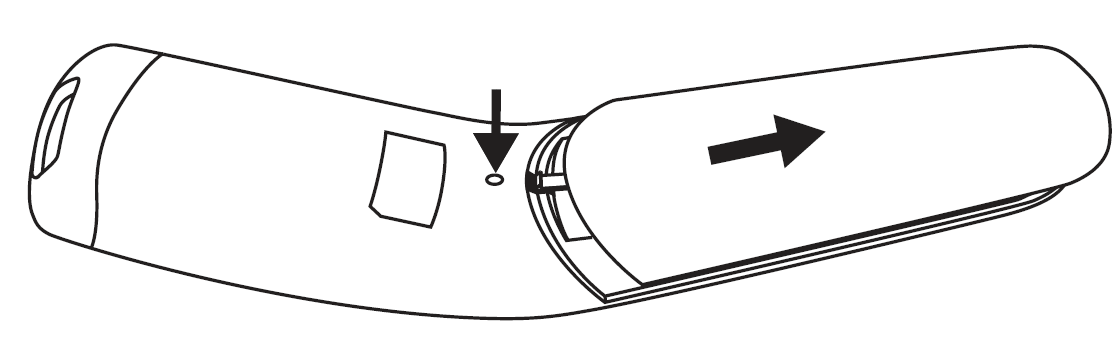
Batteries
The device requires two AAA (LR03) batteries.
- Open the battery compartment. Use a pointed object to press down on the battery compartment lock and, at the same time, slide the battery compartment downwards.
- Take the used batteries out of the battery compartment.
- Insert new batteries. Make sure that the batteries are inserted the right way round.
- Close the battery compartment.
- Empty, completely flat batteries must be disposed of through specially designated collection boxes, recycling points or electronics retailers. You are legally required to dispose of the batteries.
- The codes below are printed on batteries containing harmful substances:
- Pb = Battery contains lead.
- Cd = Battery contains cadmium.
- Hg = Battery contains mercury.
Cleaning the device
- The measuring sensor is the most sensitive part of the thermometer. Take great care of the measuring sensor when cleaning the device.
- Do not use any harsh cleaning products.
- Always observe all safety notes for the user and device.
Clean the measuring sensor after each use. Use a clean cloth or cotton bud that can be moistened with disinfectant or 70% alcohol. To clean the entire device, please use a soft cloth slightly moistened with a mild soapy solution. Under no circumstances may liquid enter the device. Do not use the device again until it is completely dry.
Storing the device
The device must not be stored or used at an excessively high or low temperature or humidity (see technical specifications), in sunlight, in association with an electrical current or in dusty locations. Otherwise, inaccuracies can occur. If prolonged storage is planned, you should remove the batteries.
Troubleshooting the Beurer Non-contact Thermometer FT 90
Common issues with the Beurer Non-contact Thermometer FT 90 include inaccurate readings, no display, or error signals. For low accuracy, ensure 2-3 cm distance from the forehead, clean the sensor lens with a soft cloth (no alcohol), and operate in 10-40°C conditions. If readings vary, perform a self-test by powering on; two beeps confirm readiness.
Error codes: No specific codes listed, but flashing display or no response often signals low battery—replace with fresh AAA batteries. If memory doesn't save (up to 60 readings), reset by removing batteries for 1 minute. Acoustic signals absent? Check sound settings via menu.[1][4]
Preventive measures: Store in the included case at room temperature (<95% RH), avoid drops, and calibrate periodically against known temperatures like room air. For persistent issues, contact Beurer support at their website (beurer.com) or local distributor helplines. As a medical device with a 5-year warranty, register for extended support; batteries and misuse are excluded.
Pros and Cons of the Beurer Non-contact Thermometer FT 90
Pros
- Hygiene and speed: Non-contact infrared measurement prevents germ spread, ideal for babies—results in seconds.
- Versatile 3-in-1 functionality: Forehead (34-42.2°C, ±0.2°C accuracy), objects (-22-80°C), and room temps.
- User-friendly features: Backlit display, 60-memory, fever alarm with icons, °C/°F switch, and auto-off.
- Excellent value: At $40-$60, offers clinical precision and long battery life vs. pricier competitors like Braun.
Cons
- Limited memory for non-body modes (body-only storage noted in some specs).
- Potential accuracy dips outside ideal range or with motion—less reliable than probe thermometers for oral use.
- No Bluetooth (unlike FT 95), manual tracking only.
- Battery life reduces with backlight/sound use.
Overall, the Beurer FT 90 non-contact thermometer excels in home use, outperforming basic models in versatility while matching premium accuracy at a budget price.
Customer Reviews for Beurer Non-contact Thermometer FT 90
Users praise the Beurer Non-contact Thermometer FT 90 for its ease and reliability, averaging 4.5/5 stars across retailers. "Perfect for my toddler—quick, hygienic, and the fever icons make it foolproof!" (5 stars, Best Buy reviewer). Common praises: Accurate readings matching doctor's visits, intuitive 3-in-1 modes, and clear display.
Complaints include occasional inconsistent forehead scans if too far (stick to 2-3 cm) and short battery under heavy use. "Great value, but memory could sync to app" (4 stars).[3] Most recommend for families: 90% repurchase intent, highlighting hygiene during pandemics. Addresses motion sickness in kids better than contact models.
Faqs
How do I set up the beurer Non-contact Thermometer FT 90 for the first time?
How do I switch between Celsius and Fahrenheit on beurer Non-contact Thermometer FT 90?
What should I do if beurer Non-contact Thermometer FT 90 gives inaccurate readings?
How do I troubleshoot beurer Non-contact Thermometer FT 90 not turning on?
How do I measure forehead temperature accurately with beurer Non-contact Thermometer FT 90?
How do I use object temperature mode on beurer Non-contact Thermometer FT 90?
How do I clean and maintain beurer Non-contact Thermometer FT 90?
How do I view stored measurements on beurer Non-contact Thermometer FT 90?
More beurer manuals
- Setup: Beurer Battery-Operated Heating Pad HK 77 Heaty User Manual
- Setup: Beurer Blood Glucose Monitor GL 49 User Manual
- Setup: Beurer Pulsoximeter PO 13 Kids User Manual
- Setup: Beurer FT 16 Express Thermometer User Manual
- Setup: Beurer Pulsoximeter PO 35 Owner Manual
- Setup: Beurer FT 09/1 Thermometer User Manual
Leave a Comment