
Setup: Beurer Non-contact Thermometer FT 95 User Manual
Content
Beurer Non-Contact Thermometer FT 95: Comprehensive Product Manual
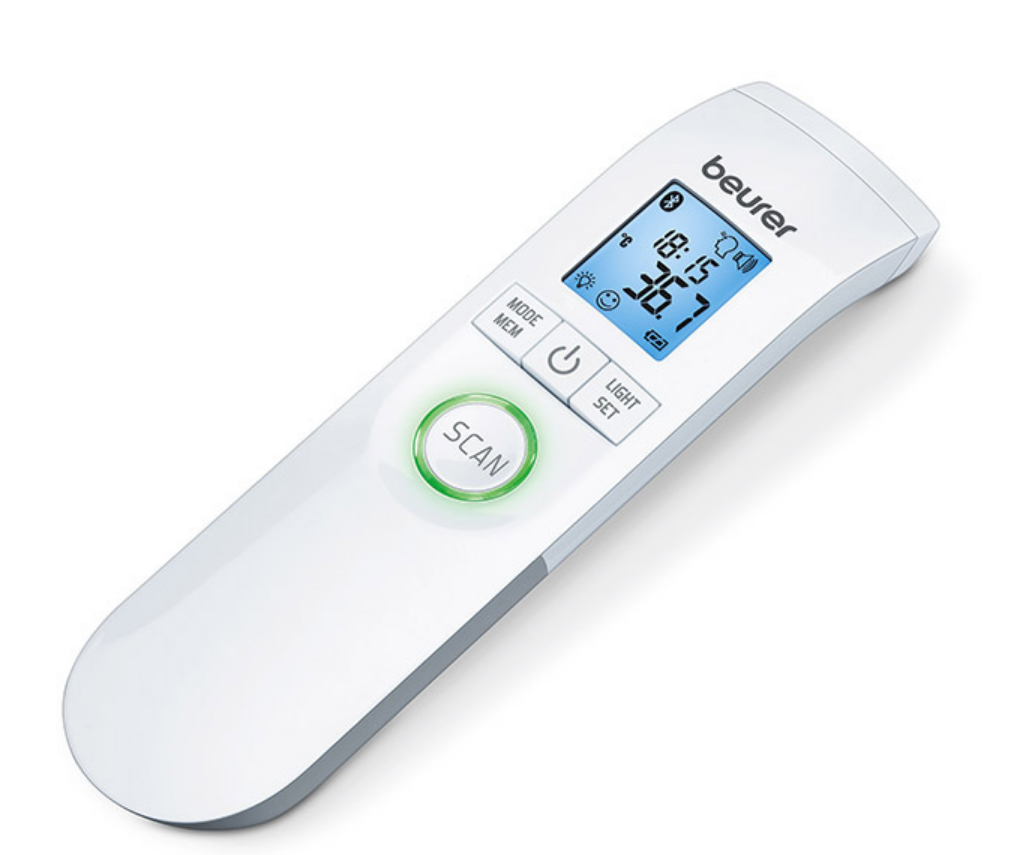
Introduction to the Beurer Non-Contact Thermometer FT 95
The Beurer Non-Contact Thermometer FT 95 is a cutting-edge infrared clinical thermometer designed for fast, hygienic forehead temperature measurements without skin contact, making it perfect for families, especially parents monitoring babies and toddlers. This medical device delivers results in seconds, featuring a 3-color LED fever indicator—green for up to 37.5°C (normal), yellow for 37.5–37.9°C (elevated), and red for 38.0°C or higher (fever)—along with optional acoustic signals for clear feedback.
Key benefits include Bluetooth connectivity to sync data with the free “beurer HealthManager Pro” or “beurer BabyCare” apps, allowing graphical tracking of temperature trends over time. It stores up to 60 body temperature readings with date and time, supports °C/°F switching, and measures ambient room, surface, and liquid temperatures too. With ±0.2°C accuracy for forehead readings (34–42.2°C range), a blue illuminated XL display, silent mode for sleeping infants, and automatic shut-off after 1 minute, the Beurer FT 95 thermometer ensures reliability and ease of use.
Ideal for home use, healthcare settings, or travel, this lightweight (74g) device (16.7 x 4.2 x 2.8 cm) runs on 2x AAA batteries (included) and offers versatile applications like checking baby formula or room temperature. Priced typically between $50–$80 USD, it's widely available online via retailers like Walmart or Beurer's official shop, backed by a 5-year warranty for peace of mind. Whether for daily health monitoring or fever detection in kids, the Beurer Non-contact Thermometer FT 9 combines precision, hygiene, and smart tech for effortless temperature management.
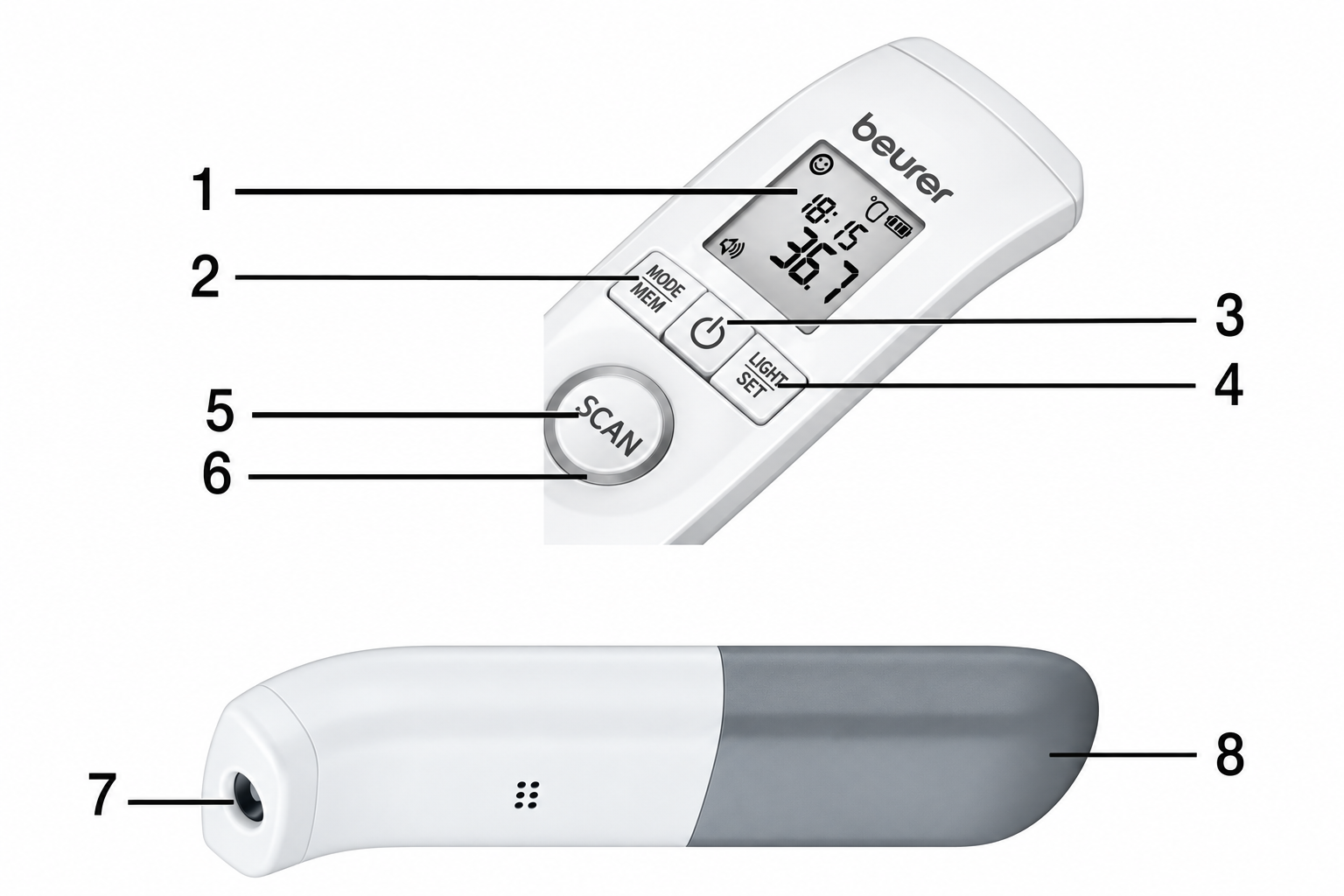
Device Description
- Display
- MODE/MEM button
- Power button
- LIGHT/SET button
- SCAN button
- Fever indicator
- Measuring sensor
- Battery compartment lid
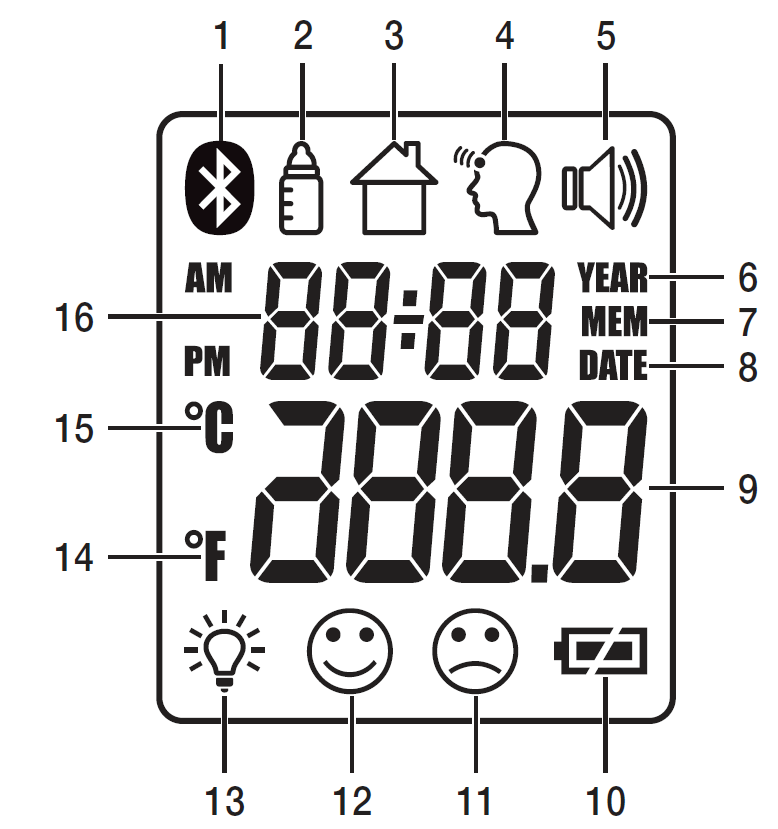
Display Description
- Bluetooth
- Object temperature mode
- Room temperature mode
- Forehead temperature mode
- Acoustic signal symbol
- Year
- Memory function
- Date
- Temperature/memory space number display
- Battery status indicator
- Measurement ≥ 38.0 °C (≥ 100.4 °F) – “Fever”
- Measurement < 37.5 °C (< 99.5 °F) – “No fever”
- Illuminated display symbol
- Temperature measurement unit, Fahrenheit
- Temperature measurement unit, Celsius
- Year/date/time display
Specifications
- Type: FT 95
- Measurement Method: Non-contact infrared measurement
- Basic Functions:
- Forehead temperature measurement
- Object temperature measurement
- Room temperature measurement
- Measurement Units: Celsius (°C) or Fahrenheit (°F)
- Operating Conditions: 15 °C to 40 °C (59 °F to 104 °F) at a relative humidity of less than 95%
- Storage and Transport Conditions: -20 °C to 50 °C (-4 °F to 122 °F) at a relative humidity of less than 85%
- Measuring Distance: 2 to 3 cm from the measuring point
- Forehead Temperature Measurement Range: 34 °C to 42.2 °C (93.2 °F to 108 °F)
- Forehead Temperature Measurement Accuracy: ± 0.2 °C (± 0.4 °F)
- Clinical Repeat Precision:
- Children (1–5 years): ± 0.07 °C (0.13 °F)
- Adults: ± 0.08 °C (0.14 °F)
- Object Temperature Measurement Range: 0 °C to 80 °C (32 °F to 176 °F)
- Object Temperature Measurement Accuracy: ± 4% or ± 2 °C (± 4 °F)
- Memory Function: Automatically stores the last 60 body temperature measurements
- Acoustic Signal: Sounds when the device is activated, during measurement, and when measurement is complete (adjustable)
- Display: LCD display
Initial Use
Inserting the Battery
- Remove the battery compartment lid.
- Insert both batteries into the battery compartment according to the specified polarity.
- Only use brand-name batteries of type 2 × 1.5 V micro (alkaline type LR03). Make sure that the batteries are inserted correctly according to the markings. Do not use rechargeable batteries.
- Close the battery compartment by positioning the lid and clicking it into place.
The thermometer automatically switches on, and the settings menu appears on the display (see section 7, Switching On and Setting the Thermometer).
Switching On and Setting the Thermometer
To switch on the thermometer, briefly press the power button. After a brief self-test and two short beeps, the thermometer is ready for forehead measurement. The device always starts in forehead temperature mode.
Setting the Basic Functions
This menu allows you to set the following functions individually, one after another.

Displaying Stored Measurements
The device only stores measurements in forehead temperature mode. It automatically stores the values from the last 60 measurements. When the 60 memory spaces are exceeded, the oldest value is deleted.
- The memory can be accessed as follows:
- With the thermometer switched on, press and hold the MODE/MEM button for 3 seconds. The most recent measurement is displayed.
- Press the MODE/MEM button again to display the next stored measurement.
- In the upper line, the time and date are displayed alternately.
Uploading Measurements via Bluetooth
It is also possible to transfer the measured values saved on the device to your smartphone using Bluetooth®. To do this, you will need the “beurer HealthManager” app or the “beurer BabyCare” app. Both apps are available for free from the Apple App Store and Google Play. Measuring Object Temperature/Room Temperature
Object Temperature Mode
If you want to measure an object's temperature with this thermometer, switch to object temperature mode.
- With the thermometer switched on, briefly press the MODE/MEM button. The device switches to object temperature mode.
- Hold the thermometer 2 to 3 cm from the measuring point. Briefly press the SCAN button and read the temperature on the display.
The device automatically switches off after approximately 60 seconds, or you can press the power button to switch it off. Measurements taken in object temperature mode are not stored.
Room Temperature Mode
If you want to use the thermometer to measure room temperature, you need to switch to room temperature mode.
- With the thermometer switched on, briefly press the MODE/MEM button twice. The device switches to room temperature mode.
- The room temperature is immediately displayed .
The device automatically switches off after approximately 60 seconds, or you can press the power button to switch it off. Measurements taken in room temperature mode are not stored.
Batteries
Changing the Batteries
The device requires two AAA (LR03) batteries.
- Open the battery compartment by pushing the battery compartment lid down.
- Take the used batteries out of the battery compartment.
- Insert new batteries. Make sure that the batteries are inserted correctly according to the polarity markings.
- Close the battery compartment.
Storing the Device
The device must not be stored or used at excessively high or low temperatures or humidity levels (see section 15, Technical Data), in direct sunlight, near sources of electrical current, or in dusty locations. Otherwise, measurement inaccuracies may occur.
If prolonged storage is planned, you should remove the batteries.
Troubleshooting the Beurer Non-Contact Thermometer FT 95
Common issues with the Beurer Non-contact Thermometer FT 95 often stem from improper use or battery problems. If no display appears, replace the 2x 1.5V AAA batteries, as low power triggers the battery indicator. For inaccurate readings, ensure 2–3 cm distance from the forehead, avoid direct sunlight or drafts, and wait 1 minute between measurements; clean the sensor with a soft cloth if dirty.
Error indicators include erratic LED colors or beeps: the fever alarm activates above 38°C (red LED), but false positives may occur from sweat or hair—wipe forehead dry and retry. Bluetooth pairing fails? Confirm device compatibility (Bluetooth 4.0+), restart apps, and hold the device near your phone; max transmission power is 2.8 dBm on 2402–2480 MHz. No acoustic signal? Toggle via LIGHT/SET button in settings.
Prevent issues by storing at 10–40°C, avoiding drops, and performing self-tests on startup (two beeps confirm readiness). The Beurer FT 95 includes a 5-year warranty; contact Beurer support at support@beurer.com or visit beurer.com for manuals and app compatibility lists. For persistent problems, scan the QR code in the manual for device-specific help.
Pros and Cons of the Beurer Non-Contact Thermometer FT 95
Pros
- Hygienic and fast: Non-contact infrared tech measures in seconds at 2–3 cm, ideal for fussy kids or infection-prone settings.
- Smart features: Bluetooth app integration for trend tracking, 60-memory storage, and versatile 3-in-1 use (body, object, room).
- User-friendly alerts: Color-coded LED (green/yellow/red) and optional beeps simplify fever detection; silent mode for nights.
- High accuracy and build: ±0.2°C forehead precision, XL blue display, °C/°F switch—excellent value at $50–$80 with 5-year warranty.
Cons
- Learning curve for modes: Switching between body/object/room requires button combos, confusing initially vs. simpler one-mode rivals.
- Battery dependency: AAA batteries drain faster with backlight/Bluetooth; no rechargeable option like some Braun models.
- App limitations: Bluetooth setup picky on older phones; object accuracy ±2°C less reliable than forehead.
- Price premium: Costlier than basic contact thermometers, though app features justify for tech-savvy users.
Overall, the Beurer Non-contact Thermometer FT 95 offers superior value for app-enabled, family-focused monitoring compared to budget alternatives.
Customer Reviews: Beurer Non-Contact Thermometer FT 95
Users rave about the Beurer Non-contact Thermometer FT 95, averaging 4.5/5 stars across sites like Walmart and Essential Aids. Praises highlight speed and hygiene: “Perfect for my newborn—reads in 2 seconds without waking her, LED colors make fever obvious!” (5/5). App connectivity shines: “Bluetooth syncs seamlessly to HealthManager Pro, tracking my kid’s cold trends effortlessly” (4.8/5).
Common complaints include occasional Bluetooth glitches: “Pairing took retries on Android” (3/5), and sensitivity to movement. Battery life draws minor gripes, but most recommend it: “Worth every penny over old oral thermometers—accurate, easy, hygienic” (4.7/5 average). Frequently mentioned perks: silent mode and multi-surface use. Ideal buy for parents seeking a reliable non-contact forehead thermometer with smart features.
More beurer manuals
- Setup: Beurer Non-Contact Thermometer FT 100 User Manual
- Setup: Beurer Shoulder & Neck Heat Pad HK 66 Cosy User Manual
- Setup: Beurer Heated Underblanket TS 17 User Manual
- Setup: Beurer Blood Glucose Monitor GL60 User Manual
- Setup: Beurer FT 09/1 Thermometer User Manual
- Setup: Beurer Ear Thermometer FT 58 User Manual
Leave a Comment