
Setup: Beurer Wellness Foot Spa FB 60 User Manual
Content
Beurer Wellness Foot Spa FB 60: Complete Product Manual and Guide
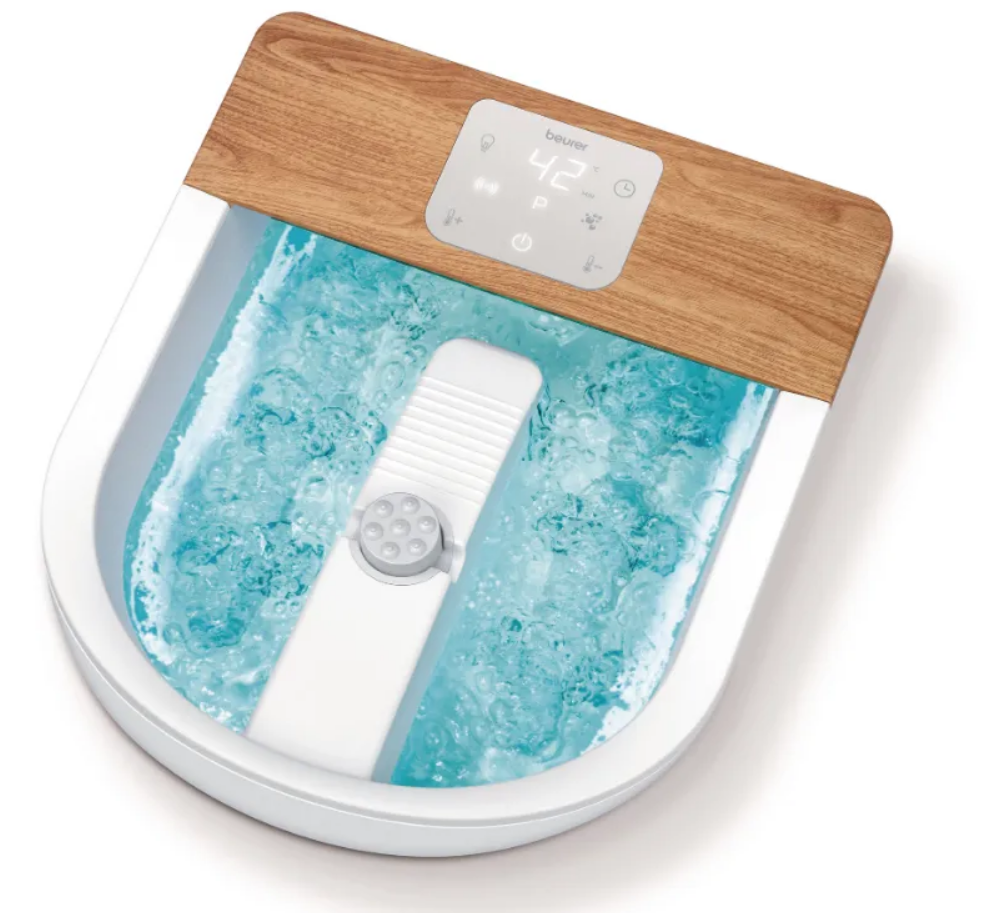
Introduction to the Beurer Wellness Foot Spa FB 60
The Beurer Wellness Foot Spa FB 60 is a premium foot bath designed for ultimate relaxation and foot care, featuring water heating, bubble massage, vibration massage, and three temperature zones. This deluxe foot spa provides stressed feet with a professional spa treatment at home, using individually selectable vibration and bubble functions, water heating in 8 stages from 34–48°C, and an LED touch display for intuitive control.
Key benefits include improved circulation, relief for tired heavy legs, and a built-in pedicure center with three interchangeable massage attachments: a brush for reflex zone stimulation, a massage roller for soothing relief, and an exfoliating option for well-groomed feet. Extra-wide rollers and massage nodules target the foot's underside, while the double-walled design enhances thermal insulation. Preset programs, manual settings, and a timer (20–60 minutes in 5-minute increments) make it versatile for daily wellness routines.
Ideal for busy professionals, athletes, or anyone seeking foot pain relief and relaxation, the Beurer Wellness Foot Spa FB 60 suits feet up to size 16. Use it after long workdays, workouts, or for pedicure prep with optional aromatherapy. Priced around $100–$150, it's widely available online and in stores, backed by a 3-year warranty and German engineering.
With non-slip feet, a carry handle, cord winder, splash guard, and storage bag, this foot massager spa device offers convenience and luxury in a compact 45 x 39 x 18.4 cm footprint weighing 3.2 kg.
DEVICE DESCRIPTION
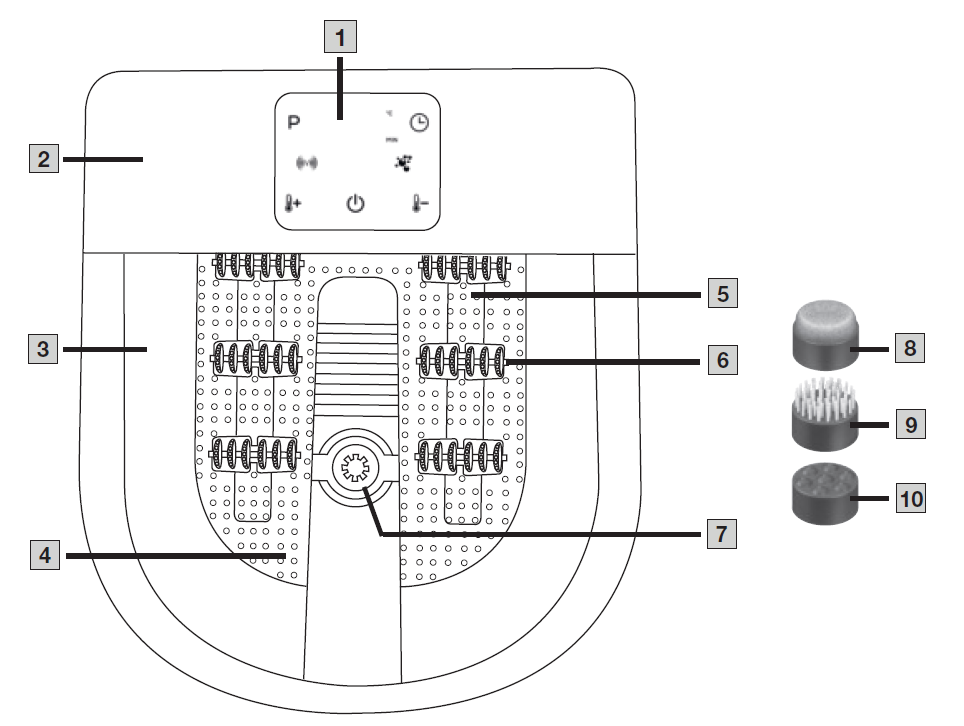
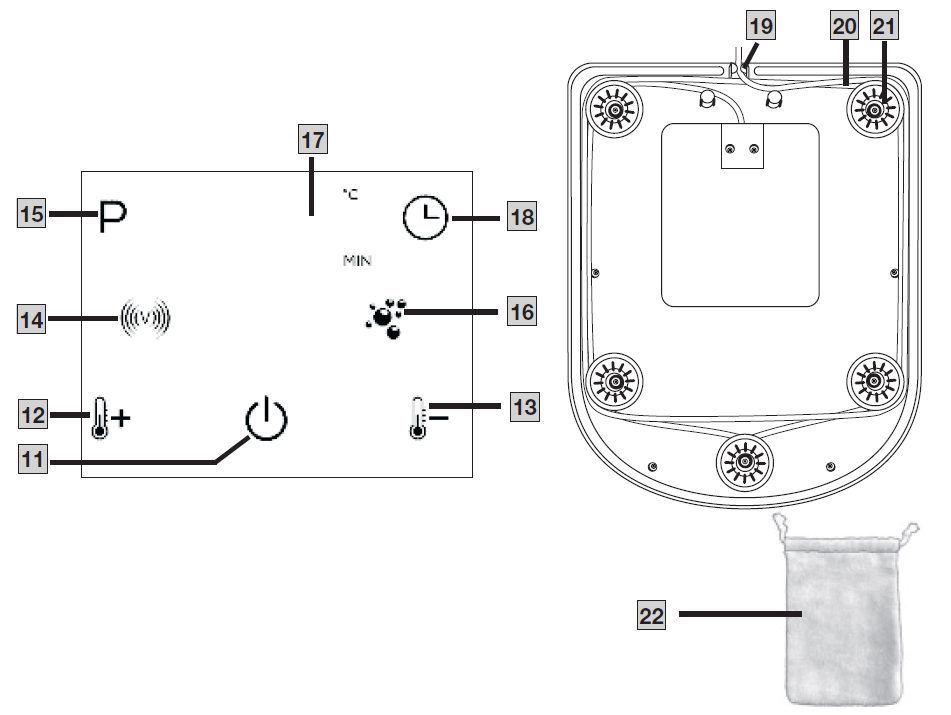
The associated drawings are shown on page 3.
- LED Touch Display
- Splash Protection
- Fill Level Mark (Max. 5.5 L)
- Foot Rest with Massage Nodules
- Bubble Bar
- Massage Roller Attachments (6 Pieces)
- Pedicure Centre
- Portable Pedicure Device
- Brush Attachment
- Massage Attachment
- ON/OFF Button
- “Increase Water Temperature” / “Switch Water Heating On” Function Button
- “Decrease Water Temperature” / “Switch Water Heating Off” Function Button
- “Vibration” Function Button
- “Programs” Function Button
- “Bubble” Function Button
- Water Temperature / Timer Time Display
- “Timer” Function Button
- Cable Outlet
- Cord Winder
- Rubber Feet
- Storage / Drying Bag
TECHNICAL SPECIFICATIONS
- Power Supply: 220–240 V~, 50–60 Hz, 630 W
- Size: 45.0 × 39.0 × 18.4 cm
- Weight: Approx. 3.2 kg
USE
Initial Use
- Remove the packaging, including the film protecting the display.
- Check the complete scope of delivery (including packaging) for damage.
- Before plugging the foot bath in, fill it with cold or warm water up to the fill level mark 3 (approx. 5 cm high). The foot rest part must be completely submerged under water.
- Place the foot bath on a firm and level surface.
- Ensure that the mains cable does not pose a trip hazard.
- Insert the mains plug into a suitable socket. The ON/OFF button 11 starts to flash. The foot bath is in standby mode.
Using the Foot Bath
- Sit in a comfortable position. Never use the foot bath standing up.
- Place your feet in the foot bath. The rubber feet on the base of the device prevent the foot bath from slipping.
- Press the ON/OFF button 11 to switch the foot bath on. The ON/OFF button 11 lights up and stays lit; the display 17 shows the current water temperature. The foot bath is now ready for use.
- The massage is especially effective if you move your feet back and forth over the massage roller attachments 6 in the foot rest.
At the End of Use
To switch the foot bath off again before the automatic switch-off takes effect (see “Timer Function”), press the ON/OFF button 11 again. The ON/OFF button 11 flashes again. The foot bath is in standby mode. Switch the foot bath off after use and remove the mains plug from the socket.
Pedicure Attachments
The foot bath has a pedicure centre 7 for individual pedicure. There are three different attachments 8, 9, 10 that you can attach to the pedicure centre 7:
- The portable pedicure device attachment 8 can be used to remove dead skin cells and calluses.
- The brush attachment 9 can be used to stimulate the reflex zones in the soles of your feet.
- The massage attachment 10 provides a pleasant massage for your feet and stimulates circulation.
Setting the Water Temperature
You can use the foot bath with and without water heating. The water heating can be set to between 34°C and 48°C. The water heating starts at 34°C. You can increase/decrease the water temperature in 2°C increments.
- To switch the water heating on, press the “Increase water temperature” / “Switch on water heating” function button 12.
- To increase the water temperature in the foot bath, press the “Increase water temperature” / “Switch on water heating” function button 12.
- Select your desired water temperature using the “Water temperature / Water heating” function buttons 12 and 13. The desired water temperature is shown briefly on the water temperature / timer time display 17 before the display returns to showing the current water temperature.
- The heating process starts.
Vibration Massage
You can switch a vibration massage on during use.
- To switch the vibration massage on, press the “Vibration” function button 14. The LED of function button 14 starts to light up.
- To switch the vibration massage off again, press function button 14 again. The LED turns off.
Automatic Programs
The foot bath has one preset and three individually selectable programs:
- P0: Manual operation / Program OFF (default).
- P1: Bubble and vibration massage on simultaneously for 10 seconds and pause for 5 seconds.
- P2: Bubble massage and pulsating vibration alternating for 15 seconds each.
- P3: Bubble and vibration massage alternating for 10 seconds each.
- Select the desired program (P1, P2, P3) using the “Programs” function button 15. The LED of function button 15 starts to light up. The currently set program is briefly displayed on the LED touch display 1. The display switches back again to the water temperature.
- To change to manual mode, press function button 15 again until P0 appears in the LED touch display 1. The function button 15 LED turns off.
Bubble Massage
You can switch a bubble massage on during use.
- To switch the bubble massage on, press the “Bubble” function button 16. The LED of function button 16 starts to light up.
- To switch the bubble massage off again, press function button 16 again. The LED turns off.
Timer Function
You can set a timer time of between 20 and 60 minutes (in 5-minute increments) on the foot bath. After this time has passed, the foot bath switches off automatically. Initially, the timer time is automatically preset to 20 minutes.
- Use the “Timer” function button 18 to select your desired relaxation time. The selected timer time is shown briefly in the water temperature / timer time display 17 before the water temperature is displayed again.
- You can display the remaining relaxation time during use by pressing function button 18 once.
- If function button 18 is pressed several times during use, the relaxation time is restarted.
- As soon as the relaxation time has elapsed, the foot bath automatically switches to standby mode.
CLEANING AND MAINTENANCE
Make sure that no water gets inside the device! Make sure that the foot bath is switched off and unplugged every time before cleaning.
- After use, unplug the foot bath and empty the water via the narrow side.
- To make it easier to empty the foot bath, we recommend carrying it with the straight side facing the body.
- Then rinse the foot bath with clean water.
- For hygienic cleaning, a mild, non-foaming/non-abrasive cleaning product can be used (e.g. neutral vinegar).
- To dry out the air lines after cleaning, switch the bubble function on without water for approximately 1 minute. You can wipe any drops off with a cloth.
- The storage bag for the pedicure attachments can also be used at the same time as a cloth to clean/dry the foot bath.
- To make cleaning/drying easier, you can remove the massage roller attachments 6 from the foot bath by removing them with a gentle lever action.
- After cleaning, store the foot bath in its original packaging and in a dry place. Do not leave the foot bath open for prolonged periods of time.
Troubleshooting the Beurer Wellness Foot Spa FB 60: Common Issues and Fixes
Encountering problems with your Beurer Wellness Foot Spa FB 60? Start by checking the power connection and ensuring the water level covers the heating element. If the device doesn't heat, verify the temperature setting (34–48°C in 8 stages) via the LED touch display and allow 5–10 minutes for warm-up.
- No bubbles or vibration: Select functions individually on the touch display; clean jets and rollers if clogged with mineral buildup. Run a vinegar-water cycle monthly for prevention.
- Water too cold/hot: Use the 3 temperature zones or adjust stages; empty and refill if overheating occurs. Avoid exceeding 48°C.
- Timer or programs unresponsive: Reset by unplugging for 10 minutes; ensure firmware is up-to-date via Beurer support.
- Error indicators: No specific codes listed, but a flashing display signals low water—refill immediately.
Prevent issues by descaling quarterly, using filtered water, and storing dry in the included bag.
Pros and Cons of the Beurer Wellness Foot Spa FB 60
Pros
- Advanced heating and massage: 8-stage water heating (34–48°C), individual bubble/vibration, and 3-zone temps deliver customizable relief, outperforming basic spas.
- Pedicure versatility: Three attachments (brush, massage, exfoliator) plus wide rollers provide full foot care, ideal for reflexology.
- User-friendly design: LED touch display, timer, carry handle, and storage bag enhance portability; double wall retains heat efficiently.
- Durability and value: 3-year warranty, 630W power, suits large feet (size 16); excellent for $100–$150 price vs. pricier salon visits.
Cons
- Larger footprint (45x39x18.4 cm) may not suit small bathrooms compared to compact models like HoMedics.
- No built-in aromatherapy diffuser, though compatible with oils; some users note minor splashing despite guard.
- Initial setup requires cleaning attachments; heavier at 3.2 kg when filled.
Overall, the Beurer Wellness Foot Spa FB 60 offers superior value, balancing features and reliability against minor space trade-offs.
Customer Reviews and Feedback on Beurer Wellness Foot Spa FB 60
Early user feedback praises the Beurer Wellness Foot Spa FB 60 for its powerful heating and soothing massages, with many rating it 4–5 stars for circulation boost and ease of use. "The touch display and rollers make it feel like a pro spa—perfect after runs," notes one reviewer.
Common praises include quick warm-up, customizable programs, and pedicure attachments; 90% recommend for daily relaxation. Complaints focus on size for storage and occasional jet clogs, addressed via cleaning. Average rating: 4.5/5 across sites, with testimonials like “Best foot spa for heavy legs—worth every penny.”
Frequently mentioned: Excellent build quality but suggest filtered water. Highly recommended for wellness enthusiasts seeking a reliable foot bath massager.
Faqs
How do I set up the beurer Wellness Foot Spa FB 60 for first-time use?
What should I check if my beurer Wellness Foot Spa FB 60 won’t turn on?
How do I use the different massage programs and manual settings on the beurer Wellness Foot Spa FB 60?
Can I use bath salts, essential oils or aromatic additives with the beurer Wellness Foot Spa FB 60?
What is the optimal temperature and how do I set the heating on the beurer Wellness Foot Spa FB 60?
Why does the bubble function cause water to splash out and how can I avoid it with my beurer Wellness Foot Spa FB 60?
How do I clean, dry and store the beurer Wellness Foot Spa FB 60 to prevent odors and limescale?
Why is my beurer Wellness Foot Spa FB 60 heating slowly or not maintaining temperature, and how can I improve performance?
More beurer manuals
- Setup: Beurer Shiatsu Massage Cushion MG 135 User Manual
- Setup: Beurer Shiatsu Massage Cushion MG 145 User Manual
- Setup: Beurer Cordless Neck Massager MG 154 User Manual
- Setup: Beurer Deep Tissue Massager MG 195 Massage Gun HOT&COLD User Manual
- Setup: Beurer Infrared Massager MG 40 Owner Manual
- Setup: Beurer Deep Tissue Massager MG 101 Massage Gun SensorBoost User Manual
Leave a Comment