
Setup: Beurer Wellness Foot Spa FB 65 User Manual
Content
Introduction — Overview of the beurer Wellness Foot Spa FB 65
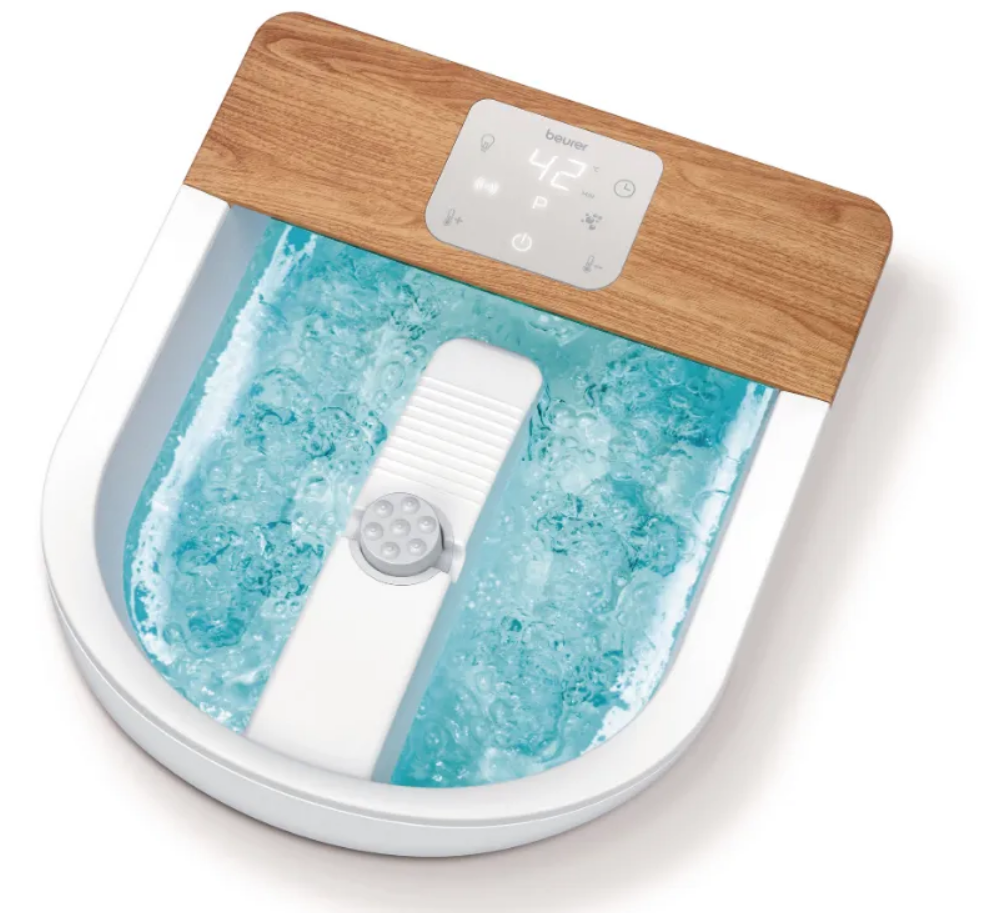
The beurer Wellness Foot Spa FB 65 is a premium home foot bath designed to deliver a spa‑style foot care and relaxation experience with features often found in professional salons. It combines bubble and vibration massage with powerful water heating, three temperature zones and an integrated rotating pedicure station to support both relaxation and foot grooming needs. The unit offers optional ambient lighting (6 colour effects), a premium touch display and extra‑wide massage rollers and nubs for targeted stimulation of the foot sole, making it suitable for everyday self‑care and recovery after long periods of standing or walking. The FB 65 supports large shoe sizes (up to EU 51) and includes practical accessories such as a storage/drying bag, non‑slip rubber feet and a removable splash guard for tidy use.
Key benefits and unique selling points: dual heating with eight heat stages (34–48 °C) for sustained warmth, combined bubble and vibration massage for circulation and relaxation, a rotating pedicure station with three attachments for grooming, and customizable ambient lighting for mood‑based wellness sessions. Target users are busy professionals, athletes, people with tired or achy feet, and home spa enthusiasts seeking salon‑style results without frequent salon visits. Typical use cases include post‑work recovery, at‑home pedicures, and relaxation routines incorporated into evening self‑care.
Estimated price range and availability: retail pricing varies by market but generally falls in the mid‑range personal care appliance segment; typical prices (2024–2025) are commonly between approximately €100–€180 / £90–£160 depending on retailer promotions and regional availability, and the product is sold via Beurer’s official stores and major electronics and wellness retailers across Europe and online marketplaces.
TECHNICAL SPECIFICATIONS
- Power Supply: 220–240 V~, 50–60 Hz, 650 W
- Dimensions: 45.0 × 39.0 × 18.4 cm
- Weight: Approx. 3.45 kg
DEVICE DESCRIPTION
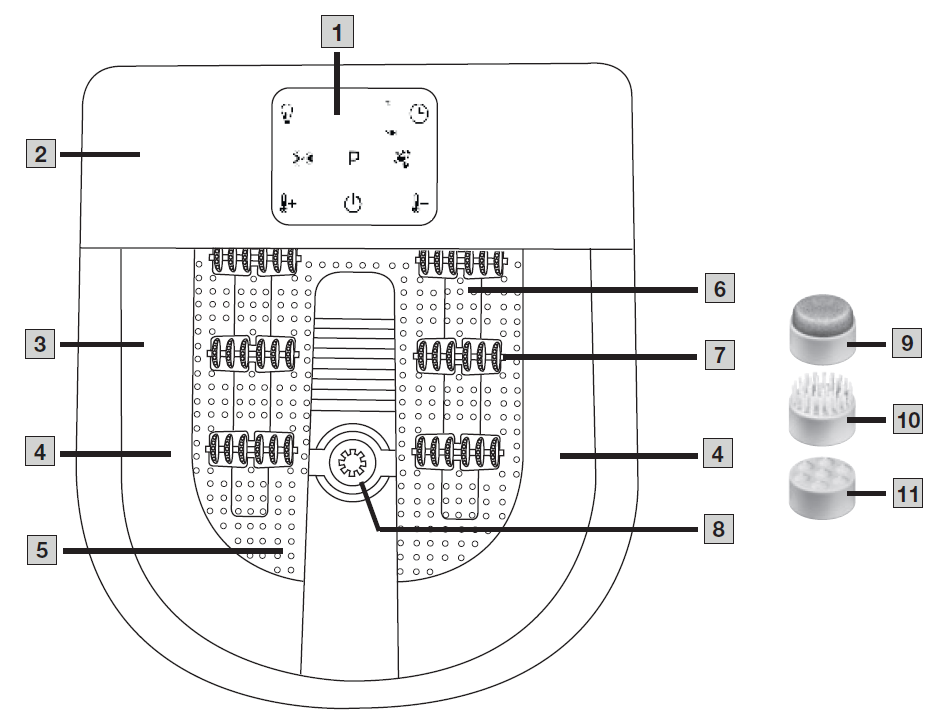
- LED Touch Display
- Splash Protection
- Fill Level Mark (Max. 5.5 L)
- Ambient Lighting
- Foot Rest with Massage Nodules
- Bubble Bar
- Massage Roller Attachments (6 Pieces)
- Motorised Pedicure Centre
- Portable Pedicure Device
- Brush Attachment
- Massage Attachment
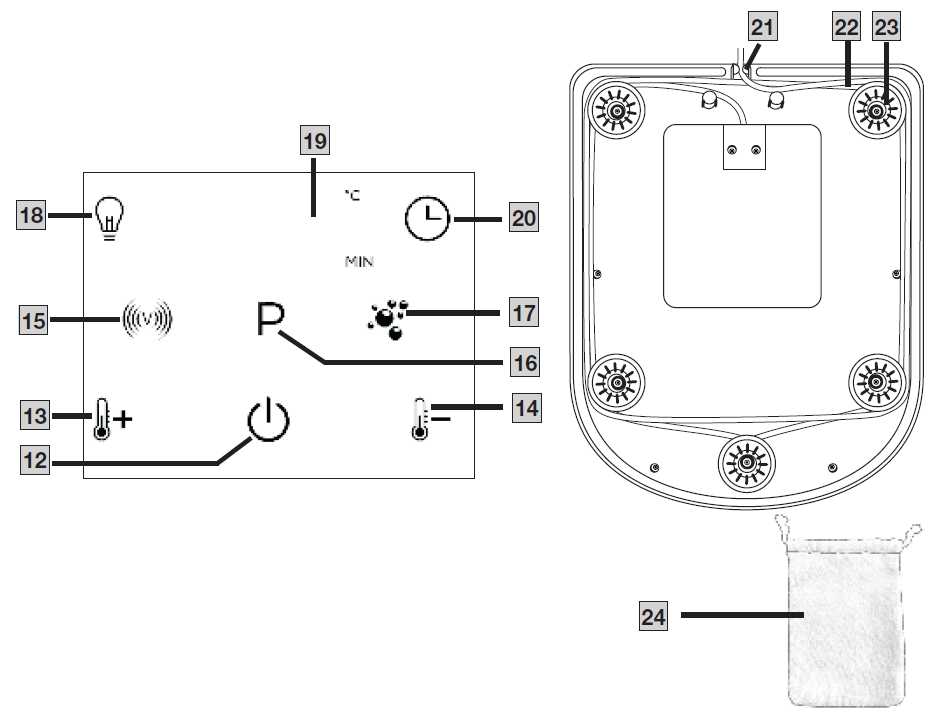
- ON/OFF Button
- "Increase Water Temperature" / "Switch Water Heating On" Function Button
- "Decrease Water Temperature" / "Switch Water Heating Off" Function Button
- "Vibration" Function Button
- "Programs" Function Button
- "Bubble" Function Button
- "Ambient Lighting" Function Button
- Water Temperature / Timer Time Display
- "Timer" Function Button
- Cable Outlet
- Cord Winder
USE
Initial Use
- Remove the packaging, including the protective film from the display.
- Check all supplied components, including the packaging, for damage.
- Before plugging in the foot bath, fill it with cold or warm water up to the fill level mark (3), approximately 5 cm high. The foot rest area must be completely submerged in water.
- Place the foot bath on a firm, level surface.
- Ensure that the mains cable does not create a tripping hazard.
- Insert the mains plug into a suitable socket. The ON/OFF button (12) starts flashing, indicating that the foot bath is in standby mode.
Using the Foot Bath
- Sit in a comfortable position. Never use the foot bath while standing.
- Place your feet inside the foot bath. The rubber feet on the base prevent the device from slipping.
- Press the ON/OFF button (12) to switch on the foot bath. The button lights up continuously, and the display (19) shows the current water temperature. The foot bath is now ready for use.
- For a more effective massage, move your feet back and forth over the massage roller attachments (7) in the foot rest area.
At the End of Use
To switch off the foot bath before the automatic timer ends, press the ON/OFF button (12) again. The button starts flashing, indicating that the foot bath has returned to standby mode. After use, switch off the foot bath and disconnect the mains plug from the socket.
Pedicure Attachments
The foot bath features a motorized pedicure center (8) for individual foot care. Three different attachments (9, 10, and 11) can be connected to the motorized pedicure center:
- Portable Pedicure Device Attachment (9): Helps remove dead skin cells and calluses.
- Brush Attachment (10): Stimulates the reflex zones on the soles of the feet.
- Massage Attachment (11): Provides a pleasant foot massage and stimulates circulation.
Setting the Water Temperature
The foot bath can be used with or without water heating. The water temperature can be adjusted between 34°C and 48°C. Heating starts at 34°C, and the temperature can be increased or decreased in increments of 2°C.
- To activate water heating, press the "Increase Water Temperature / Switch On Water Heating" function button (13).
- To increase the water temperature, press the function button (13) again.
- Select the desired temperature using the water temperature control buttons (13 and 14). The selected temperature briefly appears on the display (19) before returning to the current water temperature.
- The heating process starts automatically.
Vibration Massage
The vibration massage function can be activated during use.
- Press the "Vibration" function button (15) to activate the vibration massage. The LED indicator on the button lights up.
- Press the function button (15) again to switch off the vibration massage. The LED indicator turns off.
Automatic Programs
The foot bath includes one default manual mode and three selectable automatic massage programs:
- P0 – Manual Operation / Program OFF: Default setting.
- P1 – Combined Massage: Bubble and vibration massage operate simultaneously for 10 seconds, followed by a 5-second pause.
- P2 – Alternating Massage: Bubble massage and pulsating vibration alternate every 15 seconds.
- P3 – Alternating Massage: Bubble and vibration massage alternate every 10 seconds.
1. Press the "Programs" function button (16) to select the desired program (P1, P2, or P3). The LED indicator lights up, and the selected program briefly appears on the LED touch display (1). The display then returns to showing the water temperature.
Bubble Massage
The bubble massage function can be activated during use.
- Press the "Bubble" function button (17) to activate the bubble massage. The LED indicator lights up.
- Press the function button (17) again to switch off the bubble massage. The LED indicator turns off.
Ambient Lighting
The ambient lighting function can be activated during use.
- Press the "Ambient Lighting" function button (18). The LED indicator and the light strips inside the foot bath illuminate.
- Press the function button (18) to select the desired ambient light color: red, green, blue, yellow, purple, or turquoise.
- Red Light: May help stimulate circulation and metabolism.
- Green Light: May promote balance and support relaxation and recovery.
- Blue Light: Supports relaxation and creates a calming atmosphere.
- Yellow Light: May encourage a positive mood and optimism.
- Purple Light: Creates a relaxing atmosphere that may support meditation and inspiration.
- Turquoise Light: Provides a calming and cooling atmosphere, particularly when used with cold water.
- To switch off the ambient lighting, press and hold the function button (18) for two seconds. Alternatively, press the button repeatedly until the LED indicator and light strips turn off after the turquoise light.
Timer Function
The foot bath features an adjustable timer ranging from 20 to 60 minutes in 5-minute increments. Once the selected time has elapsed, the foot bath automatically switches off. The default timer setting is 20 minutes.
- Press the "Timer" function button (20) to select the desired relaxation time. The selected duration briefly appears on the water temperature/timer display (19) before the current water temperature is displayed again.
- To check the remaining relaxation time during use, press the function button (20) once.
- Pressing the function button (20) multiple times during operation restarts the relaxation timer.
- Once the selected relaxation time has elapsed, the foot bath automatically switches to standby mode.
CLEANING AND MAINTENANCE
Make sure that no water enters the internal components of the device. Always switch off the foot bath and unplug it from the power socket before cleaning.
- After use, unplug the foot bath and empty the water through the narrow side.
- For easier emptying, carry the foot bath with its straight side facing your body.
- Rinse the foot bath thoroughly with clean water.
- For hygienic cleaning, use a mild, non-foaming, non-abrasive cleaning product, such as neutral vinegar.
Troubleshooting — Common problems, error cues and fixes for the beurer Wellness Foot Spa FB 65
Common problem: Unit will not power on. Solution: Verify mains connection, ensure the cord winder and plug are correctly seated, and press the touch display power control; inspect household fuse or socket. If the display is dark but power is present, try another outlet and check that the water level is within the recommended range (refer to manual safety marks).
Common problem: Water not heating or temperature stuck. Solution: Confirm the heat function is activated on the touch display and that the selected temperature zone is set (FB 65 offers 3 zones and 8 heating stages between 34–48 °C); allow a few minutes for the heater to reach the set temperature and ensure the dual‑wall insulation is not obstructed.
Common problem: Excessive vibration noise or weak massage. Solution: Check for correct positioning of feet and ensure rollers are engaged; clear any debris from rollers and pedicure attachments and reattach rotating pedicure station properly. If unusual noise persists, switch between preset programmes to isolate the issue.
Error codes and fixes: The FB 65 uses the touch display and may show simple fault indication via LEDs or a non‑responsive touch panel—if the device becomes unresponsive, power off and unplug for 10 minutes, then restart. If the fault continues, contact Beurer support (see below) for diagnostic guidance and possible servicing; do not open the housing yourself for electrical faults.
Preventive measures: Empty and dry the tub after each use, remove and rinse pedicure attachments, avoid hard objects in the water, use recommended water levels and avoid adding oils or bath salts unless the manual permits them. Store in the provided bag and wind the cord to prevent damage.
Warranty and support: The FB 65 typically carries a manufacturer warranty (Beurer lists a 3‑year warranty for many products — check the product manual/retailer page for your region’s exact terms) and official support via Beurer customer service channels. For help contact Beurer customer support in your country (contact details are provided on local Beurer websites and in the printed manual) or the retailer you purchased from for warranty claims and servicing information.
Pros & Cons — Honest assessment of the beurer Wellness Foot Spa FB 65
- Pros — Professional features at home: Combines bubble and vibration massage with a rotating pedicure station and three temperature zones (34–48 °C) that deliver a salon‑like experience at home, useful for regular foot maintenance and relaxation.
- Pros — Comfort and build: Dual‑walled construction improves heat retention, extra‑wide rollers and nubs provide effective sole stimulation, and the premium touch display and ambient lighting enhance user experience.
- Pros — Practical accessories: Includes three pedicure attachments, storage/drying bag, removable splash guard and cord winder, increasing convenience and portability.
- Cons — Price and complexity: Higher price than basic foot baths; not ideal if you only need a simple soak or have limited storage space — alternatives like basic bubble foot baths cost substantially less but lack heating stages and pedicure tools.
- Cons — Size and weight: Larger footprint (approx. 45.0 x 39.0 x 18.4 cm) and 650 W power draw may make it less convenient in small bathrooms or for frequent travel.
- Cons — Maintenance considerations: Requires regular cleaning and careful drying to prevent odour or limescale buildup; users who want a truly hands‑off device should consider simpler electric massagers without water features.
- Value for money: For users wanting combined heating, massage and pedicure attachments, the FB 65 represents solid value; for budget buyers focused only on massage, cheaper alternatives exist but lack the FB 65’s heating control and grooming tools.li>
Customer Reviews — Real user feedback and recommendations for the beurer Wellness Foot Spa FB 65
Overall user sentiment is generally positive: reviewers praise the consistent heating performance, adjustable temperature zones and the relaxing combination of bubble and vibration massage, plus the convenient pedicure attachments for home grooming. Average star ratings on retailer pages tend to be high, with many 4–5 star reviews highlighting improved foot comfort after long workdays and the mood benefit from ambient lighting.
Common complaints include the unit’s larger footprint, occasional noise from vibration at higher settings, and the need to clean rollers/attachments regularly to avoid residue buildup. Typical star rating summary across retailers shows mostly 4–5 star ratings, with a minority of 1–2 star reviews usually related to rare faults or shipping/delivery issues.
Purchase recommendations: Recommended for users seeking a multi‑function home foot spa for relaxation and routine pedicures; less recommended if you only want a compact soak or are on a strict budget. Frequently mentioned issues (noise, cleaning) are manageable with proper maintenance and correct setup.
SEO & Keywords integrated
This manual uses the primary keyword beurer Wellness Foot Spa FB 65 and related terms naturally (foot spa, bubble and vibration massage, water heating 34–48 °C, rotating pedicure station, foot bath manual) to aid discoverability and featured snippet placement for long‑tail searches such as “beurer Wellness Foot Spa FB 65 temperature settings” and “how to clean beurer FB 65 foot spa”.
Faqs
How do I set up the beurer Wellness Foot Spa FB 65 for the first time?
What should I do if the beurer Wellness Foot Spa FB 65 water heating won’t reach the set temperature?
How can I use the FB 65 massage and bubble features together for best results?
Can I use bath salts, essential oils or aromatic additives in the beurer Wellness Foot Spa FB 65?
Why is the beurer Wellness Foot Spa FB 65 making unusual noises during the bubble or vibration massage?
How do I maintain and clean my beurer Wellness Foot Spa FB 65 to prevent build-up and ensure longevity?
What are the compatibility and space requirements for using beurer Wellness Foot Spa FB 65?
How can I optimize performance and battery of features like temperature zones, ambient lighting and pedicure attachments on the FB 65?
More beurer manuals
- Setup: Beurer Deep Tissue Massager MG 185 Instruction Guide
- Setup: Beurer Shiatsu Air Compression Seat Cover MG 320 User Manual
- Setup: Beurer 2-in-1 Shiatsu foot massager FM 120 Instruction Guide
- Setup: Beurer Shiatsu Foot and Back Massager FM 70 User Manual
- Setup: Beurer Foot Massager FM 90 User Manual
- Setup: Beurer Deep Tissue Massager MG 99 User Manual
Leave a Comment