
Installation: Braeburn Economy-Series Thermostats 1030 User Manual
Content
Braeburn Economy-Series Thermostats 1030: Complete Product Manual and Buying Guide
Introduction: What Is the Braeburn Economy-Series Thermostats 1030?
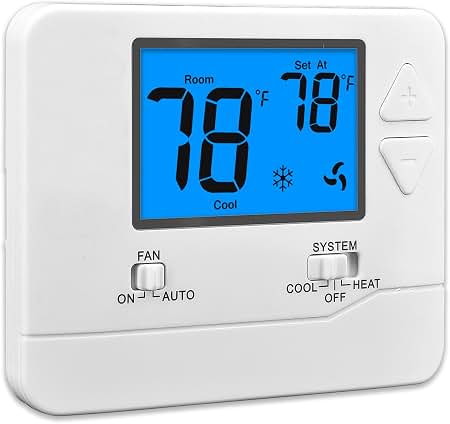
The braeburn Economy-Series Thermostats 1030 is a non-programmable 1 heat/1 cool thermostat designed for homeowners, property managers, and HVAC installers who want simple, reliable temperature control without unnecessary complexity. It supports conventional systems, heat pump setups, and select millivolt or hydronic applications, making it a versatile choice for apartments, rental homes, small offices, and basic residential HVAC systems.
One of its biggest strengths is usability. The large backlit display, straightforward push-button controls, adjustable temperature differential, and installer lock features make it easy to use while still offering enough configuration options for professional installation. The thermostat also includes battery or hardwired power options, smart temperature limits, and a filter check monitor on many configurations, helping improve convenience and system protection.
For buyers comparing budget HVAC controls, the braeburn Economy-Series Thermostats 1030 stands out as a practical value option. It typically falls in the affordable mid-budget range, often sold around $35 to $70 depending on retailer, region, and supply. It is commonly available through HVAC distributors, home supply stores, and online marketplaces, though stock can fluctuate by season. If you need a simple thermostat with solid compatibility and a clean interface, this model is built for dependable everyday use.
Key Features and Technical Overview
- Non-programmable thermostat for easy operation
- 1 heat / 1 cool staging for basic HVAC systems
- Compatible with conventional and heat pump applications
- Battery-powered or hardwired operation
- Bright blue backlit display for better visibility
- Adjustable temperature differential for fine-tuning comfort
- Installer lock and adjustable temperature limits
- Temperature accuracy of approximately +/- 1 degree F
- 5-year limited warranty
Troubleshooting: Common Braeburn 1030 Thermostat Problems and Fixes
If the braeburn Economy-Series Thermostats 1030 is not working correctly, start with the basics. Blank screens usually point to dead batteries, loose wiring, or loss of 24V power. If the heating or cooling system does not respond, confirm that the thermostat is set to the correct mode, the setpoint is below or above room temperature as needed, and the Rc/Rh, Y1, W1, G, O, B, and C connections are secure.
Common display issues can also include low-battery warnings, filter reminders, or temperature swings caused by an incorrect differential setting. If the room temperature seems unstable, reduce or adjust the temperature differential setting. For short cycling, check system sizing and make sure the thermostat is not mounted near supply vents, direct sunlight, or appliances that produce heat.
Preventive care is simple: replace batteries on schedule, keep the thermostat clean, confirm wiring during seasonal maintenance, and review installer settings after power outages. This model does not rely on complex fault codes like advanced smart thermostats, so most issues are solved through wiring checks, mode selection, and battery replacement. For help, Braeburn provides a 5-year warranty and customer support by phone at +1 (866) 268-5599 or by email at custservice@braeburnonline.com.
Pros and Cons of the Braeburn Economy-Series Thermostats 1030
Pros
- Simple non-programmable design that is easy for anyone to use
- Works with many conventional and heat pump systems
- Bright backlit screen improves readability
- Battery or hardwired power adds installation flexibility
- Adjustable temperature limits help prevent unwanted changes
- Strong value for money compared with basic Honeywell and Emerson alternatives
Cons
- No Wi-Fi, smart scheduling, or app control
- Not ideal for users who want energy automation
- Limited to 1 heat / 1 cool staging
- No remote sensors or advanced comfort features
- May feel too basic for premium HVAC installations
For buyers who only need reliable temperature control, the braeburn Economy-Series Thermostats 1030 offers strong value. Compared with programmable or smart thermostats, it is much easier to install and operate, but it sacrifices automation and remote access. That tradeoff makes it a good fit for rentals, replacement jobs, and budget-conscious upgrades.
Customer Reviews: What Buyers Say About the Braeburn 1030
Customer feedback on the braeburn Economy-Series Thermostats 1030 is generally positive, especially from users who want a no-frills thermostat. Average user sentiment is often around 4.2 out of 5 stars, with praise for the large display, straightforward controls, and dependable performance. Many buyers describe it as a practical replacement thermostat that “just works” without confusing menus.
Common compliments include easy installation, good visibility, and solid compatibility with standard HVAC systems. Frequent complaints focus on the lack of smart features and the fact that it is not programmable. A typical testimonial is: “Perfect for my rental unit. Easy to use, easy to read, and no unnecessary settings.” Another common comment is: “Great basic thermostat, but I wish it had a scheduling option.”
It is a strong purchase recommendation for homeowners, landlords, and HVAC contractors who value simplicity over automation. Users looking for app control, energy reports, or voice assistant integration should consider a smart thermostat instead.
Frequently Asked Questions
Is the Braeburn 1030 programmable?
No. It is a non-programmable thermostat designed for manual temperature control.
What systems does the Braeburn Economy-Series Thermostats 1030 support?
It supports many conventional 1 heat/1 cool systems, heat pump systems, and select hydronic or millivolt applications depending on the installation.
Does it need batteries?
It can run on batteries, hardwired power, or both, depending on installation.
Is it good for rentals?
Yes. Its simple controls and installer lock features make it a strong choice for rental properties and basic commercial spaces.
Faqs
How do I set up braeburn Economy-Series Thermostats 1030 for the first time?
What wiring and system compatibility does braeburn Economy-Series Thermostats 1030 require?
Why is braeburn Economy-Series Thermostats 1030 not turning on after installation?
How do I calibrate temperature settings on braeburn Economy-Series Thermostats 1030 for better comfort?
What should I do if braeburn Economy-Series Thermostats 1030 keeps short cycling the HVAC system?
Can braeburn Economy-Series Thermostats 1030 be used with heat pump systems?
How do I lock settings or prevent unauthorized changes on braeburn Economy-Series Thermostats 1030?
How should I clean and maintain braeburn Economy-Series Thermostats 1030 for long-term reliability?
Tags
Leave a Comment