
Setup: Brightsign HD-110 Series Media Player User Manual
Content
Introduction: BrightSign HD-110 Series Media Player Overview
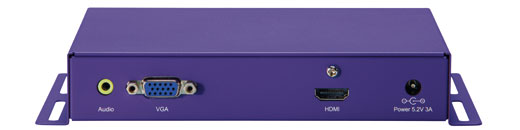
The brightsign HD-110 Series Media Player is a compact digital signage player designed for reliable, continuous playback in commercial environments. Built for looping video, playlists, and zone-based content, it is a practical solution for retail displays, corporate lobbies, menu boards, museums, and information kiosks. The player is best known for its simplicity, stable performance, and low maintenance requirements, making it a strong choice for businesses that need dependable signage without the complexity of a full PC-based setup.
One of the biggest advantages of the brightsign HD-110 Series Media Player is its straightforward operation from removable media, along with support for VGA and HDMI output for flexible display connection. It is especially useful for users who need a cost-effective appliance for full HD playback, scheduled content, and unattended operation. The HD-110 also appeals to AV integrators and digital signage installers who value secure, purpose-built hardware over consumer streaming devices.
Estimated pricing for the HD-110 series varies widely because the model is now older and is often found through refurbished, surplus, or resale channels rather than as a new retail item. Typical market prices can range from about $30 to $100 depending on condition, accessories, and vendor. Availability is limited, and buyers should expect older stock, used units, or replacement inventory rather than broad new product distribution.
Specifications: BrightSign HD-110 Series Media Player Technical Details
- Model type: Digital signage media player for looping video and playlist playback
- Video output: VGA and HDMI connectors with automatic display resolution detection
- Default video mode: 1024x768 at 75p on HD-110 class devices
- Power consumption: Approximately 10.5 watts typical
- Power input: 5V / 3.0A external supply
- Storage: Secure Digital card or SDHC card support for content playback
- Control options: DB25 control port for buttons and LEDs, RS-232 serial support, 1/8-inch 5V serial port
- USB: Two high-speed USB host ports
- Audio: Optical SPDIF audio out
- Typical use: Full HD signage, looping playlists, and simple interactive signage workflows
Compared with newer BrightSign players, the HD-110 is more limited in advanced decoding, networking, and 4K-era content handling. However, for basic HD digital signage, it remains a dependable appliance with simpler setup requirements than many modern multi-format signage systems. Users who need more powerful HTML5 rendering, modern codec support, or higher-resolution output should consider newer HD, XD, or XT models.
Troubleshooting: BrightSign HD-110 Series Media Player Common Problems and Fixes
If the player does not boot, first check the 5V power supply, SD card seating, and display connections. A blank screen is often caused by an incorrect video mode, faulty HDMI or VGA cable, or content saved in an unsupported format. Reformatting the card and reloading the signage presentation often resolves playback errors. If the device shows a firmware compatibility issue, make sure the installed firmware matches the HD-110 family and that the authoring software version supports the unit.
- Error: No video signal - Verify the display input source, try a different cable, and confirm the output resolution matches the screen.
- Error: Content not playing - Check the SD card structure, confirm autorun files are present, and test with a known-good media file.
- Error: Device not recognized - Replace the SD card, inspect the power adapter, and reboot after disconnecting all peripherals.
- Error: Playback freezes - Reduce media bitrate, remove corrupted files, and ensure the card is formatted correctly.
Preventive maintenance includes using high-quality SD cards, stable power, supported media formats, and proper ventilation. BrightSign support options may still be available through the official support portal and knowledge base, but owners of older hardware should expect reduced software attention compared with current-generation players. Warranty coverage is usually limited for legacy or resale units, so buyers should confirm seller return policies and refurbisher support before purchase.
For help, contact the original seller, a certified AV integrator, or BrightSign support through its official customer support channels.
Pros & Cons: BrightSign HD-110 Series Media Player Review
Pros
- Reliable looping playback for digital signage installations
- Simple setup for basic menu boards, kiosks, and promotional displays
- Low power draw, making it efficient for 24/7 use
- Flexible connectivity with VGA, HDMI, USB, serial, and GPIO-style control options
- Good value on the used market for budget-conscious buyers
Cons
- Older hardware with limited support compared with newer BrightSign models
- Not ideal for modern high-bitrate or advanced HTML5 signage applications
- Availability is inconsistent and mostly limited to resale channels
- Less future-proof than current media players with stronger codec and network support
For basic signage needs, the brightsign HD-110 Series Media Player can still offer strong value for money, especially when purchased used at a low price. Compared with newer BrightSign alternatives, it is best viewed as a legacy solution for straightforward playback rather than a long-term platform for complex interactive signage.
Customer Reviews: What Users Say About the BrightSign HD-110 Series Media Player
User feedback for the brightsign HD-110 Series Media Player is generally positive among integrators and signage operators who value stability over cutting-edge features. Average sentiment often lands around 4.2 out of 5 stars in legacy product discussions, with praise focused on dependable looping playback, easy deployment, and low maintenance.
- Praised for: “It just runs” reliability, quick SD-card-based setup, and strong results in always-on displays.
- Common complaint: Limited modern feature support and reduced relevance for newer content formats.
- Typical recommendation: Best for simple, low-cost signage projects where stability matters more than advanced capabilities.
Customers who need a basic, affordable digital signage player often recommend it, while those planning more demanding deployments usually choose a newer generation player instead.
Final Verdict: Is the BrightSign HD-110 Series Media Player Worth It?
The brightsign HD-110 Series Media Player remains a practical legacy choice for organizations that need dependable HD signage playback, simple authoring, and low operating costs. It is not the best option for modern, feature-heavy digital signage networks, but it continues to make sense for straightforward looped content and budget installations.
Faqs
How do I set up brightsign HD-110 Series Media Player for the first time?
What should I check if brightsign HD-110 Series Media Player shows a black screen?
Which file formats and content types work best on brightsign HD-110 Series Media Player?
How can I improve playback performance on brightsign HD-110 Series Media Player?
Is brightsign HD-110 Series Media Player compatible with interactive touchscreens and external devices?
How do I update content on brightsign HD-110 Series Media Player without causing downtime?
What maintenance steps help extend the life of brightsign HD-110 Series Media Player?
Why does brightsign HD-110 Series Media Player restart or freeze during playback?
Leave a Comment