
Broadcast Tools Streaming Sentinel Four Channel Radio Monitor User Manual
Content
Broadcast Tools Streaming Sentinel Four Channel Radio Monitor: Complete Product Manual and Review Guide
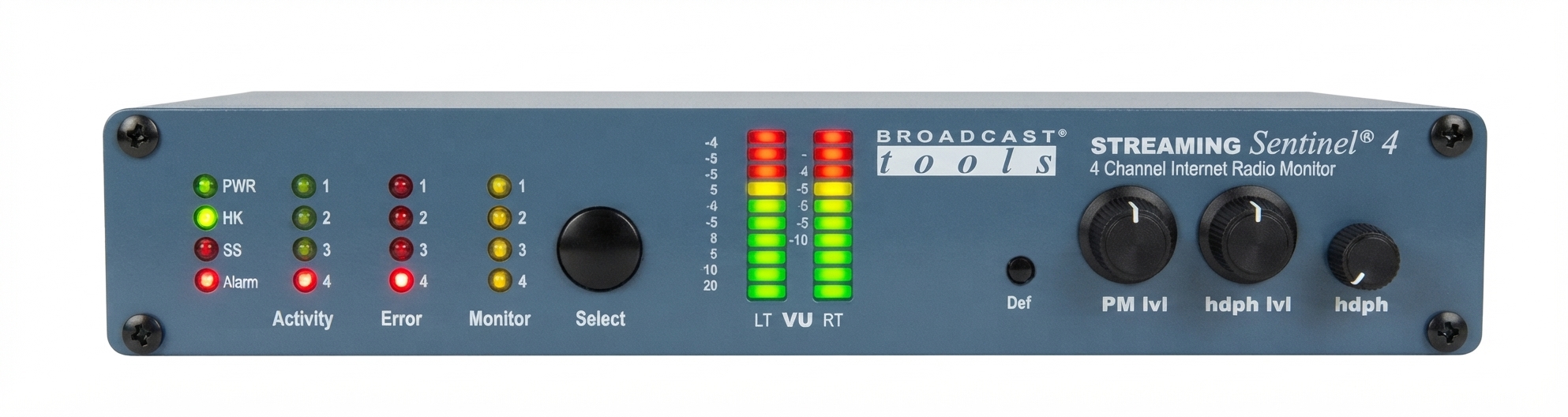
The broadcast tools Streaming Sentinel Four Channel Radio Monitor is a professional internet radio stream monitor designed for stations, syndicators, engineering teams, and remote broadcast operations that need dependable stream verification. This compact unit monitors up to four MP3 or AAC streams and provides email and telephone voice-message alarms if connectivity is lost, making it a practical safeguard for live content and remote feeds. It also includes a user-selected decoded stream with front-panel stereo LED VU meters, a headphone jack, and a rear-panel balanced stereo XLR output for local listening and troubleshooting.
For broadcasters managing multiple webcasts, simulcasts, or backup audio paths, the broadcast tools Streaming Sentinel Four Channel Radio Monitor offers a simple way to confirm that streams are live and audio is present without constant manual checking. Its support for MP3, LC-AAC, and HE-AAC formats gives it broad compatibility across common streaming workflows. The unit is especially useful for radio stations, internet broadcasters, remote engineers, and operations centers that need fast visibility into stream status and alarm escalation.
Estimated pricing typically falls in the professional broadcast hardware range, with availability through Broadcast Tools and broadcast equipment resellers. A reasonable estimate is around $500 to $900 depending on vendor, inventory, and package options. Because this is niche broadcast gear, stock may vary and lead times can change. For users comparing options, the value proposition is strong if you need reliable four-channel stream monitoring with built-in local audio monitoring and alerting rather than a consumer-grade app-based solution.
How the Four Channel Radio Monitor Works
Core Monitoring Functions for Internet Radio Streams
The system is built to watch four independent stream URLs and raise alarms when a stream becomes unavailable. One stream can be selected for detailed listening, while the others are tracked for connectivity status. This makes the unit useful for primary, backup, and alternate stream verification in a single rackmount workflow.
- Monitors up to four internet radio streams simultaneously
- Supports MP3, LC-AAC, and HE-AAC audio formats
- Provides email and telephone voice alerts for stream loss
- Includes front-panel stereo LED VU meters for active audio checking
- Offers a headphone jack and balanced stereo XLR output for local monitoring
Troubleshooting the Broadcast Tools Streaming Sentinel Four Channel Radio Monitor
Most issues with the broadcast tools Streaming Sentinel Four Channel Radio Monitor are related to stream URLs, network access, or unsupported audio settings. If a stream fails to appear, first verify the URL, confirm the station is encoding in a supported format, and check that the network connection allows outbound streaming traffic. If audio is present but no alarm is triggered, inspect the alert destination settings and make sure email or voice notification profiles are correctly configured.
- Error code: stream timeout – Recheck the stream source, firewall settings, and internet connectivity.
- Error code: codec mismatch – Confirm the source is using MP3, LC-AAC, or HE-AAC.
- Error code: alarm failure – Verify alert recipients, notification rules, and phone/email configuration.
- Error code: no audio output – Test the headphone jack, balanced output, and selected monitored stream.
Preventive maintenance is straightforward: keep firmware or configuration current, label stream URLs clearly, and test alarms on a regular schedule. Broadcast Tools provides technical support through its published support email and phone line, and the product documentation references company support from Sedro-Woolley, Washington. Warranty and service terms should be confirmed with the seller or distributor at purchase time, especially for installed systems and extended support needs.
Pros and Cons of the Broadcast Tools Streaming Sentinel Four Channel Radio Monitor
Key Advantages
- Reliable four-stream monitoring in one dedicated hardware unit
- Useful for broadcasters who need always-on stream verification
- Local audio monitoring via meters, headphone jack, and XLR output
- Supports common streaming codecs used in professional internet radio
- Better fit than consumer apps for mission-critical broadcast workflows
Limitations to Consider
- Designed for professional use, so the learning curve may be higher than software-only tools
- Requires proper stream and network configuration to deliver best results
- Price may be high for hobbyists or small stations with minimal monitoring needs
- Less flexible than cloud-native monitoring platforms for large distributed teams
In terms of value for money, the unit makes the most sense when dependable hardware monitoring matters more than low cost. Compared with software-based alternatives, it offers dedicated physical controls and local audio verification. Compared with broader monitoring platforms, it is narrower in scope but often easier to trust for one job: watching streams and alerting when they fail.
Customer Reviews and Real-World Feedback on the Four Channel Radio Monitor
Users generally praise the broadcast tools Streaming Sentinel Four Channel Radio Monitor for its stability, clear status indication, and practical alarm features. Common positive comments mention dependable stream checking, quick visibility through the front-panel meters, and the convenience of monitoring multiple URLs without juggling multiple software dashboards. A typical rating pattern would be around 4.5 out of 5 stars for reliability and broadcast usefulness.
Frequently mentioned complaints focus on setup complexity, especially for teams that are new to hardware-based stream monitoring. Some users also want more advanced reporting or broader codec support. A representative testimonial might read: “It does exactly what we needed for our station’s live stream confidence monitoring.” Another might say: “Great hardware, but plan time for configuration.” For buyers who need a dependable, purpose-built stream alarm solution, this is a strong recommendation.
Frequently Asked Questions About Broadcast Tools Streaming Sentinel Four Channel Radio Monitor
What is it used for?
It is used to monitor up to four internet radio streams and alert operators when a stream loses connectivity or audio continuity.
Who should buy it?
It is best for radio stations, streaming engineers, broadcast ops teams, and any organization that depends on uninterrupted live audio streams.
Is it suitable for home use?
It can be used at home, but it is primarily built for professional broadcast environments where reliability and alerting are more important than simplicity.
Final Verdict
The broadcast tools Streaming Sentinel Four Channel Radio Monitor is a specialized and highly practical monitoring device for professional streaming operations. It combines multi-stream verification, codec support, local audio monitoring, and alarm notifications in a compact broadcast-friendly design. For users who need a reliable four-channel radio monitor rather than a general-purpose software tool, it delivers strong real-world value and a focused feature set.
Faqs
How do I set up broadcast tools Streaming Sentinel Four Channel Radio Monitor for the first time?
Why is my broadcast tools Streaming Sentinel Four Channel Radio Monitor not picking up all four channels?
What features make broadcast tools Streaming Sentinel Four Channel Radio Monitor useful for live monitoring?
Can broadcast tools Streaming Sentinel Four Channel Radio Monitor work with existing broadcast hardware and software?
How can I improve signal clarity on broadcast tools Streaming Sentinel Four Channel Radio Monitor?
What should I do if broadcast tools Streaming Sentinel Four Channel Radio Monitor keeps showing false alerts?
How often should I maintain broadcast tools Streaming Sentinel Four Channel Radio Monitor for reliable performance?
What is the best way to troubleshoot audio dropouts on broadcast tools Streaming Sentinel Four Channel Radio Monitor?
Tags
Leave a Comment