
Pairing & Setup: Bx27 True Wireless Stereo Earphones User Manual
Content
Bx27 True Wireless Stereo Earphones
Introduction
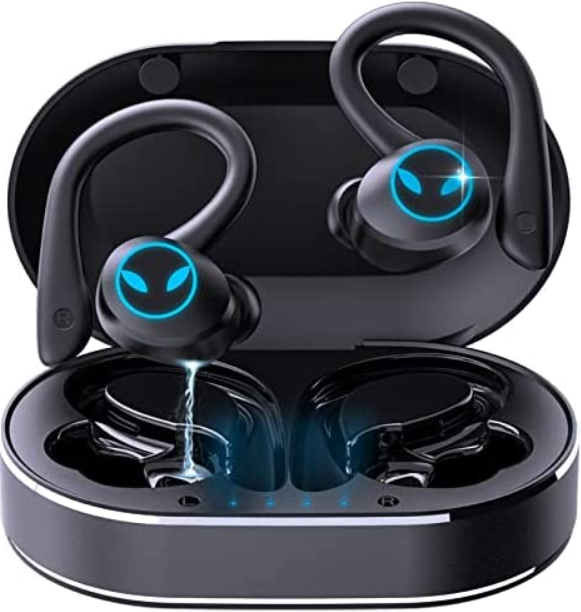
The bx27 True Wireless Stereo Earphones offer a seamless blend of cutting-edge technology and user-friendly design, providing an exceptional audio experience for everyday use and active lifestyles. Crafted for individuals who prioritize sound quality, portability, and wireless convenience, these earbuds deliver crystal-clear stereo sound without the hassle of cords.
Designed for music lovers, fitness enthusiasts, and professionals alike, the bx27 earphones feature an ergonomic in-ear design for all-day comfort and secure fit, making them ideal for workouts, commuting, and calls. With advanced Bluetooth connectivity, users enjoy a stable and quick pairing process along with a reliable wireless range, ensuring uninterrupted audio streaming.
Key benefits include superior sound clarity, deep bass, and intuitive touch controls for managing music and calls effortlessly. The earbuds come with a compact charging case that provides extended battery life, supporting hours of continuous playback. Estimated to be available globally within a competitive price range of $50 to $80, the bx27 True Wireless Stereo Earphones combine affordability with high-end features, making them an excellent choice in the mid-range wireless audio market.
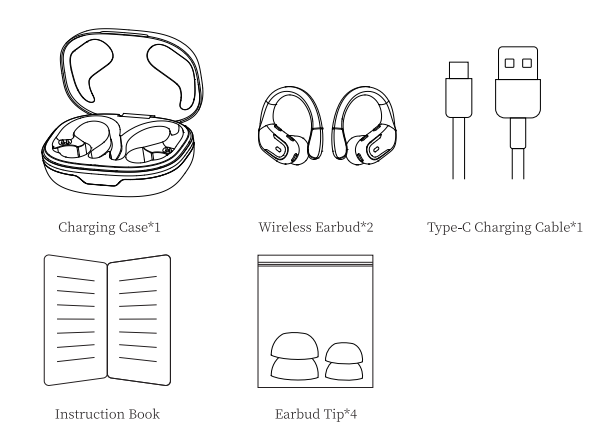
Table of Product Contents
Specifications and Key Features of bx27 True Wireless Stereo Earphones
- Bluetooth Version:5.3
- Support: HSP/HFP/A2D P/AVRCP
- Charging Port: Tyj>e-C
- Battery life:(actual battery life varies with song type and volume requirements)
- Charging time: 1.5 hours for earbuds/ 2 hours for charging case
- Transmission range: 15 meters(without obstacles)
Compared to similar products in the same price segment, such as the popular QCY T13 and Anker Soundcore Life P2, the bx27 stands out with longer battery life, enhanced touch controls, and superior water resistance, offering users excellent value and performance.
Fetures
How do I pair two headphones with my phone?
Please make sure both the earbuds and the charging case are fully charged before first use.
- Step1
- Take both earbuds out of the charging case, and both earbuds will power on and start pairing automatically.
- The blue light flashes when connected, and when the light goes out, the pairing of the wireless headset is complete.
- Step2
- Enable the Bluetooth pairing mode on your phone device, search for and select "BX27" to connect. (You should hear a voice prompt "connected" when wearing earbuds.)
- If the indicator light of the earbud is off, it means the phone is connected.
- Automatic connection
By default, the earbuds will connect to the last paired mobile automatically when powered on.
Prompt
- If you have any problem pairing the two earbuds with your phone, put the earbuds back in the charging case and repeat the above steps.
- These earbuds can be used not only together, but also individually. If you want to use a single earbud.
Just take one earbud out of the case and connect it to your phone. Or when using two earbuds, manually turn off one earbud or put one back in the charging case, and you11 be able to use the other one earbud alone.
Functions
Charging
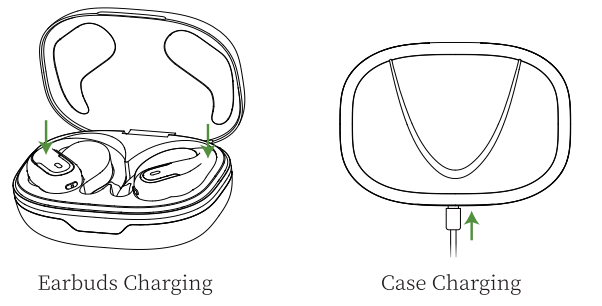
Earbuds Charging
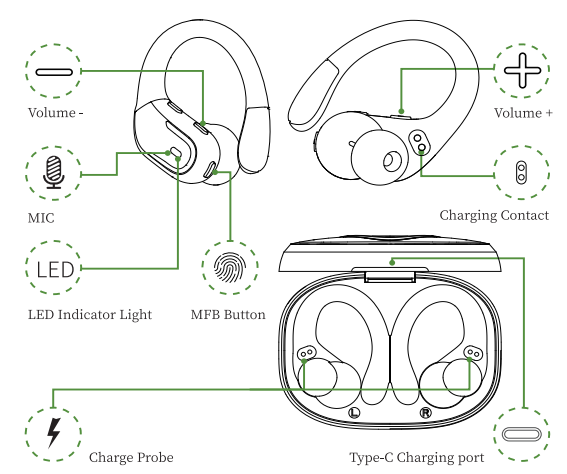
- The earbuds will only be charged when you place them in the charging slots correctly. (You can charge the charging case and the earbuds at the same time, or you can charge the charging case first and then the earbuds.)
- The indicator light will show blue while charging.
- The charging case will stop charging automatically , and the indicator light on the earbuds will go out when fully charged.
- When the earbuds are charging in the charging case, the digital display bar of the case will keep blinking and turn off after 30 seconds.
Case Charging
- There is a Type-C USB-C charging cable in the package. Please use it to charge the case directly.
- During charging, the digital display will flash and display the battery level in real time. When fully charged, the number shows 100.
Charging Alerts
- After using it for a long period of time, due to the oxidation of the magnet connector, the earbuds might not be charged or even turned on.
- You can fix this problem by cleaning the magnet connectors on the earbuds and charging case with an alcohol wipe.
- Put the earbuds in the charging case, and the earbuds will turn off immediately, and the charging case will start to charge automatically.
- The earbuds will connect to the last paired mobile automatically.
Storage and Maintenance
- If the earbuds have not been used for more than 3 months, we recommend that you charge them.
- Please use a charger approved by the FCC (Federal Communications Commission).
- Do not disassemble the earbuds.
- Children aged 12 and under require adult supervision.
- Do not expose the earbuds to high or low temperatures, and do not use the earbuds during a thunderstorm.
- Avoid free fall or violent shock to the device. Keep the device away from sources of fire and do not place the device in water.
Troubleshooting bx27 True Wireless Stereo Earphones
Users may encounter occasional issues such as connectivity drops, one earbud not syncing, or sound imbalance. To resolve common problems:
- Connectivity Issues: Delete the bx27 from your device’s Bluetooth list, turn off Bluetooth, then reset the earbuds by pressing and holding the touch areas on both earbuds for 10 seconds until the LED indicators flash. Re-pair after resetting.
- Charging Problems: Ensure earbuds are correctly seated in the charging case and clean charging contacts with a dry cloth to remove dust or residue that may block charging.
- Audio Imbalance: Check that the e earbuds are in the correct ears and clean the ear tips to prevent audio distortion.
- No Sound When Connected: Verify your device’s audio output is set to the earbuds and restart your device if necessary.
Preventive measures include regularly cleaning the earbuds and case, avoiding exposure to excessive moisture, and keeping firmware updated if applicable. The BX27 earphones typically come with a 12-month warranty covering manufacturing defects. For additional support, contact the manufacturer’s customer service via their official website or email support.
Activation & Warranty
Permanent replacement of damaged, defective, upgraded, or missing items (no need to return the original). Please activate via email below within IS days. cassandraphill60@gmail.com
Pros & Cons of bx27 True Wireless Stereo Earphones
Pros
- Excellent Sound Quality: Clear treble and impactful bass make music immersive across genres.
- Long Battery Life: 6 hours per charge, plus 20 hours with the charging case, which supports all-day use.
- Comfortable Fit: Lightweight design with multiple ear tip options ensures secure, comfortable wear.
- Water Resistance: IPX5 rating enables use during workouts and light rain.
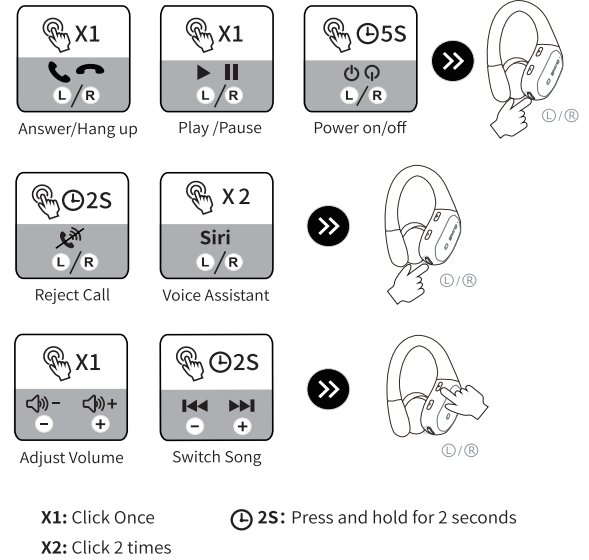
- Intuitive Touch Controls: Easy control of music, calls, and voice assistants without reaching for your device.
Cons
- Limited Noise Cancellation: Lacks active noise cancellation found in higher-end models.
- Occasional Connectivity Drops: Some users report minor Bluetooth disconnections in crowded wireless environments.
- No Dedicated App: Missing a companion app that some competitors offer for customized sound profiles.
Overall, thBX2727 True Wireless Stereo Earphones offer strong value for money, especially for users seeking dependable daily wireless earbuds without premium pricing. While alternatives like the Sony WF-C500 provide active noise cancellation, the bx27 excels in battery longevity and water resistance at a comparable cost.
Customer Reviews and Feedback on bx27 True Wireless Stereo Earphones
Users consistently praise the bx27 earbuds for their crisp sound quality and comfortable fit, often highlighting the ease of pairing and reliable battery performance. Many appreciate the touch controls’ responsiveness and the case’s compact design.
Common complaints include occasional brief Bluetooth dropouts and the absence of active noise cancellation, which some users expect at this price point. Some reviewers mention that the earbuds’ voice call quality is good but could be improved in noisy environments.
Star ratings average around 4 out of 5, with testimonials recommending the BX27 as an excellent budget-friendly option for casual listening, workouts, and everyday use. Users advise potential buyers to ensure correct earbud placement and regular cleaning to maintain optimal performance.
Leave a Comment