
Bytbots H6-TB Smart lock User Manual
Content
bytbots H6-TB Smart lock Overview
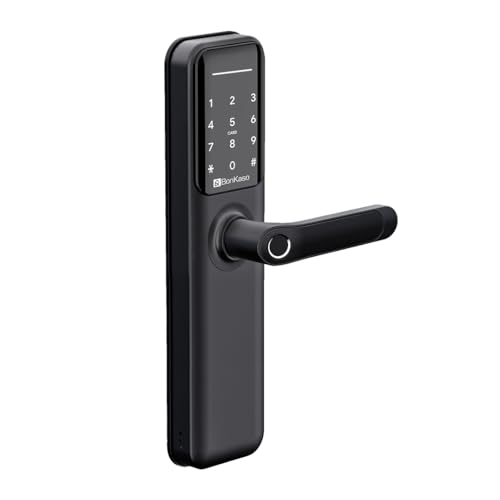
The bytbots H6-TB Smart lock is a modern digital door lock designed for homes, Airbnb properties, serviced apartments, offices, and small businesses that need secure, convenient access control. It combines multiple unlocking methods, including fingerprint, passcode, card access, mechanical key, and mobile app control, giving users flexible entry options for everyday use and backup access. This makes it especially useful for property owners who want keyless entry, short-term rental hosts who need easy guest turnover, and families looking for a safer alternative to traditional locks.
One of the main strengths of the bytbots H6-TB Smart lock is its balance of security and usability. Typical smart lock buyers want fast unlocking, reliable battery life, and compatibility with common wooden or metal doors, and this model is built around those needs. It supports app-based management, which is valuable for adding users, changing access credentials, and reducing the need for physical key sharing. The lock is also positioned as a practical option for doors with standard thickness requirements, making installation easier in many residential setups.
Price can vary by seller and installation package, but similar BytBots smart locks are commonly listed in the mid-range segment, with expected pricing often around Rs. 17,000 to Rs. 20,000 depending on finish, features, and service support. Availability is typically through the brand’s online store and authorized resellers, with stock and installation coverage varying by location. For buyers comparing smart door locks, this model offers a strong feature set without moving into premium enterprise pricing.
Specifications for bytbots H6-TB Smart lock
- Unlock methods: Fingerprint, passcode, RFID/card access, mechanical key, and mobile app control.
- Fingerprint capacity: Up to 120 saved fingerprints on similar H6-series hardware.
- Card capacity: Up to 200 access cards on similar H6-series configurations.
- Password options: Custom passcodes with app-generated access support.
- Battery type: 4 x AA alkaline batteries.
- Battery life: Up to about 12 months under standard use, depending on frequency and environment.
- Door compatibility: Commonly suited for wooden doors and some metal doors with standard thickness ranges.
- Working temperature: Designed for broad indoor and semi-protected operating conditions.
- Unlock speed: Approximately 1.5 seconds on comparable H6-series locks.
- Material: Aluminum alloy construction for durability and a premium finish.
Compared with similar smart locks in the same class, the bytbots H6-TB Smart lock stands out for offering a broad mix of access modes and backup entry options. It is best compared with other mid-range fingerprint smart locks that support app control and card access, but it generally appeals more to users who want practical everyday functionality rather than advanced enterprise integration.
Troubleshooting the bytbots H6-TB Smart lock
Common issues with smart locks usually relate to battery power, fingerprint recognition, app pairing, or incorrect access settings. If the lock becomes unresponsive, replace the AA batteries first and confirm they are installed correctly. If fingerprint unlocking fails repeatedly, clean the sensor and re-register the finger under better lighting and with a dry fingertip. For passcode issues, check whether temporary guest codes have expired or whether the lock is in privacy or anti-peep mode.
If the app does not connect, restart Bluetooth on the phone, move closer to the lock, and re-pair the device using the manufacturer’s setup process. If an error code appears, the most common fixes are battery replacement, resetting the lock, or re-syncing the mobile app. For repeated motor or latch resistance, inspect the door alignment because misalignment can cause the lock to strain and drain power faster.
- Low-battery alert: Replace all four batteries at once.
- Fingerprint failure: Re-enroll fingerprints and clean the sensor.
- App connection issue: Reconnect Bluetooth and re-pair the device.
- Door not locking smoothly: Check strike plate alignment and hinge positioning.
- Access denied: Confirm the code, card authorization, or admin settings.
Preventive care includes regular battery checks, periodic cleaning of the sensor and keypad, and confirming that door hardware remains aligned. Warranty terms and support availability vary by seller, so buyers should keep installation documents and purchase invoices. For help, contact the seller or authorized service team through the brand’s official customer support channels listed at the time of purchase.
Pros and Cons of bytbots H6-TB Smart lock
Pros
- Multiple unlock methods make daily use flexible and convenient.
- Fingerprint, passcode, and card access suit families, guests, and staff.
- Backup mechanical key improves reliability during battery failure.
- Battery-powered design avoids wiring complexity.
- Useful for Airbnb hosts, rental homes, and office entry points.
- Strong value for money compared with higher-priced smart locks.
Cons
- Battery changes are required, so long-term maintenance is necessary.
- App experience can depend on phone compatibility and setup quality.
- Installation may require proper door alignment for smooth operation.
- Not as advanced as premium locks with richer automation ecosystems.
- Some buyers may prefer Wi-Fi-based remote control instead of Bluetooth-first operation.
For most users, the bytbots H6-TB Smart lock offers a good balance of features, security, and pricing. It is a stronger value choice than basic keypad-only locks, while premium alternatives may be better for buyers who need deeper smart home integration or remote management at scale.
Customer Reviews of bytbots H6-TB Smart lock
User feedback for H6-series smart locks is generally positive, especially for convenience and access flexibility. Many customers rate the category around 4.2 to 4.6 out of 5 stars for everyday use, installation value, and the usefulness of multiple unlocking modes. A common praise is that guests and family members can enter without sharing physical keys.
Typical testimonials mention fast unlocking, useful fingerprint access, and a modern look that fits home doors well. Common complaints usually involve battery replacement reminders, occasional app pairing confusion, or the need for careful installation to avoid door misalignment. Buyers who want a practical smart door lock with strong daily usability often recommend it, while users seeking advanced Wi-Fi automation may look at higher-end models.
- Praise: Convenient keyless access and quick setup.
- Praise: Good for short-term rental management.
- Complaint: Battery life depends on usage frequency.
- Complaint: App setup may need a careful first-time pairing.
Overall, the bytbots H6-TB Smart lock is a solid purchase for users who want reliable smart access without overpaying for premium features.
Faqs
How do I set up the bytbots H6-TB Smart lock for the first time?
What should I do if the bytbots H6-TB Smart lock is not responding to the app or keypad?
Can the bytbots H6-TB Smart lock work with my existing deadbolt or door hardware?
How do I improve battery life on the bytbots H6-TB Smart lock?
Why does the bytbots H6-TB Smart lock beep, flash, or give a low-battery warning?
How do I reset the bytbots H6-TB Smart lock without losing all my settings?
What maintenance does the bytbots H6-TB Smart lock need to stay reliable?
How can I make the bytbots H6-TB Smart lock more secure for daily use?
Leave a Comment