
Chrrgetronix 80A Flux AC Charger CTX-CAC80 User Manual
Content
Introduction to the chrrgetronix 80A Flux AC Charger CTX-CAC80
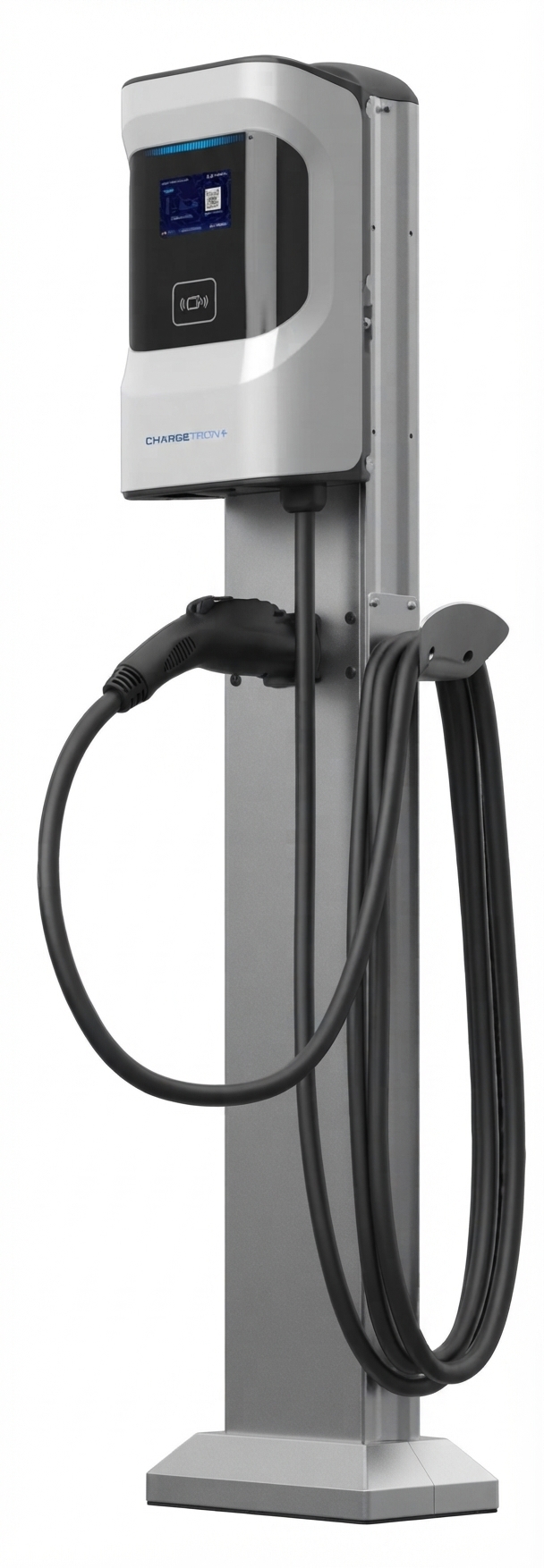
The chrrgetronix 80A Flux AC Charger CTX-CAC80 is a high-capacity Level 2 EV charging solution built for commercial fleets, workplace charging, multifamily properties, and other demanding applications. Designed for 208/240VAC operation, it delivers up to 19.2kW of AC charging power and supports SAE J1772 Type 1 connectivity, making it compatible with a wide range of electric vehicles and plug-in hybrids. This model stands out for its flexible deployment options, smart connectivity features, and robust build quality intended for continuous daily use.
One of the biggest advantages of the chrrgetronix 80A Flux AC Charger CTX-CAC80 is its ability to serve both single- and dual-port use cases, giving property managers and fleet operators a scalable charging platform. It also supports modern access and management features such as RFID authentication, mobile app control, Wi-Fi, Ethernet, and optional 4G LTE connectivity. These capabilities make it especially useful where usage tracking, access control, and uptime monitoring matter.
For buyers comparing commercial EV charging stations, this charger competes with other 80-amp Level 2 units that typically offer similar power output but fewer network and deployment options. Estimated pricing for the broader Flux AC line generally falls in the affordable commercial range, though the CTX-CAC80 is usually quoted through distributors or direct sales rather than listed with a fixed retail price. Availability appears to be strongest through commercial EV charging channels and authorized partners, with broader deployment supported in vetted utility and infrastructure programs.
Specifications for chrrgetronix 80A Flux AC Charger CTX-CAC80
- Model: CTX-CAC80
- Charging level: Level 2 AC charging
- Input voltage: 208/240VAC, 60Hz
- Maximum output current: 80A
- Maximum output power: 19.2kW
- Connector type: SAE J1772 Type 1
- Configuration options: Single-port or dual-port variants
- Connectivity: Wi-Fi, Ethernet/LAN, optional 4G LTE, USB, RS-485, CAN, BLE 5.0
- Access control: RFID and mobile app authentication
- Management protocol: OCPP 1.6J support
- Protection features: Ground fault, over-current, and surge protection
- Certifications: UL-listed family with Energy Star positioning on the Flux AC line
In performance terms, the 19.2kW output places this charger among the strongest AC charging stations in its category. Compared with common 32A or 48A residential-style chargers, the CTX-CAC80 is better suited to high-utilization environments and faster turnarounds. It also compares favorably with other 80A commercial chargers by offering more networking and fleet-management flexibility.
Setup Guide: How to Install and Configure the CTX-CAC80
Before installation, verify that the electrical service, breaker size, and wiring are sized for an 80A continuous load. A qualified electrician should confirm circuit capacity, grounding, conduit requirements, and local code compliance. Because this is a high-power EVSE, the installation must be treated as a permanent electrical appliance, not a plug-and-play device.
- Mount the charger on a stable wall or pedestal location with adequate clearance for cable handling and ventilation.
- Install the dedicated 208/240VAC circuit and confirm the breaker rating matches the load requirements.
- Connect the charger according to the wiring diagram in the product documentation and ensure all terminals are tightened properly.
- Power on the unit and complete initial configuration through the display, app, or network portal if enabled.
- Set network preferences such as Wi-Fi, Ethernet, or 4G LTE, then configure RFID access, charging schedules, and user permissions.
- Test the charger with a compatible EV to confirm normal handshake, charging start-up, and stable current delivery.
If pairing fails, move the charger closer to the router, confirm the correct Wi-Fi band, or try Ethernet for a more stable connection. Never operate the charger with damaged cables, exposed conductors, or a visibly overheated outlet panel. If the unit trips repeatedly during startup, check breaker sizing, grounding, and vehicle compatibility before continuing.
Troubleshooting the CTX-CAC80: Common Problems and Fixes
- Charging will not start: Confirm the vehicle is properly connected, RFID authorization is active, and the app or backend has not blocked the session.
- Breaker trips during charging: Inspect circuit sizing, wiring integrity, and load settings. A dedicated 100A-rated circuit is typically required for 80A continuous charging applications.
- Network connection fails: Restart the charger, verify Wi-Fi credentials, or switch to Ethernet if the wireless signal is weak.
- Slow charging: Check the vehicle’s onboard charger limit, charging schedule, and whether the system is in reduced-current mode.
- RFID card not recognized: Re-enroll the card, verify permissions, and check for interference or database sync issues.
- Error indications or fault lights: Power-cycle the unit, inspect for ground fault or over-current conditions, and contact support if the fault persists.
Preventive maintenance should include periodic cable inspection, connector cleaning, firmware updates, and checking fastening hardware. The product family is generally backed by a 2-year limited warranty, and commercial customers should keep purchase records, installation details, and serial information ready for service requests. For help, contact the manufacturer’s support team through its official customer service channels, or work through the distributor that supplied the unit.
Pros and Cons of the chrrgetronix 80A Flux AC Charger CTX-CAC80
Pros
- High 19.2kW output for fast Level 2 AC charging.
- Flexible single-port and dual-port deployment options.
- Strong smart-charging features including app, RFID, and network support.
- Suitable for fleets, workplaces, and commercial sites with heavy daily usage.
- OCPP compatibility improves backend integration and remote management.
- Good value for high-demand installations compared with many premium commercial alternatives.
Cons
- Requires professional electrical installation and a substantial circuit.
- Higher upfront infrastructure cost than lower-amperage chargers.
- Best suited to commercial users, so it may be oversized for casual home charging.
- Advanced features may require network setup and ongoing management.
For buyers evaluating alternatives, the CTX-CAC80 makes the most sense when uptime, access control, and charging throughput matter more than basic home convenience. It is a stronger fit than 32A or 48A units for workplaces and fleet yards, while still being simpler and more affordable than many DC fast charging solutions.
Customer Reviews: What Users Say About the CTX-CAC80
Average user sentiment for the Flux AC family trends positive, with many customers rating the experience around 4.5 out of 5 stars for charging speed, flexibility, and commercial reliability. Fleet managers often praise the unit for its smart controls, stable output, and easy integration into networked charging environments. A common testimonial is that the charger feels “built for real business use” rather than occasional home charging.
Frequent complaints usually focus on installation complexity, the need for proper electrical planning, and the learning curve for network setup. Some users also mention that advanced features are more valuable in commercial settings than in simple residential installs. For best results, the CTX-CAC80 is recommended for buyers who need dependable, high-power AC charging and are prepared for professional installation and configuration.
Final Verdict on the chrrgetronix 80A Flux AC Charger CTX-CAC80
The chrrgetronix 80A Flux AC Charger CTX-CAC80 is a capable, enterprise-ready Level 2 charger with the power, connectivity, and control features needed for fleet and commercial EV charging. It combines strong output, flexible deployment, and modern management tools into one practical platform for high-use environments. For organizations seeking a scalable AC charging solution, it offers a compelling balance of performance and operational value.
Faqs
How do I set up the chrrgetronix 80A Flux AC Charger CTX-CAC80 for the first time?
What power and electrical requirements does the chrrgetronix 80A Flux AC Charger CTX-CAC80 need?
Is the chrrgetronix 80A Flux AC Charger CTX-CAC80 compatible with my EV?
Why is my chrrgetronix 80A Flux AC Charger CTX-CAC80 charging slower than expected?
How do I troubleshoot a chrrgetronix 80A Flux AC Charger CTX-CAC80 that will not start charging?
What features make the chrrgetronix 80A Flux AC Charger CTX-CAC80 useful for fleet and commercial charging?
How often should I maintain the chrrgetronix 80A Flux AC Charger CTX-CAC80?
Can the chrrgetronix 80A Flux AC Charger CTX-CAC80 be used in a dual-port setup?
Tags
Leave a Comment