
Setup: Cisco Linksys E-Series Router E900 User Manual
Content
cisco Linksys E-Series Router E900 Overview
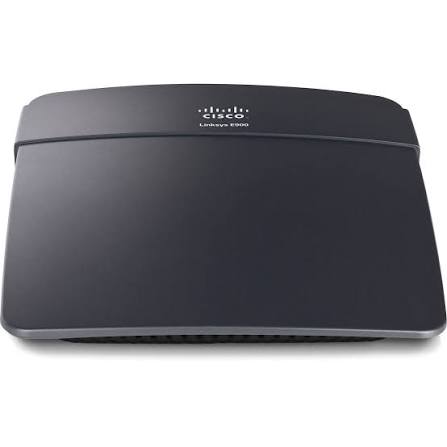
The cisco Linksys E-Series Router E900 is a compact Wireless-N300 router designed for everyday home networking, small apartments, and basic office setups. It delivers 2.4 GHz Wi-Fi with speeds up to 300 Mbps, making it a practical choice for web browsing, email, streaming in standard definition, and light file sharing. With 4 Fast Ethernet LAN ports and 1 Fast Ethernet WAN port, it also supports wired devices such as desktop PCs, smart TVs, and game consoles.
One of the main strengths of the cisco Linksys E-Series Router E900 is its simple setup and straightforward operation. It includes internal antennas, WPA/WPA2 security support, QoS features, NAT, DHCP server, port forwarding, WPS, and firmware upgrade capability. These features make it a dependable entry-level router for users who want stable wireless coverage without complex configuration. Its small footprint and lightweight design also make it easy to place on a shelf or desk without taking up much space.
This router is best suited for students, budget-conscious households, and users replacing an older 802.11g router. It is widely available through refurbished, reseller, and legacy hardware markets rather than as a current flagship model. Estimated pricing typically falls in the budget range, often around $15 to $40 depending on condition, seller, and region. For users who only need reliable basic connectivity, the cisco Linksys E-Series Router E900 remains a practical low-cost option.
Troubleshooting Common Issues with the cisco Linksys E-Series Router E900
If the cisco Linksys E-Series Router E900 loses internet access, first power cycle the modem and router, then verify that the WAN cable is firmly connected to the Internet port. If Wi-Fi is visible but devices cannot connect, check that wireless security settings match on the client device and that the router is broadcasting on the 2.4 GHz band. Common setup errors often relate to incorrect passwords, outdated firmware, or IP address conflicts.
If you see a setup or connection error code during configuration, restart the browser, clear cached pages, and reconnect through the router’s default local address. If the router repeatedly drops connections, reduce interference by moving it away from microwaves, cordless phones, and thick walls. For persistent issues, reset the router to factory settings only after backing up configuration details.
Preventive maintenance includes updating firmware when available, using strong WPA2 passwords, and keeping the router in a well-ventilated location. Because this is a legacy product, warranty coverage may be limited or unavailable depending on the seller. For help, users can check Linksys support resources, product manuals, and retailer warranty terms, or contact the seller’s customer service team directly for replacement or return options.
Pros and Cons of the cisco Linksys E-Series Router E900
Pros
- Affordable budget router with solid value for basic home networking.
- Simple setup and easy-to-use interface for beginners.
- 4 Fast Ethernet LAN ports support multiple wired devices.
- 2.4 GHz Wi-Fi coverage works well for standard browsing and streaming.
- Compact design with internal antennas keeps the unit tidy and unobtrusive.
- Good choice for replacing very old routers still limited to slower wireless standards.
Cons
- No dual-band support, so crowded 2.4 GHz environments may reduce performance.
- Fast Ethernet ports are slower than Gigabit Ethernet, limiting modern wired speeds.
- No USB port for printers or storage sharing.
- Older hardware is not ideal for heavy 4K streaming, large households, or gaming-heavy networks.
- Alternatives like newer AC or AX routers offer stronger performance and better long-term value for demanding users.
For users who only need dependable low-cost connectivity, the cisco Linksys E-Series Router E900 is a fair value-for-money option. For faster homes with multiple high-bandwidth devices, newer dual-band routers are a better alternative.
Customer Reviews for the cisco Linksys E-Series Router E900
Typical user feedback for the cisco Linksys E-Series Router E900 is mixed but generally positive for its price class. Many customers rate it around 3.8 to 4.2 out of 5 stars, praising the easy setup, compact size, and stable performance for light internet use. One common comment is that it works well as a replacement router for basic browsing and smart-home control.
Frequent complaints focus on limited speed, weaker range in larger homes, and the lack of dual-band Wi-Fi. A common testimonial style from buyers is: “Great for small apartments and simple use, but not for fast fiber plans.” Another repeated note is that advanced users often upgrade after finding the Fast Ethernet ports and 2.4 GHz-only wireless too restrictive.
Overall, the cisco Linksys E-Series Router E900 is recommended for budget buyers, first-time router users, and anyone needing a dependable spare router. Users who want higher speeds, stronger coverage, or better future-proofing should consider newer alternatives.
Faqs
How do I set up Cisco Linksys E-Series Router E900 for the first time?
What should I do if Cisco Linksys E-Series Router E900 is not connecting to the internet?
How can I change the Wi-Fi name and password on Cisco Linksys E-Series Router E900?
Why is my Cisco Linksys E-Series Router E900 Wi-Fi slow, and how can I improve performance?
Is Cisco Linksys E-Series Router E900 compatible with modern laptops, phones, and smart TVs?
How do I use Guest Access on Cisco Linksys E-Series Router E900 safely?
What router features does Cisco Linksys E-Series Router E900 offer for home security and control?
How often should I maintain and restart Cisco Linksys E-Series Router E900?
More cisco manuals
Leave a Comment