
Setup: Colmi P-73 SMART WATCH User Manual
Content
COLMI P-73 SMART WATCH
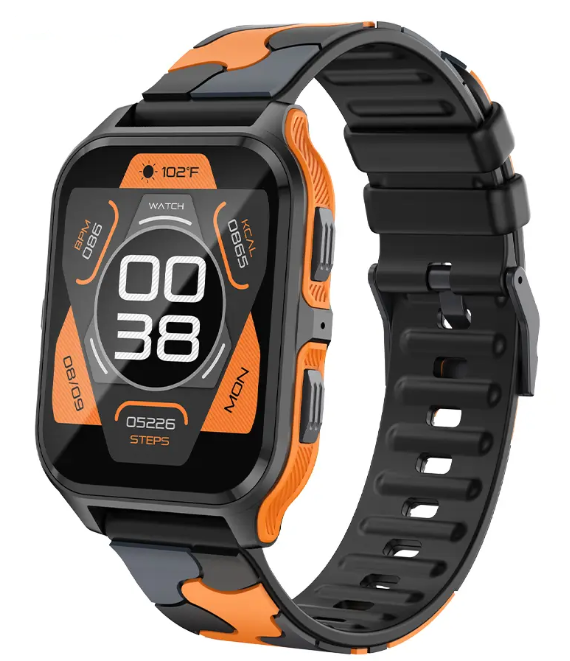
Introduction
The COLMI P-73 SMART WATCH is a cutting-edge wearable designed for fitness enthusiasts and individuals seeking a blend of style and functionality. With its 1.9-inch IPS display and IP68 waterproof rating, this smartwatch is perfect for outdoor activities such as running, cycling, and swimming. It supports over 100 sports modes, heart rate monitoring, sleep tracking, and stress evaluation, making it a comprehensive health companion. Targeted at both beginners and seasoned athletes, the P-73 is compatible with Android and iOS devices, utilizing Bluetooth 5.1 for seamless connectivity. The estimated price range is around $50-$70, making it an affordable option in the smartwatch market. Availability is widespread across online platforms and retail stores.
Specifications of COLMI P-73 SMART WATCH
Here are the key specifications of the COLMI P-73 SMART WATCH:
- Display: 1.9-inch IPS screen with 240*284 pixels resolution.
- Processor: JL7013.
- Memory: RAM 640KB, ROM 64MB.
- Bluetooth: Version 5.2.
- Waterproof Rating: IP68 & 3ATM.
- Battery Life: Up to 5-7 days typical usage, with a 300mAh Li-Poly battery.
- Health Features: Heart rate monitoring, sleep tracking, blood oxygen measurement, and stress evaluation.
- Sports Modes: Over 100 modes, including running, cycling, basketball, etc.
- Compatibility: Compatible with Android 5.1+ and iOS 8.0+ devices.
- App Integration: Works with the Pubu Wear app for data synchronization and personalized reports.
Schematic diagram of the main body of the Smart Watch
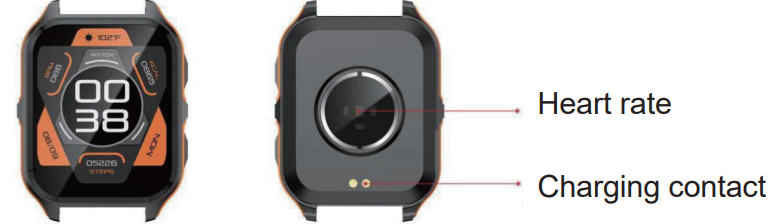
Intermediate heart rate test, upper charging position.
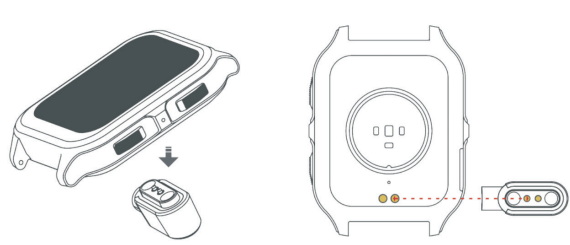
Power-on
Long-press the side button for 3 seconds or plug in the Magnetic charging cable to charge the Smart Watch.
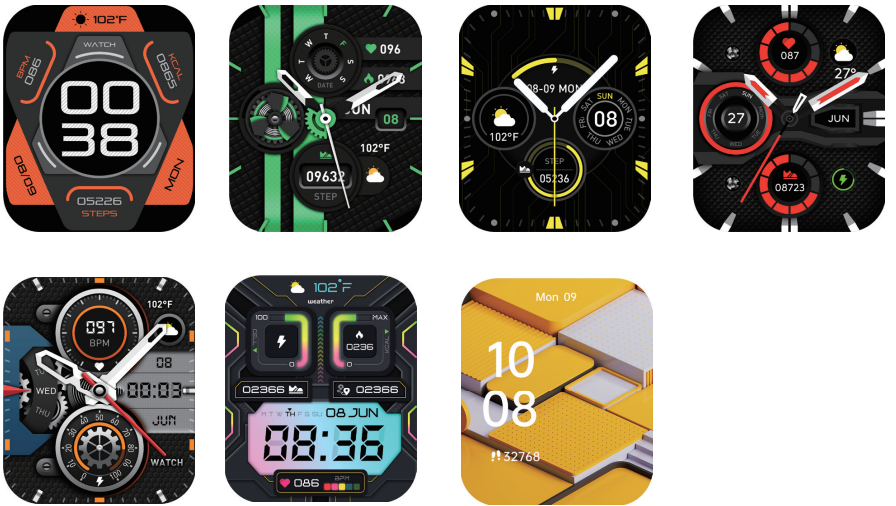
Introduction of main interface functions
After the smart bracelet and the app are first paired, the time and date of the mobile phone will be synchronized.
Step counting, distance, and calorie count
The step-counting interface shows steps. Wear the smart bracelet on your wrist, and the smart bracelet can automatically count steps, distance,, and calories.
Sleep monitoring
Wearing the smart bracelet at night to automatically judge whether you are in iahe sleep state, to record deep sleep and light sleep respectively, and to summarize the total sleep time to help you monitor your sleep quality.
The sensor can measure your sleep quality according to the range and frequency of wrist movements when you sleep.
Note: Because users' sleep time and habits are different, the time of sleep monitoring is only for reference.
Heart rate measurement
Enter the heart rate test interface, the motor will vibrate once after "Start measurement" and "Stop", and the current measurement data will be displayed.
Exercise
Sports interface, including a variety of sports, walking, running,
Click on the "Settings" icon to enter the function list, which includes, preferences, theme style, media sound, dial settings, search for phone, language, brightness, bright screen time, vibration and ringing tone, vibration, intensity, language, system , and about.
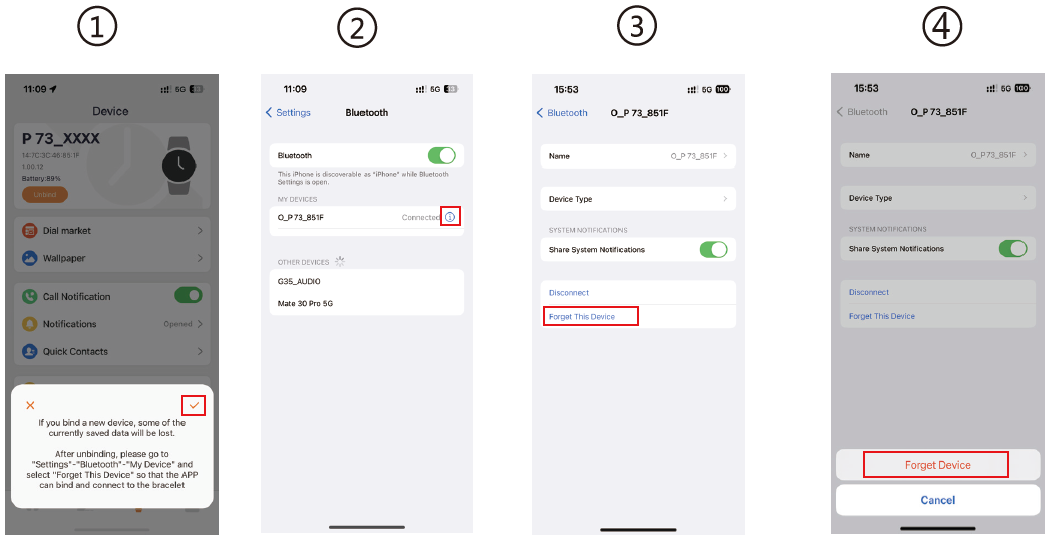
For the Android mobile phone, the device can be disconnected from your mobile phone by simply clicking on Remove Device. For the Apple mobile phone, after binding removal, you need to click on the symbol on the right in Settings- Bluetooth, and choose to ignore the device. As shown below:
Bind the Smart Watch to the APP
- Click on "Add Device" to bind the Smart Watch.
Click on your device in the device list scanned.
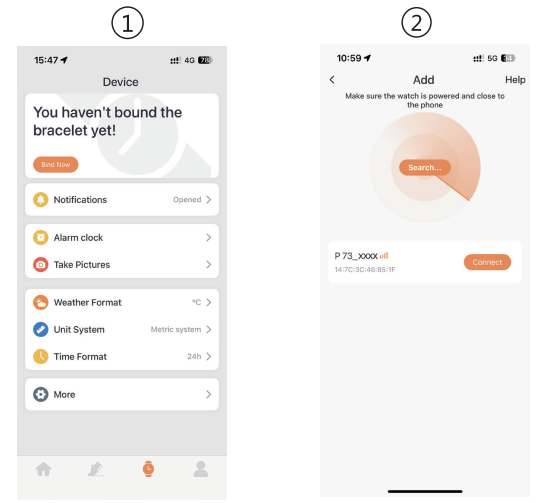
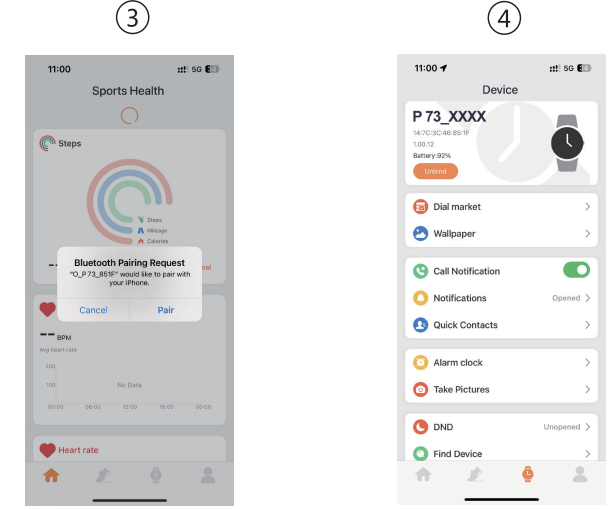
- The IOS system will show a Bluetooth pairing request,, and you can click on Bluetooth "Pairing" to confirm. Connect it directly to the o Android system.
- Binding successfully.
Cycling, skipping rope, badminton, basketball, football, and so on.
Al voice
Click on the voice, through the connection with the mobile phone, the user's spoken language is converted into text, intelligent dialogue,e and intelligent interaction of instant question and answer.
Phone
Turn on the Bluetooth function of your phone and smartwatch. The phone searches for the smartwatch's Bluetooth device and initiates pairing. When both parties confirm the pairing, there will be a prompt that the connection is successful. Click the dial pad of the watch to dial and answer the phone.
Blood pressure
Enter the blood pressure test interface, the motor will vibrate once after "Start measurement" and "Stop", and the current measurement. nt
Weather
The weather page will display the current weather today, and swipe up to display the weather forecast for the next 6 days. For weather information, it needs to connect with the client end before data can be obtained. If the disconnection time is long, the weather information cannot be updated.
Messages
You can view the content pushed by the message in the information interface. At most five messages can be saved. After five messages are saved, the messages displayed before will be replaced by new messages one by one.
Shutter
After connecting with the mobile phone, the smart bracelet can be used as a remote controller for the mobile phone camera. Open "Photo control" in the APP to "Shake" the smart bracelet and click on the icon to take a photo.
Music control
After connecting with the mobile phone, the smart bracelet can control the music player of the mobile phone. When the mobile phone plays music, you can use the smart bracelet to control the mobile phone for playing/pausing, the previous, and the next song.
Flashlight
After opening, the screen will be adjusted to the maximum brightness and always on, and you can exit the interface after swiping left.
Setting
Bluetooth call connect
Android, IPiPhoneAfter the APP successfully connects to the watch's Bluetooth.
- The phone will automatically pop up a "pairing" request, click "Allow".
- For some brands of mobile phone models, there is no need to pop up the pairing confirmation permission. After connecting to Bluetooth, data will be displayed.
The environment for measuring blood pressure should be quiet with an appropriate temperature. The user should rest for at least 5 minutes, and avoid tension, anxiety,y and emotional excitement before measurement. Repeatedly measure blood pressure for three times at an interval of 2 minutes. Record the average of three readings.
Blood oxygen
Enter the blood oxygen test interface, the motor will vibrate once after "Start measurement" and "Stop", and the current measurement data will be displayed.
Blood oxygen saturation (SpO2) is the percentage of the volume of oxyhemoglobin (HbO2)combined with oxygen in the blood to the volume of all (Hb, hemoglobin) which can be combined, ie, the concentration of blood oxygen in the blood.
Note: the data measured for blood pressure and blood oxygen are for the call function is also directly connected. After the binding is successful, you can answer and make calls on the watch. Bluetooth in sequence, and find the connection pairing (O_P 73_XXXX) in the search list. After successful binding, you can answer and make calls on your watch.
Remove Bluetooth Call connection..
Android: For the Android mobile phone, the device can be disconnected from your mobile phone by simply clicking on Remove device. iPhone: firstly, users need to dismiss the pairing, then enter into the mobile phone Settings -Bluetooth, find P 73_XXXX, click the icon on the right, ignore the device, watch, and the mobile phone is disconnected.
Power-on status
switch the menu interfaces of the main screen, as the interfaces shown in the following;
Troubleshooting for COLMI P-73 SMART WATCH
Common issues and their solutions for the COLMI P-73 SMART WATCH:
- Connection Issues: Restart both your smartwatch and phone, ensure Bluetooth is enabled, and try pairing again.
- Battery Life Issues: Use power-saving modes, limit app usage, and charge the watch regularly.
- Error Codes: Refer to the user manual or contact support for specific error codes and fixes.
Preventive measures include regular software updates and ensuring the watch is properly charged. Warranty and support options are available through the manufacturer's website. For further assistance, contact the COLMI customer service team.
Pros & Cons of COLMI P-73 SMART WATCH
Pros:
- Affordable: Offers a wide range of features at a competitive price.
- Extensive Sports Modes: Supports over 100 different sports activities.
- Health Monitoring: Includes heart rate, sleep, and blood oxygen tracking.
- Waterproof: IP68 rating ensures durability in water.
Cons:
- Display Resolution: Lower compared to some other smartwatches in the market.
- App Compatibility: Limited app support compared to some popular brands.
- Charging Time: Relatively long charging time compared to quick-charging options.
Customer Reviews for COLMI P-73 SMART WATCH
Users of the COLMI P-73 SMART WATCH have praised its durability, affordability, and comprehensive sports features. Common complaints include the display resolution and charging speed. However, the watch is generally well-regarded for its value for money. Here's a summary of user feedback:
- Ratings: Average rating of 4 out of 5 stars.
- Testimonials: Users appreciate the watch's fitness tracking capabilities and stylish design.
- Recommendations: Ideal for those seeking a budget-friendly smartwatch with robust health features.
For those considering purchasing the COLMI P-73 SMART WATCH, it's recommended to weigh its pros and cons based on your specific needs and preferences.
Faqs
How do I set up the colmi P-73 SMART WATCH for the first time?
What should I do if my colmi P-73 SMART WATCH is not syncing with the Pubu Wear app?
Can the colmi P-73 SMART WATCH track my heart rate and blood oxygen continuously?
Is the colmi P-73 SMART WATCH compatible with both Android and iOS devices?
How long does the battery last on the colmi P-73 SMART WATCH and how do I optimize it?
What sports and health monitoring features does the colmi P-73 SMART WATCH offer?
How waterproof is the colmi P-73 SMART WATCH and can I use it for swimming?
What maintenance tips should I follow to keep my colmi P-73 SMART WATCH in good condition?
Tags
More colmi manuals
Leave a Comment