
Setup & Features: Comen Vital Signs Patient Monitor NC5 User Manual
Content
Comen Vital Signs Patient Monitor NC5: Comprehensive Product Manual and Buying Guide
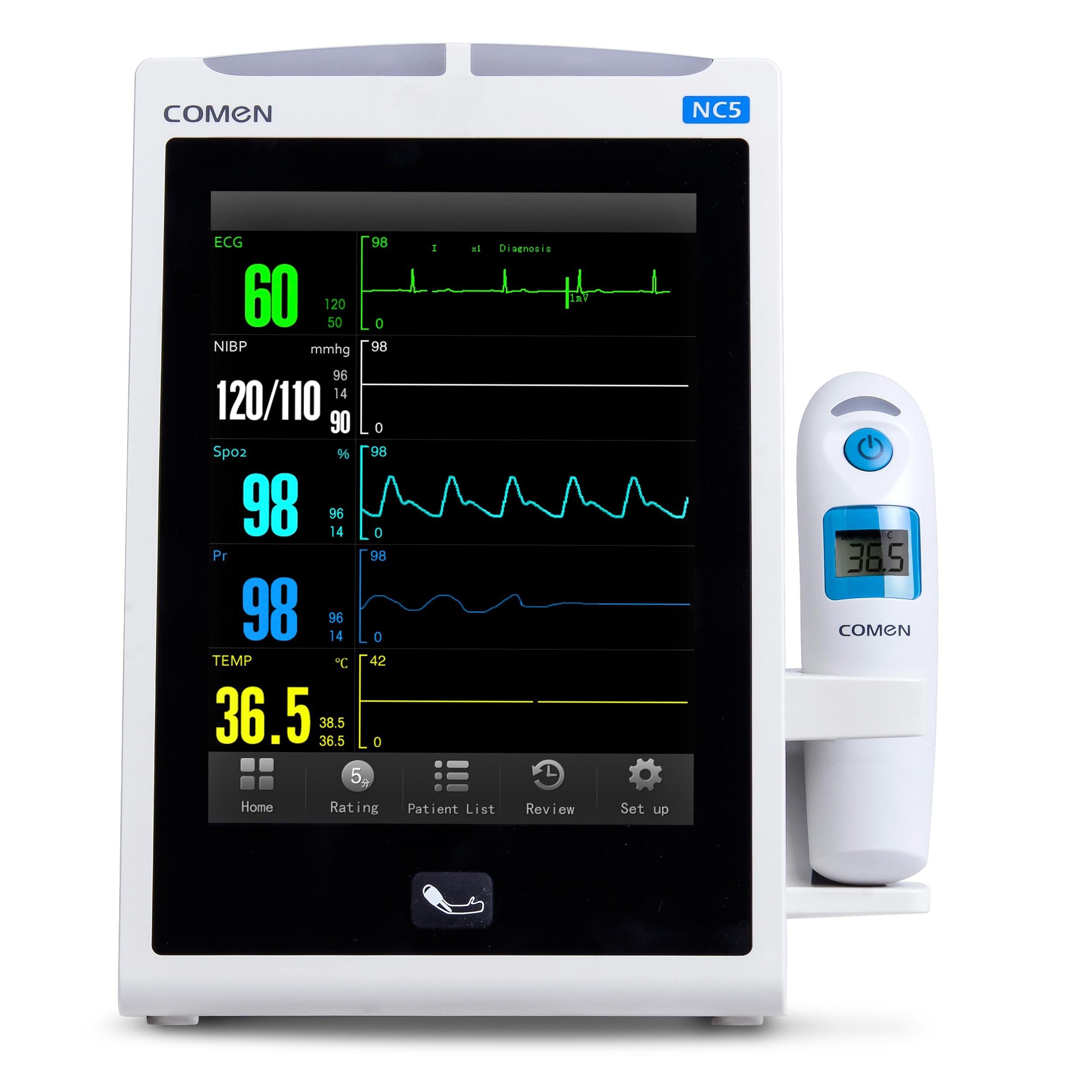
The Comen Vital Signs Patient Monitor NC5 is a compact, multi-parameter patient monitoring solution designed for fast, reliable bedside and spot-check assessments. Built for clinics, emergency departments, wards, outpatient settings, and transport use, it combines essential monitoring functions in a portable form factor that is easy to deploy across high-turnover care environments.
Key advantages include an 8-inch color TFT display, clear waveform visibility, support for core vital signs such as NIBP, SpO2, pulse rate, temperature, and optional 3-lead ECG, plus centralized monitoring and hospital connectivity features. The monitor is also valued for its lightweight build, intuitive operation, and long battery support, making it practical for round-the-clock workflows where mobility matters.
The Comen Vital Signs Patient Monitor NC5 is a strong fit for nurses, respiratory teams, emergency staff, general practitioners, and healthcare facilities that need dependable monitoring without the complexity of larger ICU systems. It works well as a spot-check monitor, bedside monitor, and transport monitor, especially where rapid patient assessment is essential.
Estimated pricing typically falls in the mid-range medical device segment, often around $1,500 to $3,500 depending on configuration, accessories, and regional distribution. Availability is generally through medical equipment distributors, hospital procurement channels, and online healthcare suppliers, with package contents varying by market and option set.
Specifications for Comen Vital Signs Patient Monitor NC5
- Display: 8-inch color TFT LCD with 800 x 600 resolution
- Measured parameters: NIBP, SpO2, PR, temperature, and optional 3-lead ECG
- Waveforms: Up to 2 waveforms displayed simultaneously
- Dimensions: Approximately 165 x 250 x 165 mm
- Weight: About 2.5 kg without battery
- Battery: 2200 mAh rechargeable lithium-ion battery
- Battery backup: Around 3 hours of continuous operation in standard configurations
- Power input: 100-240V, 50/60Hz
- Data review: Trend review, alarm event review, waveform review, and stored NIBP data
- Connectivity: USB ports, HL7 integration, and centralized monitoring support
- Ingress protection: Main unit rated IPX2
- Storage and review capability: Designed for workflow continuity in busy wards and outpatient monitoring
Compared with similar vital signs monitors, the NC5 stands out for its balance of portability, screen size, and connectivity. It is less complex than full bedside ICU monitors but more capable than basic spot-check devices, making it a practical middle-ground solution for routine patient monitoring.
Detailed Description of the Comen NC5 Vital Signs Monitor
The Comen Vital Signs Patient Monitor NC5 is engineered to simplify routine patient assessment while maintaining essential clinical accuracy. Its core design centers on quick setup, readable vital sign data, and flexible deployment across multiple care environments. The monitor collects physiological signals through standard sensors and cuffs, then processes and displays results on a bright 8-inch screen with clear numeric and waveform presentation.
In real-world use, clinicians can check blood pressure, oxygen saturation, pulse rate, and temperature in one workflow, reducing the need for multiple standalone devices. Optional ECG support expands its usefulness for early cardiac assessment and bedside observation. The build quality is suited to daily hospital use, with a compact chassis and a portable weight that makes it practical for moving between rooms or attaching to a trolley.
The enclosure and overall construction are designed for clinical environments, where frequent cleaning and repeated transport are common. Users often appreciate the straightforward interface, readable display, and efficient parameter layout, especially in fast-paced settings where quick interpretation matters.
Setup Guide: How to Configure the Comen NC5 Monitor
Start by placing the monitor on a stable surface or approved trolley and connecting the power adapter. If battery operation is required, charge the unit fully before first use. Confirm that all accessories, including the NIBP cuff, SpO2 sensor, and temperature probe, are compatible with the selected configuration.
Next, power on the device and enter the setup menu to select patient type, language, date and time, alarm thresholds, and display preferences. Configure measurement modes for adult, pediatric, or neonatal use as needed. If your model supports connectivity, connect USB accessories or integrate the device into a central monitoring system using the appropriate hospital network workflow.
For pairing and connectivity, verify that any central station, HL7 interface, or peripheral device is recognized before clinical use. Perform a test reading to confirm sensor placement and monitor response. If the screen shows unstable readings, check cuff fit, sensor alignment, and patient movement.
Safety warnings: use only approved accessories, avoid placing the unit near liquids, and do not use the wrong patient profile for measurements. Always follow institutional infection-control and electrical safety procedures.
Troubleshooting the Comen Vital Signs Patient Monitor NC5
Common issue: no power. Check the wall outlet, power cord, battery charge, and rear power connection. If the device still fails to start, remove accessories and retry after a full charge cycle.
Common issue: inaccurate NIBP readings. Ensure the cuff is the correct size, wrapped snugly, and positioned at heart level. Patient movement, talking, or a loose cuff can cause unreliable results.
Common issue: weak SpO2 signal. Reposition the sensor, warm the patient’s extremity if perfusion is poor, and clean the sensor surface. Nail polish, motion, and cold fingers can interfere with measurements.
Common issue: ECG or waveform instability. Verify lead placement, cable integrity, and skin preparation. Replace worn cables if the signal remains noisy.
Error codes may vary by configuration, so the best first step is to consult the on-screen alarm message, then restart the monitor if the issue is temporary. Preventive maintenance includes regular calibration checks, cable inspection, battery testing, and cleaning with approved disinfectants.
Warranty and support are usually handled through the distributor or authorized service partner. For help, contact the supplier, hospital biomedical department, or regional Comen service channel listed on the purchase invoice or packaging documentation.
Pros and Cons of the Comen Vital Signs Patient Monitor NC5
Pros
- Compact and lightweight design makes it easy to move between bedsides and wards
- 8-inch display provides clear readability for vital signs and waveforms
- Supports core monitoring needs in one unit: NIBP, SpO2, pulse, temperature, and optional ECG
- Battery backup supports mobile workflows and transport use
- Connectivity features make it suitable for hospital integration and centralized monitoring
- Good value for facilities needing a mid-range vital signs monitor rather than a full ICU system
Cons
- Not as advanced as high-end multiparameter monitors with full ICU-level expansion
- Battery runtime is shorter than some premium portable monitors
- Optional features may increase total cost depending on configuration
- Some clinical teams may prefer a larger display for intensive monitoring workflows
Overall, the Comen Vital Signs Patient Monitor NC5 offers strong value for money when compared with basic spot-check devices and entry-level bedside monitors. It is best suited for facilities that want dependable daily monitoring without overspending on more complex systems.
Customer Reviews and User Feedback on the Comen NC5
Average user rating: 4.4 out of 5 stars.
Users frequently praise the monitor for its compact size, readable screen, and practical vital signs workflow. Many nurses and technicians like how quickly it boots up and how easy it is to move between rooms. One common testimonial describes it as “simple, reliable, and ideal for busy wards.”
Frequent complaints focus on battery runtime in heavier-use environments and the added cost of optional features such as ECG or advanced connectivity. A typical user comment notes that “it performs well for daily checks, but a longer battery would be better for transport rounds.”
Purchase recommendation: the monitor is a solid choice for clinics, general wards, emergency rooms, and outpatient departments that need a versatile and portable patient monitoring solution. Facilities requiring advanced ICU analytics may want a more specialized multiparameter monitor.
Faqs
How do I set up comen Vital Signs Patient Monitor NC5 for the first time in a clinic or bedside area?
What should I do if the comen Vital Signs Patient Monitor NC5 is not showing readings correctly?
Which vital signs can the comen Vital Signs Patient Monitor NC5 measure during routine patient monitoring?
How do I configure alarm limits on the comen Vital Signs Patient Monitor NC5 for safer patient monitoring?
Why does the comen Vital Signs Patient Monitor NC5 keep giving false alarms during monitoring?
Is the comen Vital Signs Patient Monitor NC5 compatible with different patient sizes and accessories?
How can I improve measurement accuracy on the comen Vital Signs Patient Monitor NC5?
What maintenance routine should I follow for the comen Vital Signs Patient Monitor NC5 to keep it reliable?
Tags
Leave a Comment