
Concept2 MODEL-D Indoor Rower User Manual
Content
Concept2 Model-D Indoor Rower: Complete Product Manual and Buying Guide
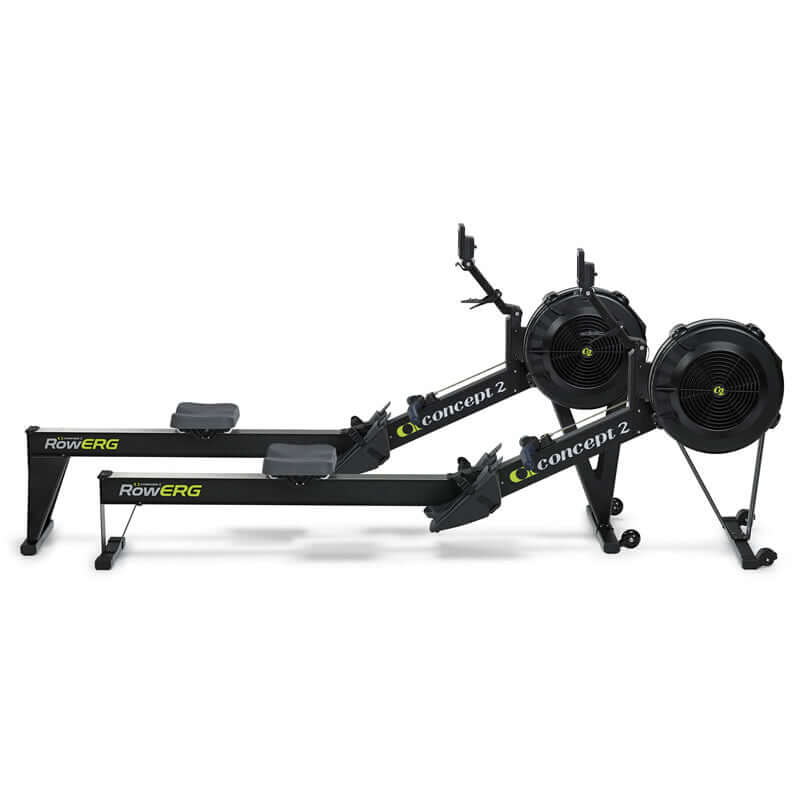
The Concept2 Model-D Indoor Rower is one of the most trusted rowing machines for home gyms, commercial studios, and athletic training programs. Known for its air resistance system, durable aluminum and steel construction, and highly accurate PM5 monitor, this indoor rower delivers a smooth, low-impact full-body workout that scales from beginner fitness routines to elite conditioning. The machine is designed to separate into two pieces for easier storage, and its 500 lb user capacity, 14-inch seat height, and 96-inch length make it a practical fit for serious training spaces. The Concept2 Model-D Indoor Rower is especially popular with rowers, CrossFit athletes, endurance trainers, and anyone who wants reliable cardio equipment that supports interval training, steady-state rowing, and calorie-focused workouts.
As of 2026, the estimated price range typically falls around $900 to $1,200 depending on retailer, shipping, and region, with availability through Concept2 and major fitness equipment sellers. The Model D is now commonly marketed as the RowErg, but the core design and performance profile remain closely associated with the Concept2 Model-D Indoor Rower. Its biggest advantages include repeatable performance tracking, a durable frame, easy maintenance, and strong resale value. For buyers comparing air rowers, the Model-D stands out for its balanced mix of commercial-grade feel, simple setup, and long-term reliability.
Specifications for Concept2 Model-D Indoor Rower
- Resistance type: Air/flywheel with adjustable spiral damper
- Monitor: PM5 Performance Monitor with pace, watts, stroke rate, and calories tracking
- Overall dimensions: 96 in x 24 in x 14 in with standard legs
- Storage dimensions: Approximately 25 in x 33 in x 53 in when separated for storage
- Machine weight: About 57 lb
- Maximum user weight: 500 lb
- Seat height: 14 in standard; taller leg options are available on some configurations
- Monorail length: 54 in
- Power source: Two D-cell batteries, with power assistance from the flywheel during use
- Frame material: Aluminum front legs and steel rear legs
- Connectivity: Bluetooth and ANT+ support on PM5
- Damper settings: 1 to 10 for airflow control
Compared with many magnetic resistance rowers, the Concept2 Model-D Indoor Rower offers a more natural rowing feel and broader performance data. Compared with budget hydraulic rowers, it is more durable, quieter in operation, and far more suitable for high-volume training. It remains a benchmark machine in the indoor rowing category.
Troubleshooting Concept2 Model-D Indoor Rower Problems
Common issues are usually easy to fix. If the monitor does not power on, replace the batteries and check that they are installed correctly. If the chain feels rough or noisy, inspect it for dirt, then clean and lubricate it according to the maintenance guide. If the seat rolls unevenly, look for debris on the monorail or worn rollers. If the machine feels loose, confirm that all frame hardware is tightened before use.
For PM5 error codes or display problems, restart the monitor, check battery condition, and make sure any sensor connections are secure. Some common monitor issues are resolved by replacing weak batteries or resetting the unit. Preventive maintenance helps avoid most complaints: keep the monorail clean, wipe sweat from the frame after workouts, inspect the chain regularly, and store the rower in a dry area. The Concept2 warranty typically includes five years on the frame and two years on the monitor and moving parts, though coverage can vary by region.
For help, Concept2 support can be reached in the United States and Canada at 800.245.5676 or by email at info@concept2.com. Regional support pages are also available for international customers.
Pros and Cons of the Concept2 Model-D Indoor Rower
Pros
- Excellent durability for home and commercial use
- Air resistance creates a smooth, realistic rowing stroke
- PM5 monitor delivers accurate workout data and performance tracking
- Easy to split into two pieces for storage
- Supports users up to 500 lb, making it highly versatile
- Strong value for money because it lasts for years and holds resale value well
Cons
- Air resistance is louder than magnetic rowers, especially at high effort
- Price is higher than entry-level rowing machines
- Requires more floor space than compact fitness rowers
- Minimalistic design may feel basic to users who want touchscreen workouts
For buyers comparing alternatives, the Concept2 Model-D Indoor Rower is usually the better choice than cheaper magnetic or hydraulic models if long-term reliability matters. It is less flashy than premium connected rowers, but it is often the smarter investment for serious training.
Customer Reviews of the Concept2 Model-D Indoor Rower
Customer feedback is consistently strong, with many users giving the machine 4.8 to 5 stars. Common praise includes the smooth pull, dependable build quality, accurate workout data, and easy maintenance. One typical review says, “It feels like a real rowing machine, and it still looks and performs like new after years of use.” Another frequent comment is that the PM5 monitor makes interval training and progress tracking simple.
Common complaints include the louder airflow sound, the higher upfront cost, and the need for a dedicated workout space. Some users also mention that the seat can feel firm during long sessions, especially at first. Even so, most buyers recommend the Concept2 Model-D Indoor Rower because it performs consistently and delivers exceptional long-term value. For athletes, home gym owners, and anyone seeking a best-in-class air rower, it remains one of the most recommended options available.
Faqs
How do I set up the concept2 MODEL-D Indoor Rower for the first time?
Why is the chain on my concept2 MODEL-D Indoor Rower making noise or feeling rough?
How do I connect the concept2 MODEL-D Indoor Rower to the ErgData app or other training software?
What resistance setting should I use on the concept2 MODEL-D Indoor Rower for beginners?
How can I troubleshoot if my concept2 MODEL-D Indoor Rower Performance Monitor is not turning on?
What is the best way to maintain the concept2 MODEL-D Indoor Rower for long-term performance?
How do I know if the concept2 MODEL-D Indoor Rower is calibrated correctly for accurate workout data?
Can the concept2 MODEL-D Indoor Rower be folded or stored easily in a small home gym?
Tags
More concept2 manuals
Leave a Comment