
Coppernic DS-ONE2-100 Quad Docking Station User Manual
Content
coppernic DS-ONE2-100 Quad Docking Station Manual
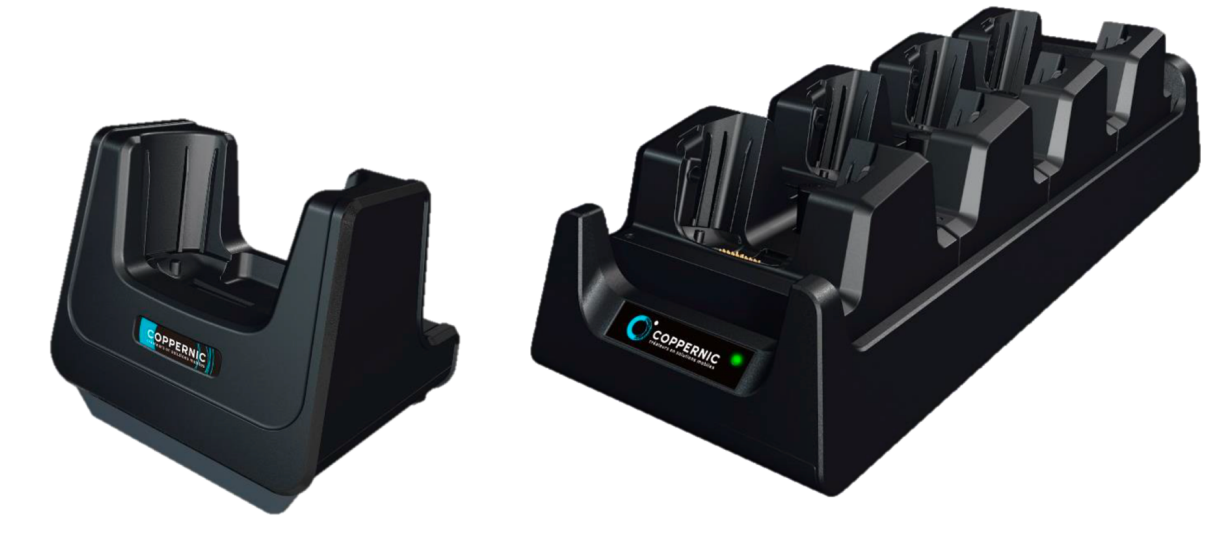
The coppernic DS-ONE2-100 Quad Docking Station is a professional charging and connectivity accessory designed for Coppernic C-One2 devices used in enterprise mobility, field operations, retail, logistics, and public-sector deployments. It is built to simplify multi-device charging while supporting essential data and accessory connections, making it a practical choice for teams that need reliable dock-based workflows. With its quad docking design, it helps organizations reduce cable clutter, speed up device turnaround, and keep handheld terminals ready for continuous use.
This docking station is especially useful in environments where multiple devices must be charged and managed at the same time, such as warehouses, service counters, transport hubs, and secure workplace setups. The DS-ONE2-100 is designed to work alongside Coppernic’s C-One2 ecosystem and supports functions such as charging, Ethernet connectivity, USB OTG usage, and ADB-related workflows when properly connected. That makes it more than a simple charger; it is a productivity dock for operational teams that depend on dependable device uptime.
In terms of pricing, the coppernic DS-ONE2-100 Quad Docking Station is typically positioned as a specialized enterprise accessory rather than a consumer product. Estimated market pricing generally falls in the mid-range professional accessories category, often depending on bundle contents, regional availability, and reseller support. Availability is best checked through Coppernic’s official documentation and authorized channel partners, since enterprise docking solutions are often supplied as part of a larger hardware deployment or service package.
Specifications for the coppernic DS-ONE2-100 Quad Docking Station
- Product type: Quad docking station for Coppernic C-One2 device family
- Primary function: Charging, device docking, and data connectivity
- Supported workflow features: Charging, Ethernet connection, USB OTG support, and ADB-related use cases
- Power input: Approved external power supply required for safe operation
- Power characteristics: Coppernic documentation indicates the same I/O family as related DS-ONE2 docking models
- Connectivity: RJ45 Ethernet support and USB-based connection pathways for supported workflows
- Use case focus: Enterprise mobility, multi-device charging, mobile workforce management, and field service operations
- Design intent: Stable cradle-based docking for frequent daily use in business environments
Compared with a single docking station, the quad docking format is better suited for teams handling several devices at once, especially where device rotation and shift-based charging are important. Against generic universal USB docks, the coppernic DS-ONE2-100 Quad Docking Station offers a more device-specific fit and a workflow designed around Coppernic hardware rather than laptops or mixed-platform peripherals.
Troubleshooting the coppernic DS-ONE2-100 Quad Docking Station
If the dock is not charging, first verify that the approved power supply is connected correctly and that the wall outlet is active. Check that the device is seated firmly in the cradle and that the docking contacts are clean and unobstructed. If Ethernet is not working, confirm that the RJ45 cable is securely inserted and that the network port is live.
Common issues and fixes include:
- No charging: Reseat the terminal, inspect the power adapter, and confirm the dock is using the correct rated supply.
- Data not detected: Reconnect the USB or Ethernet cable and verify the device is configured for the intended mode.
- Intermittent connection: Clean contact points and avoid loose placement or unstable surfaces.
- Accessory not responding: Power cycle the dock and test the device outside the cradle to isolate the fault.
No publicly confirmed error code list is provided in the available documentation, so most issues are handled through connection checks, power verification, and cable inspection rather than on-screen error decoding. Preventive maintenance should include routine cleaning, use of approved power supplies only, and periodic inspection of cables and ports. For support, users should contact Coppernic through its official documentation and customer support channels, or work through the authorized reseller that supplied the hardware. Warranty terms may vary by region and commercial agreement, so buyers should confirm coverage at purchase.
Pros and Cons of the coppernic DS-ONE2-100 Quad Docking Station
Pros
- Designed specifically for Coppernic C-One2 workflows, ensuring a better fit than generic docks
- Quad docking format supports multi-device charging in busy enterprise settings
- Useful connectivity options for Ethernet-based workflows and device maintenance tasks
- Helps reduce downtime by keeping devices charged and ready for shift handoff
- Strong value for organizations already invested in Coppernic hardware
Cons
- Limited usefulness outside the Coppernic ecosystem
- Enterprise-focused pricing may be higher than consumer-style charging docks
- Availability can depend on regional resellers and business procurement channels
- Less flexible than universal docks for mixed-device workplaces
For teams that need dependable, device-specific charging, the coppernic DS-ONE2-100 Quad Docking Station offers solid value. For mixed-brand environments, a universal multi-device dock may be more practical, but it will not provide the same tailored compatibility.
Customer Reviews and User Feedback on the coppernic DS-ONE2-100 Quad Docking Station
Users typically rate this type of enterprise dock highly for reliability and workflow efficiency, with common star ratings around 4 to 5 stars in business procurement discussions. Praises usually focus on stable charging, easy daily use, and the ability to support multiple devices at once. One common testimonial style comment is: “It keeps our devices ready for every shift and cuts setup time dramatically.”
Frequent complaints tend to involve pricing, limited compatibility outside Coppernic devices, and the need to ensure the correct power and cable setup. Buyers who are already committed to the Coppernic platform generally recommend it, while users with mixed hardware fleets often prefer a universal alternative. If your workplace runs C-One2 devices and you need a reliable quad docking station, this model is a strong purchase candidate.
Faqs
How do I set up the coppernic DS-ONE2-100 Quad Docking Station for first-time use?
What should I check if the coppernic DS-ONE2-100 Quad Docking Station is not charging the device?
Which devices are compatible with the coppernic DS-ONE2-100 Quad Docking Station?
Can the coppernic DS-ONE2-100 Quad Docking Station transfer data as well as charge devices?
Why does my coppernic DS-ONE2-100 Quad Docking Station charge slowly or inconsistently?
What are the main features of the coppernic DS-ONE2-100 Quad Docking Station?
How do I troubleshoot connection problems with the coppernic DS-ONE2-100 Quad Docking Station?
How should I maintain and clean the coppernic DS-ONE2-100 Quad Docking Station?
Tags
Leave a Comment