
How to Connect: Coros Pace Pro GPS Sport Watch User Manual
Content
COROS Pace Pro GPS Sport Watch
Introduction
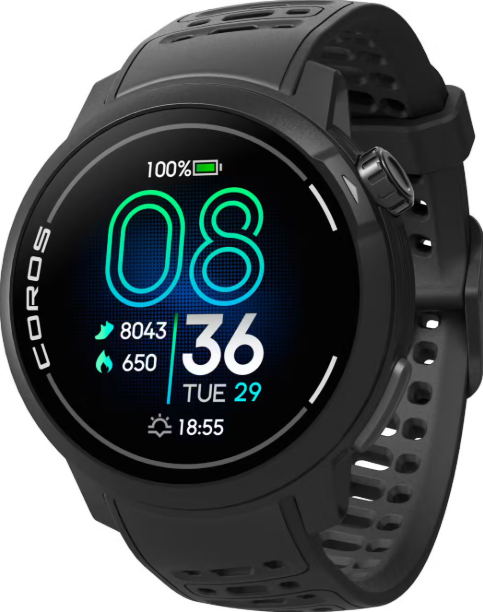
The COROS Pace Pro GPS Sport Watch is designed for multi-sport athletes seeking precision, performance, and clarity in their training and racing experiences. This advanced watch combines a high-performance processor, a bright AMOLED screen, and industry-leading energy-efficient technology into a compact, lightweight design. Key benefits include exceptional visibility with a 1500 nits display, enhanced GPS accuracy through dual-frequency support, and a long-lasting battery life of up to 38 hours in GPS mode or 20 days in daily use. The watch targets runners, cyclists, swimmers, and triathletes, offering comprehensive sport modes and health features like ECG and heart rate variability tracking. With a price around $349, the COROS Pace Pro is a competitive option in the sports watch market.
Quick Start Guide
Download the COROS app

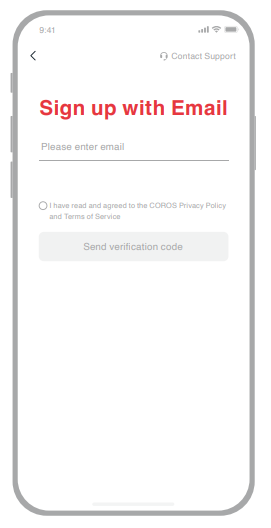
Create your COROS account
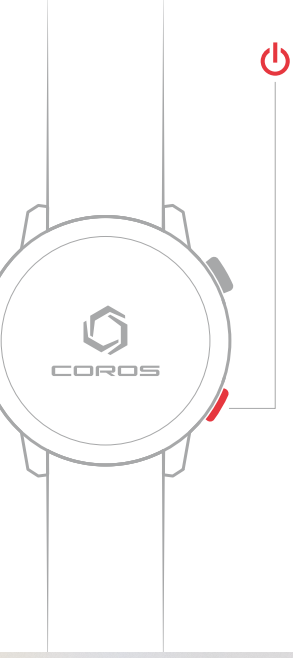
Press to power on
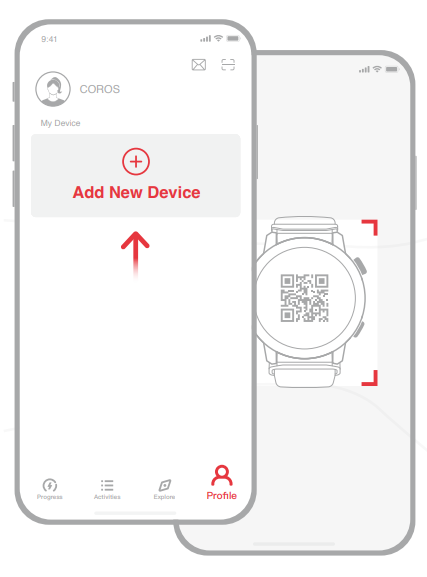
- Pair with the COROS app
Specifications of the COROS Pace Pro GPS Sport Watch
The COROS Pace Pro boasts impressive technical specifications:
- Display: 1.3-inch AMOLED touchscreen with 416 x 416 pixel resolution, offering vivid colors and high brightness up to 1500 nits.
- Processor: Ambiq Apollo510, providing more than 2x the processing power of the PACE 3.
- GPS Capability: Dual-frequency GPS supports multiple satellite systems (GPS, GLONASS, Galileo, Beidou, QZSS) for enhanced accuracy.
- Battery Life: - Up to 38 hours in GPS mode - Up to 32 hours in dual-frequency GPS mode - Up to 20 days in daily use with gesture display - Up to 6 days with always-on display
- Sensors: Includes optical heart rate, barometric altimeter, accelerometer, gyroscope, electronic compass, pulse oximeter, and ECG.
- Storage: 32GB internal memory for storing maps and data.
Compared to similar products, the COROS Pace Pro stands out with its advanced AMOLED display and enhanced GPS capabilities.
Troubleshooting the COROS Pace Pro GPS Sport Watch
Here are some common issues and solutions:
- Low GPS Accuracy: Ensure the watch has a clear view of the sky and try resetting the GPS settings.
- Heart Rate Issues: Check the strap fit and ensure the sensor area is clean.
- Screen Not Turning On: Check the power button and ensure the watch is fully charged.
- Warranty and Support: Refer to the official COROS website for warranty details and contact customer support
Pros & Cons of the COROS Pace Pro GPS Sport Watch
Pros:
- Advanced Display: The 1500 nits AMOLED screen offers excellent visibility in all conditions.
- Enhanced GPS: Dual-frequency support provides superior accuracy.
- Long Battery Life: Up to 38 hours in GPS mode and 20 days in daily use.
- Value for Money: Offers a comprehensive set of features at a competitive price.
Cons:
- Weight Increase: Slightly heavier than the PACE 3.
- ECG Limitations: Not FDA/CE certified for AFib detection.
- Price Increase: Higher than the PACE 3.
Customer Reviews of the COROS Pace Pro GPS Sport Watch
Users praise the COROS Pace Pro for its vibrant display, precise GPS tracking, and long-lasting battery. Common complaints include the slight weight increase and limited ECG functionality. Overall, it receives positive reviews for its value and performance, with many considering it a top choice for athletes. Rated 4.5/5 stars by users, the COROS Pace Pro is highly recommended for those seeking a reliable and feature-rich sports watch.
Faqs
How do I set up my coros Pace Pro GPS Sport Watch for the first time?
What should I do if my coros Pace Pro GPS Sport Watch is not pairing with the COROS app?
How can I optimize battery life on my coros Pace Pro GPS Sport Watch during long training sessions?
Can the coros Pace Pro GPS Sport Watch sync data with other fitness platforms like Strava or Apple Health?
How do I customize the display and data fields on my coros Pace Pro GPS Sport Watch?
What are the best practices for maintaining and caring for the coros Pace Pro GPS Sport Watch?
How do I restart or reset my coros Pace Pro GPS Sport Watch if it becomes unresponsive?
Is the coros Pace Pro GPS Sport Watch compatible with both iOS and Android devices?
Tags
Leave a Comment