
Setup: Corsair Icue LC100 Case Accent Lighting Panels Mini Triangle User Manual
Content
Corsair iCUE LC100 Case Accent Lighting Panels Mini Triangle

Introduction
The Corsair iCUE LC100 Case Accent Lighting Panels Mini Triangle is a premium RGB lighting solution designed to transform your PC case into a vibrant, customizable light show. This innovative starter kit includes nine interconnected mini triangular panels, each packed with nine brilliant RGB LEDs, delivering a total of 81 individually addressable lights for striking, smooth illumination across your build. The panels are housed in a sturdy, light-diffusing casing that ensures continuous, gradient-free color transitions—perfect for users seeking a professional, immersive lighting experience.
Uniquely, the Corsair iCUE LC100 system allows for nearly endless creative configurations. With included low-profile connectors and corner hinges, you can arrange the triangles in flat, 3D, or freeform layouts, magnetically attaching them to any steel surface for easy repositioning. The kit comes with a Lighting Node PRO controller and integrates seamlessly with Corsair’s iCUE software, enabling full synchronization with other iCUE-compatible devices for a unified, smart lighting ecosystem.
This product is ideal for PC enthusiasts, modders, and gamers who want to personalize their setups with advanced RGB effects. Whether you’re highlighting internal components, creating a themed build, or simply elevating your desk aesthetics, the Corsair iCUE LC100 Case Accent Lighting Panels Mini Triangle offers both flexibility and visual impact. The starter kit is widely available from major retailers and Corsair’s official store, with an estimated price range of $100–$150, depending on region and retailer.
Specifications
- Product Name: Corsair iCUE LC100 Case Accent Lighting Panels Mini Triangle – 9x Tile Starter Kit
- Manufacturer Part Number: CL-9011114-WW
- Lighting: 9 panels, 81 RGB LEDs total (9 per panel), individually addressable
- Light Diffusion: Sturdy, light-diffusing casing for smooth, gradient-free effects
- Mounting: Magnetic attachment for easy placement on any steel surface
- Layout Flexibility: Includes 8 low-profile connectors and 2 corner hinges for 3D and custom layouts
- Controller: Lighting Node PRO RGB Lighting Controller included
- Software: Fully customizable via Corsair iCUE software; syncs with all iCUE-compatible devices
- Expandability: Supports up to 18 panels (expansion kit sold separately)
- Warranty: 2-year limited warranty
Performance Benchmarks: The Corsair iCUE LC100 system delivers vibrant, uniform lighting with minimal hotspots, thanks to advanced diffusion technology. Compared to traditional LED strips, these panels offer superior layout flexibility and a more refined, professional look. While similar products like the Phanteks Neon or Lian Li Strimer offer linear lighting, the LC100’s modular triangles provide unique geometric patterns and 3D effects not easily replicated by competitors.
GETTING TO KNOW YOUR LC100
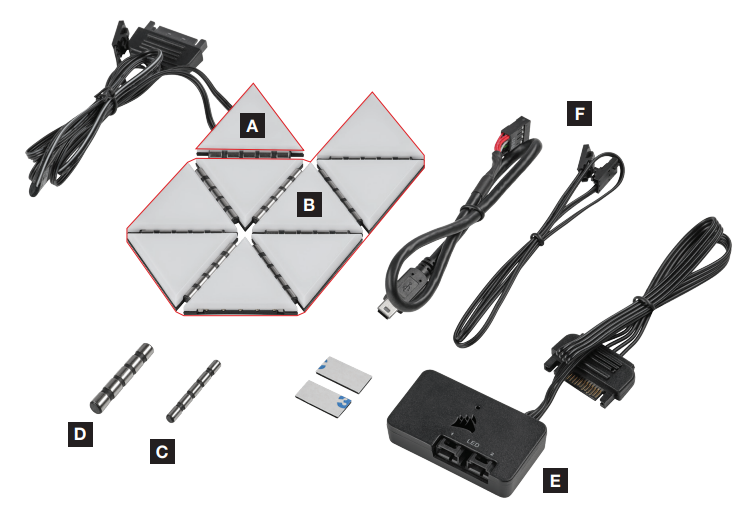
- 1x MASTER LC100 TRIANGLE
- 8x COMPANION LC100 TRIANGLES
- 8x 4mm CONNECTION RODS
- 2x 5.5mm CONNECTION RODS
- LIGHTING NODE PRO (INCLUDED WITH LC100 STARTER KIT)
- CABLES (INCLUDED WITH LC100 STARTER KIT)
LC100 INSTALLATION
To ensure proper operation, keep the contact pins and connection rods free of any foreign objects/materials.
Please use the LC100 panels and connection rods as defined in this document. Only LC100 panels must be connected to the connection rods.
Turn off computer
Turn your system off prior to installing your LC100 Case Accent Lighting Triangles and Lighting Node PRO.
Mount LC100
- Mount the [A] LC100 master triangle on a steel surface inside the case.
- Attach [B] companion LC100 triangles to the left or right connection sides of the [A] master triangle by inserting a [C] 4mmconnection rod between the triangles.
- Use a [D] 5.5mm connection rod if placing two triangles on a corner.
- Up to eighteen (18) total LC100 triangles can be connected simultaneously. An additional [A] LC100 master triangle is required as a power input, which is available through the LC100 Expansion Kit.
- The 3-pin RGB connector from the secondary master tile is not required to be connected to the Lighting Node PRO.


Mount Lighting Node PRO
(Starter Kit only)
- Find a location for the [E] Lighting Node PRO that allows the 3-pin RGB cable from the [A] master triangle to reach the [E] Lighting Node PRO, then mount it with the provided mounting strips.
Connect LC100
Connect the 3-pin RGB connector from the main [A] master triangle into the [E] Lighting Node PRO.

Connect Lighting Node PRO
- Plug the 9-pin USB cable [F] from the [E] Lighting Node PRO into an available internal USB 2.0 header on your motherboard or USB hub.
- Connect the SATA power connector to an available SATA connector from your power supply unit.

iCUE SETUP
Install iCUE
Click the image to download CORSAIR’s latest iCUE software.

ADDITIONAL SETUP
Please visit our CORSAIR LAB for additional iCUE setup, configuration, and tips.

Comparison Table
| Feature | Corsair iCUE LC100 | Phanteks Neon | Lian Li Strimer |
|---|---|---|---|
| Light Type | Modular Triangles | Flexible LED Strip | Programmable Cable |
| Customization | 3D/Geometric Layouts | Linear/Custom Bends | Cable-Focused Effects |
| Software | iCUE Ecosystem | Basic RGB Control | L-Connect Software |
| Expandability | Up to 18 Panels | Multiple Strips | Multiple Cables |
Troubleshooting
If you experience issues with your Corsair iCUE LC100 Case Accent Lighting Panels Mini Triangle, consult the following troubleshooting guide:
- Panels Not Lighting Up: Ensure all connectors are securely attached. Check that the Lighting Node PRO is properly connected to your motherboard and powered. Update Corsair iCUE software to the latest version.
- Software Detection Issues: Restart your PC and reconnect the Lighting Node PRO. Reinstall iCUE software if problems persist. Ensure your motherboard’s USB headers are functioning correctly.
- Uneven or Flickering Lights: Verify that all panels are firmly connected. Avoid bending cables excessively. If flickering persists, try a different USB port or controller.
- Magnetic Attachment Problems: The panels adhere best to steel surfaces. For non-metallic cases, consider using adhesive strips (not included).
Preventive Measures: Handle panels and cables gently to avoid damage. Keep firmware and software updated for optimal compatibility. Regularly check connections for dust or debris.
Warranty & Support: Corsair offers a 2-year limited warranty on the LC100 system. For further assistance, visit Corsair’s official support page or contact their customer service team directly. Always retain your proof of purchase for warranty claims.
Pros & Cons
Pros
- Unmatched Customization: Create unique 3D and geometric lighting layouts not possible with standard LED strips.
- Smooth, Uniform Lighting: Advanced diffusion ensures vibrant, gradient-free color transitions.
- Easy Installation: Magnetic attachment and modular design simplify setup and repositioning.
- Ecosystem Integration: Full sync with Corsair iCUE software and compatible devices for a unified RGB experience.
- Expandable System: Grow your setup with additional panel kits for larger, more intricate designs.
Cons
- Premium Price: Higher cost compared to basic LED strips, reflecting advanced features and build quality.
- Steel Surface Required: Magnetic mounting works best on steel cases; adhesive solutions are needed for other materials.
- Software Learning Curve: iCUE offers deep customization but may overwhelm beginners.
- Limited Expansion Included: Starter kit supports up to 18 panels, but expansion requires a separate purchase.
Value for Money: The Corsair iCUE LC100 Case Accent Lighting Panels Mini Triangle delivers exceptional customization and quality for the price, though budget-conscious builders may prefer simpler solutions. It stands out for users seeking a premium, visually striking PC lighting system.
Customer Reviews
User feedback for the Corsair iCUE LC100 Case Accent Lighting Panels Mini Triangle highlights both its strengths and areas for improvement. Many praise the smooth, vibrant lighting effects and the ability to create unique 3D layouts, calling it a “game-changer” for PC modding and desk aesthetics. The magnetic attachment and modularity receive frequent positive mentions for ease of use and flexibility.
Common complaints include the need for a steel case for optimal mounting and the higher price compared to standard LED strips. Some users note a learning curve with the iCUE software, though most appreciate the depth of customization once familiar. Star ratings typically range from 4 to 5 stars, with users recommending the product for enthusiasts willing to invest in premium RGB lighting.
Testimonials often mention the LC100’s ability to synchronize with other Corsair devices, creating a cohesive, immersive environment. Frequent suggestions for improvement include offering more panel shapes and better adhesive options for non-steel cases.
Purchase Recommendation: Ideal for advanced users and modders seeking unparalleled RGB customization. Beginners may want to start with simpler lighting solutions before upgrading to the Corsair iCUE LC100 system.
Tags
Leave a Comment