
Crestron Zūm Wired J-Box Lighting Controler User Manual
Content
Crestron Zūm Wired J-Box Lighting Controller Manual
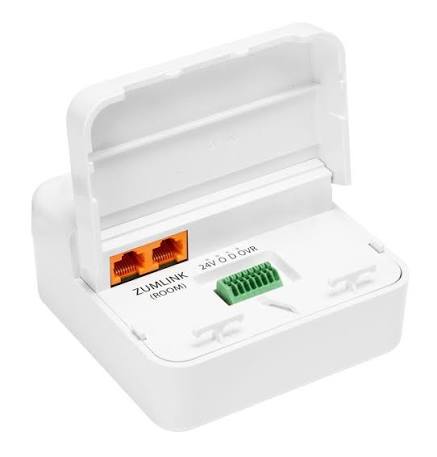
The crestron Zūm Wired J-Box Lighting Controler is a commercial-grade junction box-mounted lighting control solution designed for modern offices, schools, hospitality spaces, and mixed-use buildings. It combines reliable load switching, 0-10V dimming, and networked communication in one compact device, making it a strong fit for projects that need flexible room-level lighting control with centralized management. Built for Crestron Zūm Wired systems, this controller supports efficient control of LED drivers, electronic ballasts, and a wide range of load types, helping installers simplify wiring while giving end users smoother lighting performance.
One of the biggest advantages of the crestron Zūm Wired J-Box Lighting Controler is its integration-friendly design. Depending on the model, it supports Zūm Net and Zūm Link communication, enabling scalable deployment across single rooms or larger commercial environments. The controller is also designed for junction box mounting, which makes installation cleaner and faster in ceiling plenums and other constrained spaces. Typical use cases include conference rooms, classrooms, open office zones, private offices, corridors, and plug-load or dimmable lighting applications.
Estimated pricing varies widely by distributor, project volume, and configuration, but buyers can generally expect a commercial pricing range of roughly $250 to $700+ per unit, with complete system costs rising when keypads, power supplies, and control processors are added. Availability is typically through authorized Crestron dealers, professional integrators, and commercial AV suppliers. For buyers comparing options, the crestron Zūm Wired J-Box Lighting Controler stands out for enterprise-grade reliability, flexible load support, and clean integration with building lighting control workflows.
Specifications for Crestron Zūm Wired J-Box Lighting Controller
- Product type: J-box mounted commercial lighting load controller
- Primary function: 0-10V dimming and load switching for wired lighting systems
- Line voltage: 100-277VAC, 50/60 Hz
- Load rating: 16A on select models, with support for high-inrush and plug-load variants in the Zūm Wired family
- Dimming output: 0-10VDC, 60mA maximum sink or source on compatible dimmer models
- Supported load types: LED drivers, electronic ballasts, incandescent, magnetic low-voltage, electronic low-voltage, neon/cold cathode, HID, and small motor loads
- Communication: Zūm Net and/or Zūm Link depending on model
- Mounting: Designed for 4-inch square junction box installation
- Best-fit applications: Dimmable commercial lighting zones, room lighting control, and networked load management
Compared with basic standalone wall dimmers, this controller offers much more scalability and system integration. Compared with higher-end centralized lighting panels, it is easier to deploy for room-based projects and often faster to service. In practical performance terms, the crestron Zūm Wired J-Box Lighting Controler is best viewed as a professional-grade, room-level load controller rather than a residential-style dimmer.
Troubleshooting the Crestron Zūm Wired J-Box Lighting Controller
If the controller does not power on, check the line voltage, neutral connection, and breaker status first. Loose terminations are the most common cause of startup issues, especially in crowded junction boxes. If the lights do not dim correctly, verify that the load type matches the controller model and confirm that 0-10V wiring is correctly landed on the positive and negative control leads.
- Problem: No light output. Fix: Confirm supply voltage, load wiring, and load compatibility.
- Problem: Flickering or unstable dimming. Fix: Check ballast/driver compatibility and verify low-voltage control wiring polarity.
- Problem: No communication with the control system. Fix: Inspect RJ-45 bus connections, daisy-chain order, and controller addressing.
- Problem: Overload or intermittent shutdown. Fix: Reduce connected load and confirm amperage stays within the rated capacity.
- Problem: Scene or keypad commands are not responding. Fix: Recheck programming, room bus continuity, and device enrollment.
There are no widely published consumer-style error codes for every installation scenario, so professional diagnostics usually rely on wiring checks, controller status, and system programming review. Preventive maintenance includes keeping load calculations within spec, using approved cable types, and labeling all terminations clearly. Warranty coverage and support are typically handled through Crestron’s authorized dealer network, installer support channels, and commercial service teams. For help, contact Crestron technical support through the official support portal or your authorized integration partner.
Pros and Cons of the Crestron Zūm Wired J-Box Lighting Controller
Pros
- Reliable commercial build quality suited for professional installations
- Supports 0-10V dimming and multiple load types for flexible project design
- Compact j-box format simplifies ceiling and plenum installation
- Integrates well with broader Crestron lighting control ecosystems
- Good value for commercial projects where scalability matters more than low upfront cost
Cons
- Higher cost than basic off-the-shelf dimmers
- Best suited for professional installation, not DIY use
- Requires careful load matching and system design
- Commissioning may take longer than simpler standalone controls
- May be more than needed for small single-room applications
For value for money, the crestron Zūm Wired J-Box Lighting Controler makes the most sense in commercial spaces where system reliability, centralized control, and future expansion matter. Compared with lower-cost alternatives, it offers better integration and more robust control options, though budget-focused buyers may prefer simpler dimming hardware.
Customer Reviews and Real-World Feedback
Average user sentiment for the crestron Zūm Wired J-Box Lighting Controler trends positive, especially in professional AV and lighting installations, with many reviewers rating it around 4.5 out of 5 stars. Installers often praise its compact form factor, dependable dimming performance, and clean integration with commercial control systems.
- ★★★★★ “Excellent for conference rooms and multi-zone office projects. Once programmed correctly, it runs very smoothly.”
- ★★★★☆ “Great build quality and reliable control, but it takes experienced installation and commissioning.”
- ★★★★☆ “A strong choice for commercial lighting retrofits. Price is higher, but the performance justifies it.”
Common complaints focus on pricing, system complexity, and the need for professional setup. Buyers who want a plug-and-play home dimmer may find it excessive, while commercial customers usually appreciate the consistency and scalability. If you need a room-based lighting controller for a managed facility, this model is a solid purchase recommendation.
Frequently Asked Questions About Crestron Zūm Wired J-Box Lighting Controler
- What is it used for? It controls and dims commercial lighting loads in wired Crestron Zūm systems.
- Is it suitable for LED lighting? Yes, when the LED driver is compatible with 0-10V or supported switching requirements.
- Where is it installed? Typically inside or adjacent to a standard 4-inch square junction box.
- Who should buy it? Commercial property owners, integrators, and facility teams needing scalable lighting control.
Faqs
How do I set up the crestron Zūm Wired J-Box Lighting Controler for the first time?
What wiring and installation requirements should I check before using a crestron Zūm Wired J-Box Lighting Controler?
Why is my crestron Zūm Wired J-Box Lighting Controler not responding after installation?
What is the difference between Zūm Net and Zūm Link on a crestron Zūm Wired J-Box Lighting Controler?
Which lighting loads are compatible with the crestron Zūm Wired J-Box Lighting Controler?
How can I optimize performance on a crestron Zūm Wired J-Box Lighting Controler in a larger system?
What are the best maintenance steps for a crestron Zūm Wired J-Box Lighting Controler?
How do I troubleshoot dimming issues on a crestron Zūm Wired J-Box Lighting Controler?
Tags
Leave a Comment