
Setup: Cubot C28 Smart Watch User Manual
Content
Meet the Cubot C28 Smart Watch
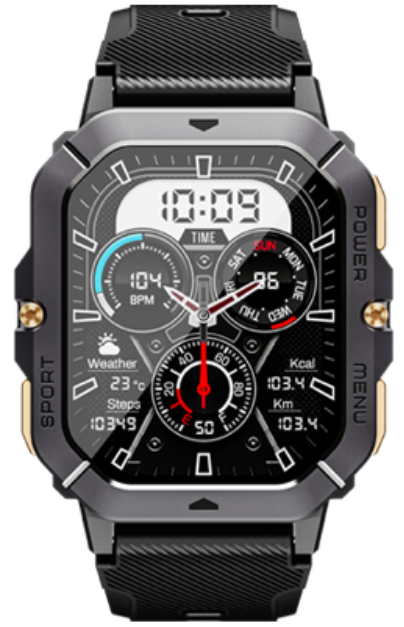
Introduction
The Cubot C28 Smart Watch is a feature-packed, rugged wearable designed for active lifestyles and health-conscious users. Built with durability in mind, this smartwatch combines a large 2.02-inch HD TFT touchscreen with military-grade toughness, making it ideal for outdoor adventures, gym sessions, and everyday use..
One of the standout features of the Cubot C28 is its comprehensive health monitoring suite, including 24/7 heart rate tracking, blood oxygen (SpO2) monitoring, blood pressure estimation, stress detection, sleep analysis, and even menstrual cycle tracking for women. With over 100 sport modes, from running and cycling to swimming and yoga, the C28 adapts to virtually any fitness routine, providing real-time data and personalized insights to help you reach your goals.
The Cubot C28 is also built to last, offering 1ATM waterproofing for rain, sweat, and splashes, along with anti-shock, anti-vibration, and dustproof construction. Its zinc alloy frame ensures it can withstand extreme temperatures from -30°C to 70°C, making it a reliable companion in any environment.
Targeted at fitness enthusiasts, outdoor adventurers, and anyone seeking a durable, health-focused smartwatch, the Cubot C28 is competitively priced in the mid-range segment, offering exceptional value for its robust feature set. It is widely available through online retailers and electronics stores globally.
Watch profiles
The watch adopts s push button + color touch screen, integrating multiple functions, and the large color screen provides a larger view.
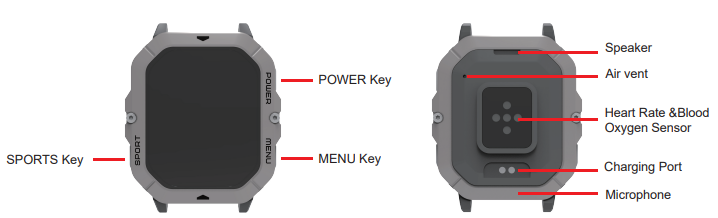
- Awakens: With the screen off, click the button to wake up the watch.
- Light up the screen: Click the up button to light the screen. Raise your wrist or turn your wrist inwards to light up the screen.
- AOD off-screen:
- After lighting up the screen by pressing the button or lifting the wrist, the screen automatically turns off after a period of no operation.
- Lowering your arm makes the screen go off quickly.
- Select Watch Settings>Display>Screen Off Time to set the screen off time.
Charging and powering up
Charging: Aim the charging cable at the charging area on the back of the fitted device, and connect the other end to Connect the charger and turn on the power until the charging power indicator appears on the screen of the device. The charging power indicator appears on the screen of the device.
Power on: Charging can be auto power on, or long-press the up button to power on.
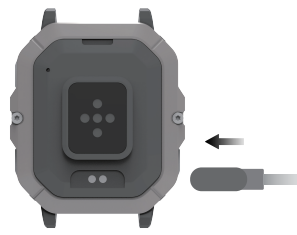
Please keep the charging cable, device, etc.,, dry when charging. It is recommended to use a power adapter with a rated output voltage of 5V and a rated output current of 1A to power the charging cable. Consumers should use a power adapter that is CCC certified and meets the standard requirements for charging.
Pairing of connecting devices
After the device is turned on for the first time, the Bluetooth is paired by default. Please download and install the latest version of the DaFit App before pairing.
Please make sure your phone has Bluetooth and location services turned on.
HarmonyOS, Android users
In the DaFit App, click Add Device. The app will automatically scan for connectable devices, click on the target device to connect it, and pair it according to the interface prompts.
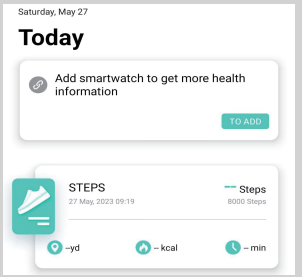
Click on the device with Bluetooth name C28 on the Search for Devices page to bind it.
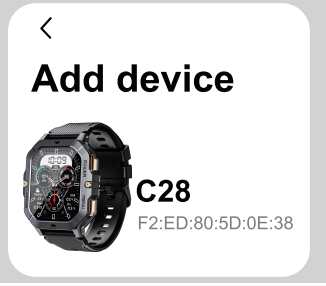
- You need to agree to the following permissions to use the Bluetooth calling feature.
If you replace the paired connected cell phone, you need to go to App > RemoveDevice>.
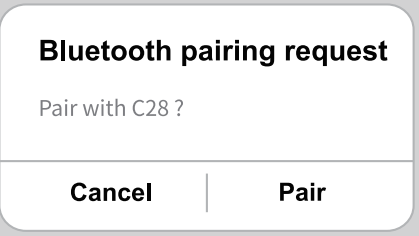
iOS users
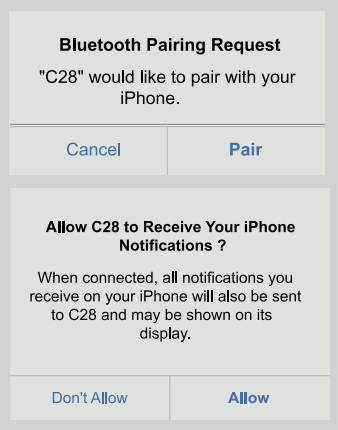
- In the DaFit App, click Add Device, select the device you want to pair with in the device list, and click Pairing.
- Click on the device with Bluetooth name C28 on the Search for Devices page to bind it.
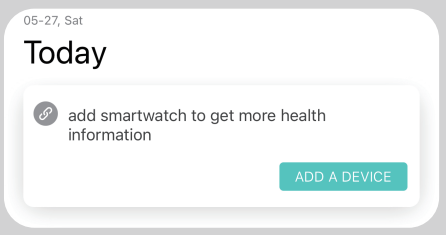
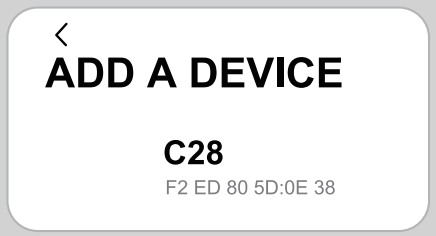
You need to agree to the following permissions for the watch functions to work properly and for Bluetooth calling to function.
After successful pairing, the device returns to the dial interface and synchronizes the relevant information (date, time, etc.)
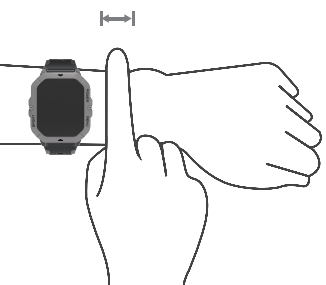
Wearing a watch
Please make sure that the bottom case of the watch is clean and free of debris, and then fit the monitoring unit area on your wrist to maintain a comfortable, snug fit. Do not put a film on the back of the watch, there are sensors at the bottom of the watch to recognize the human body, once covered, it will lead to inaccurate or unrecognized recognition, which will lead to inaccurate or unrecorded records of heart rate, blood oxygen, sleep,, and so on.
Device maintenance
Please remember the following tips when you maintain your SmartWatch:
- Clean the smart watch regularly, especially its inner side, and keep it dry.
- Adjust the smart watch tightness to ensure air circulation.
- Excessive skincare products should not be used on the wrist. Wearing the smart watch.
- Please cease wearing the smart watch in case of skin allergy or any discomfort.
Open the client and download it
- Scan the QR code below to download and install the client on your cell phone.

Detailed Specifications and Key Features
- Display: 2.02-inch TFT touchscreen, 320 x 390 resolution for crisp, clear visuals
- Battery: 410mAh long-lasting battery for extended use between charges
- Build: Zinc alloy frame, military-grade ruggedness, 1ATM waterproof (IP68 equivalent), dustproof, anti-shock, anti-vibration
- Health Sensors: Heart rate (VC30F sensor), blood oxygen (SpO2), blood pressure estimation, stress monitoring, sleep tracking, menstrual cycle tracking
- Sports Modes: 100+ activities including running, cycling, swimming, yoga, basketball, football, and more
- Connectivity: Bluetooth 5.0 for seamless pairing with smartphones
- Memory: 128MB onboard storage
- Dimensions: 58.3mm (height) x 46.1mm (width) x 13.3mm (thickness)
- Charging: Magnetic charging cable, 5V/1A recommended adapter
- Compatibility: Works with Android and iOS via the DaFit app
Compared to similar smartwatches in its price range, the Cubot C28 stands out for its rugged construction, extensive health tracking, and wide array of sport modes. While it may lack some advanced smart features found in premium brands, it offers robust performance for fitness and health monitoring at a more accessible price point.
Troubleshooting Common Cubot C28 Smart Watch Issues
Even the most reliable devices can encounter issues. Here’s how to address common problems with your Cubot C28 Smart Watch:
Common Problems and SolutiDevice won’t’t’t Turn On: Ensure the battery is charged. Use the included magnetic charger and a 5V/1A adapter. If the device still doesn’t power on, try a long press on the up button..
- Bluetooth Pairing Issues: Make sure your phone’s Bluetooth and location services are enabled. Reinstall the DaFit app if pairing fails..
- Screen Not Responding: Clean the screen with a soft, dry cloth. Avoid using harsh chemicals. Restart the device if the issue persists
- Inaccurate Health Data: Ensure the watch is snug on your wrist. Clean the sensors regularly. Update the firmware via the DaFit app for improved accuracy..
- Water Resistance Compromised: Avoid exposing the watch to hot water or submersion beyond the 1ATM rating. Dry the device thoroughly after exposure to moisture.
Preventive Measures
- Regularly clean your Cubot C28 with a soft, dry cloth
- Avoid extreme temperatures and direct sunlight for prolonged periods
- Use only recommended chargers to prevent battery damage
Warranty and Support
The Cubot C28 comes with a standard manufacturer’s warranty. For support, contact Cubot customer service via their official website. Keep your proof of purchase for warranty claims.
Pros & Cons: Balanced Assessment
Advantages
- Rugged Durability: Military-grade build, 1ATM waterproofing, and extreme temperature resistance make it ideal for active users
- Comprehensive Health Tracking: Heart rate, SpO2, blood pressure, stress, sleep, and menstrual cycle tracking provide a holistic health overview
- Extensive Sport Modes: Over 100 activities supported, catering to a wide range of fitness routines
- Long Battery Life: 410mAh battery ensures extended usage between charges
- Value for Money: Packed with features at a competitive mid-range price
Limitations
- Limited Smart Features: Lacks advanced smartwatch functionalities like NFC payments or a full app ecosystem.
- Bulkier Design: The rugged build adds thickness, which may not appeal to users seeking a slim profile
- App Dependency: Health and fitness data require pairing with a smartphone and the DaFit app
- No GPS Built-in: Relies on connected GPS from your phone for location tracking.
Overall, the Cubot C28 Smart Watch excels as a durable, health-focused wearable with strong value for active users, though it may not satisfy those seeking the latest smart features or a minimalist design.
Customer Reviews and Real-World Feedback
Users consistently praise the Cubot C28 for its ruggedness, clear display, and comprehensive health tracking. Many highlight the accuracy of heart rate and SpO2 sensors, as well as the convenience of having over 100 sport modes at their fingertips. The long battery life is frequently mentioned as a major advantage for daily use and outdoor activities.
Common complaints include the watch’s relatively bulky design and the lack of a standalone GPS. Some users note occasional syncing issues with the DaFit app, though these are often resolved with app updates or device resets. Star ratings typically range from 4 to 4.5 out of 5, reflecting strong satisfaction among fitness enthusiasts and outdoor adventurers.
Testimonials often recommend the Cubot C28 for those seeking a tough, reliable smartwatch with advanced health features at a reasonable price. It is especially popular among hikers, gym-goers, and users with active lifestyles.
For best results, keep your device and app updated, and ensure a snug fit for accurate sensor readings. If you prioritize durability and health tracking over advanced smart features, the Cubot C28 Smart Watch is a compelling choice in its category.
Faqs
How do I set up my cubot C28 Smart Watch for the first time?
What should I do if my cubot C28 Smart Watch is not working properly?
How do I use the heart rate monitoring feature on my cubot C28 Smart Watch?
Can I use my cubot C28 Smart Watch for swimming?
How often should I clean my cubot C28 Smart Watch?
What are the key features that make cubot C28 Smart Watch different?
Is the cubot C28 Smart Watch compatible with both Android and iOS devices?
How can I optimize the battery life of my cubot C28 Smart Watch?
Tags
Leave a Comment