
How to Use: Daewoo Air Purifier COL1563 User Manual
Content
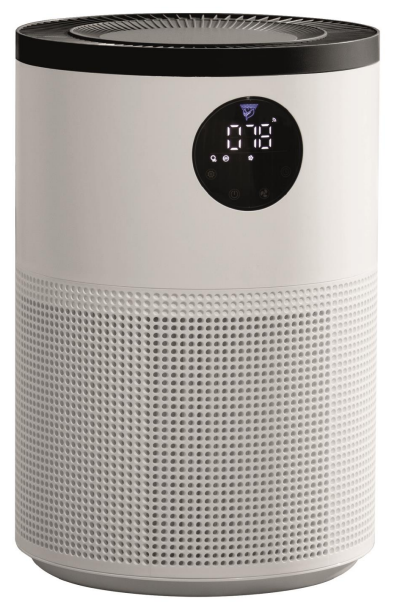
Daewoo Air Purifier COL1563
Introduction
The Daewoo Air Purifier COL1563 delivers a breath of fresh air to homes and offices, combining advanced filtration, smart connectivity, and energy efficiency in a sleek, modern design. Designed for those who prioritize clean air, this air purification system is ideal for allergy sufferers, families with pets, or anyone living in urban environments with higher pollution levels.
Key benefits include a powerful 280m³/h CADR (Clean Air Delivery Rate), which quickly removes dust, pollen, smoke, and odors, ensuring healthier indoor air quality. The Daewoo COL1563 features a multi-stage filtration system, including a pre-filter, HEPA filter, and activated carbon filter, capturing particles down to 0.3 microns. Unique selling points include Wi-Fi connectivity for remote control via a mobile app, UV-C sterilization for germ elimination, and quiet operation suitable for bedrooms and workspaces.
Target users include busy professionals, parents, and health-conscious individuals seeking reliable air purification. Use cases range from daily home use to supporting offices, nurseries, and pet-friendly spaces. The Daewoo Air Purifier COL1563 is widely available online and through major electronics retailers, with an estimated price range of £150–£250, offering strong value for its feature set compared to competitors.
Specifications
- Model Number: COL1563
- Mains Adaptor Rated Input: 100-240V~ 50/60Hz (1.5A max.)
- Mains Adaptor Rated Output: 24V DC 2A
- Air Purifier Rated Power: 30W
- Noise Level: 55dB
- Coverage Area: ≤36m2
- Wi-Fi Frequency: 2.4GHz
- Protection Class (Mains Adaptor): II
This product conforms to the Radio Equipment Directive 2014/53/EU
The Daewoo COL1563 stands out for its high CADR and smart features, positioning it above basic purifiers and on par with premium brands. Its Wi-Fi integration and UV-C sterilization are rare in this price range, making it a compelling choice for tech-savvy users seeking both performance and convenience.
IMPORTANT SAFETY INSTRUCTIONS FOR PROPER USE
When using electrical appliances, basic safety precautions should always be followed.
Only use the product as described in this user manual. Any other use is considered improper and may result in damage to property or persons. The manufacturer or vendor cannot be held liable for damages or injury incurred through improper or incorrect use.
- Read and familiarise yourself with all operating instructions before using this Air purifier.
- Before using your unit on the mains, visually check that the unit is intact and has not suffered any transit damage.
- Check that the voltage indicated on the data plate corresponds with that of the local network before connecting the appliance to the mains power supply.
- Always use this appliance on a solid, level, non-flammable surface.
- The Air purifier shall not be exposed to dripping or splashing,, and that no objects filled with liquids, such as vases, shall be placed on the apparatus.
- DO NOT immerse the Air purifier or its power cord in water or any other liquids.
- DO NOT leave the Air purifier unattended during use.
- DO NOT leave the Air purifier unattended whilst connected to a mains power supply.
- Avoid touching any moving parts within the appliance.
- Never insert fingers, pencils, or any other objects through the guard.
- DO NOT push objects into any openings,, as damage to the product and/or electric shock may occur.
- This appliance can be used by children aged from 8 years and above and persons with reduced physical, sensory,, or mental capabilities or lack of experience and knowledge if they have been given supervision or instruction concerning the use of the appliance in a safe way and understand the hazards involved. Children shall not play with the appliance. Cleaning and user maintenance shall not be made by children without supervision.
- Children of less than 3 years should be kept away unless continuously supervised.
- Close supervision is required when using this Air purifier near children.
- Never leave this Air purifier within reach of children.
- It is imperative to unplug from the mains supply after the Air purifier has been used, before it is cleaned,, and whilst being repaired.
- Unplug after each use.
- DO NOT operate this appliance if the power cord or plug is damaged. Ensure that the power cord is not stretched or exposed to sharp objects or edges.
- DO NOT operate this appliance after a malfunction or after being dropped or damaged in any way.
- DO NOT allow the mains cable to hang over sharp edges or come in contact with hot surfaces.
- DO NOT run the mains cable under carpets, rugs, etc.
- This product is intended for household use only and should not be used for industrial purposes.
- Never connect the appliance to an electrical outlet using an extension lead. If an outlet is not available, one should be installed by a qualified electrician.
- Never use the mains plug or external timer as a means of switching the Air purifier on or off. Use the ON/OFF button located on the control panel.
- Always place the unit on a dry and stable surface.
- The appliance should not be placed in a laundry or wet room.
- DO NOT position the Air purifier close to sources of heat and/or ignition,, such as radiators, heaters, other electronic equipment, etc.
- No naked flame sources, such as lighted candles, should be placed on the Air purifier.
- The appliance must be stored in such a way as to prevent mechanical failure.
- DO NOT use any accessories or attachments with this product other than those supplied or recommended by the supplier.
- DO NOT use this product for anything other than its intended use.
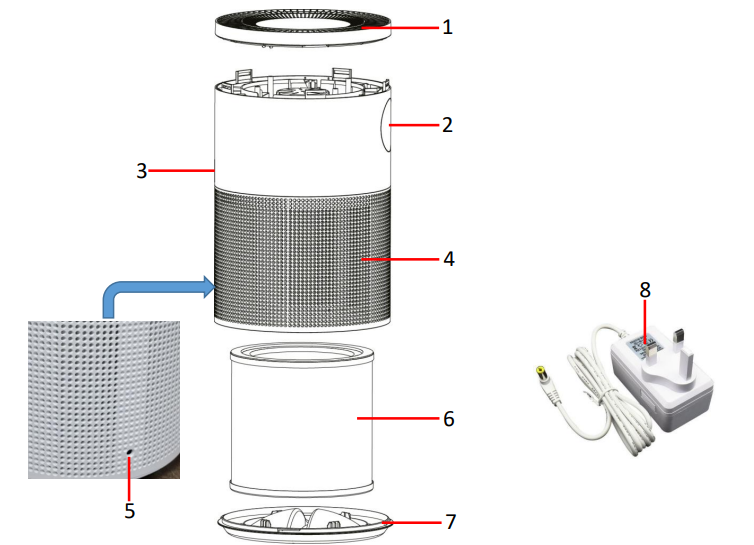
Description of Parts
- Air Outlet
- Control Panel
- Air Quality Sensor
- Air Inlet
- DC Input Socket
- Filter
- Base
- Mains Ada ptor
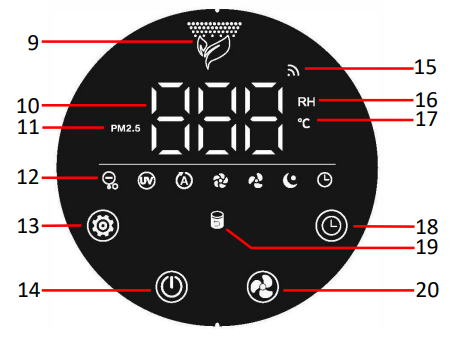
Description of Parts – Control Panel - Air Quality Indicator
- LED Display
- Air Quality Indicator
- Function Indicators
- Function Button
- Power Button
- Wi-Fi Indicator
- Relative Humidity Indicator
- Temperature Indicator
- Timer Button
- Filter Indicator
- Fan/Wi-Fi Button
Using your Air purifier
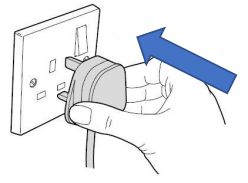
Before use, please ensure that the unit is placed on a firm, level surface in an area with at least 30cm of free space on all sides to allow for good air circulation. Insert the small plug of the Mains Adaptor (8) into the DC Input Socket (5) on the rear of the unit.
- Insert the Mains Adaptor (8) into the nearest socket.
- The device will beep once, and all indicators will light for 1 second to confirm power up in standby mode.
Note: The device will beep once for every action.
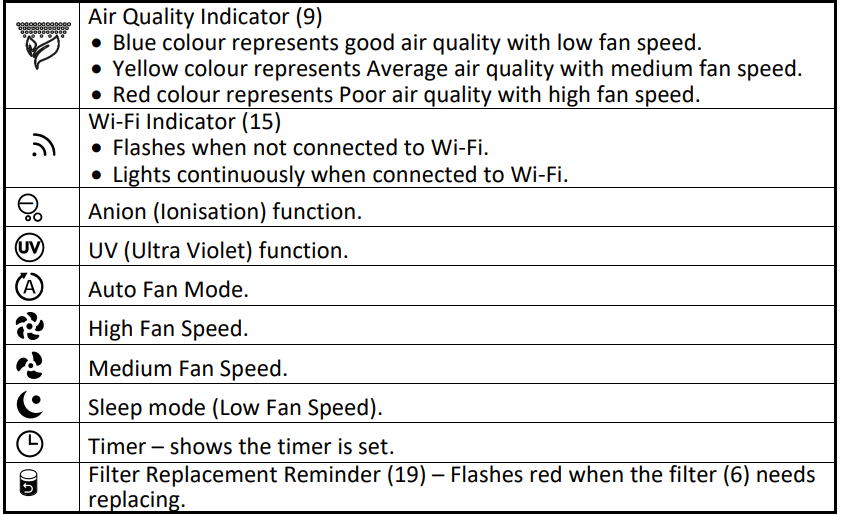
Function Indicator Description
Replacing filter
- The Filter Indicator (18) will flash red after the unit has been running for 2200 hours, indicating that the Filter (6) requires replacement.
- Replace the filter by following the Note Regarding the Filter section above.
- To reset the filter time, touch the Function Button (12) for 7sec after installing a new filter. Alternatively, use the APP to reset the filter as described above.
- Only use the original type of filter; do not use any other style of filter. The use of any other of filter not recommended by Daewoo may impair the performance of the product and may invalidate your warranty.
- The filter is not washable.
Filter Information
Replacement filters are available by contacting 0161 831 7879, (9.00 am-5.00 pm Monday to Thursday, 8.00 am-4.00 pm Friday) or by contacting us via the website: www.esgltd.com quoting COL1563FILTER.
Air Quality Information – Unit of Measure
Your Daewoo Air Purifier measures the air quality in PM 2.5 units.
PM 2.5 refers to particulate matter no larger than 2.5 microns in the atmosphere. This Daewoo Air Purifier is equipped with an internal Laser air quality sensor so that it can detect the PM 2.5 in the air and display the PM 2.5 value on the LED Display (10).
The lower the reading on the LED Display (10), the higher the air quality:

The LED Display (10) – Information Displayed
The LED Display (10) will change every 5 seconds to display the current ambient air quality, humidity,, and temperature as below:

Cleaning and Maintenance
- Always disconnect the Air Purifier from the mains supply before cleaning.
- Do not immerse the appliance in water or any other liquid.
- Do not use abrasive, corrosive, or flammable cleansers such as bleach or alcohol, to clean any part of the appliance.
- Do not use a vacuum cleaner to clean the filter.
- Do not wash the filter.
- You may sterilize the filter under sunlight.
- If you do not use the unit for a long time, place the appliance in a cool and dry environment.
Troubleshooting
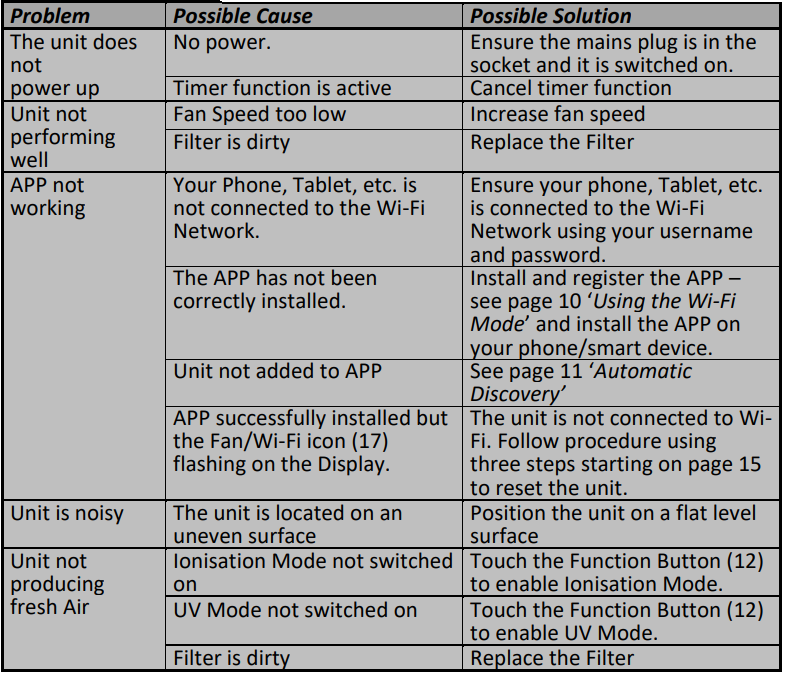
Most issues with the Daewoo Air Purifier COL1563 can be resolved quickly with these steps:
- Unit does not power up: Check that the mains plug is securely connected and switched on. If the timer function is active, cancel it to restore power.
- Poor performance: Increase fan speed or replace a dirty filter. Clean any blocked air inlets for optimal airflow.
- App not working: Ensure your device is connected to Wi-Fi. Reinstall or update the app if necessary. If the fan/Wi-Fi icon flashes, follow the reset procedure in the manual.
- Noisy operation: Place the unit on a flat, level surface to reduce vibration and noise.
- Fresh air not produced: Enable ionizer or UV mode via the function button. Replace the filter if dirty.
For persistent issues, consult the user manual or contact Daewoo customer support. The product is covered by a manufacturer’s warranty—retain your proof of purchase for service claims. For direct assistance, visit the Daewoo Electricals website or contact their support line.
WARRANTY
Thank you for purchasing your Daewoo product.
As part of our commitment to quality, we are offering you an extra 2 years' warranty in addition to your 1-year guarantee.
Your Daewoo product is guaranteed for 1 year from the date of original purchase, with proof of purchase or receipt. If any defect should occur due to faulty workmanship or material, your faulty product should be returned to the place of purchase, and replacement or refund is at the discretion of the retailer.
The guarantee is subject to the following provisions:
- The product must be correctly installed and operated in accordance with the requirements contained in the instruction manual.
- The product must be used solely for domestic purposes.
- It does not cover general wear and tear, damage, misuse, or any consumable parts.
- The guarantee will be rendered invalid if the product is resold or has been damaged by an inexperienced repairer..
- The guarantee is only valid within the UK and Ireland.
Your standard 1-year guarantee will only be extended to the maximum available for your individual product upon registration. (Note: products must be registered individually and cover the main body and ho.).)ing). If you do not register your product within 28 days of the original purchase date, your product will only be guaranteed for 1 year.
To validate your extended 2-year warranty*, please register your purchase online within 28 days of the original purchase date by registering at: https://help.daewooelectricals.com or Contact Us (daewooelectricals.com)
Pros & Cons
Pros
- High CADR: Rapid air purification for medium to large rooms.
- Smart Features: Wi-Fi app control for convenience and scheduling.
- Multi-stage Filtration: Effectively removes allergens, odors, and germs.
- UV-C Sterilization: Adds an extra layer of protection against bacteria and viruses.
- Quiet Operation: Suitable for use in bedrooms and offices.
Cons
- Filter Replacement Cost: Ongoing expense for HEPA and carbon filters.
- App Dependency: Full feature access requires a smartphone and stable Wi-Fi.
- Limited Physical Controls: Some users may prefer more buttons over touch panel/app control.
Compared to alternatives, the Daewoo Air Purifier COL1563 offers excellent value for money, especially for users wanting smart features without a premium price tag. However, those seeking the absolute quietest operation or simplest interface might consider competing models.
Customer Reviews
Users consistently praise the Daewoo Air Purifier COL1563 for its powerful purification and ease of use, with many noting a visible reduction in dust and allergens. The smart app receives positive feedback for its intuitive controls and scheduling options. Common complaints include the need for regular filter changes and occasional connectivity issues with the app. Most reviewers rate the COL1563 4 out of 5 stars, highlighting its performance and value. Frequent recommendations emphasize purchasing replacement filters in advance and placing the unit in a central location for best results. If you value clean air and smart home integration, the Daewoo COL1563 is a strong contender in its class.
Faqs
How do I properly set up the daewoo Air Purifier COL1563 for optimal air circulation?
What should I do if the daewoo Air Purifier COL1563 is not responding or turning on?
How does the air quality indicator on daewoo Air Purifier COL1563 work and what do the colors mean?
Can I control the daewoo Air Purifier COL1563 remotely using Wi-Fi?
What maintenance is required to keep the daewoo Air Purifier COL1563 performing well?
How do the anion and UV functions on the daewoo Air Purifier COL1563 improve air purification?
What room size is suitable for the daewoo Air Purifier COL1563 to achieve the best performance?
Why is the daewoo Air Purifier COL1563 fan speed changing automatically and how can I optimize it?
More daewoo manuals
- Usage & Setup: Daewoo Air Fryer SDA1861 User Manual
- Setup: Daewoo Air Purifier COL1524 User Manual
- Setup & Features: Daewoo Espresso Maker With Milk Frother User Manual
- Setup: Daewoo Air Purifier COL1573 User Manual
- How to Use: Daewoo 5 in 1 Wireless Charger User Manual
- Daewoo Heated Electric Blanket HEA1484 User Manual
Leave a Comment