
Setup & Pairing: Dayton Audio BOOST Portable Audio Bluetooth Speaker User Manual
Content
Dayton Audio BOOST Portable Audio Bluetooth Speaker Review and User Manual
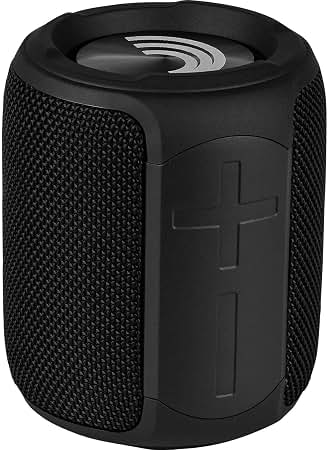
The Dayton Audio BOOST Portable Audio Bluetooth Speaker is a compact, rugged wireless speaker designed for everyday listening, travel, outdoor use, and small-room audio. It combines Bluetooth 5.0 connectivity, IPX7 water resistance, USB-C charging, TWS stereo pairing, and microSD playback in a palm-sized cabinet that is easy to carry in a backpack, picnic bag, or office setup. For users who want a portable Bluetooth speaker with simple controls, strong durability, and versatile playback options, the Dayton Audio BOOST Portable Audio Bluetooth Speaker offers a practical balance of convenience and value.
Its key selling points include a waterproof enclosure, dual full-range drivers with passive radiators for fuller bass, and stereo pairing support for a wider soundstage when two units are used together. It is especially appealing to students, commuters, travelers, and casual listeners who need a reliable wireless speaker for podcasts, background music, camping, or poolside listening. The speaker also supports microSD playback, which is useful when a phone is not available or when you want to conserve battery life.
Estimated pricing typically falls in the budget category, often around the $30 range depending on the seller and availability. In 2026, it is generally available through audio retailers and online marketplaces, though stock and pricing may vary by region. For shoppers comparing compact Bluetooth speakers, the Dayton Audio BOOST Portable Audio Bluetooth Speaker stands out for its feature set at an entry-level price point.
Specifications of the Dayton Audio BOOST Portable Audio Bluetooth Speaker
- Bluetooth version: 5.0 for stable wireless pairing and efficient power use
- Wireless range: up to 10 meters in typical conditions
- Driver configuration: 2 x 1.5-inch full-range drivers with passive radiators
- Output power: 6W x 2 for compact-room listening and portable use
- Frequency response: approximately 80Hz to 20kHz for balanced everyday audio
- Battery: 3.7V 2200mAh lithium-ion rechargeable battery
- Battery life: up to about 6 hours, depending on volume and playback type
- Charging time: about 3 hours via USB-C
- Water resistance: IPX7 for splash protection and short-term immersion resistance
- Playback options: Bluetooth, auxiliary input, and microSD playback
- Stereo features: TWS support for pairing two speakers into a left/right setup
- Weight: about 0.9 lb / 410-426 g
- Dimensions: roughly 3.5 x 3.5 x 4.3 inches
Compared with many mini speakers in the same price class, the Dayton Audio BOOST Portable Audio Bluetooth Speaker offers stronger portability than larger outdoor models and better feature coverage than many basic budget speakers. It is less powerful than premium name-brand options, but it delivers a useful mix of waterproofing, stereo pairing, and microSD playback that many low-cost competitors omit.
How to Set Up the Dayton Audio BOOST Portable Audio Bluetooth Speaker
Set up the speaker by fully charging it with the included USB-C cable before first use. A full charge typically takes about 3 hours. Once charged, press and hold the power button until the speaker enters pairing mode. Open Bluetooth settings on your phone, tablet, or laptop, then select the speaker from the available device list. After the first connection, the speaker usually reconnects automatically when powered on near the same device.
To use microSD playback, insert a compatible card before turning on the speaker. For TWS pairing, power on two BOOST speakers, activate pairing mode on both units, and follow the stereo pairing sequence described in the user manual if available. This creates a wider stereo image for music and video playback.
Useful configuration tips include keeping the source device within range, avoiding heavy wireless interference, and testing volume levels at low output before moving to full volume. If pairing fails, turn Bluetooth off and on again, reset the speaker, or remove the device from your phone’s saved Bluetooth list and reconnect. Safety precautions: do not charge the speaker in wet conditions, avoid exposing ports to water while charging, and use only a compatible 5V USB power source.
Troubleshooting the Dayton Audio BOOST Portable Audio Bluetooth Speaker
If the speaker will not power on, charge it for at least 30 minutes and try a different USB-C cable or charger. If Bluetooth pairing fails, make sure the speaker is not already connected to another device. Forget the speaker in your phone’s Bluetooth menu, then reconnect in pairing mode. If audio cuts out, move closer to the source device and reduce interference from walls, routers, or other wireless devices.
Common sound problems are often caused by low battery, high volume distortion, or blocked speaker grills. If playback sounds weak, try a different music source or file because compressed audio can make small speakers sound flatter. If microSD playback does not start, confirm that the card is properly inserted and formatted correctly. There are no widely documented user-facing error codes for this model, so most issues are resolved through reset, reconnection, or power cycling.
Preventive care includes keeping the charging port dry, avoiding drops, and storing the speaker in a cool, dry place. Warranty terms and support availability can vary by retailer, so check the seller’s return policy and Dayton Audio’s official support channels if help is needed. For assistance, use the manufacturer’s customer support page or contact the retailer where the speaker was purchased. Keep your receipt and product model information ready for faster service.
Pros and Cons of the Dayton Audio BOOST Portable Audio Bluetooth Speaker
Pros
- Compact and highly portable, making it easy to carry for travel and daily use
- IPX7 water resistance adds confidence for outdoor listening and poolside use
- USB-C charging is convenient and modern
- TWS stereo pairing improves soundstage when two units are used together
- MicroSD playback adds flexibility when a phone is not available
- Good value for money for buyers who want basic features at a budget price
Cons
- Battery life is modest compared with larger premium Bluetooth speakers
- Sound output is best for small spaces rather than large parties
- Bass performance is limited by the speaker’s compact size
- No built-in microphone for hands-free calling on this model
- Feature set is simpler than higher-priced alternatives from major brands
For shoppers comparing compact wireless speakers, the Dayton Audio BOOST Portable Audio Bluetooth Speaker offers a strong value proposition if waterproofing and portability matter more than maximum loudness. Users who want deeper bass, longer battery life, or smart features may prefer a higher-end alternative, but budget-conscious buyers will likely appreciate the overall package.
Customer Reviews of the Dayton Audio BOOST Portable Audio Bluetooth Speaker
Typical user feedback points to a solid 4 out of 5 star experience for the price. Many buyers praise the compact size, simple pairing, and water-resistant design, especially for beach trips, dorm rooms, and desk use. A common positive comment is that it feels more capable than expected for a small budget Bluetooth speaker.
Frequent complaints focus on limited bass, average battery endurance, and sound quality that is best at moderate volume. Some users also mention that the speaker is not ideal for large gatherings or bass-heavy genres. One common sentiment is: “Great little speaker for the money, especially if you want something waterproof and easy to carry.” Another typical reaction is: “Perfect for casual listening, but not a replacement for a larger speaker system.”
Purchase recommendation: this speaker is a smart buy for casual listeners, students, and travelers who want a compact waterproof speaker with useful extras. Buyers seeking louder output or stronger low-end performance should consider larger portable speakers instead.
Faqs
How do I set up dayton audio BOOST Portable Audio Bluetooth Speaker for the first time?
Why is my dayton audio BOOST Portable Audio Bluetooth Speaker not pairing with my phone?
What devices are compatible with dayton audio BOOST Portable Audio Bluetooth Speaker?
How can I improve sound quality on dayton audio BOOST Portable Audio Bluetooth Speaker?
What should I do if dayton audio BOOST Portable Audio Bluetooth Speaker keeps disconnecting?
How do I charge and maintain the battery on dayton audio BOOST Portable Audio Bluetooth Speaker?
Can I use dayton audio BOOST Portable Audio Bluetooth Speaker while it is charging?
How should I clean and store dayton audio BOOST Portable Audio Bluetooth Speaker safely?
Leave a Comment