
Installation: Defender EL00226 Video Doorbell User Manual
Content
defender EL00226 Video Doorbell Overview
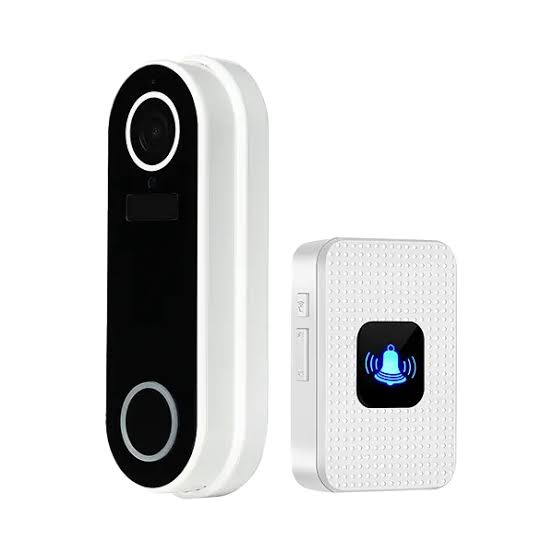
The defender EL00226 Video Doorbell is a practical wireless smart doorbell designed for homeowners who want reliable front-door monitoring without a complicated setup. It combines HD 1080p video, two-way audio, motion-activated recording, infrared night vision, and PIR motion detection into a compact unit that works well for everyday home security. With a 120° field of view and adjustable motion zones, it helps reduce false alerts while keeping an eye on visitors, deliveries, and movement near the entrance.
This video doorbell is a strong fit for apartments, houses, rental properties, and small businesses that need simple video entry monitoring. It supports 2.4 GHz Wi-Fi only, includes a plug-in chime, and can run on two rechargeable 18650 lithium-ion batteries that may last up to six months depending on activity. It is also IP65 weather-resistant, making it suitable for outdoor installation in changing conditions. The defender EL00226 Video Doorbell is typically priced in the budget-to-midrange category, often around £80 to £120 depending on seller and bundle content, and it is commonly available through UK security retailers and online marketplaces.
For users searching for a smart doorbell with local installation flexibility, motion alerts, and easy app-based monitoring, the defender EL00226 Video Doorbell offers solid value. It is especially appealing to buyers who want a straightforward wireless doorbell camera with good battery life, quick setup, and a door chime included in the box.
Technical Specifications and Key Features
- Video resolution: HD 1080p for clear live view and playback
- Field of view: 120° ultra-wide angle for doorway coverage
- Night vision: Infrared night vision for low-light monitoring
- Motion detection: PIR motion sensor with adjustable zones and up to 5 m detection range
- Audio: Two-way audio for speaking with visitors
- Power: 2 x 18650 rechargeable lithium-ion batteries included
- Battery life: Up to 6 months depending on usage and connection frequency
- Connectivity: 2.4 GHz Wi-Fi only; not compatible with 5.0 GHz networks
- Weather rating: IP65 waterproof rating for outdoor use
- Dimensions: 13.5 x 4.5 x 2.5 cm
- Weight: 240 g
- Included accessories: Plug-in chime, mounting bracket, warning sticker, USB charging cable, SD card, screws, and wall plugs
- Warranty: 12 months
Compared with entry-level rivals, this model stands out for its included chime, adjustable PIR zones, and battery-powered flexibility. Against higher-end options such as premium 2K or 4K doorbells, the defender EL00226 Video Doorbell offers lower resolution but a simpler and more affordable user experience.
Troubleshooting Guide for the defender EL00226 Video Doorbell
Problem: Device will not connect to Wi-Fi. Confirm that your router is broadcasting on 2.4 GHz only, because this doorbell does not support 5.0 GHz networks. Move closer to the router during setup and recheck the password.
Problem: Motion alerts are too frequent. Reduce sensitivity in the PIR settings and narrow the detection zones so the camera does not monitor sidewalks, roads, or neighboring property. This is the most effective way to prevent false notifications.
Problem: Battery drains too quickly. Heavy live-view use, frequent motion events, and weak Wi-Fi signal can shorten battery life. Reposition the router or doorbell for stronger connectivity and minimize unnecessary activations.
Problem: No video or poor image quality. Clean the lens, check night-vision conditions, and verify that the app is updated. If the SD card is not recording properly, reformat it in the app if supported.
If the unit shows a setup or connection error, restart the doorbell, router, and mobile app before trying again. There are no widely published error codes for this model, so most issues are handled through basic reset and pairing steps. The product includes a 12-month warranty, and support is normally available through the retailer or Defender product support channels. For help, contact the store of purchase first, then refer to Defender’s official support pages or customer service details on the packaging and product documentation.
Pros and Cons of the defender EL00226 Video Doorbell
Pros
- Affordable smart doorbell option with strong core features
- Clear HD 1080p video is suitable for everyday front-door monitoring
- Two-way audio makes it easy to speak with delivery drivers and guests
- Adjustable PIR detection zones help reduce false alarms
- Includes a plug-in chime, so there is no need to buy one separately
- IP65 weather resistance adds confidence for outdoor use
- Battery-powered design makes installation easier than hardwired alternatives
Cons
- 2.4 GHz Wi-Fi only may be limiting in newer mesh-network homes
- 1080p resolution is good, but not as detailed as 2K or 4K doorbells
- Battery life varies significantly with motion activity and signal strength
- Best suited to basic monitoring rather than advanced smart-home ecosystems
- Some premium alternatives offer richer app features and faster notifications
For value for money, the defender EL00226 Video Doorbell is a sensible choice if the goal is reliable entryway monitoring without paying for high-end features that many users do not need. Compared with higher-priced competitors, it trades advanced image resolution for simplicity, included accessories, and straightforward setup.
Customer Reviews and User Feedback
Customer feedback for the defender EL00226 Video Doorbell is generally positive, with many users giving it around 4 out of 5 stars for ease of use, decent video clarity, and useful motion alerts. Buyers often praise the included chime, simple installation, and dependable battery-powered operation. One common comment is that the PIR motion zones are helpful for reducing unwanted alerts near busy streets or shared walkways.
Some users mention that battery life can be shorter than expected when motion is frequent or Wi-Fi is weak. Others would prefer sharper video resolution or more advanced app controls. Overall, it is commonly recommended for budget-conscious shoppers who want a straightforward video doorbell camera rather than a premium smart security system. For most households, the defender EL00226 Video Doorbell offers a balanced mix of convenience, security, and affordability.
Faqs
How do I set up the defender EL00226 Video Doorbell for the first time?
Why is my defender EL00226 Video Doorbell not ringing inside the house?
What should I do if the defender EL00226 Video Doorbell has no video or a blank screen?
Is the defender EL00226 Video Doorbell compatible with standard home wiring and existing chimes?
How can I improve motion detection on the defender EL00226 Video Doorbell?
What causes the defender EL00226 Video Doorbell to lose connection, and how can I fix it?
How do I maintain and clean the defender EL00226 Video Doorbell safely?
What are the most useful settings to adjust on the defender EL00226 Video Doorbell for better daily use?
Leave a Comment