
How to Use: Demabon SMART WATCH T59 User Manual
Content
Demabon SMART WATCH T59
Introduction
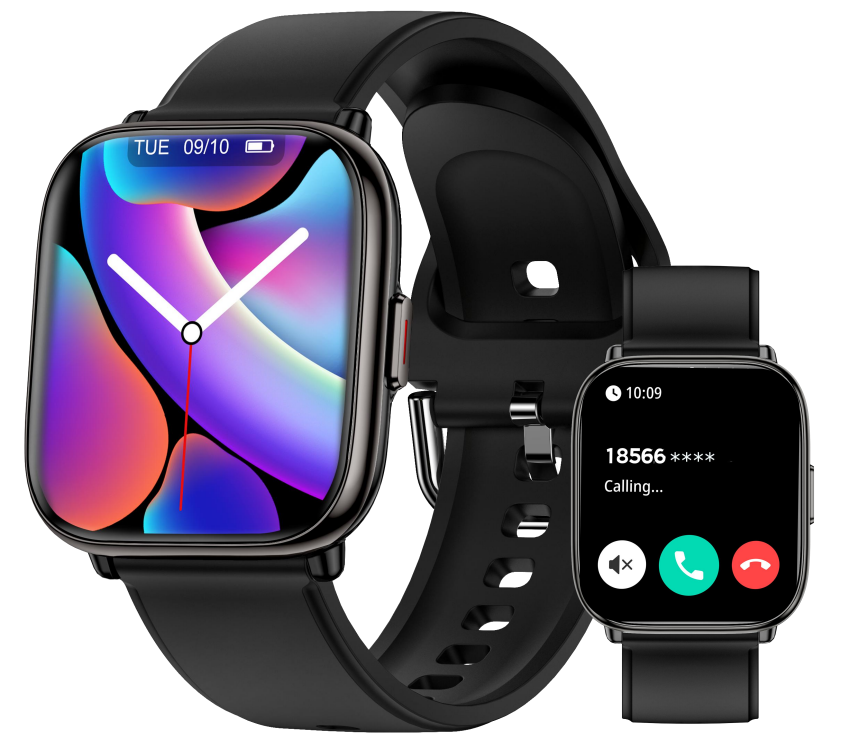
The demabon SMART WATCH T59 is a cutting-edge wearable designed to seamlessly blend advanced health tracking, communication, and lifestyle features into a stylish, durable device. With its vibrant 1.75-inch AMOLED display and sleek design, the T59 offers users an intuitive and attractive interface for everyday use.
Key benefits of the demabon SMART WATCH T59 include over 120 sports modes tailored for diverse fitness activities, accurate heart rate and sleep monitoring, and Bluetooth calling functionality for hands-free communication. Its IP67 waterproof rating makes it suitable for everyday wear, including workouts and outdoor activities. The watch integrates with the Dafit app, enabling comprehensive data analysis and personalized health insights.
This smartwatch caters primarily to fitness enthusiasts, busy professionals, and tech-savvy users seeking a versatile device that supports health management, connectivity, and smart notifications. It is also ideal for users who want a budget-friendly alternative with premium features typically found in higher-end models.
Available globally through online retailers, the demabon SMART WATCH T59 is priced competitively in the range of approximately $40 to $70 USD, offering excellent value for its feature set and build quality. Whether you are tracking your workouts, managing calls, or monitoring your health metrics, the T59 stands out as a reliable and multifunctional smartwatch for 2025 users.
Demabon SMART WATCH T59 Specifications and Features
- Display: 1.75-inch AMOLED touchscreen, 320x385 pixels resolution for vivid visuals
- Memory & Storage: 128 MB internal memory
- Connectivity: Bluetooth for calls and notifications, compatible with iOS and Android via the Dafit app
- Health Monitoring: Continuous heart rate tracking, sleep analysis, blood oxygen monitoring (SpO2)
- Sports Modes: Over 120 modes,, including running, cycling, swimming, yoga, and more
- Water Resistance: IP67 waterproof rating, safe against sweat, rain, and accidental splashes
- Battery Life: 5 to 7 days on a single charge using the magnetic charging dock
- Additional Features: Bluetooth calling, message alerts, sedentary reminders, alarm, music control, weather updates
- Performance: Smooth UI with reliable sensor accuracy and quick response times
Compared to similar models in its category, the demabon SMART WATCH T59 offers a notably larger AMOLED display and a broader variety of sports modes than many competitors in the $50-$80 price range, making it a strong contender for users prioritizing fitness and communication features combined.
Strap assembly/disassembly instructions
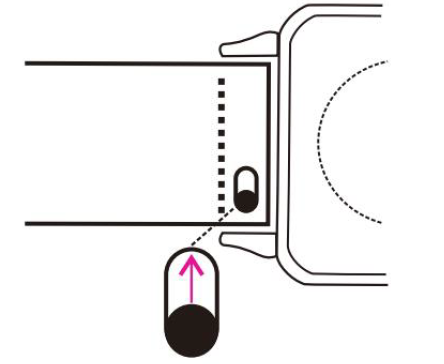
Finger-operated ear switch, used for assembling or replacing watch straps
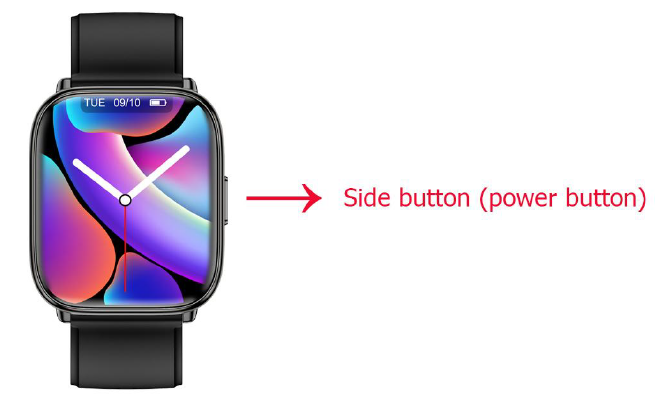
Side Button Instructions
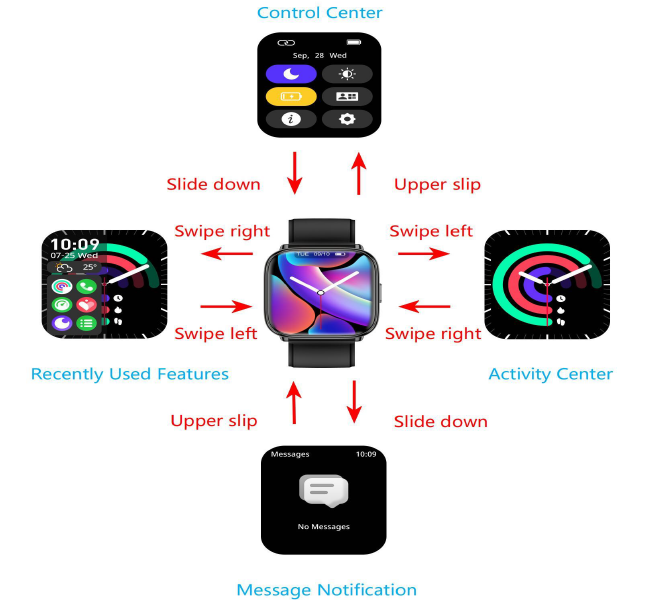
- Power On/Off: Press and hold the side button (power button) to turn the device on or off.
- Access the Function List: From the home screen, press the side button on ce to enter the function list.
- Switch Main Menu View: In the function list, double-press the side button to switch the main menu view.
- Return to the Home Screen: From any function screen, press the side button to return to the home screen.
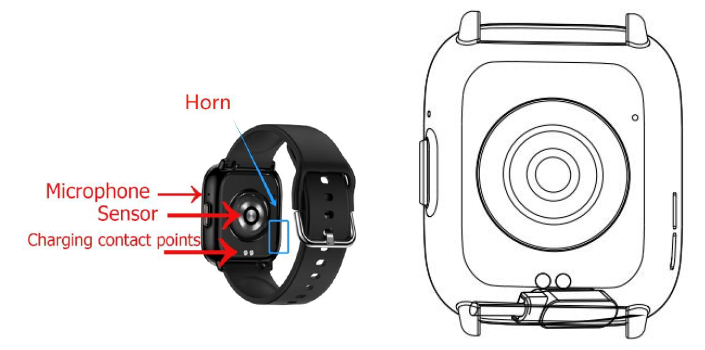
Watch Charging and Activation Guide
Before using the watch for the first time, please charge and activate it first.
- Use the included magnetic charging cable to align the magnetic end with the charging contacts on the back of the watch, and make sure the direction of the charging cable is consistent with the side button.
- Connect the other end of the charging cable to a USB charging head (voltage less than 5V) or a USB port on a computer to start charging.
- The smartwatch requires 2-3 hours to fully charge. If the smartwatch has not been used for an extended period, charge it for at least 30 minutes to activate it before further use.
Note: Be sure to use a charging head with a voltage less than 5V to avoid damaging the battery.
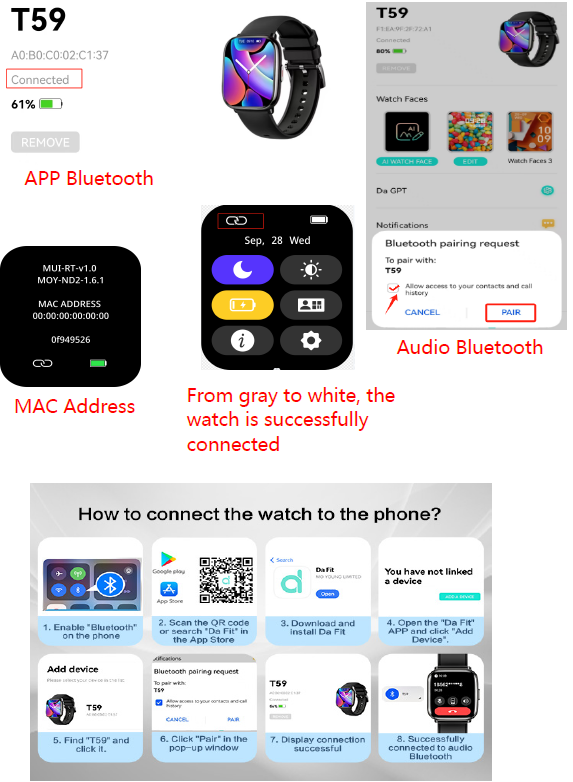
Connect the smartwatch with the app
General Connection Steps:
- Step 1. Enable Bluetooth in your phone settings.
- Step 2. Open the APP "Da Fit" and set your personal information, including gender, birthday, height, and weight.
- Step 3. Switch to the device page in the APP "DaFit" and click Add Device
- Step 4. Click the device name "T59" in the scanned device list and wait for about 1 minute. A pairing audio request will pop up. Click pairing and observe whether the Bluetooth connection of the APP has been successfully established. Then turn on Bluetooth in the phone settings and check whether the Bluetooth audio "T59" has been successfully connected.
Note
- After the watch is successfully connected, when you open the "Da Fit" APP, it will automatically connect, and you can sync the data in the watch with the "Da Fit" APP by pulling down the homepage.
- When selecting the device name from the scanned device list (step 4 above), if you have multiple T59 smartwatches around, you can identify the specific device by your MAC address (enter "Settings" > click on the "About" option in your smartwatch, and the MAC address will be displayed. You can identify the device by the MAC address in the scanned device list)
Disconnect the smart watch from the app “ Da Fit”
Go to the Devices page on the app, and tap ‘REMOVE’ below the device name. For iOS iPhones, you also need to go to the Bluetooth settings on your phone and forget device T59 from the list after tapping ‘REMOVE’ on the app."
Function Description
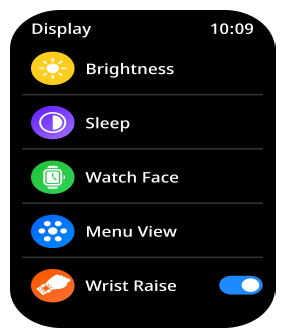
Wrist Raise:
Turn your wrist to wake up the watch screen. To turn it off, press the power button on the side of the watch to wake the screen again.
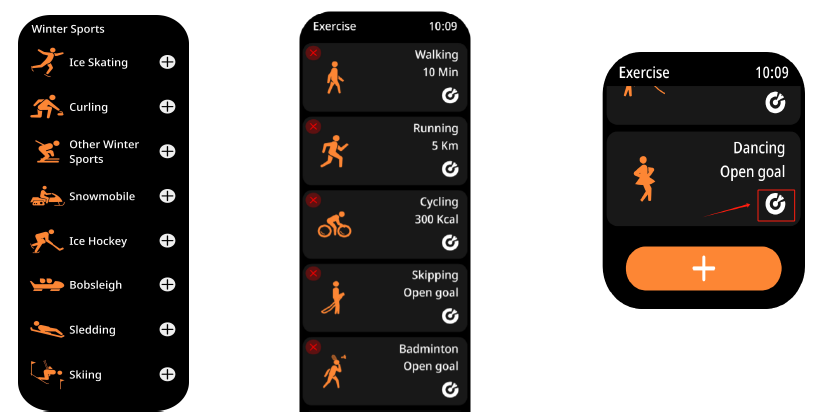
Sports:
You can add up to 25 exercise types by default.
If you want to remove any exercise types, simply press the exercise type. When a red '×' icon appears on the screen, tap it to delete.
In the workout feature interface, you can set your exercise goals by tapping the target icon on the right.
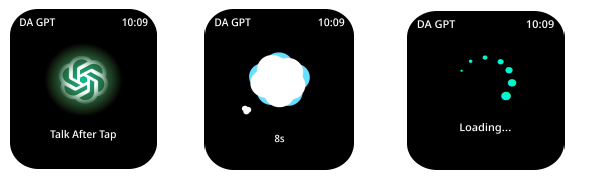
DA GPT
Once your T59 is successfully paired via Bluetooth, you can start chatting with DA GPT directly on your smartwatch. Think of DA GPT as your personal AI companion — always ready to chat, answer questions, translate in real time, share health tips, and provide smart, personalized suggestions to make your day easier and more efficient.
Discover all the ways DA GPT can assist you — it’s always standing by.
Note: On the watch, DA GPT responses are limited to 320 characters. If needed, simply ask it to shorten its reply. There’s no character limit when using DA GPT in the Da Fit app!
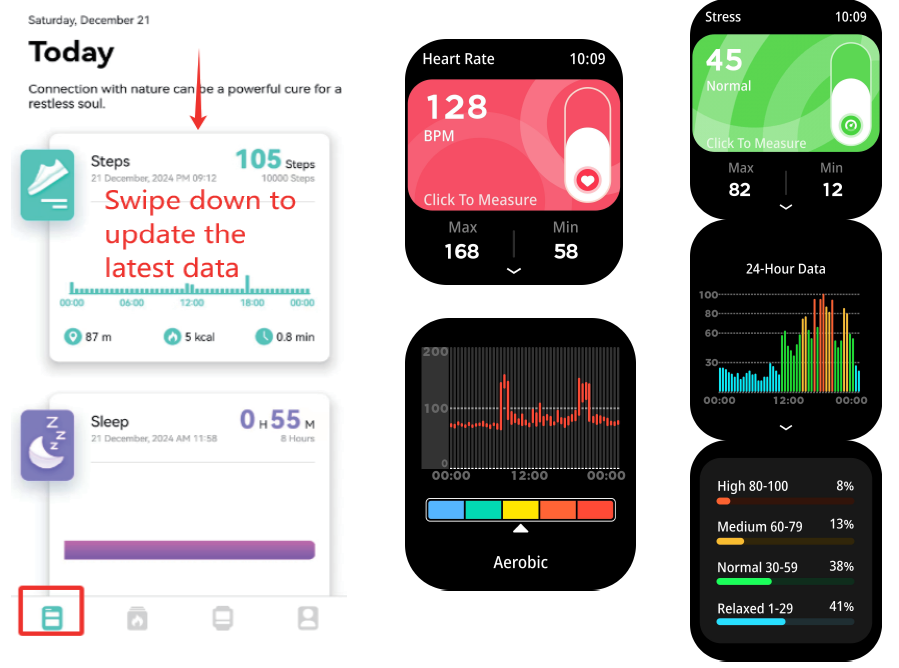
All-day monitoring:
Once you enable All-Day Monitoring in the app, you can view your heart rate data either on the watch or in the app.
To view it on your watch, swipe up from the corresponding function interface to view the data.
Note: If the app does not display your all-day heart rate data after enabling "All-day monitoring", try swiping down on the home page to refresh (sometimes it is because it has just been turned on and the data needs to be updated. Please wait a few minutes for your all-day detection data to be displayed).
If the data still doesn't show up, please fully close the app, reconnect and pair the watch, then re-enable the "All-Day Monitoring" feature.
Troubleshooting and Support for demabon SMART WATCH T59
- Common Issue: Bluetooth connection failure – Solution: Restart both watch and phone, ensure the Dafit app is updated, and re-pair devices.
- Error Code: “E01” displayed during charging – Fix: Check magnetic charger alignment; clean contacts of debris.
- Screen unresponsiveness: Perform a soft reset by holding down the power button for 10 seconds.
- Battery drains quickly: Disable unused features like continuous heart rate or reduce screen brightness.
- Preventive Measures: Keep software updated via the Dafit app, avoid exposure to extreme temperatures, and regularly clean charging contacts.
The demabon SMART WATCH T59 comes with a standard 12-month warranty covering manufacturing defects. For further assistance, users can contact Demabon customer support via the official website or authorized retailers, offering email and phone support to resolve technical issues promptly.
Pros & Cons of demabon SMART WATCH T59
- Pros:
- Large, sharp AMOLED display enhances readability and user experience.
- Extensive 120+ sports modes accommodate varied fitness routines.
- Robust health monitoring, including heart rate, sleep, and SpO2 tracking.
- Bluetooth calling and notifications improve connectivity on the go.
- IP67 waterproof rating provides confidence during workouts and daily wear.
- Competitive price point offers excellent value for the feature set.
- Cons:
- Limited internal memory (128 MB) may restrict future app enhancements.
- App dependency (Dafit) may pose compatibility issues with some devices.
- Battery life, while decent, could be improved relative to some rivals offering over a week.
- Some users report occasional Bluetooth disconnections during calls.
Customer Reviews and Feedback on demabon SMART WATCH T59
Users consistently praise the demabon SMART WATCH T59 for its vibrant AMOLED screen and comprehensive sports tracking capabilities. Many highlight its ease of use and the convenience of Bluetooth calling as standout features. The smartwatch averages a 4.3-star rating out of 5 across various online platforms.
Common complaints include occasional Bluetooth connectivity issues and minor lag in app synchronization. However, customers appreciate the affordable price point and robust design. Several reviews recommend the T59 for fitness beginners and casual users looking for a reliable smartwatch with solid health functions and good battery life.
Faqs
How do I set up the demabon SMART WATCH T59 for the first time?
What can I do if my demabon SMART WATCH T59 is not syncing with my phone?
What are the main fitness tracking features of the demabon SMART WATCH T59?
Is the demabon SMART WATCH T59 compatible with both Android and iOS devices?
How waterproof is the demabon SMART WATCH T59 and can I wear it while swimming?
What steps can I take to optimize battery life on my demabon SMART WATCH T59?
How do I update the firmware on the demabon SMART WATCH T59?
How do I properly clean and maintain my demabon SMART WATCH T59?
Leave a Comment