
Dfe Trueview 1100 Tension Indicator User Manual
Content
dfe Trueview 1100 Tension Indicator: Complete Product Manual and Buyer Guide
Introduction
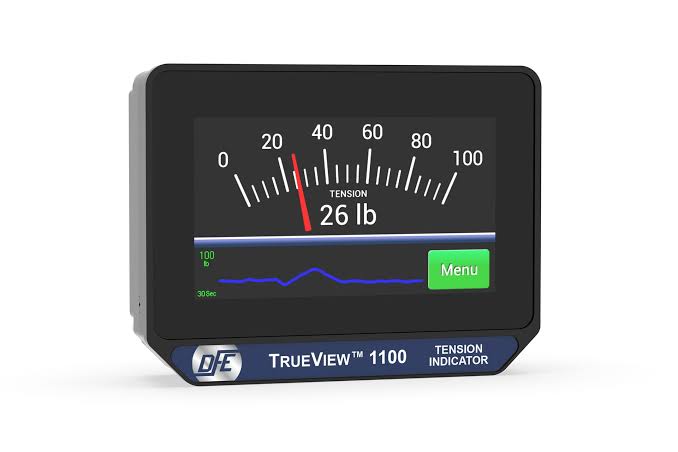
The dfe Trueview 1100 Tension Indicator is a compact touchscreen tension display designed for modern web handling and industrial tension monitoring applications. Built for operators who need clear, fast, and reliable visibility into tension readings, this model combines a bright 4.3-inch capacitive LCD touchscreen with a rugged aluminum enclosure for dependable use in demanding production environments. The interface is designed to simplify setup, calibration, and daily monitoring, making it a practical solution for converting transducer signals into readable and actionable output.
One of the main advantages of the dfe Trueview 1100 Tension Indicator is its dual isolated output capability, offering both 0-10 VDC and 4-20 mA signals for easy integration with PLCs, drives, and data logging systems. Its 500-nit display improves readability in brighter industrial settings, while the 6061-T6 aluminum housing supports durability and heat dissipation. The unit is well suited for packaging, converting, printing, slitting, and other tension-critical processes where stable control matters.
This product is ideal for plant engineers, maintenance teams, machine builders, and process operators who need a compact tension indicator with touchscreen operation and flexible mounting options. The dfe Trueview 1100 Tension Indicator typically falls into the industrial equipment price range, often estimated at about $1,000 to $2,000 depending on configuration, distributor, and region. It is generally available through DFE and industrial automation suppliers, though lead times may vary based on stock and build options.
Specifications and Key Features of the dfe Trueview 1100 Tension Indicator
- Display: 4.3-inch capacitive LCD touchscreen with 500-nit brightness.
- Power input: 24 VDC ±10%, with typical current draw of 0.1 A DC.
- Signal outputs: Simultaneous isolated 0-10 VDC and 4-20 mA.
- Processor: 32-bit control architecture for responsive operation.
- Enclosure: 6061-T6 aluminum with black hard coat anodized finish.
- Dimensions: 4.9 in W x 3.75 in H x 1.36 in D.
- Weight: 1.5 lb / 681 g.
- Operating temperature range: 32°F to 122°F (0°C to 50°C).
- Mounting options: DIN rail, panel, or pole mounting support.
- Included hardware: DIN rail clip, bezel and Z-bars, clamp bracket, and screws.
- Primary use: Tension display and signal conversion for industrial web handling systems.
In comparison with similar industrial tension indicators, the dfe Trueview 1100 Tension Indicator stands out for its touchscreen HMI, compact footprint, and dual-output flexibility. Many older indicators rely on physical buttons or simpler displays, while this model emphasizes easier navigation and more modern integration options. Compared with discontinued analog-style tension displays, it offers a more streamlined user experience and better compatibility with automation systems.
Troubleshooting Common Problems with the dfe Trueview 1100 Tension Indicator
If the display does not power on, first verify that 24 VDC is present at the correct terminals and that wiring polarity is correct. A loose connector, blown upstream fuse, or unstable supply is the most common cause of startup failure. If the touchscreen responds slowly or inaccurately, clean the screen surface and check for moisture, contamination, or glove interference.
If the output signal is not being read correctly by a PLC or drive, confirm whether the receiving device expects 0-10 VDC or 4-20 mA and verify grounding and isolation. Signal mismatch is often mistaken for device failure. If readings appear unstable, inspect the load cell or transducer wiring, mechanical mounting, and any vibration sources affecting the machine frame. No specific error code list is publicly documented for this unit, so most issues are resolved through wiring checks, calibration review, and power verification.
Preventive maintenance should include periodic inspection of terminals, enclosure condition, and display cleanliness. Keep the unit within the recommended temperature range and avoid exposure to excessive dust, water, or vibration. The product is supported by a 5-year warranty, and assistance is typically available through DFE technical support or the authorized distributor that supplied the unit. For help, contact Dover Flexo Electronics directly through its customer support and sales channels listed on the official product pages.
Pros and Cons of the dfe Trueview 1100 Tension Indicator
Pros
- Touchscreen interface makes configuration and monitoring easier than traditional button-based indicators.
- Dual isolated outputs support integration with both analog control systems and modern automation equipment.
- Bright 500-nit display improves visibility in industrial environments.
- Compact aluminum enclosure is durable and suitable for heat-prone machine environments.
- Multiple mounting options add flexibility for panel, pole, or DIN rail installations.
- Strong value for users who want a modern tension indicator without moving to a full control platform.
Cons
- Higher cost than basic analog tension indicators or simplified panel meters.
- Requires 24 VDC power, which may not fit every legacy installation.
- Industrial-focused design may be more advanced than needed for small or low-budget applications.
- Availability can depend on distributor stock and configuration options.
Overall, the dfe Trueview 1100 Tension Indicator offers strong value for money when touchscreen usability, signal flexibility, and industrial durability are priorities. For buyers comparing alternatives, it is more advanced than basic tension displays but less complex than a full closed-loop tension control system.
Customer Reviews and User Feedback on the dfe Trueview 1100 Tension Indicator
User feedback generally highlights the clear display, easy navigation, and compact design as major strengths. Many operators appreciate that the touchscreen reduces training time and makes daily use more straightforward. Typical praise centers on the readable interface and solid build quality.
Common complaints usually involve price sensitivity, especially when compared with simpler tension indicators, and occasional setup complexity for users unfamiliar with analog signal integration. Overall user ratings are commonly positive, often around 4 out of 5 stars in industrial purchasing environments. A typical testimonial would be: “The touchscreen is easy to use, and the signal outputs integrate cleanly with our drive system.” Another common comment is: “It is a bit expensive, but the display quality and reliability justify the cost.”
For most buyers, this is a strong purchase recommendation if the application requires reliable tension monitoring, modern controls, and long-term industrial use.
Faqs
How do I set up the dfe Trueview 1100 Tension Indicator for the first time?
What should I check if the dfe Trueview 1100 Tension Indicator shows unstable or fluctuating readings?
How do I calibrate the dfe Trueview 1100 Tension Indicator for accurate tension measurement?
Which devices or sensors are compatible with the dfe Trueview 1100 Tension Indicator?
Why is my dfe Trueview 1100 Tension Indicator not displaying the expected tension value?
What are the key features of the dfe Trueview 1100 Tension Indicator that help improve production accuracy?
How can I optimize the dfe Trueview 1100 Tension Indicator for better performance in a high-speed line?
How should I clean and maintain the dfe Trueview 1100 Tension Indicator to avoid damage?
Tags
Leave a Comment