
How to Setup: Dh Lifelabs Sciaire Mini+HEPA CAHP-20XX01 User Manual
Content
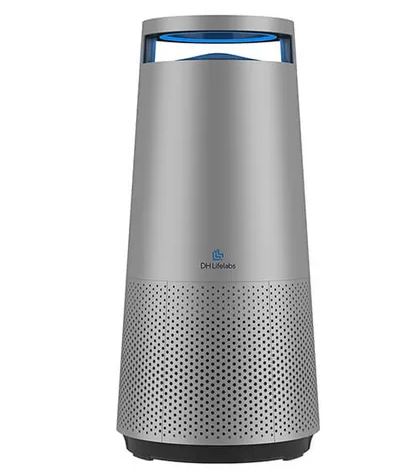
DH LifeLabs Sciaire Mini+HEPA CAHP-20XX01
Introduction
The dh lifelabs Sciaire Mini+HEPA CAHP-20XX01 is a compact and efficient air purifier designed to improve indoor air quality. This device is perfect for small to medium-sized rooms, making it an ideal choice for bedrooms, offices, or living areas. With its advanced HEPA filter technology, it captures 99.97% of particles as small as 0.3 microns, including dust, pollen, and other allergens.
The Sciaire Mini+HEPA is estimated to be priced around $100-$150, making it an affordable solution for those seeking to enhance their indoor air quality. It is expected to be available in the market starting from early 2024.
This air purifier is not just about cleaning the air; it also features a sleek and modern design that fits seamlessly into any home decor. Its quiet operation ensures that it does not disrupt your daily activities or sleep.
Product Overview
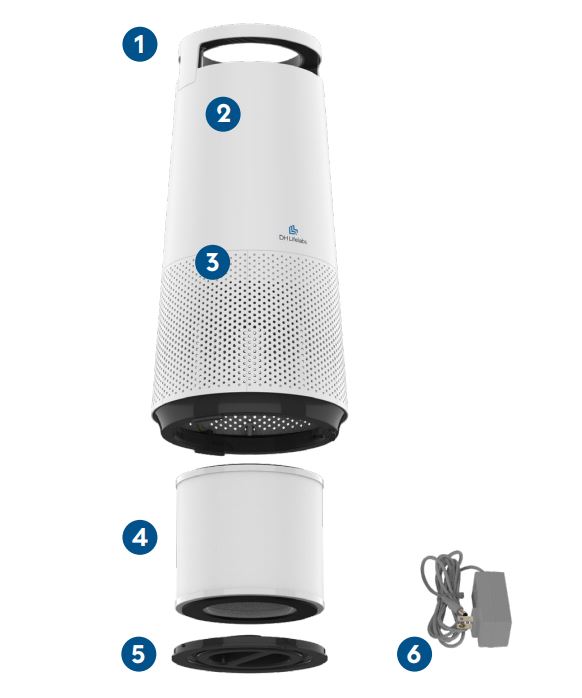
- Main Body
- Plasma Generators (Internal)
- Plasma Generators (Internal)
- 3-in-1 HEPA Filter
- Bottom Cover
- Power Cord
Device Specifications
- Power Consumption: 32 Watts
- Input Voltage: 120VAC 60Hz
- Fan Speed: 3 levels (1/2/3) + Sleep Mode
- Noise: Max. 57 dB
- CADR (clean air delivery rate):
- Smoke: 140 CFM
- Dust: 141 CFM
- Pollen: 142 CFM
- Timer: 2H/4H/8H
- Material & Finish: ABS, Glossy White & Copper
- Recommended Room Size: 217 square feet (20 m2)
- Reminder: Filter Replacement Reminder: 3-in-1 HEPA filter
- Dimensions (Machine): 9.84 (bottom diameter) x 7.24 (top diameter) x 20.62 (height) inches (250*184*524mm)
- Net Weight: 7.72 lbs (3.5 kg)
- Compact Design: Suitable for small to medium-sized rooms.
- Quiet Operation: Operates at a low noise level of 20-40 dB.
- Multiple Speed Settings: Adjustable fan speeds for customized performance.
- Air Quality Indicator: LED light indicates real-time air quality.
- Eco-Friendly: Energy-efficient and uses a replaceable filter.
How It Works
The Sciaire Mini + HEPA incorporates a 5-stage cleaning system to help clean the air. A fan forces air through the unit from bottom to top.
- Plasma Generators in the air inlet. The plasma generators enlarge the diameter of particles and generates an electrostatic magnetic field, thus improving the downstream HEPA filter's absorption rates.
- Pre-Filter. Captures large particulate matters including dust, pollen and hair.
- H13 True HEPA Filter. The true High Efficiency Particulate Air (HEPA) filter captures up to 99.97% of particles down to 0.3 microns in diameter.
- Activated Carbon Filter. The activated carbon filter traps odors, gases, and volatile organic compounds (VOCs).
- Plasma Generators in the air outlet. The plasma generatorss generate positive ions and negative ions that are diffused into the air. These ions keep killing bacteria and viruses in the room. As the room is filled with negative oxygen ions, you will enjoy a fresh smell - like the forest after a rain shower. The ozone generated is well within US EPA safety limits and the optimum concentration (less than 0.05ppm).
Unpacking and Setup
- Remove the unit from the box and check that all the items are included. It is a good idea to retain the packaging for storing the unit or in the event it must be shipped back for service.
- The unit is shipped with the 3-in-1 HEPA filter sealed inside a protective plastic bag. Detach the bottom cover and remove the 3-in-1 HEPA filter from the plastic bag, then replace it inside the unit and replace the bottom cover.
- Locate the unit on a flat, solid surface in proximity to an AC electrical outlet.
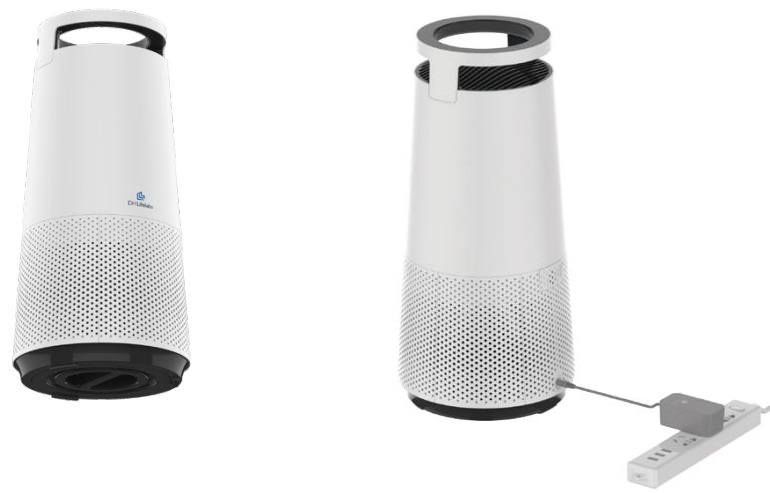
- Connect the AC adapter to the unit, and route the power cord to the outlet, but do not plug it in yet. Make sure that the power cord is out of the way and does not pose a tripping hazard, and is out of reach of children and pets. Connect the AC adapter to the unit, and route the power cord to the outlet, but do not plug it in yet. Make sure that the power cord is out of the way and does not pose a tripping hazard, and is out of reach of children and pets.
Quick Start
- Twist and detach bottom cover.
Remove 3-in-1 HEPA filter from plastic bag, and install it in device.
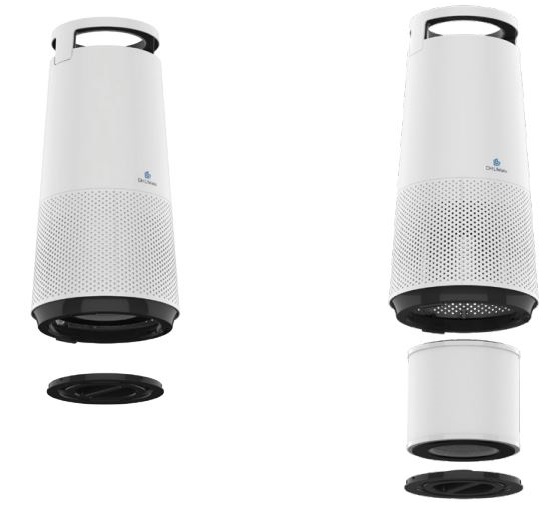
- Replace bottom cover.
- Connect the AC adapter to the device, plug into an outlet, and press the power button to turn on.
Control Panel
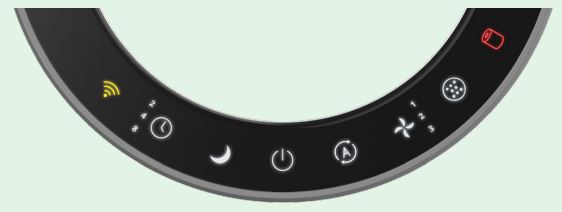
- Wi-Fi Indicator
- Flashing amber: Attempting to connect
- Steady amber: Connection successful
- Steady red: Not connected
- Connect/disconnect: Short press (only apply to CAHP-20XX01C model)
- Timer: (2H/4H/8H) Set the timer to have the machine turn off automatically.
- Sleep Mode: Lowest fan speed level that is ultra-quiet.
- On/Off: Powers the device on and off.
- Auto Mode
- Blue: Air Quality Good
- Yellow: Air Quality Moderate
- Red: Air Quality Poor
- Fan Speed: (1/2/3) Three fan speeds.
- Plasma On/Off: Press the icon to togle the plasma purification function on or off.
- Filter Replacement Indicator: After changing filter, press for 3 seconds to reset the filter life countdown.
Using Wi-Fi & DH Lifelabs App
(only apply to CAHP-20XX01C Wi-Fi Enabled model)
Sciaire Mini + HEPA can connect with your smart device when you download the DH Lifelabs App. Follow the steps below and/or in the App.
- On your smartphone, install DH Lifelabs app and turn your Location authorization and Bluetooth function on.
- Open DH Lifelabs app and add the device.
- There are two ways to add your device, pls kindly select either ways to help.
- Recommended way: Auto discovering device. Make sure the device is turned on, APP will search for nearby devices automatically. Follow in-APP instruction to click "ADD", select the device you have and click "+", APP will read your WIFI network and start to add the device automatically.
- Add Manually. Select the device you have, APP will read your WIFI network, follow in-APP instruction to turn on the device and long press WIFI button for 3s to pairing mode, connect to the hotspot of the device in "SmartLife-XXXX", then APP will connect to the device step by step.
To disconnect from the network, press the Wi-Fi Status Indicator/Button. The unit will beep and the indicator will flash red.
Using the Schedule Function
Using the DH Lifelabs App operation you can set up a schedule to turn the Sciaire Mini + HEPA on or off time (like an alarm clock) in advance. You can also set up the desired operating mode including, fan speed, plasma on/off function or sleep mode. For example, if you set the machine on at 22:30 in sleep mode, it will be turned on immediately at 22:30 at night and enter sleep mode.
Voice Control
Using the DH Lifelabs App operation you connect with your voice equipment for the control, following the instruction codes your voice equipment have. Works with Google Home or Amazon Alexa.
Filter Replacement
3-in-1 HEPA Filter Replacement
The filter should be replaced every 12 months or whenever indicated by the red illuminated on the Filter Replacement Indicator on the Control Panel. However this interval is intended as a guideline only. In environments with a high concentration of contaminants such as dust, pet dander, or cigarette/cigar smoke you may need to replace the filter more frequently.
NOTE: The HEPA filter is not washable. DO NOT immerse it in water.
- Make sure the Purifier is OFF and unplugged.
- Detach and remove the magnetic bottom cover from the unit.
- Remove using the pull tabs and replace the replacement 3-in-1 HEPA filter into the Purifier main body.
NOTE: Ensure that the pull tabs are facing outward to facilitate filter removal later. - Inspect the screen on the bottom cover and if necessary clean any excess dust or dirt from the screen using a hand held vacuum.
- Replace the bottom cover by placing the bottom cover into the slots on the unit. Gently push the top of the bottom cover into place.
- Turn on the Purifier. After replacing the filter, press and hold the Filter Replacement Button for 3 seconds to reset the filter life countdown.
Cleaning and Maintenance
When the device is not used for an extended time, store it in a cool dry place. Do not store the device where it might be exposed to excess moisture or direct sunlight. The device may not operate effectively in very low temperatures. The device can be damaged when exposed to sub-freezing temperatures. Use a dry cloth to clean the exterior of the device. Do not use any chemicals or cleaners.
Cleaning the Air Quality Sensor
The inlet for the air quality sensor is located at the back of the machine. Every 2 months you should clean the inlet using a vacuum or with a cotton swab that has been lightly moistened with clean water.
Troubleshooting
If you encounter any issues with your dh lifelabs Sciaire Mini+HEPA CAHP-20XX01, here are some common problems and solutions:
- Purifier does not operate:
- Power cord not securely plugged into outlet. Make sure plug is securely inserted.
- No AC power. Check fuse or circuit breaker. Replace fuse with a time delay type or reset the circuit breaker.
- Purifier is starting to make noise and the air output is low: 3-in-1 HEPA filter may be dirty or obstructed. Replace filter.
- Air coming from Purifier has a bad odor: The first time you use the Purifier, you might perceive a plastic or paint smell. This is normal, but it should disappear quickly. If the smell persists or if you sense a burning smell, please disconnect the unit and contact Customer Support.
- Air quality does not improve as the Purifier operates: Windows or doors are open. Constant introduction of dirty air from outside the room can reduce the effectiveness of the Purifier. Close all exterior doors and windows.
- Fan does not operate: Bottom cover is not securely in place. Ensure that the bottom cover is closed properly, and the filter is properly installed.
- Fan speed does not change after selecting a new fan speed: The fan speed will decrease or increase gradually, this is normal. If fan speed does not change after a prolonged period of time after changing the setting contact Customer Support.
- The appliance is very loud: Ensure that there are no obstacles near the appliance and that it has a minimum of 12 inches (30 cm) of clearance around it for optimal operation.
- The app does not operate properly or it is not possible to sync the purifier with the DH Lifelabs APP.
- APP only apply to CAHP-20XX01C Wi-Fi Enabled model.
- If confirmed the device is Wi-Fi Enabled model but not work, contact Customer Support.
Instructions & Warnings: Always follow the manufacturer's instructions for maintenance and operation. Avoid placing the device near water or in humid environments.
Product Warranty
This 2 year limited warranty applies to repair or replacement of product found to be defective in material or workmanship. This warranty does not apply to damage resulting from commercial, abusive, unreasonable use or supplemental damage. Defects that are the result of normal wear and tear will not be considered manufacturing defects under this warranty.
DH Lifelabs IS NOT LIABLE FOR INCIDENTAL OR CONSEQUENTIAL DAMAGES OF ANY NATURE, ANY IMPLIED WARRANTY OF MERCHANTABILITY OR FITNESS FOR A PARTICULAR PURPOSE ON THIS PRODUCT IS LIMITED IN DURATION TO THE DURATION OF THIS WARRANTY.
Some jurisdictions do not allow the exclusion or limitation of incidental or consequential damages or limitations on how long an implied warranty lasts, so the above limitations or exclusions may not apply to you. This warranty gives you specific legal rights, and you also may have other rights which vary from jurisdiction to jurisdiction. This warranty applies only to the original purchaser of this product from the original date of purchase. At its option, DH Lifelabs will repair or replace this product if it is found to be defective in material or workmanship. This warranty does not cover damage resulting from any unau-thorized attempts to repair or from any use not in accordance with the instruction manual. This warranty does not cover the filter except for material or workmanship defects.
Pros & Cons
Pros:
- Compact and Space-Saving Design
- Advanced HEPA Filter Technology
- Quiet Operation
- Multiple Speed Settings
- Air Quality Indicator
- Eco-Friendly and Energy-Efficient
Cons:
- Filter Replacement Costs Over Time
- Limited Coverage Area Compared to Larger Models
- No Built-In Ionizer or UV Light Feature
Customer Reviews
Customers have praised the dh lifelabs Sciaire Mini+HEPA CAHP-20XX01 for its effectiveness in improving indoor air quality and its quiet operation. Some users have noted that the filter replacement costs can add up over time, but overall, the product has received positive feedback for its performance and ease of use.
Common complaints include the lack of additional features like ionizers or UV lights, but most users agree that the basic functionality of the device is more than sufficient for their needs.
Faqs
What is the coverage area of the dh lifelabs Sciaire Mini+HEPA CAHP-20XX01?
How often should I replace the HEPA filter?
Is the dh lifelabs Sciaire Mini+HEPA CAHP-20XX01 energy-efficient?
Can I use the dh lifelabs Sciaire Mini+HEPA CAHP-20XX01 in a humid environment?
Does the dh lifelabs Sciaire Mini+HEPA CAHP-20XX01 have an ionizer or UV light feature?
How loud is the dh lifelabs Sciaire Mini+HEPA CAHP-20XX01?
Can I use the dh lifelabs Sciaire Mini+HEPA CAHP-20XX01 in a large room?
Is the dh lifelabs Sciaire Mini+HEPA CAHP-20XX01 easy to clean and maintain?
Does the dh lifelabs Sciaire Mini+HEPA CAHP-20XX01 come with a warranty?
Where can I purchase the dh lifelabs Sciaire Mini+HEPA CAHP-20XX01?
Tags
Leave a Comment