
Digitron FM25 Wireless Digital Thermometer User Manual
Content
Digitron FM25 Wireless Digital Thermometer Review and User Manual
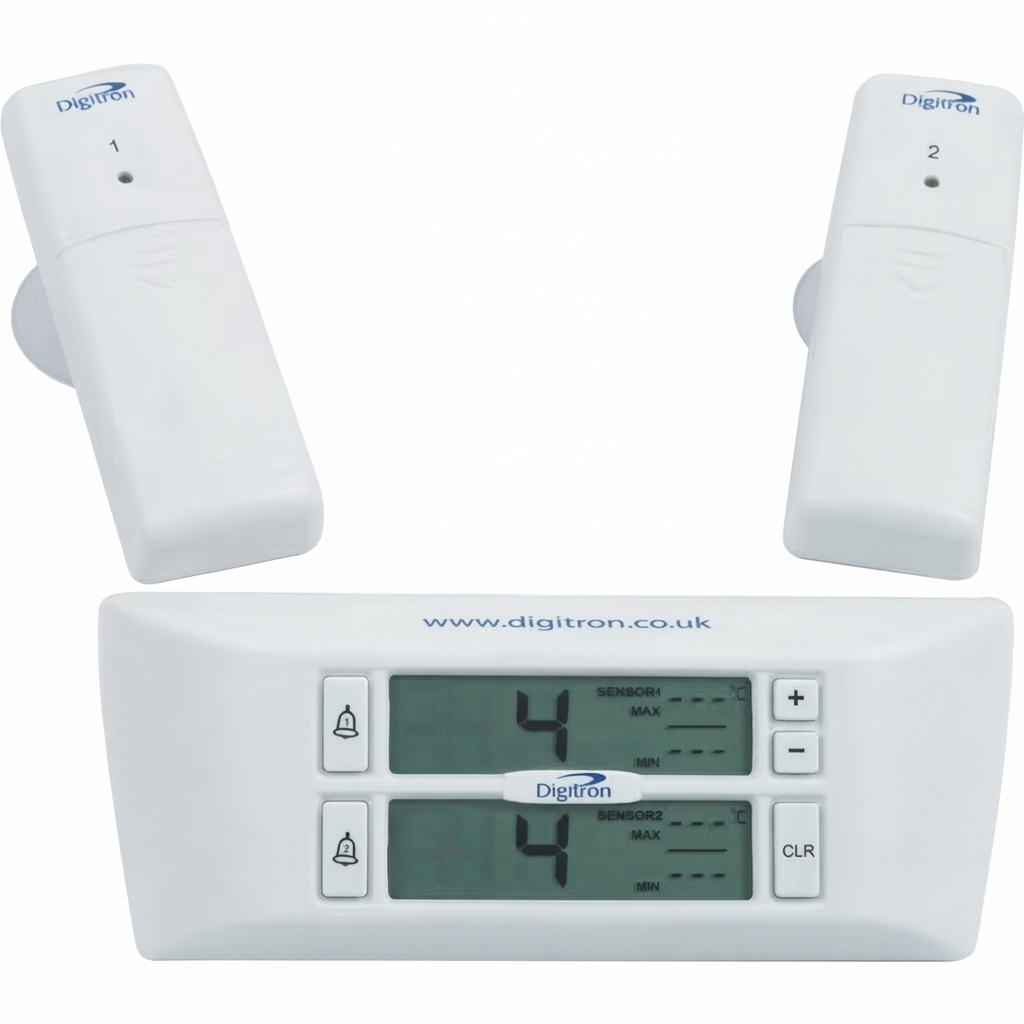
The digitron FM25 Wireless Digital Thermometer is a two-channel wireless temperature monitoring solution designed for fridges, freezers, and other cold-storage applications. It combines remote sensing with a clear base-station display, making it easy to monitor temperature conditions without opening the appliance. With both channels shown simultaneously, selectable Celsius or Fahrenheit readout, and audible and visual alarms, the FM25 is built for convenience, compliance, and peace of mind.
This model is especially useful for food service businesses, caterers, laboratories, retail refrigeration, and home users who need reliable max/min monitoring. One of its main strengths is the delayed alarm system, which waits 15 minutes before triggering an alert, helping reduce false alarms when doors are opened for loading or restocking. The wireless sensors transmit readings to a base station that can be mounted magnetically, fixed to a wall, or used free-standing, giving it flexibility in a variety of setups.
The digitron FM25 Wireless Digital Thermometer typically sits in the mid-range price bracket, with market listings often placing it around £42 to £60, depending on supplier, stock levels, and delivery options. Availability is generally strongest through industrial and catering suppliers, with occasional retail and trade listings. For buyers comparing wireless fridge thermometers, the FM25 stands out for its simple operation, dual-sensor design, and practical alarm system.
Key Specifications of the Digitron FM25 Wireless Digital Thermometer
- Measurement range: -30°C to +40°C / -22°F to +104°F
- Resolution: 1°C
- Transmission range: up to 20 m in open conditions
- Update frequency: every 8 minutes
- Alarm system: Audible and visual alarm with a 15-minute delay
- Display: LCD base station showing both channels simultaneously
- Temperature units: Selectable °C or °F
- Mounting options: Magnetic, wall-mounted, or free-standing base
- Sensor attachment: Spring clips and suction cup options
- Power supply: Base station uses 2 x AAA batteries; sensors use AA batteries
- Low battery indicator: Included
- Protection rating: IP54
- Dimensions: Base station 150 x 59 x 27 mm; sensor 105 x 35 x 18 mm
- Weight: Base station 137 g; sensor 92 g
Compared with basic single-probe fridge thermometers, the FM25 offers better visibility and dual-channel monitoring. Against more advanced digital temperature loggers, it is simpler and less expensive, but it does not provide continuous data logging or app connectivity. That makes it a strong fit for users who want dependable wireless monitoring without unnecessary complexity.
Pros and Cons of the Digitron FM25 Wireless Digital Thermometer
Pros
- Dual-channel monitoring: Ideal for tracking fridge and freezer temperatures at the same time.
- Wireless convenience: Reduces the need to open doors for manual checks.
- Delayed alarm feature: Helps avoid nuisance alerts during loading or restocking.
- Flexible installation: Magnetic, wall, and free-standing mounting options make setup easy.
- Good value for money: Offers practical features at a reasonable price compared with premium logging systems.
- Clear display: Simultaneous channel display improves quick reading and daily monitoring.
Cons
- Not a data logger: No detailed temperature history or exportable records.
- Modest update interval: Readings refresh every 8 minutes, which is slower than some advanced monitors.
- Limited range compared with smart devices: Best suited to short-range indoor use.
- Battery dependency: Requires periodic battery replacement in both the base and sensors.
For users comparing alternatives, the FM25 is best viewed as a practical mid-range wireless fridge thermometer rather than a professional-grade logging system. It offers strong everyday usability, but buyers needing cloud tracking or multi-day analytics may prefer a more advanced digital temperature monitoring solution.
Customer Reviews and User Feedback
Customer feedback for the digitron FM25 Wireless Digital Thermometer is generally positive, with many users giving it around 4 out of 5 stars for ease of use and dependable temperature monitoring. Buyers frequently praise the dual-sensor setup, the readable display, and the helpful alarm delay that reduces false warnings.
Typical praise includes comments such as: “Simple to install and accurate enough for daily fridge checks,” and “The alarm delay is useful when stocking the freezer.” Common complaints center on the lack of data logging, the 8-minute refresh interval, and the need to replace batteries periodically. Some users also note that the signal range is best kept within practical indoor distances.
Overall, this model is recommended for households, cafés, food storage areas, and small businesses that need straightforward wireless temperature monitoring. If you want a reliable fridge and freezer thermometer without app setup or complicated software, the FM25 remains a solid purchase.
Is the Digitron FM25 Wireless Digital Thermometer Worth Buying?
If your priority is easy wireless temperature checking with clear alarms and dual-channel visibility, the digitron FM25 Wireless Digital Thermometer is a strong choice. It delivers the core features most users need for fridge and freezer monitoring while keeping the setup simple and the price reasonable.
For everyday cold-chain monitoring, this wireless digital thermometer offers a balanced mix of performance, usability, and value. Buyers who need more advanced reporting tools can look at higher-end alternatives, but for straightforward temperature management, the FM25 is an effective and dependable solution.
Faqs
How do I set up the digitron FM25 Wireless Digital Thermometer for the first time?
Why is my digitron FM25 Wireless Digital Thermometer showing no signal or an unstable reading?
What temperature range can the digitron FM25 Wireless Digital Thermometer measure accurately?
Can I use the digitron FM25 Wireless Digital Thermometer for food, room, or outdoor temperature monitoring?
How do I improve the wireless range and signal strength on the digitron FM25 Wireless Digital Thermometer?
What should I do if the digitron FM25 Wireless Digital Thermometer is giving incorrect temperature readings?
How do I maintain and clean the digitron FM25 Wireless Digital Thermometer safely?
How do I know when the batteries in the digitron FM25 Wireless Digital Thermometer need replacing?
Leave a Comment