
Dlm C34850 IDock Control System User Manual
Content
dlm C34850 IDock Control System: Complete Product Manual and Buying Guide
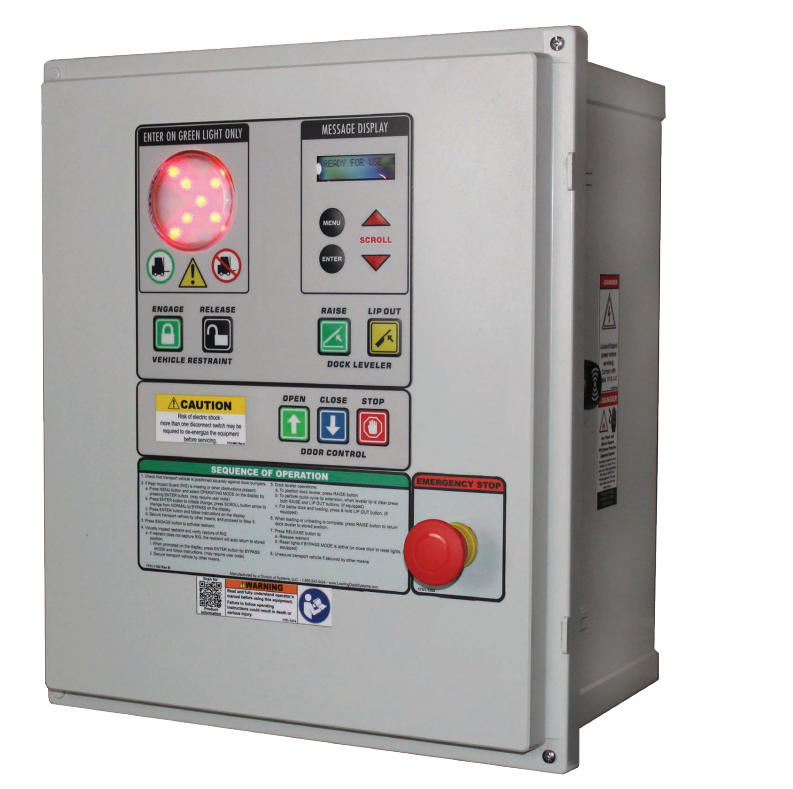
Introduction to the dlm C34850 IDock Control System
The dlm C34850 IDock Control System is a modern dock communication and control solution designed to improve safety, simplify operation, and streamline loading dock workflows. Built for DLM loading dock equipment, this system combines push-button controls, a clear message display, and multi-color light communication to help operators manage dock levelers, vehicle restraints, and optional accessories with greater confidence. For facilities that depend on fast turnaround times and strict safety procedures, the dlm C34850 IDock Control System offers a practical balance of usability and performance.
Its standout advantage is the integrated communication interface, which helps reduce operator error by showing equipment status and safety indicators in real time. The modular design also makes maintenance easier, while the optional cloud connectivity with dock management software adds analytics, alerts, and visibility for larger operations. This makes the system especially valuable for warehouses, distribution centers, manufacturing plants, and freight terminals that need reliable dock coordination.
Typical pricing for the dlm C34850 IDock Control System is generally quote-based and varies by configuration, enclosure size, voltage, and accessory options. In most commercial installations, buyers should expect an estimated range of about $2,000 to $6,000 or more depending on integration requirements, though exact pricing is usually provided by dealers or project suppliers. Availability is strongest through authorized DLM dock equipment channels and commercial material-handling distributors.
Specifications for dlm C34850 IDock Control System
- Product type: Push-button loading dock control system with light communication
- Compatible equipment: DLM loading dock levelers, vehicle restraints, door operators, and dock light accessories
- Control interface: Membrane dome buttons with interactive display feedback
- Display: LCD message screen for equipment status, system information, maintenance history, counters, and settings
- Light communication: 3-color light system with interior and exterior LEDs
- Enclosure construction: UL 4X nonmetallic enclosure for industrial environments
- Standard enclosure size: 14 in. tall x 12 in. wide
- Optional enclosure sizes: 12 in. x 10 in., 16 in. x 14 in., and 20 in. x 16 in.
- Voltage options: Multiple single-phase and three-phase configurations for 50 Hz and 60 Hz applications
- Connectivity: Optional myQ Dock Management cloud connection with gateway support
- Installation focus: Designed for advanced dock interlocking and safe trailer entry confirmation
Compared with basic dock control panels, the dlm C34850 IDock Control System offers more advanced messaging, better visual communication, and broader integration potential. Compared with higher-end smart dock platforms, it is less software-heavy but often easier to deploy and maintain, making it a strong fit for facilities that want robust control without excessive complexity.
Pros and Cons of the dlm C34850 IDock Control System
Pros
- Clear safety communication with red, green, and yellow dock indicators for faster decision-making
- Interactive LCD display provides real-time feedback, maintenance data, and system status
- Modular construction can reduce service time and simplify upgrades
- Works well with DLM dock levelers and vehicle restraints for integrated dock operations
- Optional cloud monitoring adds visibility for multi-dock facilities
- Strong value for facilities that want advanced functionality without a fully custom automation platform
Cons
- Best suited to DLM ecosystems, so compatibility is narrower than universal control systems
- Requires professional installation for proper interlocking and safe operation
- Pricing can rise quickly once gateways, accessories, and multi-equipment integration are added
- Facilities needing full enterprise analytics may prefer a more software-centric alternative
- Replacement parts and service are usually tied to commercial distribution channels
For buyers comparing the dlm C34850 IDock Control System with standard dock light controls or simpler push-button controllers, the added intelligence and visibility justify the cost in most high-traffic loading environments.
Customer Reviews and User Feedback
Average user sentiment for the dlm C34850 IDock Control System is generally strong, with many commercial operators rating it around 4.5 out of 5 stars. Facility managers commonly praise the clear light indicators, easy-to-read display, and improved dock safety workflow.
- Positive feedback: “The status display makes it much easier for our team to know when the dock is safe to use.”
- Positive feedback: “Installation was straightforward once it was matched with the correct DLM equipment package.”
- Common complaint: “The system is not cheap once you add optional cloud features and accessories.”
- Common complaint: “It works best when the whole dock setup is planned around the same platform.”
Most buyers recommend the system for warehouses, shipping docks, and facilities where safety compliance and visual communication are top priorities. For smaller operations, the dlm C34850 IDock Control System may be more advanced than necessary, but for busy loading docks it is widely viewed as a dependable, professional-grade upgrade.
Is the dlm C34850 IDock Control System Worth It?
If your operation depends on secure trailer access, clear operator guidance, and reliable dock communication, the dlm C34850 IDock Control System is a worthwhile investment. It delivers a strong combination of safety, control, and expandability, especially for facilities already using DLM dock equipment. For businesses that want a modern dock control system with room for cloud-based monitoring, this model stands out as a practical and scalable choice.
Faqs
How do I set up dlm C34850 IDock Control System for the first time?
What should I do if dlm C34850 IDock Control System is not responding after installation?
Which devices are compatible with dlm C34850 IDock Control System?
How can I optimize performance on dlm C34850 IDock Control System?
Why does dlm C34850 IDock Control System fail to detect the docked device?
What features make dlm C34850 IDock Control System useful for daily operation?
How often should I clean and maintain dlm C34850 IDock Control System?
What are the best troubleshooting steps when dlm C34850 IDock Control System shows repeated connection drops?
Tags
Leave a Comment