
Setup: Donner Multi-Effects Headphone Guitar Amplifiers User Manual
Content
Donner Multi-Effects Headphone Guitar Amplifiers
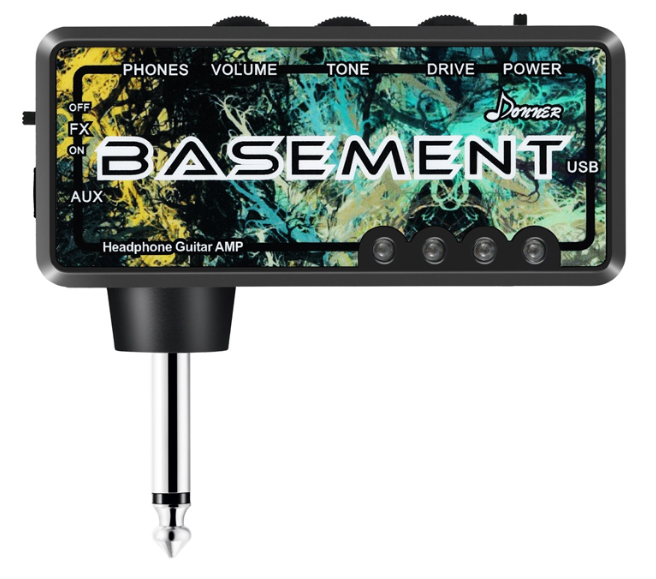
Introduction
The Donner Multi-Effects Headphone Guitar Amplifiers are compact, versatile devices designed for guitarists seeking a portable solution to practice, perform, and experiment with a wide range of sound effects. These amplifiers integrate multiple built-in effects, allowing musicians to instantly access diverse tones without the need for external pedals or bulky equipment. Ideal for beginners, hobbyists, or seasoned players who require silent practice options, these headphone amps deliver high-quality sound directly to headphones, making them perfect for home use, travel, or late-night sessions.
Key benefits include easy operation with multiple effects like distortion, reverb, delay, chorus, and modulation, plus intuitive controls for tone shaping. Their lightweight design enhances portability, while compatibility with various headphone types ensures comfortable, clear audio output. The product typically falls within an affordable price range of approximately $40 to $70, making it accessible to a broad audience. Availability is global through online retailers and music stores, catering to electric guitar players who demand versatility and convenience in a single amplified headphone unit.
Specifications of Donner Multi-Effects Headphone Guitar Amplifiers
- Input: Standard 1/4" guitar input jack for direct connection
- Output: 3.5mm stereo headphone output with low latency
- Built-in Effects: Distortion, Overdrive, Delay, Reverb, Chorus, Flanger, Phaser, Tremolo, and EQ presets
- Power Supply: USB rechargeable lithium battery or USB power adapter
- Controls: Effect type selector, parameter adjustment knobs (e.g., tone, gain, level), volume control
- Dimensions: Compact, typically around 4.5 x 3 x 1.5 inches
- Weight: Lightweight, generally under 200 grams
- Additional Features: Tuner function, preset memory, auxiliary input for play-along tracks
Performance-wise, these amplifiers provide clear sound output with a low noise floor, suitable for both electric and acoustic-electric guitars. When compared to competitors like the VOX amPlug or Blackstar Fly 3 headphone amps, Donner’s multi-effects unit offers a richer variety of built-in effects and slightly better user customization options, at a comparable or lower price point.
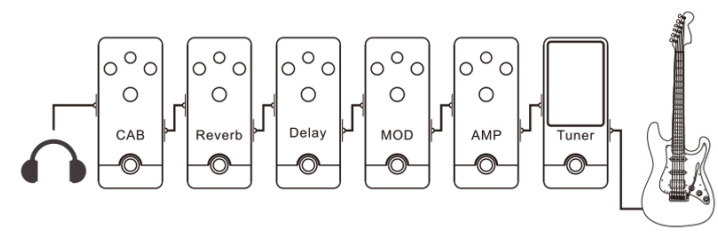
Mini turbo's effect module link
Guitar lnput---+Tuner---+Amp Simulation---+Chorus/Phase Shift Effect---+Delay Effect---+Reverb Effect---+CAB Simulation---+Output to the headphone.
Mini turbo panel function diagram
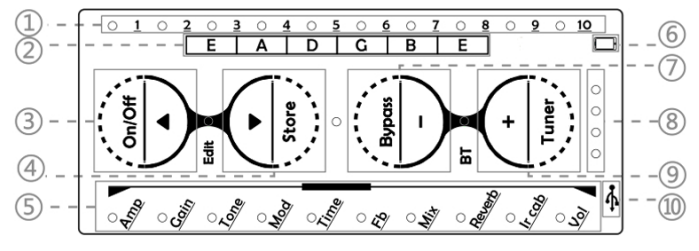
- (Effect parameter prompt light:l inn the PRESET mode, it is the preset's position displa. If you change the master volume, it will display the volume for a few seconds. In the EDIT mode, it is the effect parameter display.
- Guitar tuning note name table : In order from right to left, the far right is the guitar 1 string note name, and the far left is the guitar 6 string note name.
- On/Off button:(long press) On/Off button. In PRESET mode (short press) to switch to he previous preset. In the EDIT mode (short press), select the effect module for scrolling up.
- Store button:(long press) Preset store button. In PRESET mode (short press) to switch to the next preset . In EDIT mode (short press), select the effect module for scrolling down.
- Effect module indicator: ln PRESET mode, it indicates the effect module link. In the EDIT mode, it prompts the currently selected effect module. In TUNER mode, it functions as a tuning table.
- Mobile phone internal recording interface icon: it can be connected to a phone for "internal recording". (Z)Bypass button: (long press) Enter the bypass function . In PRESET mode (short press) to reduce the master volume.In EDIT mode (short press)to reduce the effect module parameters.
- Charging indicator light:lt lights up when charging, and automatically goes out to stop charging when fully charged.
- Tuner button:(long press) Enter the tuner mode, in PRESET mode (short press) to increase the master volume. In EDIT mode (short press) to increase the effect module parameters.
- USB icon: Can be used for charging, connecting to a computer as a sound card, and loading third-party IR files.
Edit indicator: It is off in the PRESET mode, and it is light in the EDIT mode.
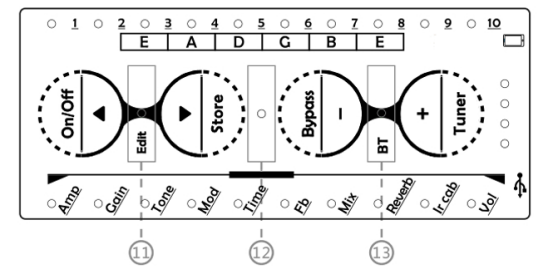
- Bypass/Tuner indicator:lt lights up blue in Bypass mode, red in Tuner mode, and off in other modes.
- BT indicator light: Wireless music link indicator light. This indicator light flashes slowly when the wireless device is not connected . After the wireless device is connected, the light turns to a steady state. It is off when the wireless function is turned off.
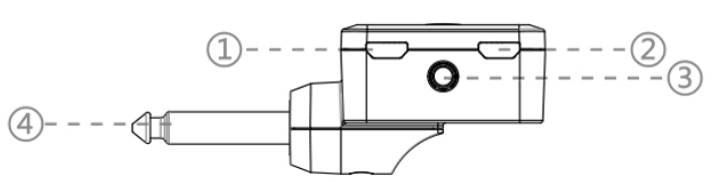
Audio, Data interface function illustrated. ed
- USB 2.0 data line socket/charging socket.
- The recording data line socket in the mobile phone. @1/8 headphone output jack.
- 1/4 audio plug.
PRESET and EDIT mode
Mini turbo has two operating modes: es, EDIT is the real-time editing mode, and PRESET is the preset mode. Initially, it enters the PRESET preset mode by default. Press the On/Off and Store combination buttons at the same time to switch between EDIT and PRESET modes.
PRESET Mode
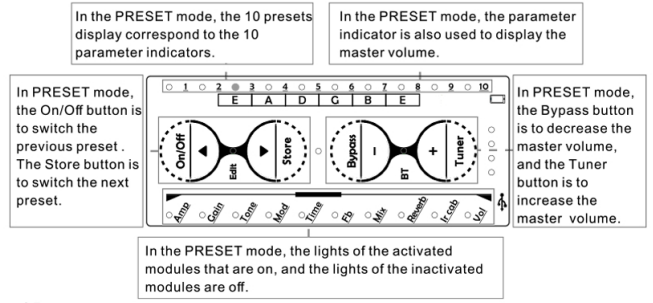
- Mini turbo defaults to the PRESET mode when it is initially turned on. You can switch and browse presets by short-pressing the On/Off (previous) and Store button (next).
- In PRESET mode, short-pressing the Bypass- button decreases the master volume, short pshort-pressingthe the Tuner+ button increases the master volume.
- In the PRESET mode, the parameter indicator is used as a reminder to show the preset position and output volume.
- In the effect module chain of the preset, the indicators of the modules that are not activated are off, and the indicators of the effect modules that have been activated are on.
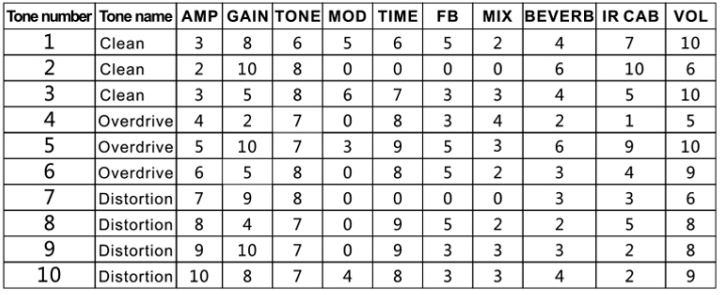
- Mini turbo effector presets 10 commonly used factory presets for users.
The picture below shows the parameter table of Mini turbo presets.
EDIT Mode (please short-press the combination button On/Off and Store to switch from PRESET mode to EDIT mode after booting)
- In EDIT mode, short-pressing the On/Off button to scroll up for selecting the function module, and short-pressing the Store button to scroll down for selecting the function module. When the effect module is selected, the corresponding indicator lights up, and others light off.
- When entering the EDIT mode initially, the system defaults to the AMP module, and you can browse the 10 amps in the AMP module up /down through the Bypass+/Tuner- buttons.
- Bypass+ and Tuner- buttons play different roles in different modules. For example, they play the role of up/down browsing in the Amp or IR CAB module, and increase/decrease the effect parameters in the REVERB or DELAY module. The user can edit the parameters in EDIT mode and save them to PRESET mode.
- In the EDIT mode, the user can store the edited preset to the corresponding position in the PRESET mode by long-pressing the Store button. The storage location cannot be moved. For example, if you select the third preset in the PRESET mode and then press the On/Off and Store combination button to enter the EDIT mode, then the edited preset can only be stored in this case in the position of the third preset.
Troubleshooting Donner Multi-Effects Headphone Guitar Amplifiers.
- Problem: No sound output
Solution: Check headphone connection and volume levels. Ensure the guitar cable is properly plugged into the input jack. Confirm the amplifier is powered on and charged. - Problem: Distorted or crackling sound
Solution: Adjust gain and volume controls to lower levels. Inspect cables for damage or loose connections. Try a different headphone set. - Problem: Effects not working or stuck
Solution: Reset the amplifier by turning it off and on again. Refer to the user manual for performing a factory reset if available. - Error Codes: Most models use LED indicators instead of error codes; blinking lights generally indicate low battery or input issues.
- Preventive Measures: Avoid exposing the unit to moisture, extreme temperatures, or physical shocks. Use original charging cables and avoid overchargingDonnerer offers a limited warranty, typically one year, covering manufacturing defects. For technical support, customers should contact Donner’s official support via their website or authorized reseller contacts.
Pros & Cons of Donner Multi-Effects Headphone Guitar Amplifiers
- Pros:
- Wide range of built-in effects in a compact device
- Excellent value for money with features often found in pricier models
- USB rechargeable, offering portability without frequent battery replacements
- Easy to use with intuitive controls suitable for all skill levels
- Silent practice capability with headphone output ut ideal for apartments and late-night use
- Cons:
- Limited speaker output—primarily for headphone use, not suitable for live amplification
- Some users report occasional latency or minor noise interference, depending on headphone quality.y
- Effect parameter customization is basic compared to standalone multi-effects pedals. als
- Lack of MIDI or external control connectivity limits integration with larger rigs
Customer Reviews on Donnerr Multi-Effects Headphone Guitar Amplifiers
Users consistently praise the Donner Multi-Effects Headphone Guitar Amplifiers for their excellent sound quality and variety of effects for the price, often awarding it 4 to 4.5 out of 5 stars. Many appreciate its portability and the convenience of silent practice. Common compliments highlight the robust distortion and modulation effects, as well as clear headphone sound. Some complaints involve minor issues with noise or occasional latency, but most users find these manageable with proper setup.
Several testimonials recommend the product for beginners seeking a budget-friendly multi-effects amp that doesn't compromise on tone variety or ease of use. Users also note that the rechargeable battery life comfortably supports extended practice sessions, adding to its convenience as a travel companion.
Faqs
How do I set up donner Multi-Effects Headphone Guitar Amplifiers for the first time?
What should I do if my donner Multi-Effects Headphone Guitar Amplifiers have no sound or low output?
Can donner Multi-Effects Headphone Guitar Amplifiers be used with electric guitars that have active pickups?
How do I optimize the sound performance of donner Multi-Effects Headphone Guitar Amplifiers for home practice?
What are the key features of donner Multi-Effects Headphone Guitar Amplifiers that enhance practice sessions?
How can I troubleshoot popping or crackling noises when using donner Multi-Effects Headphone Guitar Amplifiers?
Are there specific maintenance tips to prolong the life of donner Multi-Effects Headphone Guitar Amplifiers?
Can donner Multi-Effects Headphone Guitar Amplifiers connect to external devices like smartphones or computers?
Tags
Leave a Comment